
VPN Review
CyberGhost VPN Review 2026: Paid Hands-On Tests, Pricing, Streaming, Refund, and Alternatives
CyberGhost VPN is a mainstream VPN with a large country footprint, streaming-focused server categories, a 45-day refund window on longer plans, and beginner-friendly apps. In our paid June 2026 review, it performed well for streaming and produced strong download numbers, but we also found meaningful limitations: no port forwarding, no obfuscated or multi-hop mode according to support, website-only split tunneling on Windows, and a less polished signup/app experience than the best VPNs we tested.
ReviewsAlly may earn a commission if you click affiliate links on this page. This does not change our editorial process. For this CyberGhost VPN review, we bought a paid 1-month subscription, tested the Windows app, checked speed, DNS/WebRTC/IP behavior, streaming, P2P visibility, support, cancellation/refund flow, and reviewed official pricing, policy, privacy, server, and help-center pages.
Bottom line
Quick Verdict
CyberGhost VPN is a good VPN to compare if streaming is your main reason for buying. In our paid tests, the best CyberGhost experience came from its specialized streaming servers, not from treating every regular server/protocol as equally suitable for entertainment use.
It is weaker for advanced VPN users. We did not find app-based split tunneling on Windows, CyberGhost support told us it does not offer port forwarding, obfuscated servers, stealth mode, or multi-hop routing, and the Windows app felt simpler and less configurable than PIA, Proton VPN, and NordVPN in our hands-on review set.
CyberGhost’s strongest buying case is straightforward: it gives non-technical users an easy way to pick streaming, torrenting, gaming, and all-purpose server categories, and it pairs longer plans with a 45-day refund window. In our June 2026 paid review, streaming checks were the best part of the product. Amazon Prime Video, Apple TV, Disney+/Hulu, Netflix, and a live video stream worked in the scenarios we tested, with an important caveat: several platforms only worked correctly when we selected CyberGhost’s specialized streaming servers rather than regular protocol/server combinations.
The weaker side is also clear. CyberGhost is not the VPN we would choose first for power users who care about granular app controls, port forwarding, multi-hop/obfuscation, custom DNS, or advanced kill-switch behavior. The Windows app was easy to use, but in our paid account it felt stripped down compared with the more configurable VPNs already tested for ReviewsAlly.
Want the simple version? CyberGhost is strongest for streaming-focused users, but compare it carefully if you need advanced controls.
Visit CyberGhost VPN Compare VPNsAt a glance
Quick Facts
- Best for
- Streaming-focused users, beginners, and buyers who want a long refund window on longer plans.
- Not ideal for
- Power users who need app-based split tunneling, port forwarding, multi-hop, obfuscation, or unlimited devices.
- Monthly price checked
- $12.99/month for the 1-month plan.
- Longer plans checked
- $6.99/month for 6 months; $1.59/month promotional 2-year+ plan in our checkout review.
- Refund window
- 14 days for monthly subscriptions; 45 days for 6-month or longer subscriptions.
- Device limit
- Up to 7 devices/connections with one subscription.
- Windows app tested
- CyberGhost VPN for Windows v8.4.14.14661.
- Protocols checked
- Automatic/default, WireGuard, OpenVPN, and IKEv2.
- Speed test tool
- Speedtest by Ookla Windows app, using a Latin America-based cable test environment.
- Refund test
- Requested through live chat; approval came in about 1 minute, with a 5–10 business day return estimate.
Fit assessment
Who CyberGhost VPN Is Best For — and Who Should Skip It
Best for
- Users who mainly want a VPN for streaming checks and travel-style access.
- Beginners who prefer labeled server categories over advanced configuration.
- Buyers who are considering a longer subscription and want a 45-day refund window.
- People who want Smart DNS options for devices such as game consoles or smart TVs.
- Users who want a dedicated IP add-on but do not need to test it before buying the base VPN.
Not ideal for
- Users who need port forwarding for seeding, gaming setups, or incoming connections.
- Advanced users who want app-based split tunneling on Windows.
- People who need multi-hop, obfuscated servers, or stealth mode for restrictive networks.
- Large households that prefer unlimited simultaneous devices.
- Linux users who expect feature parity with the Windows app without checking the current support status first.
Editorial evidence
How We Reviewed CyberGhost VPN
This is a Level 4 — Paid Hands-On Review. In June 2026, ReviewsAlly purchased CyberGhost VPN’s 1-month plan directly from the official website, used the account dashboard, installed and tested the Windows app, contacted support before purchase, performed structured paid-account speed checks, ran DNS/WebRTC/IP checks, tested streaming and a legal P2P scenario, reviewed official documentation, and requested a refund through live chat.
The performance checks in this review are structured paid-account speed checks, not a global benchmark. They show how CyberGhost behaved in one Latin America-based test environment on the same day, using the same connection and Speedtest by Ookla Windows app. Your results can differ by ISP, router, Wi-Fi/cable setup, device, protocol, VPN location, server load, and time of day.
What was hands-on
Paid account, dashboard, checkout, Windows app, protocols, speed tests, DNS/WebRTC/IP checks, streaming checks, legal P2P visibility, support chat, and refund request.
What was document-based
Pricing, refund policy, app/device coverage, server network, no-logs messaging, audit materials, Linux/router support, Dedicated IP details, and help-center documentation.
Cost and checkout
CyberGhost VPN Pricing and Plans
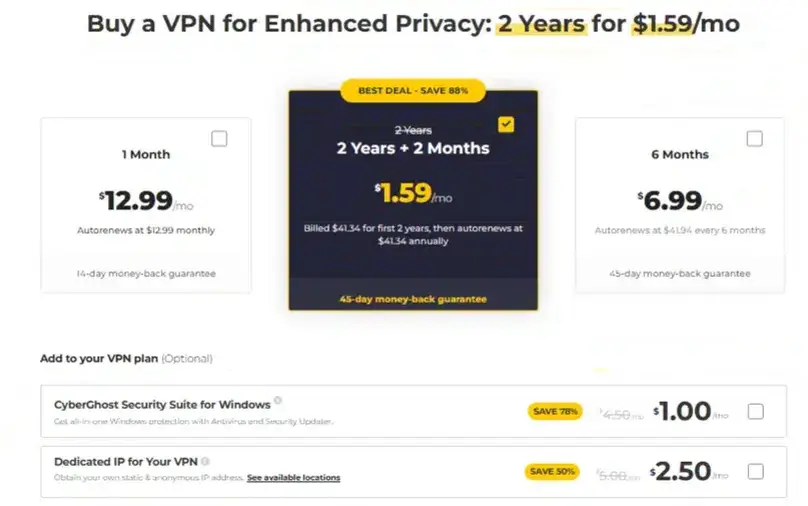
CyberGhost’s pricing is built around a familiar VPN tradeoff: the short-term monthly plan is simple but expensive, while the long-term plan has a much lower promotional monthly-equivalent price and a longer refund window. In our June 2026 pricing review, the 1-month plan was $12.99/month, the 6-month plan was $6.99/month billed as $41.94, and the long-term 2-year promotional plan was shown at $1.59/month with $41.34 due for the first 2 years.
The renewal language matters. In our checkout review, the monthly plan renewed at $12.99/month, the 6-month plan renewed at $41.94 every 6 months, and the long-term promotional plan showed renewal language that should be checked carefully before buying. CyberGhost’s promotional pricing can be attractive, but users should read the total due today, the renewal amount, and the billing frequency rather than relying only on the large monthly-equivalent number.
| Plan / pricing factor | What we saw in June 2026 | Editorial note |
|---|---|---|
| 1-month plan | $12.99/month | Best for a short paid test, but it gets only a 14-day refund window. |
| 6-month plan | $6.99/month, billed as $41.94 | Lower monthly equivalent and covered by the 45-day refund policy. |
| Long-term promotional plan | $1.59/month, $41.34 due for the first 2 years in our checkout review | Strong advertised value, but buyers should verify renewal language at checkout. |
| Dedicated IP add-on | $5/month in our review | Visible as an add-on; we reviewed availability but did not purchase or test a dedicated IP. |
| Security Suite add-on | $4.50/month when visible in our checkout | Appeared in one checkout context; add-on visibility may vary by location or flow. |
| Payment methods shown | Credit card, PayPal, Google Pay, and Bitcoin | We completed the purchase directly from CyberGhost’s official website. |
Pricing can change by promotion, location, tax/VAT, affiliate path, and checkout timing. Confirm the final amount and renewal before purchasing.
Billing and refund
Refund, Billing, and Cancellation
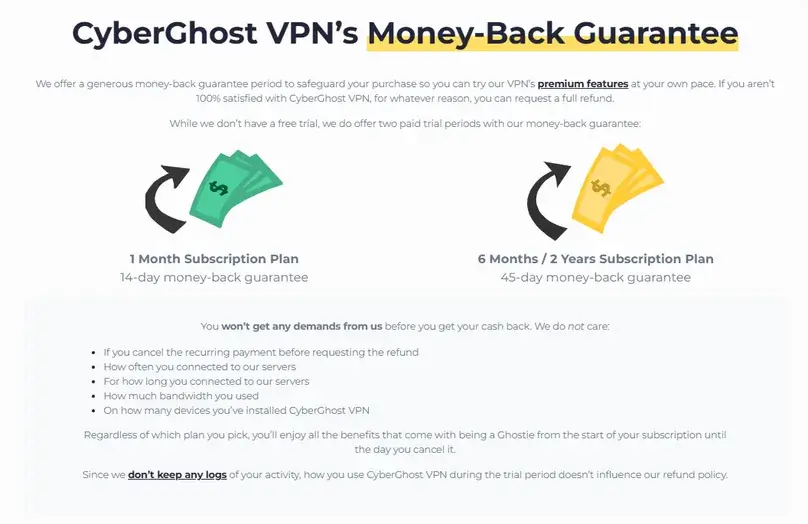
CyberGhost’s refund policy is more nuanced than a single “45-day” claim. The official support policy separates 1-month subscriptions from longer subscriptions: 1-month plans have a 14-day money-back guarantee, while subscriptions of 6 months or longer have a 45-day money-back guarantee. In our pre-purchase support check, CyberGhost also told us Dedicated IP and add-ons follow the same refund policy as the main VPN subscription during the applicable refund window.
| Refund / billing item | What we verified | Why it matters |
|---|---|---|
| Monthly plan refund window | 14 days | Shorter than the 45-day window often emphasized in marketing. |
| 6-month or longer refund window | 45 days | One of CyberGhost’s stronger buying protections if you choose a longer plan. |
| Canceling auto-renewal | Separate from requesting a refund | Support told us cancellation and refund are separate requests. |
| Refund path | Support ticket, email, or live chat | We did not find a self-service refund button in the account area. |
| App Store purchases | Apple App Store refunds are handled by Apple, not CyberGhost’s money-back guarantee | Important if you start through iOS instead of buying directly from CyberGhost. |
| Google Play | CyberGhost policy materials indicate Google Play may follow CyberGhost refund handling | Still verify current Play Store cancellation/refund rules before subscribing. |
Our refund test
We requested a refund on June 16, 2026 at about 14:52 through live chat. The process involved the bot first and then support. We did not find a refund button inside the dashboard, and the refund request was handled through chat. The refund was approved in about 1 minute, CyberGhost said the money should return in 5 to 10 business days, the refund was for the full amount, and access ended immediately. Our final payment record confirms that the full PayPal payment returned on the request date; see the dated row in our VPN refund comparison.
That is a positive refund result for our test, but it should not be treated as a promise that every refund request will be identical. Payment method, purchase path, app-store rules, renewal status, add-ons, and policy changes can affect the process.
Windows app and account
App Experience and Onboarding
CyberGhost’s Windows app was easy to understand, but it was not the most polished paid-account experience in our VPN review series. The first problem came immediately after checkout: the account was created during purchase, but after payment we were redirected to a login page without a password. We had to use password recovery to receive an email, create a new password, and finally log in. We also had a PayPal checkout issue where the PayPal button did not respond until browser cookies were cleared and the page was reloaded.
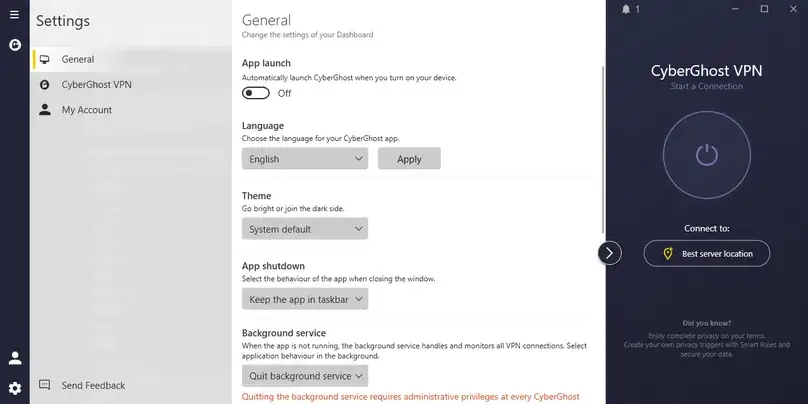
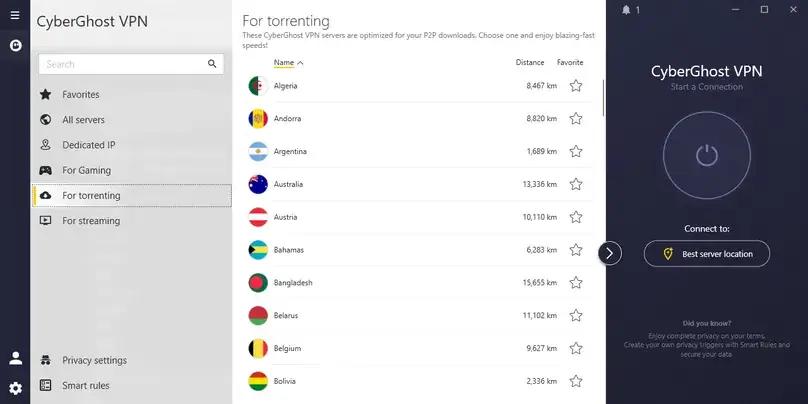
Once inside the app, CyberGhost was simple. The Windows app showed “Best server location” for quick connect, manual country selection, favorites, streaming servers, torrenting servers, gaming servers, a Dedicated IP menu, Smart Rules, and Privacy Settings. However, the app also felt too simple compared with PIA, Proton VPN, and NordVPN. It exposed fewer useful stats, did not show latency in the way we expected, and its split-tunneling implementation was much weaker than the best competitors we tested.
Smart Rules are useful, but not a replacement for advanced controls
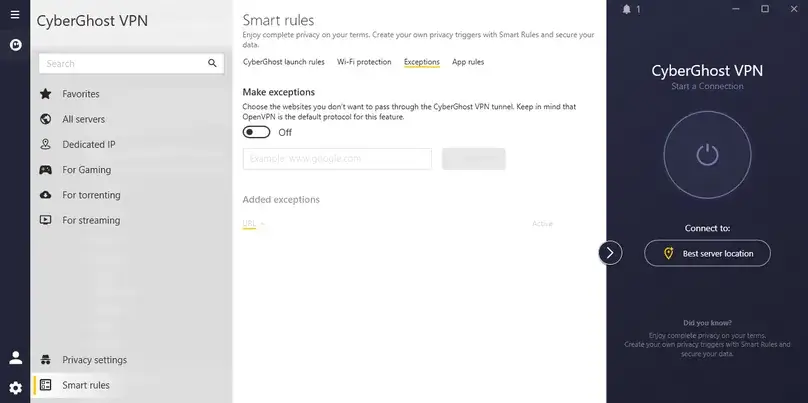
CyberGhost’s Smart Rules section lets users define behavior for secure and unsecured Wi-Fi, auto-connect on launch, and app launch rules. We found these rules useful for automation, especially for users who want CyberGhost to connect when a specific app opens. But Smart Rules should not be confused with the deeper routing controls available in more configurable VPN apps.
Split tunneling was the biggest app limitation
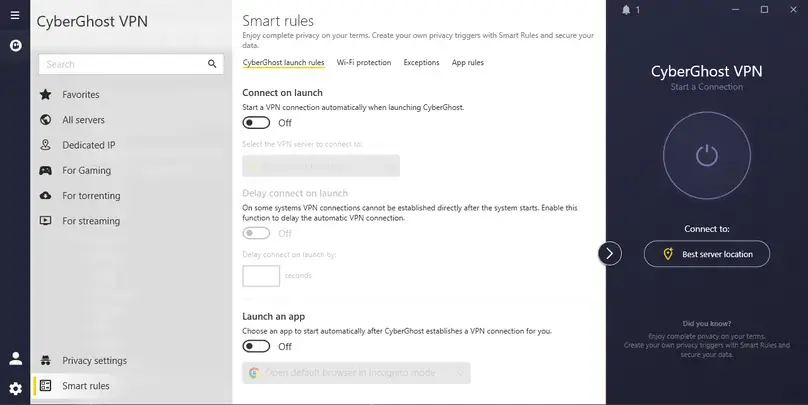
In our Windows app check, CyberGhost’s split tunneling was limited to website/domain exceptions inside Smart Rules. We could exclude websites from the VPN connection, but we could not add Windows programs/apps to the exclusion list. This is a major difference from VPNs such as PIA, NordVPN, and PureVPN, which offered more practical app-based split tunneling controls in our paid tests. See our VPN split-tunneling guide for the practical difference between website, app, and IP-based rules.
Structured performance checks
Speed and Performance Checks
We tested CyberGhost with the Speedtest by Ookla Windows app on a Windows 10 desktop using a cable connection. The test environment was Latin America-based, and all tests were run on the same day, same internet connection, and same approximate testing window with no heavy downloads running. Our no-VPN baseline average across 11 tests was about 903.9 Mbps download, 55.4 Mbps upload, and 13.3 ms ping.
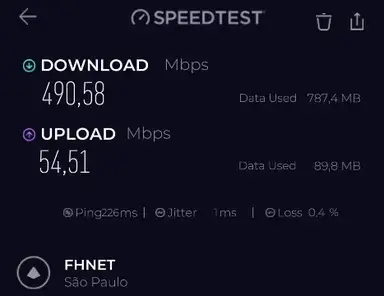
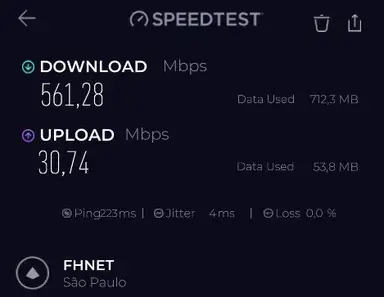
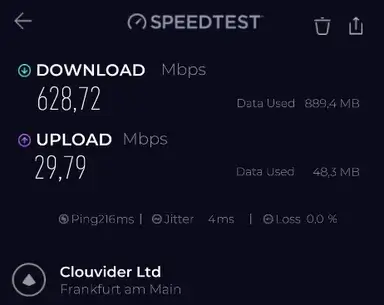
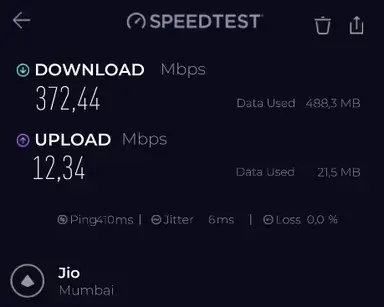
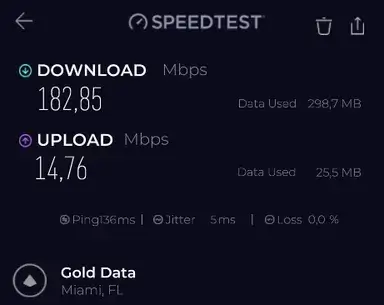
CyberGhost produced strong download numbers in our paid-account speed checks, especially considering the very high baseline. Frankfurt averaged about 636 Mbps download, Miami and New York were also strong, and even distant locations such as Hong Kong and Mumbai stayed usable for download-heavy activity. Upload retention was more variable, especially on distant routes, and the “Best server location” result showed unexpectedly high ping in our environment despite selecting São Paulo/Brazil.
| Location tested | Protocol | Avg download | Download retention | Avg upload | Upload retention | Avg ping | Notes |
|---|---|---|---|---|---|---|---|
| No VPN baseline | None | 903.9 Mbps | 100% | 55.4 Mbps | 100% | 13.3 ms | Average of 11 baseline tests. |
| São Paulo, Brazil / Best location | WireGuard | 525.9 Mbps | 58.2% | 42.6 Mbps | 77.0% | 224.5 ms | Strong download, but unusually high ping in our route. |
| Miami, United States | WireGuard | 465.9 Mbps | 51.5% | 41.9 Mbps | 75.6% | 136.5 ms | Good US performance from our test location. |
| New York, United States | WireGuard | 508.0 Mbps | 56.2% | 49.1 Mbps | 88.6% | 121.0 ms | One of the stronger US routes in our checks. |
| London, United Kingdom | WireGuard | 451.5 Mbps | 50.0% | 40.9 Mbps | 73.8% | 202.5 ms | Usable, but with expected long-distance latency. |
| Frankfurt, Germany | WireGuard | 636.2 Mbps | 70.4% | 29.7 Mbps | 53.6% | 216.0 ms | Best download retention in our location set. |
| Hong Kong | WireGuard | 408.1 Mbps | 45.1% | 23.3 Mbps | 42.1% | 347.5 ms | Distant route; download remained usable, upload dropped. |
| Mumbai, India | WireGuard | 445.9 Mbps | 49.3% | 14.4 Mbps | 26.0% | 411.0 ms | Distant route; high ping and weaker upload. |
Want to compare this VPN against your own no-VPN baseline? Use our VPN speed test and speed-loss calculator for a repeatable at-home method and local, privacy-preserving calculation. Retention = VPN result divided by the no-VPN baseline average. Packet loss/jitter can vary by test server, route, ISP, cable/Wi-Fi, VPN load, and time of day.
Protocol comparison
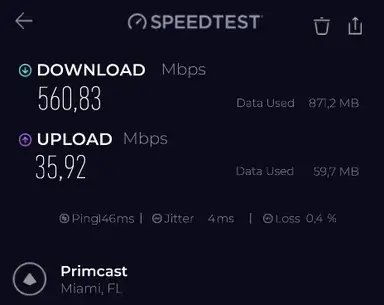
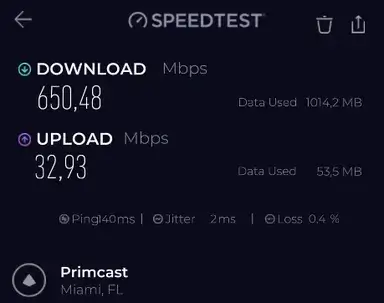
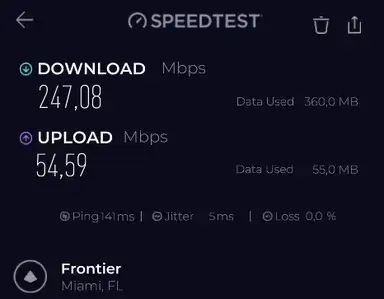
We also compared protocols on Miami. In this protocol set, WireGuard was the strongest download performer, Automatic/default was also strong, OpenVPN was slower on download but retained upload better, and IKEv2 was the weakest in our checks.
| Miami protocol test | Avg download | Download retention | Avg upload | Upload retention | Avg ping |
|---|---|---|---|---|---|
| Automatic/default | 547.8 Mbps | 60.6% | 35.7 Mbps | 64.5% | 145.5 ms |
| WireGuard | 625.2 Mbps | 69.2% | 29.8 Mbps | 53.9% | 140.5 ms |
| OpenVPN | 235.4 Mbps | 26.0% | 52.5 Mbps | 94.8% | 141.0 ms |
| IKEv2 | 143.6 Mbps | 15.9% | 12.7 Mbps | 23.0% | 140.0 ms |
For the broader technical context behind these results, see our VPN protocols comparison, including WireGuard, OpenVPN, IKEv2, TCP/UDP, provider-specific modes, and our paid protocol test data.
Privacy and security
Privacy, Security, and Leak Checks
CyberGhost’s official materials emphasize a no-logs policy, RAM-only server messaging, Deloitte audit materials, DNS/IP leak protection, strong encryption, and an automatic kill switch. Those are positive trust signals, but we do not describe any VPN as “fully anonymous.” A VPN can hide your real IP from many websites and encrypt traffic between your device and the VPN server, but accounts, cookies, fingerprinting, payment data, malware, and user behavior can still identify you.
DNS, WebRTC, and IP checks
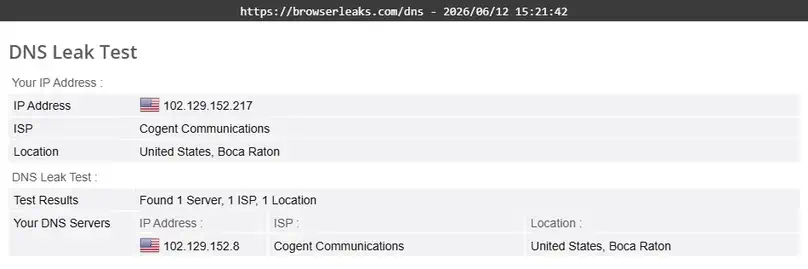
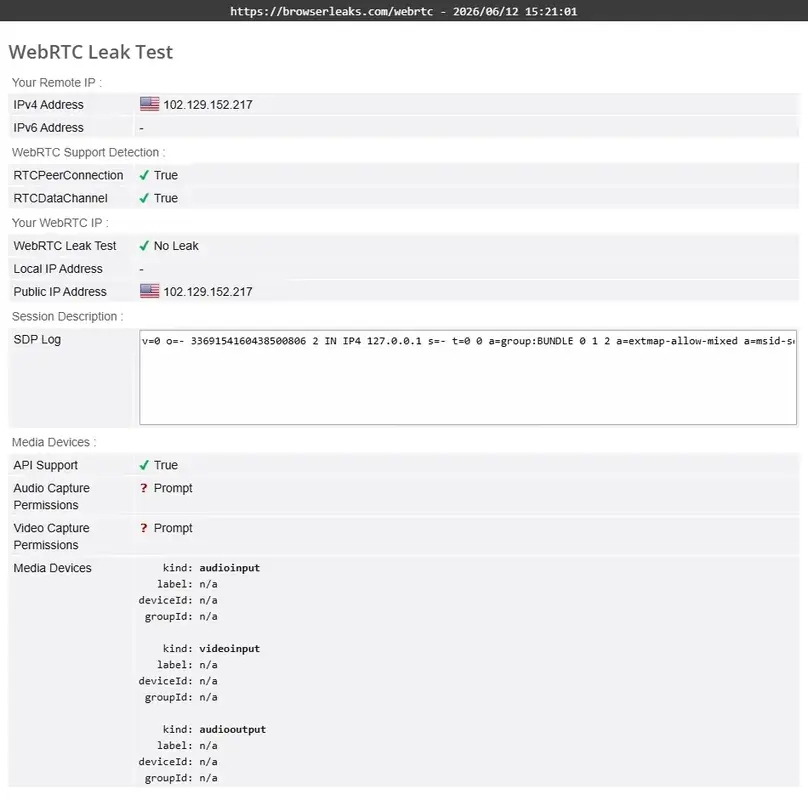
In our browser checks using a Miami CyberGhost server, the VPN changed the visible IP location to the United States/Miami, our real ISP DNS did not appear in the DNS test, and our real IP did not appear in the WebRTC check. These were practical leak checks in one browser/device setup, not a guarantee for every browser, operating system, extension, or network.
Kill switch and Content Blocker
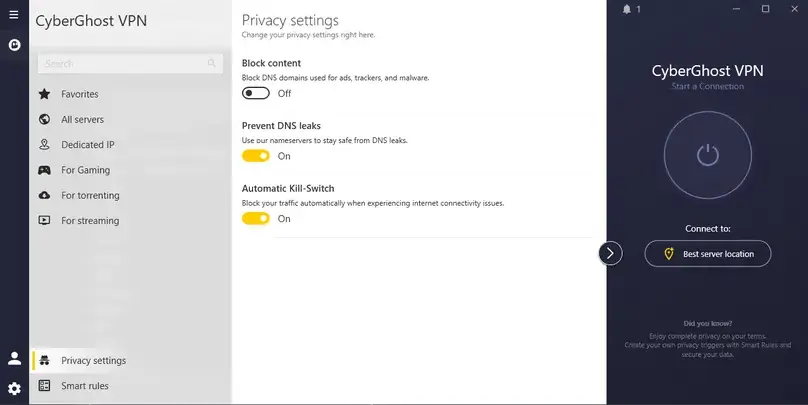
The Windows app exposed an Automatic Kill-Switch, but we did not find separate standard/advanced kill-switch modes comparable to some competitors. Content Blocker was available in Privacy Settings and was disabled by default until we turned it on. The in-app description said it blocks DNS domains used for ads, trackers, and malware. Support also clarified that ads are blocked using a database of known ad providers, which means some ads can still slip through.
Want to reproduce this safety check? Our VPN Kill Switch guide explains the Windows failure test, Pass / Fail / Inconclusive interpretation, manual-disconnect caveat, and the limits of browser-level evidence.
Advanced settings
Advanced Features: Useful Basics, Real Limitations
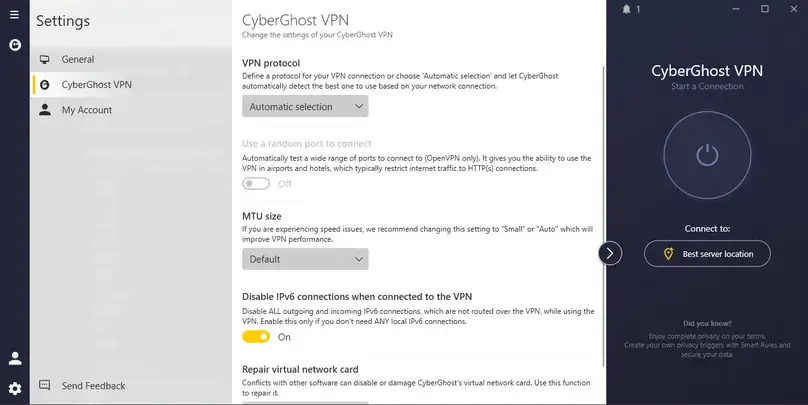
CyberGhost covers the basics for mainstream users, but it is not the most flexible VPN in this review set. The biggest limitations we found were website-only split tunneling on Windows, no port forwarding, no obfuscated servers/stealth mode/multi-hop according to support, no custom DNS option found in our Windows app check, and no visible NoSpy list in the Windows app even though NoSpy is marketed as a CyberGhost feature.
| Feature | What we found | Editorial impact |
|---|---|---|
| Split tunneling | Website/domain exceptions only in our Windows app check | Weak compared with VPNs that let you include/exclude specific desktop apps. |
| Port forwarding | Not supported; confirmed by CyberGhost support and official support docs | Important limitation for advanced P2P, seeding, and incoming-connection use cases. |
| Obfuscation / stealth / multi-hop | Support told us CyberGhost does not offer these modes | Weak fit for restrictive networks compared with VPNs that offer dedicated obfuscation-style features. |
| Dedicated IP | Available as a $5/month add-on; not purchased in our review | Useful for consistency and whitelisting, but we cannot claim dedicated-IP performance was tested. |
| Linux | Support told us Linux uses OpenVPN manual configuration and lacks WireGuard/Dedicated IP/Security Suite support in that answer | Linux users should confirm current support before buying because official pages and support answers can be confusing. |
| Router setup | Support said router setup counts toward the 7-device limit and uses OpenVPN manual configuration if compatible | Useful for device coverage, but not equivalent to unlimited-device VPNs. |
Network and server categories
Server Network and Specialty Servers
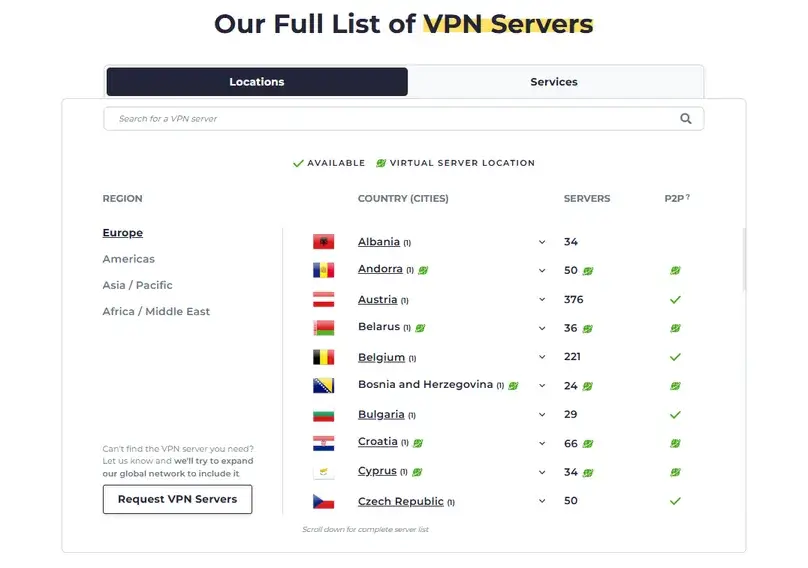
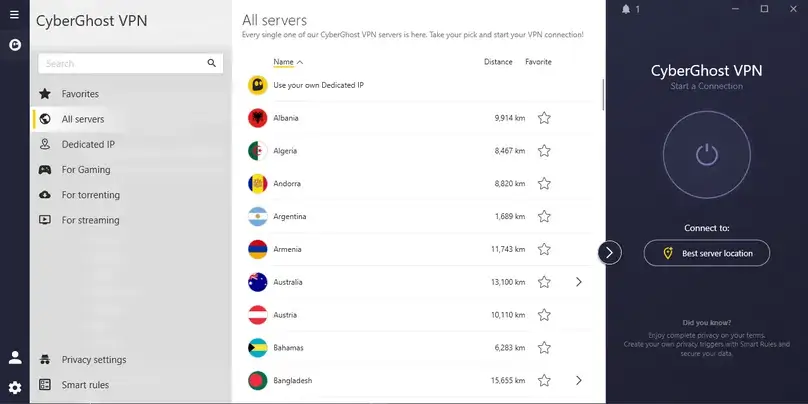
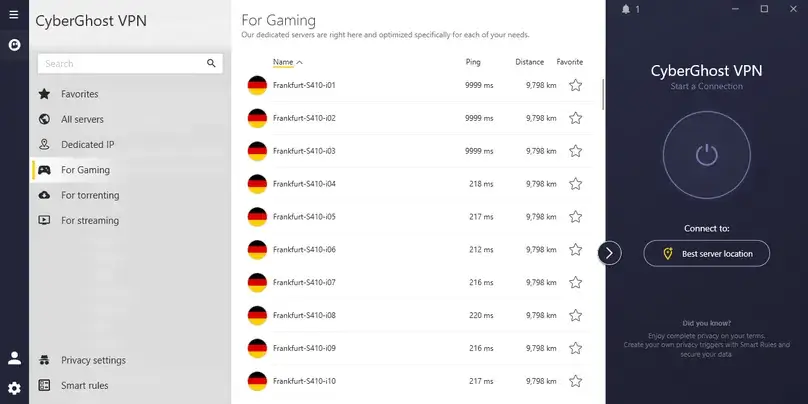
CyberGhost’s public server materials describe a network across 100 countries, and its free-trial page references 126 cities. In the Windows app, we saw a large country/city list and dedicated sections for all servers, streaming, torrenting, and gaming. We did not find a clearly labeled NoSpy list in the Windows app during our review, despite CyberGhost marketing NoSpy servers separately.
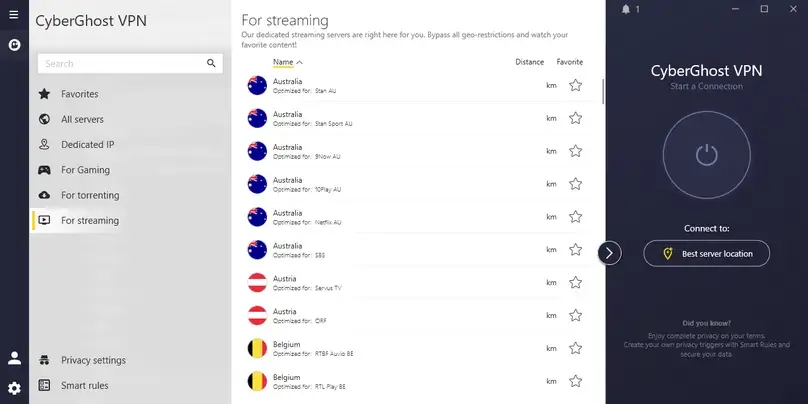
The app’s strongest organizational feature is specialty server labeling. Instead of requiring users to guess which server to use for entertainment, CyberGhost exposes streaming-specific and platform-specific options. In the US list alone, we saw specialized options such as Hulu Android TV, Netflix Android TV, YouTube US, CBS, NBC, FOX, Comedy Central, ESPN, Sling TV, DAZN, Hulu, Amazon Prime, Max, Netflix, Netflix Firestick, Paramount+, NFL+, PeacockTV, and F1 TV. We also saw streaming-specific server coverage across many other countries, including the UK, Switzerland, Turkey, Sweden, Spain, South Africa, Singapore, Romania, Norway, New Zealand, the Netherlands, Korea, Japan, Italy, India, Germany, France, Finland, Denmark, Croatia, Canada, Brazil, Belgium, Austria, and Australia.
Use cases
Streaming, Live Video, and P2P Checks
Streaming was CyberGhost’s clearest strength
Streaming was the strongest part of our CyberGhost test. Amazon Prime Video, Apple TV, Disney+/Hulu, Netflix, and a live video stream loaded and played in the scenarios we tested. The important detail is that most streaming platforms worked best — and in several cases only worked — when we selected the relevant streaming-specialized server. Regular server/protocol combinations produced proxy/VPN or playback errors for some platforms in our checks.
| Streaming check | Result in our test | Caveat |
|---|---|---|
| Amazon Prime Video | Worked on the Amazon Prime US specialized server | Regular WireGuard/OpenVPN/IKEv2 checks showed a VPN/proxy error. |
| Apple TV | Playback worked on the specialized streaming setup we tested | Regular protocol/server checks produced playback errors. |
| Disney+/Hulu | Catalog and playback worked on the specialized streaming setup we tested | Regular protocol/server checks produced site/login errors. |
| Netflix | Worked with WireGuard in our check | Streaming access can vary by account region, catalog, device, and server. |
| Live video stream | Loaded and played smoothly in our check | We do not claim every live platform or event will work. |
P2P is easy to find, but port forwarding is not available
CyberGhost’s Windows app showed many torrenting/P2P server options, and our legal P2P test started successfully. However, CyberGhost does not support port forwarding. That makes it a weaker choice than PIA or some technical VPNs for users who specifically care about incoming connections, seeding efficiency, or port-forwarding-dependent workflows.
To find VPN providers that support port forwarding, feature-level test methods, and the differences across providers, check out our VPN port forwarding guide.
Support and refund experience
Support Experience
We contacted CyberGhost support before purchasing and again for the refund process. The pre-purchase chat started with the AI assistant and then transferred to a human support agent. The human support answer was useful because it clarified several buying-risk issues that are easy to miss from marketing pages alone.
| Question area | Support answer we received | Editorial interpretation |
|---|---|---|
| Dedicated IP refund | Dedicated IP follows the same refund policy as the regular VPN subscription. | Positive, but still confirm during your own checkout. |
| Add-on refund | Support said add-ons are covered under the same refund policy. | Useful if Security Suite or other add-ons appear in your cart. |
| Cancellation vs refund | Support said cancellation and refund are separate requests. | Important: turning off auto-renew is not the same as asking for a refund. |
| Port forwarding | Support said CyberGhost does not offer port forwarding yet. | Matches official support messaging and is a real limitation for some users. |
| Obfuscation / stealth / multi-hop | Support said CyberGhost does not offer obfuscated servers, stealth mode, or multi-hop routing. | Not ideal for restrictive-network buyers. |
| Content Blocker | Support described database-based ad provider blocking and noted some ads can slip through. | Honest answer; do not treat it as a full ad-blocker replacement. |
The refund support experience was fast in our case. The refund was approved in about one minute after we requested it through live chat. That is a strong result for our test, but a single interaction should not be inflated into a broad claim that support is always excellent.
Public signals
Reputation and User Review Signals
Public review signals were mixed but not alarming for a major VPN brand. During our June 2026 research, CyberGhost showed about 23,916 Trustpilot reviews with a 4.0/5 rating, about 39,000 App Store ratings with a 4.2/5 rating, and about 167,000 Google Play ratings with a 3.9/5 rating. These numbers are useful as public reputation signals, but they are not substitutes for testing the exact app, device, server, and refund path that matter to you.
Positive signals
Large user base, long-running brand, extensive documentation, visible app-store footprint, and fast refund approval in our paid review.
Complaints to watch
As with most VPNs, Reddit and public reviews include both positive and negative experiences. Common areas to verify yourself include streaming reliability, billing, app behavior, and support outcomes.
Comparison context
CyberGhost VPN Alternatives
CyberGhost is not a bad VPN, but our paid test makes it easier to place it: it is stronger as a streaming-oriented, beginner-friendly VPN than as a power-user VPN. Compare it with these alternatives depending on what you need most.
NordVPN
Better if you want a more polished mainstream app, broader advanced feature set, and a stronger all-around paid hands-on result in our review set.
Private Internet Access
Better for configurability, unlimited devices, port forwarding, custom DNS, MACE, and advanced desktop settings.
Proton VPN
Better for privacy-focused buyers who value Secure Core, NetShield, open-source/audited apps, a serious free plan, and the Proton ecosystem.
PureVPN
Worth comparing if you want broad features and add-ons, though our paid PureVPN review also found issues that should be weighed carefully.
Surfshark
Likely stronger if unlimited devices and value pricing are more important than CyberGhost’s streaming-specific server labels.
ExpressVPN
Likely stronger if you want premium simplicity and polished apps, though it should be compared after hands-on testing.
Final assessment
Final Verdict
CyberGhost VPN deserves credit for its streaming server organization, high download numbers in our structured paid-account checks, clear 14-day/45-day refund split, and fast refund approval in our test. If your main goal is to test streaming services during a refund window and you like the idea of choosing platform-labeled servers, CyberGhost is genuinely worth comparing.
It is harder to recommend as a top all-around VPN. The Windows app felt basic, split tunneling was limited to websites/domains rather than desktop apps, we did not find custom DNS, NoSpy was not visible in our Windows app check, support confirmed no port forwarding, and support also said CyberGhost does not offer obfuscation, stealth mode, or multi-hop routing. Those gaps matter if you are an advanced user or if you expect a VPN to offer deep controls.
Our final recommendation is measured: CyberGhost is a strong streaming-first VPN candidate, but not the strongest VPN for advanced controls or power-user flexibility. Test your exact streaming platforms, device setup, and server locations during the refund window before committing long-term.
Try CyberGhost only if its strengths match your use case: streaming categories, simple apps, and a long refund window on longer plans.
Visit CyberGhost VPN View Our VPN Top PicksReview scope
What We Checked in This Review
Review checks completed in June 2026.
Common questions
CyberGhost VPN FAQ
Is CyberGhost VPN good for streaming?
CyberGhost was strongest for streaming in our paid review. The important caveat is that several platforms worked correctly only when we used CyberGhost’s specialized streaming servers. We would not describe it as working with every streaming platform, every account region, or every server.
How much does CyberGhost VPN cost?
In our June 2026 pricing review, the 1-month plan was $12.99/month, the 6-month plan was $6.99/month billed as $41.94, and the long-term promotional plan showed $1.59/month with $41.34 due for the first 2 years. Pricing and renewal terms can change, so always verify checkout before buying.
Does CyberGhost have a 45-day refund policy?
Yes, but not for every plan. CyberGhost’s official policy gives 1-month subscriptions a 14-day money-back guarantee and subscriptions of 6 months or longer a 45-day money-back guarantee.
Did ReviewsAlly test CyberGhost’s refund process?
Yes. We requested a refund through live chat on June 16, 2026. In our test, the refund was approved in about 1 minute, CyberGhost estimated 5 to 10 business days for the money to return, and access ended immediately. Individual results can vary by purchase method and policy conditions.
Does CyberGhost support port forwarding?
No. CyberGhost support told us it does not offer port forwarding, and CyberGhost’s support documentation says it does not allow port forwarding. This is an important limitation for some P2P and incoming-connection workflows.
Does CyberGhost offer split tunneling on Windows?
CyberGhost offered website/domain exceptions in our Windows app check, but we did not find app-based split tunneling for desktop applications. That makes it weaker than VPNs that let you include or exclude specific apps from the tunnel.
Does CyberGhost have obfuscated servers or multi-hop?
In our support check, CyberGhost told us it does not offer obfuscated servers, stealth mode, or multi-hop routing. Users who need restrictive-network features should compare alternatives before buying.
Is CyberGhost faster than other VPNs?
We do not call CyberGhost the fastest VPN. In our structured paid-account checks, CyberGhost produced strong download results, but speed depends on your location, ISP, device, protocol, server load, and test route. It also had variable upload and high latency on distant routes.
How many devices does CyberGhost allow?
CyberGhost allows up to 7 devices/connections with one subscription. This is enough for many individuals, but less flexible than unlimited-device VPNs.
Did ReviewsAlly test CyberGhost Dedicated IP?
No. We reviewed CyberGhost’s Dedicated IP add-on visibility, price, locations, and token explanation, but we did not purchase or test a dedicated IP address. We do not make dedicated-IP performance claims for CyberGhost.
Research basis
Sources Reviewed
Sources reviewed in June 2026 included official CyberGhost pages, support documentation, policy pages, app/dashboard screenshots, paid account tests, and public reputation signals.
- CyberGhost VPN homepage
- CyberGhost VPN buy/pricing page
- CyberGhost VPN download page
- CyberGhost VPN refund policy support article
- CyberGhost money-back guarantee page
- CyberGhost VPN free trial page
- CyberGhost VPN server network page
- CyberGhost NoSpy servers page
- CyberGhost Dedicated IP page
- CyberGhost support article on P2P speeds and port forwarding
- CyberGhost terms
- CyberGhost privacy policy
- CyberGhost transparency report
- CyberGhost no-logs page
- CyberGhost support center
Reader feedback
Share Your CyberGhost VPN Experience
Have you used CyberGhost VPN for streaming, travel, gaming, torrenting, public Wi-Fi, or everyday browsing? Leave a comment below to help other readers understand where CyberGhost works well and where it may fall short. Comments are moderated before publication.