
Paid Hands-On VPN Reviews
Best VPN Services of 2026
We bought and tested nine VPN services, compared structured speed results, ran five streaming checks per provider, examined DNS and WebRTC behavior, reviewed apps and platform support, rechecked pricing and renewals, contacted support, and completed real refund workflows before assigning each provider a place in this guide.
Reviews Ally may earn a commission when you use some links on this page. Providers did not control our test results, rankings, strengths, or cautions. Prices, server networks, streaming access, and plan terms can change, so confirm the current checkout details before buying. Read our advertising disclosure.
Key findings
What You Need to Know Before Choosing a VPN
- NordVPN is our best overall pick. It offered the strongest balance of speed, app quality, streaming, leak-check results, security tools, and refund experience for a broad audience.
- Proton VPN was the fastest in our nine-provider comparison. Its strong result does not make it the automatic best choice for every buyer, but it pairs speed with unusually strong privacy documentation and a real free plan.
- Surfshark and Private Internet Access allow unlimited devices. Surfshark is the easier household bundle; PIA is the more technical and customizable option.
- Streaming results were workflow-specific. Some providers worked on normal servers, while PIA, CyberGhost, and Turbo VPN relied partly or entirely on specialized streaming routes in our checks.
- Promotional monthly prices can hide the real commitment. Use our VPN cost and renewal study to compare the total first charge, included months, renewal amount, and effective renewal rate—not only the large discount headline.
- Leak testing materially changed one recommendation. PrivateVPN delivered useful port forwarding and strong WireGuard results, but our real ISP DNS appeared in its documented Miami test.
Scope matters: these results describe our documented test devices, servers, protocols, accounts, dates, and network conditions. They are not guarantees that every server, streaming catalog, protocol, or future app version will behave identically.
Our approach
How We Found and Checked the Best VPN Services
We selected nine providers that represent distinct buyer needs, then purchased each service and completed a Level 4 paid workflow review. The shared evidence covers account setup, pricing and renewal, app behavior, structured speed records, five streaming workflows, leak-oriented checks, relevant security controls, support, cancellation, and a real refund request.
We standardize what is meaningfully comparable without pretending every VPN exposes the same controls. Specialized streaming-server passes remain separate from normal-server passes, externally configured WireGuard remains separate from native app performance, and missing evidence is not filled in after the fact. Our VPN split-tunneling guide shows why routing direction and rule type matter more than a generic feature checkmark.
Protocol choice can materially change performance and connection behavior. Our VPN protocols comparison explains WireGuard, OpenVPN, IKEv2, TCP/UDP, provider-specific modes, and the 65 protocol-comparison records behind our current hands-on findings.
Read our full VPN testing methodology for the Evidence Levels, test environment, speed formula, leak and streaming criteria, refund handling, provider scope, and limitations behind this comparison.
A visible Kill Switch toggle is only availability evidence. Our VPN Kill Switch guide explains how we interpret actual drop behavior, including the difference between manual Disconnect, unexpected failure, and an inconclusive test where the protected tunnel never went down.
Start here
Our Top Three VPN Picks at a Glance
These are the strongest starting points for most visitors. The complete ranking below includes six additional providers for narrower needs, but the top three delivered the best overall combinations of performance, usability, evidence quality, pricing fit, and practical reliability.
Best overall VPN for most users
NordVPN
Our most balanced recommendation: #2 in speed, stable playback in all five streaming checks, polished apps, useful security controls, clean tested DNS/WebRTC behavior, and a completed refund workflow.
Best value for many devices
Surfshark
The easiest recommendation for households with many devices: unlimited connections, polished apps, five successful streaming checks on a regular server, broad bundled tools, and a fast refund approval.
Best privacy-focused free plan
Proton VPN
The strongest privacy-first choice in this list: #1 in our speed index, a meaningful free plan, open-source apps, public audit material, Secure Core, Stealth, port forwarding on eligible paid plans, and five successful streaming checks.
0 people found this helpful
At a glance
VPN Services Comparison Table
The table answers the fastest pre-purchase questions without replacing the full provider findings. “Long-term” prices are promotional monthly equivalents for the checked first term, not month-to-month prices. Streaming counts reflect the five documented workflows and distinguish partial, failed, or specialized-server results.
| Provider | Best For | Monthly Price Checked | Lowest Long-Term Offer Checked | Devices | Our Speed Rank | Streaming Checks | Security / Trust Note | Main Caution | Full Review |
|---|---|---|---|---|---|---|---|---|---|
| NordVPN | Best overall for most users | $14.99Basic monthly | $3.49/month$94.23 first 27 months; then $139.08/year | 10 | #2 of 9237.3 Mbps median route speed | 5 passesNormal-server playback in the final workflows | Public no-logs assurance work; tested DNS/WebRTC checks did not expose original network details | Port forwarding only through the newer Dedicated Server add-on (not tested); standard servers and Dedicated IP do not support it; substantial renewal increases; higher tiers bundle extras | Read review |
| Surfshark | Best value for many devices | $16.45Starter monthly | $2.49/month$67.23 first 27 months; then $79/year | Unlimited | #6 of 9370.6 Mbps median on a gigabit-class baseline | 5 passesRegular Miami WireGuard server | No-logs, RAM-only, audit, and transparency material reviewed; tested leak checks were clean | No port forwarding; bundle complexity; recurring payments listed as non-refundable | Read review |
| Proton VPN | Best privacy-focused free plan | Free / $9.99Free or VPN Plus monthly | $4.99/month$119.76 first 24 months; then $83.88/year | 1 free / 10 paid | #1 of 9247.3 Mbps median route speed | 5 passesNormal New York server | Open-source apps, audit and transparency material, Secure Core, Stealth, and clean tested leak checks | More technical interface; Secure Core adds overhead; no unlimited-device tier | Read review |
| Private Internet Access | Best for customization | $11.95Monthly | $2.03/month$79 first 3-year term and renewal | Unlimited | #5 of 9169.9 Mbps median route speed | 5 passesU.S. East Streaming Optimized server | Open-source apps, advanced controls, port forwarding, and clean tested DNS/WebRTC checks | Technical interface; OpenVPN TCP was extremely slow; no U.S. port forwarding | Read review |
| CyberGhost VPN | Best for a longer refund window | $12.99Monthly | $2.19/month$56.94 first 26 months; then $56.94/year | 7 | #3 of 9465.9 Mbps median route speed | 5 passes3 required specialized streaming servers | No-logs, RAM-only, audit, and transparency material reviewed; tested leak checks were clean | No port forwarding, stealth/obfuscation, or multi-hop; limited Windows split tunneling | Read review |
| PureVPN | Best broad network and add-on ecosystem | $12.95Standard monthly | $2.15/month$58.20 first 27 months; then $47.95/year | 10 | #7 of 9180.2 Mbps median; lower test completeness | 5 passesAt least one documented workflow; shortcuts mattered | Clean tested DNS/WebRTC behavior, working kill switch/split tunneling, broad policy review | Windows firewall/app issue; mixed long-distance speed and packet loss | Read review |
| PrivateVPN | Best for port forwarding and lean controls | $9.90Monthly | $2.00/month$72 first 36 months; then $72/year | 10 | #4 of 9395.9 Mbps median route speed | 3 pass / 1 partial / 1 failMixed WireGuard/Miami results | Port forwarding worked; WebRTC did not expose the real public IP | Real ISP DNS appeared; OpenVPN/Stealth failed in our environment | Read review |
| VPN.ac | Best for technical protocol control | $9Monthly; $2 paid 7-day trial also offered | $3.75/month$90 first and renewal 2-year terms | 6 OpenVPN/IPsec + 6 WireGuardProvider description; not stress-tested | #8 of 9150.1 Mbps native median; external WireGuard was much faster | 5 passesNormal Miami OpenVPN ECC connection | Kill switch, SecureDNS, Double-Hop, and tested leak checks worked; temporary metadata documented | Slow ticket support; manual WireGuard; no written refund approval preserved, although the full PayPal payment returned on the request date | Read review |
| Turbo VPN | Best mobile-first basic option | $11.99Gold monthly | $3.33/month$89.99 every 27 months; checkout variation observed | 10 Gold / 20 Platinum | #9 of 998.6 Mbps median route speed | 4 pass / 1 failUSA All Videos specialized server | Kill switch, bypass rules, and tested DNS/WebRTC behavior worked; free Windows tier available | Very low retention; TAP troubleshooting; no public independent no-logs audit found | Read review |
Prices were rechecked in July 2026 and can change. A “pass” means stable playback was reached in our documented workflow—not that access is guaranteed for every future server, account, region, or platform.
Measured performance
ReviewsAlly VPN Speed Ranking
Raw Mbps alone would unfairly favor providers tested on the faster baseline connection, while retention percentage alone could understate the practical value of a very high-throughput result. Our final index balances both.
Protocol choice can change throughput dramatically inside the same VPN. We keep the standard route ranking separate from protocol experiments; see what our paid VPN protocol tests showed for the 65-record protocol subset and its limitations.
Want to measure the same baseline-versus-VPN effect on your own connection? Our VPN speed test and speed-loss calculator calculates throughput loss/retention and latency changes locally in your browser, then explains how to run a repeatable comparison.
| Final Rank | Provider | Calculated Index | Median Route Download | Median Download Retention | How to Interpret the Result |
|---|---|---|---|---|---|
| 1 | Proton VPN | 79.2 | 247.3 Mbps | 75.8% | Best final balance of normalized download retention, upload retention, and practical throughput. |
| 2 | NordVPN | 76.7 | 237.3 Mbps | 75.7% | Nearly tied with Proton VPN on download retention, with slightly lower upload retention in the final index. |
| 3 | CyberGhost VPN | 65.9 | 465.9 Mbps | 51.5% | Strong absolute throughput balanced the lower retention percentage from a gigabit-class baseline. |
| 4 | PrivateVPN | 64.7 | 395.9 Mbps | 48.6% | Strong WireGuard throughput, but route variability, packet loss, and failed OpenVPN modes remain important caveats. |
| 5 | Private Internet Access | 63.3 | 169.9 Mbps | 61.6% | Good normalized retention and upload behavior, but lower absolute route throughput than the providers above it. |
| 6 | Surfshark | 57.7 | 370.6 Mbps | 40.2% | High practical speed, but lower retention against a much faster baseline. It won the technical tie on completeness and repeatability. |
| 7 | PureVPN | 57.8* | 180.2 Mbps | 58.6% | Raw score was within 0.1 of Surfshark, but only one standard run per route reduced confidence and lost the tie-break. |
| 8 | VPN.ac | 31.5 | 150.1 Mbps | 16.6% | The standard ranking uses native OpenVPN routes. A separate official WireGuard-app workflow averaged 653.1 Mbps in Miami. |
| 9 | Turbo VPN | 20.6 | 98.6 Mbps | 10.6% | Low download retention and inconsistent route/protocol behavior placed it last in this nine-provider test set. |
*Surfshark and PureVPN were treated as a technical tie because the calculated difference was below one point. Surfshark ranked higher because its standard route set contained more complete repeated runs. Ping and packet loss were not forced into the universal formula because locations and measurement completeness differed, but both influenced provider cautions. These are structured real-world tests, not a permanent global laboratory benchmark.
Complete ranking
Our 9 Best VPN Services of 2026
Every provider below has a legitimate reason to remain in the comparison, but lower-ranked services carry narrower use cases or more serious cautions. The ranking is editorial, not a simple sort by speed: security findings, app reliability, pricing clarity, streaming workflow, support, refunds, feature fit, and evidence confidence all matter.
Best overall VPN for most users
NordVPN Review
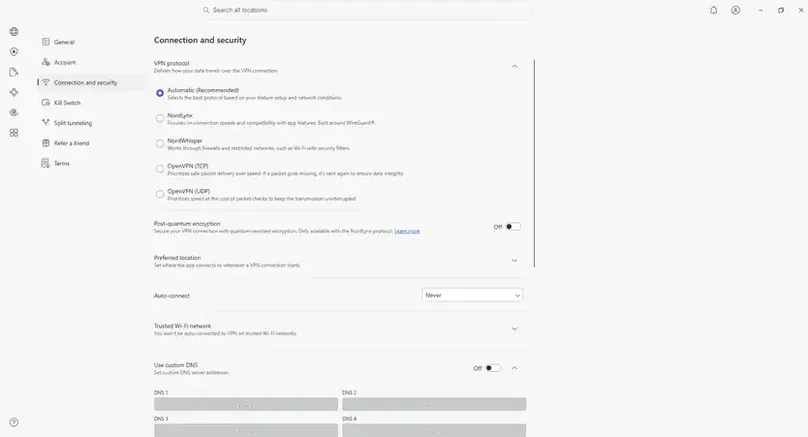
NordVPN ranks first because it delivered the strongest overall balance in our paid review rather than winning every individual category. The Windows app was polished, NordLynx produced strong practical speeds, all five streaming checks reached stable playback, our DNS and WebRTC checks did not expose the original network details, and the direct-purchase refund request was accepted about three hours after submission. Proton VPN ranked slightly higher in our speed index and Surfshark covers unlimited devices, but NordVPN is the most complete starting point for mainstream buyers who want speed, app quality, broad use-case coverage, and useful security extras in one service.
Why it ranks first
NordVPN combined strong speed retention, a mature Windows app, confirmed streaming playback, tested kill-switch and split-tunneling controls, public no-logs assurance work, and a completed refund workflow.
Main trade-off
It limits standard accounts to 10 simultaneous devices, and port forwarding now requires NordVPN’s separate Dedicated Server add-on; standard VPN servers/Dedicated IP still do not support it. Discounted first terms can also renew at much higher prices, and higher plan tiers bundle extras that not every VPN buyer needs.
- Windows
- macOS
- Android
- iOS
- Linux
- Browser extensions
- Routers
NordVPN pricing at a glance
| Term | Basic | Complete | Complete Max |
|---|---|---|---|
| Monthly | $14.99/month$14.99 billed monthly | $19.99/month$19.99 billed monthly | $29.99/month$29.99 billed monthly |
| 1 year | $4.49/month$53.88 first 12 months Renews at $139.08/year |
$5.49/month$65.88 first 12 months Renews at $219.48/year |
$8.49/month$101.88 first 12 months Renews at $296.28/year |
| 2 years + 3 months | $3.49/month$94.23 first 27 months Renews at $139.08/year |
$4.49/month$121.23 first 27 months Renews at $219.48/year |
$7.49/month$202.23 first 27 months Renews at $296.28/year |
Pricing rechecked in July 2026. Higher tiers bundle additional Nord products and services. Promotions, taxes, plan contents, and checkout terms can change by location. Confirm the total first charge and renewal price before paying.
Streaming playback in our tests
Stable playback was confirmed in the final U.S. server checks, including the corrected Netflix retest. Streaming availability can change by server, platform, account region, catalog, and time.
Privacy and security evidence
- Public no-logs assurance and audit materials were reviewed.
- Our U.S. DNS and WebRTC checks did not expose the original ISP DNS or real public IP.
- Internet Kill Switch, App Kill Switch, split tunneling, NordLynx, NordWhisper, Meshnet, and eligible-plan security tools were checked in the Windows workflow.
What buyers should know
- During our May 2026 review, support told us the standard NordVPN service did not support port forwarding. NordVPN has since added the feature exclusively to its newer Dedicated Server add-on; we have not tested that add-on.
- The Basic tier does not include every security or bundled feature shown across NordVPN’s broader product pages.
- Linux feature parity is more limited than Windows or macOS, and renewal prices deserve close attention.
Best value for many devices
Surfshark Review
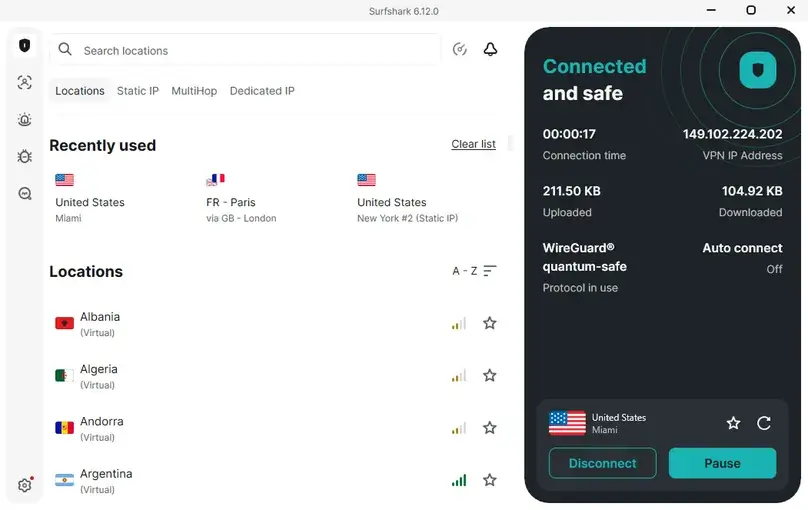
Surfshark ranks second because it gives households and heavy multi-device users an unusually complete package for the money. We purchased Surfshark One+ and found polished Windows, Android, and browser experiences, unlimited-device coverage, smooth playback across all five streaming checks on a regular Miami WireGuard server, working Bypasser and kill-switch controls, and a fast refund approval. Its sixth-place speed rank needs context: the median route speed was still about 370.6 Mbps, but retention was lower because Surfshark was tested against a much faster gigabit-class baseline. The main reasons to choose something else are the lack of port forwarding, non-refundable recurring payments in the terms we reviewed, and a bundle that can feel excessive if you only need a simple VPN.
Why it ranks second
Unlimited devices are a genuine household advantage, the app experience was polished across multiple platforms, regular-server streaming worked throughout our test set, and the feature bundle is broader than most VPN-only subscriptions.
Main trade-off
Surfshark does not support port forwarding. The pricing structure spans Starter, One, and One+, recurring payments were listed as non-refundable, and fair-use rules still apply despite the unlimited-device positioning.
- Windows
- macOS
- Android
- iOS
- Linux
- Browser extensions
- Smart TVs and streaming devices
- Routers
Surfshark pricing at a glance
| Term | Starter | One | One+ |
|---|---|---|---|
| Monthly | $16.45/monthBilled monthly | $18.95/monthBilled monthly | $21.85/monthBilled monthly |
| 1 year + 3 months | $3.39/month$50.85 first 15 months Renews at $79/year |
$3.59/month$53.85 first 15 months Renews at $99/year |
$7.49/month$112.35 first 15 months Renews at $119/year |
| 2 years + 3 months | $2.49/month$67.23 first 27 months Renews at $79/year |
$2.79/month$75.33 first 27 months Renews at $99/year |
$4.49/month$121.23 first 27 months Renews at $119/year |
Pricing rechecked in July 2026. Starter is the core VPN tier; One and One+ add broader privacy, security, identity, or data-removal tools. Confirm the total charge, included features, renewal, taxes, and refund eligibility in your checkout region.
Streaming playback in our tests
All five services loaded and played smoothly on a regular Miami server over WireGuard; no specialized streaming server was required. Results can change by server, account, region, platform, and time.
Privacy and security evidence
- No-logs, RAM-only infrastructure, transparency, ownership, and audit materials were reviewed.
- Our Miami WireGuard checks did not show the real ISP DNS or real public IP, and the Windows kill switch worked in the tested workflow.
- Bypasser, CleanWeb, NoBorders, IP Rotator, and Dynamic MultiHop were visible or tested during the paid review.
What buyers should know
- Surfshark does not support port forwarding.
- Unlimited devices are intended for legitimate personal use rather than abusive account sharing.
- Some of the most visible extras belong to One or One+, so the cheapest Starter plan should not be treated as the full bundle.
Best privacy-focused free plan
Proton VPN Review
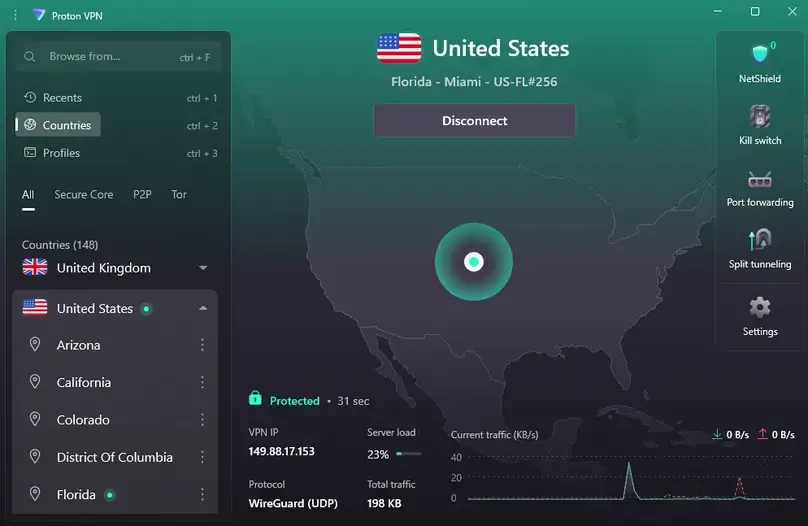
Proton VPN ranks third overall and first in our nine-provider speed index. It is the strongest pick here for buyers who prioritize public privacy evidence, open-source apps, a meaningful free plan, and advanced controls such as Secure Core, Stealth, flexible split tunneling, and paid-plan port forwarding. In our paid Windows review, WireGuard performed consistently across nearby and distant routes, all five streaming checks reached stable playback on a normal New York server, the kill switch worked, and browser checks did not expose the real ISP DNS or real public IP. It is less approachable than a simple one-button VPN, paid plans stop at 10 simultaneous devices, and Secure Core brings a clear speed and latency trade-off.
Why it ranks third
Proton VPN paired the best speed index in our test set with open-source apps, public no-logs and audit material, strong leak-check results, a usable free plan, advanced privacy routes, and paid-plan port forwarding that assigned a random port in our Windows test.
Main trade-off
The interface exposes more concepts than beginner-first VPNs, Secure Core substantially reduces speed, the free plan is limited to one active connection, and paid consumer plans stop at 10 simultaneous devices.
- Windows
- macOS
- Android
- iOS
- Linux
- Browser extensions
- Smart TVs and streaming devices
- Routers
Proton VPN pricing at a glance
| Plan | Monthly | 1 year | 2 years | Renewal |
|---|---|---|---|---|
| Free | $0No credit card required | $0Ongoing free plan | $0Ongoing free plan | No charge1 active connection and fewer paid features |
| VPN Plus | $9.99/month$9.99 billed monthly | $6.99/month$83.88 first 12 months | $4.99/month$119.76 first 24 months | $83.88/yearAfter annual or 2-year first term |
| Proton Unlimited | $12.99/month$12.99 billed monthly | $9.99/month$119.88 first 12 months | $7.99/month$191.76 first 24 months | $119.88/yearBroader Proton ecosystem bundle |
Pricing rechecked in July 2026. VPN Plus is the cleanest consumer VPN comparison; Proton Unlimited bundles additional Proton services. Family and business plans are not included here because they answer different buying intents.
Streaming playback in our tests
All five checks reached playback on a normal New York server with Secure Core off and NetShield enabled. Secure Core or Stealth was not required for these tests. Streaming access can change over time.
Privacy and security evidence
- No-logs audit, transparency reporting, open-source apps, GitHub materials, and Swiss privacy positioning were reviewed.
- Our New York DNS and WebRTC checks did not expose the real ISP DNS or real public IP, and the standard and advanced kill-switch modes worked.
- Secure Core, Stealth, NetShield, flexible split tunneling, VPN Accelerator, P2P categories, and paid-plan port forwarding were checked.
What buyers should know
- Secure Core is useful for higher-risk privacy scenarios, but it added a substantial speed and latency penalty in our test.
- Port forwarding assigns a random port in the normal app flow rather than a fixed user-selected port.
- Dedicated IP is not included for normal individual VPN Plus users; support tied dedicated servers/IPs to business plans.
Best for customization
Private Internet Access Review
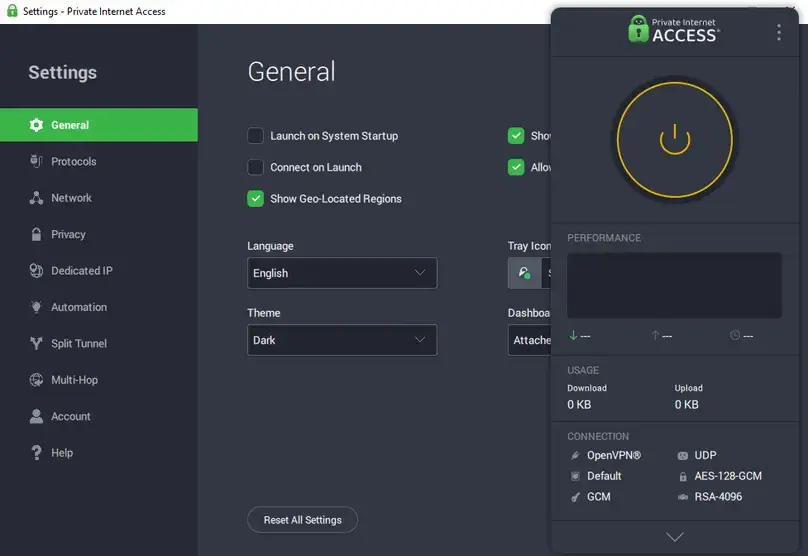
Private Internet Access ranks fourth because it gives technical users more meaningful control than most mainstream VPNs without charging extra for unlimited simultaneous connections. In our paid Windows review, its open-source app exposed automation, custom DNS, MACE, app- and IP-based split tunneling, multi-hop and obfuscation options, two kill-switch modes, and a port-forwarding control that assigned a port on an eligible non-U.S. server. All five streaming checks reached stable playback through the U.S. East Streaming Optimized server, our Chicago DNS and WebRTC checks did not expose the real ISP resolver or public IP, and support started the direct-purchase refund immediately. PIA is not the easiest choice for beginners, its fifth-place speed result was solid rather than exceptional, and OpenVPN TCP was extremely slow in our protocol comparison.
Why it ranks fourth
PIA combines unlimited devices with open-source apps, granular split tunneling, port forwarding, MACE, automation, custom DNS, and unusually deep protocol and network controls.
Main trade-off
The interface is more technical than beginner-first VPNs, speeds were moderate in our route set, OpenVPN TCP performed poorly, and port forwarding is unavailable on U.S. servers.
- Windows
- macOS
- Android
- iOS
- Linux
- Browser extensions
- Smart TVs and streaming devices
- Routers
Private Internet Access pricing at a glance
| Term | Advertised price | First charge | Renewal |
|---|---|---|---|
| Monthly | $11.95/month | $11.95Billed monthly | $11.95/month |
| 1 year | $3.33/month | $39.95First annual term | $39.95/year |
| 3 years | $2.03/month | $79Promotional first term | $79 every 3 years |
Pricing rechecked in July 2026. Promotional monthly equivalents, included bonus months, taxes, and checkout conditions can change. Confirm the displayed first charge and renewal before purchasing.
Streaming playback in our tests
All five checks reached stable playback using PIA’s U.S. East Streaming Optimized server. The result supports that tested workflow, not every server, platform, account, region, or future access attempt.
Privacy and security evidence
- Open-source apps, GitHub materials, no-logs messaging, independent audit material, transparency reporting, and RAM-only infrastructure claims were reviewed.
- Our Chicago DNS and WebRTC checks did not show the real ISP DNS or real public IP.
- Kill Switch, Advanced Kill Switch, split tunneling, MACE, custom DNS, automation, and multi-hop/obfuscation settings were checked.
What buyers should know
- Port forwarding was enabled and assigned a port in our paid Windows workflow; our notes do not document a separate outside-reachability pass. Support told us during that review that the feature was not available on U.S. servers.
- MACE is a useful blocker, but it should not be treated as a complete ad, tracker, malware, or antivirus solution.
- WireGuard was the strongest practical protocol in our test; OpenVPN UDP was slower and OpenVPN TCP was dramatically slower.
Best for a longer refund window
CyberGhost VPN Review
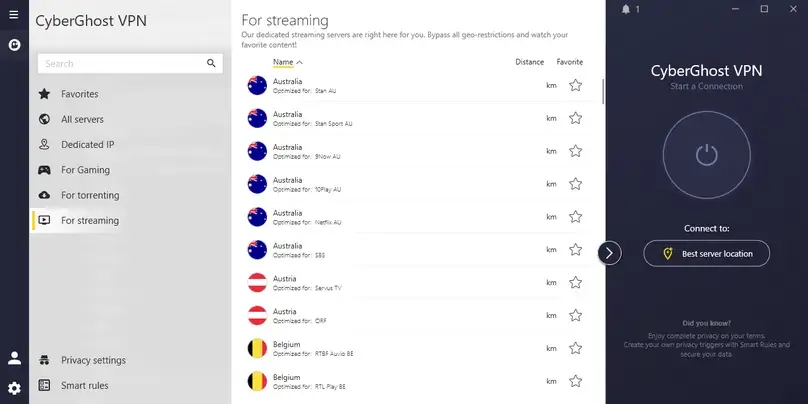
CyberGhost VPN ranks fifth and is the clearest choice here for buyers who want labeled streaming servers and more time to evaluate a longer subscription. Its Windows app was easy to understand, the specialized server categories made platform selection unusually direct, our route tests produced the third-highest speed result in the group, and the refund on our paid purchase was approved in about one minute. Netflix and the live-video check worked on normal connections, while Prime Video, Disney+/Hulu, and Apple TV+ required specialized streaming servers in our workflow. The trade-offs are meaningful: CyberGhost permits only seven devices, support confirmed no port forwarding, obfuscation, stealth mode, or multi-hop, and Windows split tunneling was limited to website/domain exceptions rather than full app rules.
Why it ranks fifth
CyberGhost combines strong practical download speeds, an approachable Windows app, clearly labeled streaming server categories, useful Smart Rules, and a 45-day refund window on eligible longer plans.
Main trade-off
It allows only seven devices, several platforms required specialized servers in our streaming checks, and support confirmed that port forwarding, obfuscation, stealth mode, and multi-hop are not offered.
- Windows
- macOS
- Android
- iOS
- Linux and manual setup
- Browser extensions
- Smart TVs and streaming devices
- Routers and manual setup
CyberGhost VPN pricing at a glance
| Term | Advertised price | First charge | Renewal | Refund window |
|---|---|---|---|---|
| Monthly | $12.99/month | $12.99Billed monthly | $12.99/month | 14 days |
| 6 months | $6.99/month | $41.94First 6-month term | $41.94 every 6 months | 45 days |
| 2 years + 2 months | $2.19/month | $56.94First 26 months | $56.94/yearAfter the promotional first term | 45 days |
Pricing rechecked in July 2026. The longest first term covers 26 months and then renews annually. Promotions, add-ons, taxes, payment method, location, and checkout terms can change the total.
Streaming playback in our tests
Netflix and the live-video check worked through normal connections. Prime Video, Disney+/Hulu, and Apple TV+ reached stable playback only after we selected CyberGhost’s specialized streaming-server workflow.
Privacy and security evidence
- No-logs, RAM-only server, transparency, and Deloitte audit materials were reviewed.
- Our Miami DNS and WebRTC checks did not show the real ISP DNS or real public IP.
- Automatic Kill-Switch, Content Blocker, Smart Rules, privacy settings, protocol selection, and website exceptions were checked.
What buyers should know
- Support said CyberGhost does not offer port forwarding, obfuscated servers, stealth mode, or multi-hop routing.
- The tested Windows split-tunneling control handled website/domain exceptions rather than complete app-based rules.
- Linux and router workflows have more limitations than the Windows app, and router use still counts toward the seven-device limit.
Best broad network and add-on ecosystem
PureVPN Review
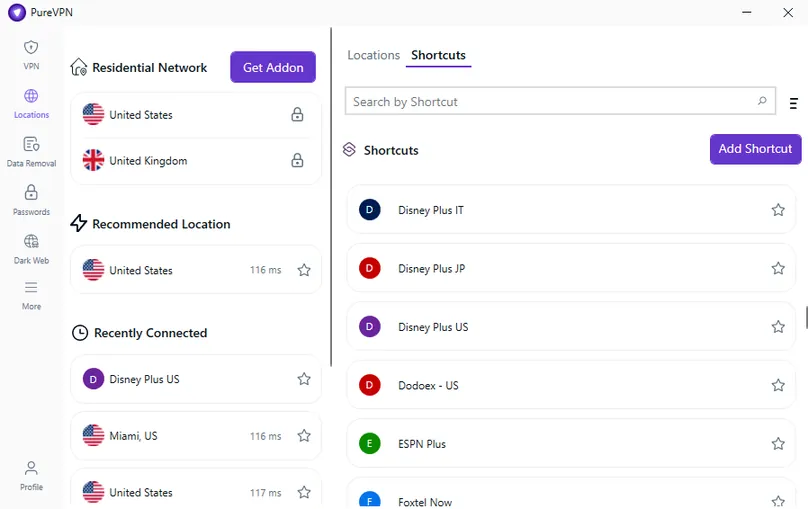
PureVPN ranks sixth because its Shortcuts feature and optional add-ons solve specific needs that many simpler VPNs ignore. In our paid Windows review, platform-specific shortcuts helped us reach streaming playback, the app offered a broad country/city list and useful specialty filters, the kill switch and split tunneling worked, DNS and WebRTC checks did not reveal the original network details, and the eligible direct-purchase refund was approved in about 15 minutes. PureVPN also sells options such as a Dedicated IP add-on and port forwarding rather than forcing every buyer into the same package. The recommendation comes with a serious caveat: we encountered connection errors and a PureVPN-related Windows Defender Firewall rule that temporarily blocked internet access until it was disabled, while long-distance speeds and packet-loss results were mixed.
Why it ranks sixth
PureVPN differentiates itself with platform-specific Shortcuts, broad location filters, paid add-ons for specialized needs, support across many device categories, and a fast direct-purchase refund workflow.
Main trade-off
Our Windows test produced connection errors and a firewall-related connectivity problem, long-distance performance was inconsistent, and some streaming workflows depended on shortcuts or selected server/protocol combinations.
- Windows
- macOS
- Android
- iOS
- Linux
- Browser extensions
- Smart TVs and streaming devices
- Routers
PureVPN pricing at a glance
| Term | Standard | Plus | Max |
|---|---|---|---|
| Monthly | $12.95/month$12.95 first month Then auto-renews at the standard price |
$17.95/month$17.95 first month Then auto-renews at the standard price |
$19.95/month$19.95 first month Then auto-renews at the standard price |
| Annual offer / 16 months | $2.55/month$40.80 first 16 months Renews at $57.95/year |
$4.55/month$72.80 first 16 months Renews at $69.95/year |
$5.55/month$88.80 first 16 months Renews at $89.95/year |
| 2-year offer / 27 months | $2.15/month$58.20 first 27 months Renews at $47.95/year |
$2.73/month$73.80 first 27 months Renews at $69.95/year |
$3.55/month$95.85 first 27 months Renews at $84.95/year |
Pricing rechecked in July 2026. Standard, Plus, and Max bundle different extras, and add-ons such as port forwarding or dedicated IP can affect the final total. Confirm the plan contents, first charge, renewal, taxes, and refund eligibility at checkout.
Streaming playback in our tests
All five services reached playback in at least one documented workflow. Platform-specific shortcuts or selected servers helped with Disney+/Hulu and similar services, and the summarized streaming workflow did not succeed through every tested protocol.
Privacy and security evidence
- Privacy, no-log, trust-center, transparency, security, policy, and vulnerability-disclosure materials were reviewed.
- Our U.S. DNS, WebRTC, and IP checks did not display the real ISP DNS or original public IP.
- The main kill switch, app kill switch, and split tunneling worked in our Windows checks.
What buyers should know
- The apps added to split tunneling were routed through the VPN, which is the opposite of apps that use the list as an exclusion rule.
- Port forwarding, dedicated IP, residential networking, dedicated servers, team servers, and extra multi-login capacity can require paid add-ons or specific plans.
- The Windows firewall incident was resolved in our setup, but buyers who are uncomfortable troubleshooting should test the app early in the refund window.
Best for port forwarding and lean technical controls
PrivateVPN Review
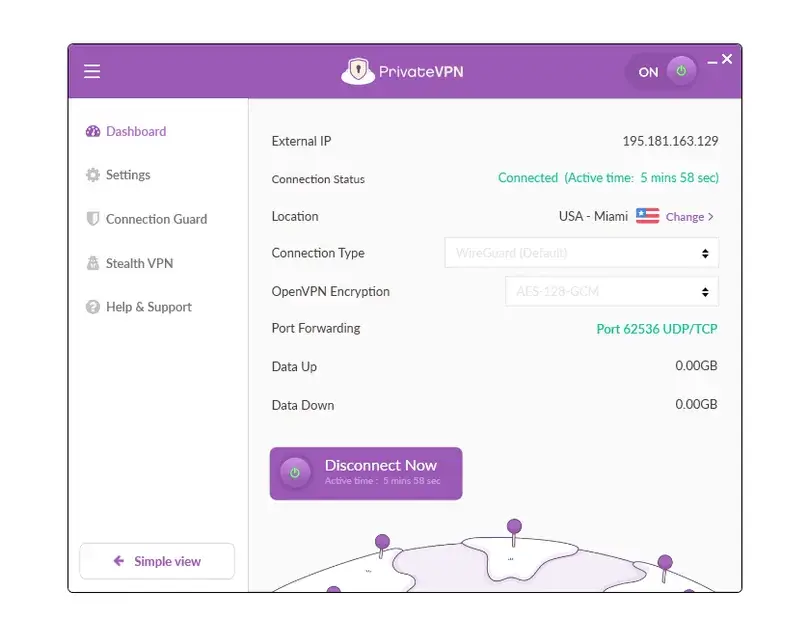
PrivateVPN ranks seventh because it offers something increasingly uncommon in consumer VPNs: working port forwarding inside a comparatively lean app. In our paid Windows review, WireGuard produced several strong route results, PrivateVPN finished fourth in our nine-provider speed index, the kill switch and Application Guard worked, Netflix and Apple TV+ reached stable playback, and a legal P2P check confirmed download, upload, and incoming traffic through the assigned port. Those strengths are offset by serious limitations. BrowserLeaks displayed our real ISP DNS during the Miami WireGuard check, OpenVPN UDP/TCP and Stealth VPN did not connect in our environment, Prime Video playback was blocked, Disney+/Hulu failed, and we found no easy in-app split tunneling, independent no-logs audit, or broader blocker/security bundle.
Why it remains in our picks
PrivateVPN gives technical and P2P users a straightforward app, up to 10 connections, a true monthly plan, useful connection guards, and port forwarding that worked in our legal P2P workflow.
Main trade-off
We observed a real ISP DNS leak, OpenVPN and Stealth failed to connect in the tested Windows environment, streaming was mixed, and the public audit/transparency footprint was limited.
- Windows
- macOS
- Android
- iOS
- Linux and manual setup
- Browser extension
- Routers and manual setup
PrivateVPN pricing at a glance
| Term | Advertised price | First charge | Renewal |
|---|---|---|---|
| Monthly | $9.90/month | $9.90Billed monthly | $9.90/month |
| 3 months | $6.00/month | $17.99First 3-month term | $17.99 every 3 months |
| Long-term promotion | $2.00/month | $72First 36 months | $72/yearAfter the promotional first term |
Pricing checked in July 2026. No paid add-ons were found at checkout. Promotions, payment method, taxes, renewal terms, and regional checkout details can change.
Streaming playback in our tests
Netflix, Apple TV+, and the live-video check played through Miami over WireGuard. Prime Video allowed login and catalog browsing but blocked playback, while Disney+/Hulu failed before normal playback access. OpenVPN-dependent Stealth could not be used as a fallback because OpenVPN did not connect in this environment.
Privacy and security evidence
- The kill switch and Application Guard worked, and the WebRTC check did not expose the real public IP.
- PrivateVPN’s no-log and privacy pages were reviewed, but we did not find a strong public independent-audit or transparency-report footprint.
- WireGuard was the reliable modern protocol in our test; OpenVPN UDP/TCP and Stealth VPN were visible but did not connect.
Important leak warning
- BrowserLeaks displayed the real ISP DNS while PrivateVPN was connected to the Miami WireGuard server.
- This result prevents us from describing PrivateVPN as leak-free. Buyers should run their own DNS tests immediately after setup and after changing servers or protocols.
- We found no easy Windows app split tunneling or built-in ad, tracker, malware, threat-protection, or dark-web-monitoring suite.
Best for technical protocol control
VPN.ac Review
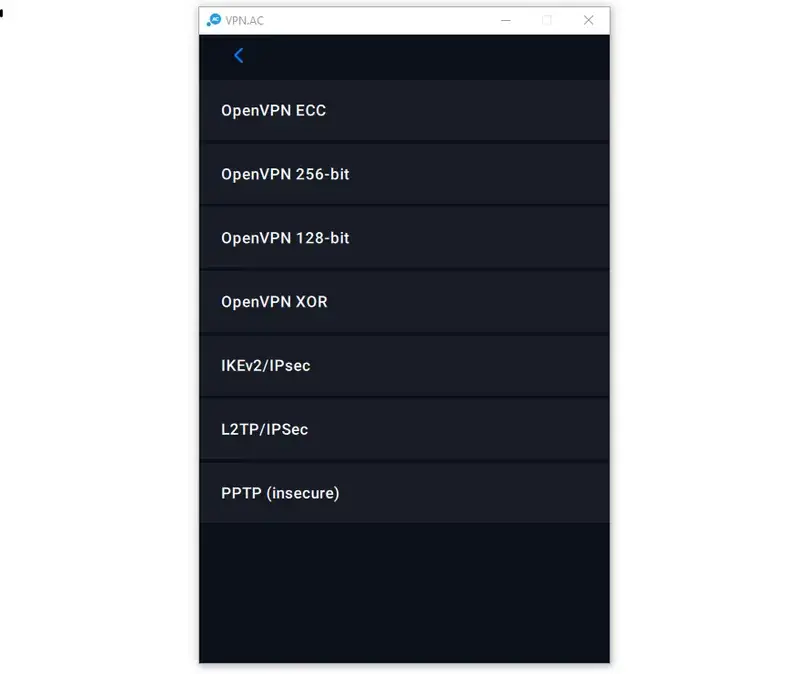
VPN.ac ranks eighth because its technical controls are real, but the overall buying experience carries more friction than the providers above it. The Windows app exposed detailed OpenVPN ECC, AES, XOR, TCP/UDP, proxy-obfuscation, SecureDNS, Double-Hop, P2P-labelled nodes, and connection-log controls; the kill switch worked; all five streaming checks reached stable playback on a normal Miami OpenVPN ECC connection; and WireGuard reached 653.1 Mbps when we generated a profile and used the separate official WireGuard app. However, the native OpenVPN route set retained only 16.6% of baseline download speed at the median, WireGuard was not integrated into VPN.ac’s own Windows client, and support was ticket-only and slow. The account became inaccessible during the refund exchange without a written approval, but the full PayPal payment returned on the request date. See our VPN trial and refund comparison for the complete nine-provider record.
Why technical users may consider it
VPN.ac offers unusually deep OpenVPN configuration, working SecureDNS and Double-Hop, browser-only SecureProxy, P2P-labelled nodes, and strong WireGuard performance through manually generated profiles.
Main trade-off
Native OpenVPN speeds were weak, WireGuard required another app, common consumer conveniences were missing, and support took roughly 41–65 hours. The refund was financially completed, although no written approval was preserved before the account became inaccessible.
- Windows
- macOS
- Android
- iOS
- Linux and manual setup
- SecureProxy browser extension
- Android TV and Fire TV access
- Routers and advanced manual setup
VPN.ac pricing at a glance
| Term | Total price | Effective price | Renewal / note |
|---|---|---|---|
| 7-day paid trial | $2 | Trial access | Does not auto-renewSupport said it does not affect later refund eligibility |
| Monthly | $9 | $9/month | Monthly renewal |
| 3 months | $24 | $8/month | $24 every 3 months |
| 1 year | $58 | $4.83/month | $58/year |
| 2 years | $90 | $3.75/month | $90 every 2 years |
Pricing checked in July 2026. The separate $2 trial is the lowest-risk way to evaluate the service because the standard refund window is only seven days and our own refund outcome remained unresolved.
Streaming playback in our tests
All five checks reached playback on a normal Miami OpenVPN UDP ECC connection. Obfuscation and SecureDNS were not required for this streaming workflow, and the result should not be treated as permanent compatibility with every account, server, or catalog.
Privacy and security evidence
- The OpenVPN kill switch and SecureDNS worked; our DNS check did not reveal the real ISP resolver and WebRTC did not reveal the real public IP.
- Double-Hop, ECC/AES/XOR modes, proxy-based obfuscation, IKEv2, connection logs, and P2P-labelled locations were checked.
- SecureProxy changed browser traffic only; non-browser applications remained outside the proxy by design.
What buyers should know
- VPN.ac documents temporary connection/session metadata, so its policy should not be simplified into an absolute “zero logs” statement.
- We found no public independent audit or transparency report, easy Windows split tunneling, port forwarding, Dedicated IP, or blocker/security suite.
- Support was ticket-only, substantive answers took about 65 hours, and the account became inaccessible before any written refund confirmation was received.
Best mobile-first basic VPN option
Turbo VPN Review
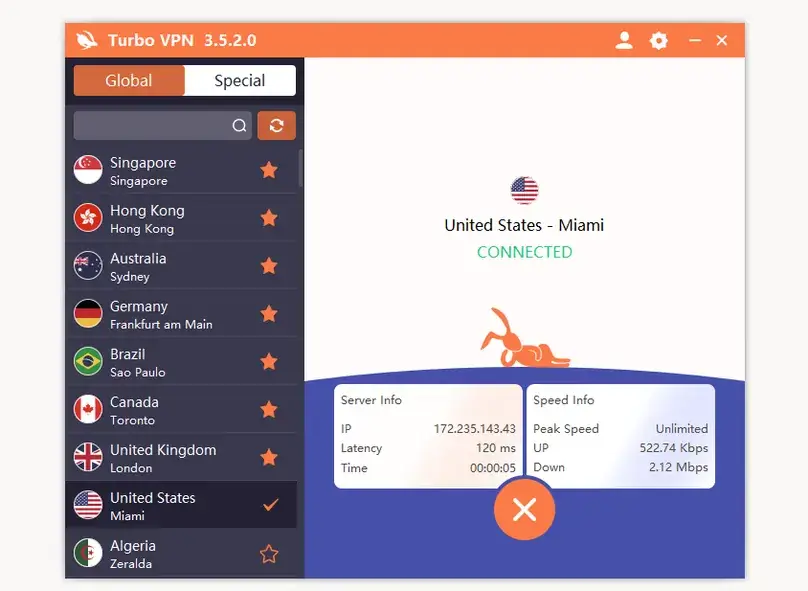
Turbo VPN ranks ninth, but the paid product was more capable than its basic branding suggested. We purchased Platinum and found straightforward Windows and Android apps, 20-device capacity on the tested tier, working kill-switch and app/website bypass controls, a usable account-level Smart DNS feature, four successful streaming checks through the USA All Videos server, a functional free Windows tier, and a refund approval recorded about one day after the request. The lower position reflects substantial drawbacks: Turbo VPN retained only 10.6% of baseline download speed at the median and finished last in our speed index, V2Ray failed, LinkSentinel was extremely slow, initial TAP-adapter conflicts required driver cleanup, Disney+/Hulu failed, no native Linux app or port forwarding was available, and we found no public independent no-logs audit or transparency report.
Why it remains in our picks
Turbo VPN offers easy apps, 10 or 20 device slots depending on tier, a usable free Windows option, paid kill-switch and bypass controls, special streaming servers, and a refund path that ultimately produced approval.
Main trade-off
It ranked last in our speed comparison, some protocols and locations were highly inconsistent, installation required TAP-driver troubleshooting, and its independent privacy-assurance record was weaker than the leading providers.
- Windows
- Android
- iOS
- Chrome browser extension
- Smart DNS and supported TV/device paths
Turbo VPN pricing at a glance
| Term | Gold — 10 devices | Platinum — 20 devices |
|---|---|---|
| Monthly | $11.99/month$11.99 billed and renewed monthly | $13.99/month$13.99 billed and renewed monthly |
| Annual | $5.00/month$59.99 billed and renewed every 12 months | $5.83/month$69.99 billed and renewed every 12 months |
| Long term | $3.33/month$89.99 billed every 27 months Includes 3 promotional months |
$4.58/month$109.99 billed and renewed every 24 months |
Pricing rechecked in July 2026. Turbo VPN’s public Gold page showed $89.99 every 27 months, while our checkout session showed a lower $79.99 total for the same renewal cycle. We use the public pricing-page figure because checkout offers may vary by session, location, or promotion.
Streaming playback in our tests
Netflix, Prime Video, Apple TV+, and the live-video check reached stable playback through the special USA All Videos server. Disney+/Hulu failed at the website/login stage in the same workflow.
Privacy and security evidence
- The paid kill switch blocked internet during disconnect, process-close, and server-change checks; app and website bypass rules also worked.
- Our DNS check did not show the real ISP resolver, and WebRTC displayed the VPN public IP rather than the real public IP.
- The privacy policy and Google Play security-review reference were checked, but we found no public independent no-logs audit or transparency report.
What buyers should know
- The tested Windows app did not expose WireGuard or separate OpenVPN UDP/TCP choices; V2Ray failed, LinkSentinel was extremely slow, and protocol availability affected server choice.
- Initial TAP/OpenVPN adapter conflicts caused repeated connection errors and required removing older adapters before reinstalling Turbo VPN components.
- No native Linux app, port forwarding, Dedicated IP, custom DNS, blocker suite, antivirus, dark-web monitor, or Meshnet-style feature was found.
Research & editorial review
How This VPN Guide Is Researched
This ranking combines paid hands-on testing with provider documentation, pricing research, account and app checks, technical measurements, support interactions, and refund testing. During our 2026 research round, ReviewsAlly purchased and tested nine VPN subscriptions and recorded 268 speed measurements, alongside protocol, privacy, leak, app, streaming, kill-switch, support, pricing, renewal, and refund checks.
Editorial responsibility
Andre Granito, ReviewsAlly’s founder and lead reviewer, leads the VPN testing, evidence review, comparison criteria, and final editorial ranking. Test findings are kept separate from provider claims and affiliate relationships.
Evidence behind the ranking
We use measured speed results, connection baselines, privacy and leak checks, kill-switch behavior, protocol and app workflows, streaming checks, support conversations, checkout and renewal pricing, refund records, and current provider documentation. Results are limited to the devices, servers, protocols, locations, dates, and workflows actually checked.
See How We Test VPNs for the category-specific methodology, plus our How We Rank and Editorial Policy pages for our broader ranking and evidence standards.
Ranking process
Our VPN Methodology
The overall ranking is intentionally different from the speed ranking. A VPN can be fast and still rank lower because of a leak, unreliable app behavior, weak support, unclear refund handling, missing features, or a narrower buyer fit. We do not convert those judgments into invented star ratings or a fake universal score.
This section explains how collected evidence becomes an editorial ranking. For how that evidence is produced—including our Evidence Levels, test environment, speed calculations, leak checks, streaming stages, refund handling, and limitations—see how ReviewsAlly tests VPNs.
Broad buyer value and use-case fit
We ask who should actually choose the provider and whether its strongest advantage is relevant to enough readers. The label above each provider is part of the ranking, not decorative marketing copy.
Verified performance and reliability
Speed, connection success, protocol behavior, streaming playback, app stability, kill-switch behavior, and troubleshooting burden are considered together.
Privacy and security confidence
We weigh leak checks, privacy wording, no-logs evidence, audits, transparency material, open-source apps, ownership context, and the limits of what was publicly available.
Usability and platform coverage
A large feature list is not automatically better. We consider whether important controls are understandable, work in the tested environment, and remain available across the buyer’s devices.
Price, renewal, and refund reality
Monthly cost, total first charge, renewal amount, tier differences, add-ons, device allowance, refund exclusions, and the real support/refund workflow affect value.
Evidence quality and caveat severity
Repeated route tests, successful paid workflows, screenshots, policy confirmation, and direct support answers increase confidence. A DNS leak, unresolved refund, or serious app problem can outweigh several smaller strengths.
Why the top three receive more emphasis
NordVPN, Surfshark, and Proton VPN are the strongest default starting points for the broadest groups of buyers, so they receive a separate quick-picks section. The remaining six providers are not filler: PIA, CyberGhost, PureVPN, PrivateVPN, VPN.ac, and Turbo VPN each answer a narrower need or illustrate a meaningful trade-off.
How commercial relationships are handled
Affiliate links can generate revenue for Reviews Ally, but commercial availability does not erase negative findings or decide the rank. The page openly includes failed streaming checks, speed weaknesses, a DNS leak, app troubleshooting, renewal caveats, weak support, and an unresolved refund outcome where the evidence requires it.
How we maintain the guide
Volatile facts—especially pricing, renewal terms, server claims, app capabilities, and refund policies—should be rechecked before significant updates. Hands-on findings keep their review month so readers can distinguish what we directly observed from information that may change later.
Buying guide
How to Choose the Right VPN
Start with your actual reason for buying
“Best VPN” is not one universal question. A household may care most about unlimited devices, a traveler may want simple reliable apps, a privacy-focused user may prioritize audits and open-source software, and a technical user may need port forwarding, custom DNS, split tunneling, or obfuscation. Choose the provider whose strengths match your real workflow.
Do not confuse speed rank with overall rank
Proton VPN ranked first in our speed index, while NordVPN ranked first overall. Speed is important, but it does not answer whether the app is easy to use, the refund process is clear, the device allowance fits your household, streaming works in your workflow, or a material leak or reliability problem appeared.
Compare the total first charge and renewal
A long-term offer advertised as “$2.49 per month” may charge dozens of dollars immediately and renew at a much higher annual amount. Check the number of included months, whether promotional bonus months repeat, the future renewal cycle, taxes, local-currency conversion, and whether the plan tier contains the feature you need.
Count devices realistically
Phones, laptops, tablets, TVs, browsers, and routers can quickly consume a device limit. Surfshark and PIA allow unlimited connections, while NordVPN, Proton VPN, PureVPN, and PrivateVPN cap normal accounts at 10. Router rules also differ: one router may count as one connection even though several devices use it.
Treat streaming as a testable workflow, not a promise
Streaming platforms actively change detection systems. A provider that worked today may require another server tomorrow. Specialized servers can help, but they also mean a normal nearby server may not be enough. Use the refund window early and test the exact platform, account region, device, and server combination that matters to you.
Read “no logs” precisely
“No logs” can refer to browsing activity while the provider still processes account, billing, diagnostic, device, crash, or temporary session information. Look for a precise privacy policy, public audits where available, transparency reporting, open-source apps, and evidence that explains—not merely repeats—the slogan.
Run your own leak and kill-switch checks
DNS and WebRTC behavior can change by operating system, browser, protocol, network adapter, and server. Test after installation, after changing protocols, and after major app updates. PrivateVPN’s strong WireGuard and port-forwarding results did not outweigh the real ISP DNS that appeared in our documented check.
Know whether you need port forwarding
Port forwarding matters to some P2P, self-hosting, gaming, and remote-access workflows, but it also requires careful configuration. PIA, Proton VPN paid plans, and PrivateVPN offered verified or documented paths in our research. PureVPN treated it as an add-on. Many mainstream services do not offer it. For the feature-level test method and the differences across providers, see our VPN port forwarding guide.
Use refund windows as part of testing
Cancellation and refund are usually separate actions. App-store purchases, renewals, cryptocurrency, dedicated IPs, or extras can follow different rules. Record the purchase date, preserve receipts and support messages, and request the refund through the stated channel before the deadline.
Remember what a VPN cannot do
A VPN can encrypt traffic between your device and its server and reduce direct IP exposure, but it does not make you completely anonymous. Account logins, cookies, browser fingerprinting, payment records, malware, unsafe downloads, and information you voluntarily share can still identify or harm you.
Definitions
VPN Glossary
- VPN
- A virtual private network that encrypts traffic between your device and a remote VPN server and changes the public IP address seen by many websites.
- Speed retention
- The percentage of the no-VPN baseline speed retained while connected. It helps compare tests performed on different baseline connection speeds.
- WireGuard
- A modern VPN protocol known for efficient performance. Some providers integrate it directly; VPN.ac required generated profiles in a separate official app.
- OpenVPN
- A widely supported open-source protocol available in UDP and TCP modes. Performance can differ dramatically by provider and configuration.
- Kill switch
- A control that blocks internet traffic when the VPN disconnects, helping reduce accidental public-IP exposure.
- DNS leak
- A condition where DNS requests reach an unintended resolver outside the expected VPN path, potentially revealing the user’s ISP or browsing lookups.
- WebRTC leak
- Browser behavior that can expose network addresses. A local/private address is not the same as exposing the real public IP.
- Split tunneling
- A feature that sends only selected apps or websites through—or outside—the VPN. Providers implement inclusion and exclusion rules differently.
- Port forwarding
- A way to accept inbound traffic through an assigned port, useful for certain P2P, remote-access, gaming, or self-hosted workflows.
- Obfuscation
- Techniques intended to make VPN traffic less recognizable as VPN traffic on restrictive or filtered networks.
- Double-Hop / MultiHop
- A route that sends traffic through two VPN servers instead of one, adding another routing layer while usually increasing latency and reducing speed.
- Secure DNS
- A provider-controlled or protected DNS workflow intended to keep name-resolution requests inside the expected VPN path.
- Dedicated IP
- An IP assigned to one customer or account rather than shared widely. It can reduce repeated verification prompts but offers different privacy trade-offs.
- Streaming-optimized server
- A server or route labeled for a particular streaming platform. A pass on that server should not be generalized to every normal server.
- Smart DNS
- A DNS-based tool for location-sensitive media access on compatible devices. It is not the same as a full encrypted VPN tunnel.
- RAM-only server
- A server architecture designed to operate without persistent hard-drive storage, reducing some data-retention risks but not replacing policy or audit evidence.
Common questions
Best VPN FAQ
What is the best VPN overall in 2026?
NordVPN is our best overall pick for most users because it delivered the strongest balance of practical speed, app quality, five successful streaming checks, tested DNS/WebRTC behavior, useful security tools, broad compatibility, and a completed refund workflow. It was not the winner of every individual category.
Which VPN was fastest in ReviewsAlly’s tests?
Proton VPN ranked first in our nine-provider speed index, followed by NordVPN and CyberGhost VPN. The index balances median download retention, practical throughput, and upload retention rather than sorting only by raw Mbps.
What is the best free VPN in this guide?
Proton VPN is our strongest privacy-focused free-plan recommendation. Its free tier is materially different from the paid plan: it allows one active connection and provides fewer locations and premium features. Turbo VPN also had a usable free Windows tier in our test, but its paid-account speed retention and public privacy-assurance evidence were weaker.
Which VPNs allow unlimited devices?
Surfshark and Private Internet Access allow unlimited simultaneous connections. Surfshark is the easier household-oriented choice, while PIA exposes more technical controls such as custom DNS, automation, granular split tunneling, and port forwarding.
Which VPN was best for streaming in your tests?
NordVPN, Surfshark, and Proton VPN each reached playback in all five checks without needing a specialized streaming server in the documented final workflow. PIA, CyberGhost, and Turbo VPN also produced useful results, but specialized routes mattered. Streaming access can change at any time.
Did any VPN show a leak?
Yes. BrowserLeaks displayed the real ISP DNS during our PrivateVPN Miami WireGuard check, although WebRTC did not expose the real public IP. This is why PrivateVPN remains a niche port-forwarding choice rather than a broad top recommendation.
Which VPNs support port forwarding?
PrivateVPN is our strongest end-to-end case: our legal P2P workflow recorded download, upload/seeding, and an incoming connection through the assigned port. PIA enabled port forwarding and assigned a port in our paid Windows workflow, while Proton VPN assigned a random port on an eligible paid connection; our notes do not document separate outside-reachability passes for PIA or Proton. PureVPN sells port forwarding as an add-on, and NordVPN now offers it through its newer Dedicated Server add-on; we did not functionally test those two add-on implementations. See our VPN port forwarding guide for the current restrictions and evidence scope.
Why can the renewal price be much higher than the advertised price?
VPN providers often advertise the monthly equivalent of a discounted first term. The first payment can cover 12, 24, 27, or 36 months, while renewal may switch to a shorter and more expensive annual cycle. Always check total first charge, included months, and renewal—not only the headline monthly equivalent.
Does a no-logs policy mean the VPN collects no data?
Not necessarily. A provider may say it does not store browsing activity while still processing account, payment, device, diagnostic, crash, or temporary connection information. Read the exact policy and look for audits, transparency material, or open-source apps where available.
Can a VPN make me completely anonymous?
No. A VPN can reduce direct IP exposure and encrypt traffic to the VPN server, but account logins, cookies, fingerprinting, payment records, malware, and information you share can still identify you.
Are VPNs legal?
VPN rules vary by country, and unlawful activity remains unlawful when a VPN is used. Check current local law, workplace rules, school policies, and service terms before relying on a VPN in a restricted environment.
Source notes
Sources Reviewed
This Best Picks page combines the nine paid ReviewsAlly reviews, internal evidence logs, 268 structured speed-test records, 45 streaming checks, pricing rechecks, screenshots, support interactions, refund workflows, and official provider documentation. Each individual review contains the detailed provider-specific evidence and source context.
ReviewsAlly paid reviews
Official provider documentation
General reference sources
Update policy
Pricing, renewal terms, server counts, app features, support channels, streaming access, and refund rules are volatile. We preserve the month of each hands-on review and recheck material commercial facts when the page receives a significant update.