
VPN IP guide + current provider evidence
Dedicated IP vs Shared VPN IP
Shared VPN IPs are included and better for blending into a crowd. Dedicated IPs add a stable address for allowlisting and consistent access, but they cost extra and can make sessions easier to link. We compare the trade-offs, current provider options, and what we actually verified.
Evidence note: We purchased and used nine base VPN services from May through July 2026 and saw Dedicated IP menus, prices, locations, or activation fields in several paid accounts and apps. We did not purchase or activate a consumer Dedicated IP add-on, so this page does not claim Dedicated IP speed, streaming, CAPTCHA, banking, or long-term stability results. ExpressVPN is an official-source-only current update. See how we test VPNs for our wider evidence framework. Reviews Ally may earn a commission when you use some links elsewhere on our site. Read our advertising disclosure.
What you’ll find
Start with your problem, then compare the product
“Dedicated” sounds like an upgrade. Sometimes it is simply an address that is easier to recognize. Use these paths to separate a real stable-IP requirement from an add-on looking for a job.
Compare the IP types
Separate exclusivity from persistence so a shared static server is not mistaken for a personal IP.
Use the decision tree
Decide whether to stay with shared IPs, consider a Dedicated IP, or buy a different product.
Check current provider options
Compare dated prices, locations, assignment models, and ReviewsAlly evidence across ten VPNs.
Understand the privacy trade-off
See why stable identification helps allowlisting but weakens the crowd effect of a shared exit IP.
Avoid Dedicated IP look-alikes
Keep Dedicated IP separate from Dedicated Server, residential IP, port forwarding, and shared static IP.
Read the evidence boundary
See exactly what appeared in paid accounts and what still comes only from provider documentation.
The decision in one minute
Shared IP is the better default for most people
Use the shared IP included with your VPN for everyday browsing, stronger crowd blending, flexible server choice, streaming experimentation, and avoiding another recurring charge. Consider a Dedicated IP when you can name a specific consistency problem, especially a work system or private resource that requires your public IP to be allowlisted.
A Dedicated IP may also reduce friction caused by changing or poorly reputed shared addresses, but it cannot guarantee fewer CAPTCHAs, bank acceptance, streaming access, or faster performance. If nothing currently requires the same address, start with shared. You can always pay for consistency after the need exists.
| Factor | Shared VPN IP | Dedicated VPN IP |
|---|---|---|
| Who uses the address? | Many VPN subscribers | One account, user, or organization, depending on the product |
| Usually included? | Yes | No; commonly an add-on or business feature |
| Address consistency | Often rotates, although shared static exceptions exist | Usually fixed while the product remains active |
| Privacy blending | Stronger crowd effect | A recurring identifier is easier to associate over time |
| IP reputation | Other users can affect it | Primarily affected by the assigned user or organization |
| IP allowlisting | Poor fit if the address changes | Strong fit when a stable address is required |
| Location flexibility | Broad shared server pool | Usually one purchased location |
| Guaranteed service access? | No | No |
Two properties, not one
Shared, dedicated, static, and dynamic describe different things
Shared and dedicated describe exclusivity: who can use the address. Dynamic and static describe persistence: whether the address changes. A VPN exit IP can be shared and static at the same time.
| Who can use it? | Dynamic or rotating | Static or consistent |
|---|---|---|
| Shared | Shared dynamic IP Normal VPN default: many users share an address, and the address may change between sessions or servers. |
Shared Static IP The address stays consistent, but multiple subscribers can still use it. |
| Dedicated | Exclusive but rotating Possible in theory, but uncommon as a consumer VPN product. Verify what a provider’s label actually promises. |
Dedicated static IP The usual paid VPN add-on: one assigned user or organization gets a consistent public exit address. |
Shared dynamic IP: the normal VPN default
Many subscribers can leave a VPN server through the same public address, and your assigned exit may change when you reconnect or choose another server. That crowd effect makes a simple IP observation less specific to one subscriber, although logins, cookies, browser fingerprinting, and other signals can still identify you.
Shared Static IP: stable does not mean exclusive
Surfshark exposes a Static IP server category separately from its paid Dedicated IP add-on. In our paid review, we speed-tested a Surfshark New York Static IP route. That was a shared static server, not a Dedicated IP benchmark. The result proves nothing about Surfshark’s unpurchased add-on performance.
Dedicated static IP: the usual consumer add-on
Consumer Dedicated IP products usually combine exclusivity with persistence. The exact contract still matters: one provider may permit multiple simultaneous devices, another may restrict protocols, and many lock the selected location after activation. Infrastructure failure, expiration, abuse response, or migration can also cause reassignment, so “static” should not be read as “unchangeable forever.”
“Dynamic Dedicated IP”: verify the provider’s definition
PrivateVPN currently labels an app category “Dynamic Dedicated IP,” but support told ReviewsAlly that the category uses dynamic addresses accessible to other users rather than a personal static-IP add-on. A product label is a starting point, not a networking specification.
A “private IP” can mean something else entirely
In networking, a private IP commonly means a non-public address used inside a local network. Marketing pages sometimes use “private” loosely to mean personal or exclusive. When precision matters, ask whether the product supplies a dedicated public VPN exit IP.
The real trade-off
Shared IPs improve crowd blending; Dedicated IPs improve consistency
With a shared exit address, many people present the same public identifier to websites. That does not make anyone magically anonymous, but it makes a basic IP-to-person association less specific. A Dedicated IP repeats across sessions, which is exactly why an administrator can recognize and allowlist it. The same persistence also makes separate visits easier to associate with one recurring identifier.
VPN encryption can remain active in both cases. Encryption protects data in transit between your device and the VPN infrastructure; it does not erase sign-ins, cookies, payment records, browser fingerprints, account linkage, or the visibility of a recurring public IP. Proton’s business documentation makes this narrow trade-off unusually clear: its organization-only Dedicated IP is less private than its shared servers in the crowd-blending sense.
How the address reaches your app
Account-linked, token-based, and blind-token assignment
The address can be exclusive in every model, but the provider’s administrative link between payment, account, and assigned IP may differ. Recovery convenience and separation often pull in opposite directions: an unrecoverable code can support separation by design, but losing it is still a remarkably ordinary way to ruin your afternoon.
| Assignment model | What the provider says happens | What the buyer should understand | Current examples |
|---|---|---|---|
| Account-linked | The provider account or email is associated with the assigned address. | Administration and recovery can be simpler; direct account linkage is clearer. | NordVPN; Surfshark’s current page notes closer account/email association. |
| Token-based separation | A one-time token activates the address, and the provider says it does not retain an account-to-IP map. | Lost tokens may be unrecoverable. The separation remains a provider-described design unless independently audited. | PIA and CyberGhost. |
| Blind-token / zero-knowledge claim | The provider says blind issuance and encrypted processing prevent account/payment association with the IP. | The design claim may be stronger, but ReviewsAlly has not audited source code or the live deployment. | ExpressVPN. |
| Not established | The reviewed current sources do not explain a comparable separation method. | Do not assume anonymous assignment merely because the address is sold as “private.” | PureVPN in the sources reviewed for this page. |
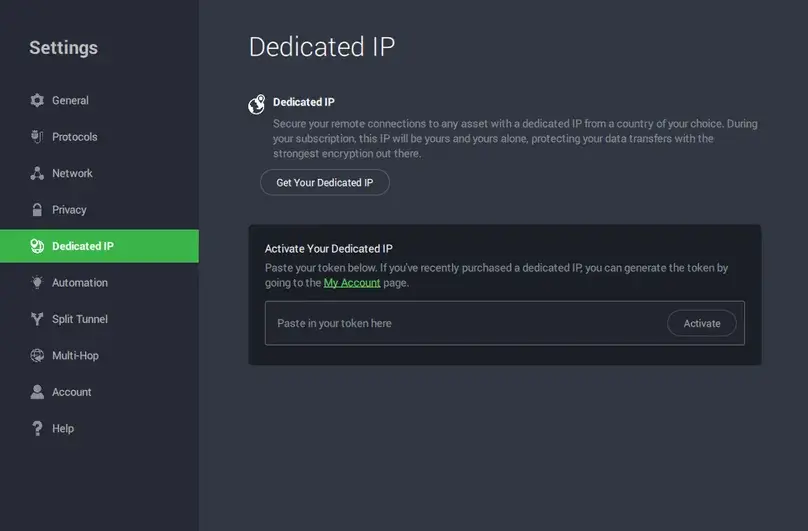
Claim boundary: PIA, CyberGhost, and ExpressVPN describe privacy-oriented token systems. ReviewsAlly verified the PIA activation field and reviewed the providers’ current documentation; we did not independently prove that an operator, account system, or deployment cannot associate a buyer with an address.
A behavior-first decision
Should you get a Dedicated IP?
Choose shared IP by default
Best fit for general privacy, ordinary browsing, flexible locations, travel, and users without a stable-address requirement.
Consider Dedicated IP
Best fit for explicit IP allowlisting or a documented, recurring reputation problem that a suitable shared/static route did not solve.
You may need another product
Inbound ports, isolated compute, root access, a residential address, or rotating identities are different requirements.
Compare the underlying VPN too
A stable IP does not repair a poor base VPN. Compare the VPN services we bought and tested before paying for an add-on.
Useful, not magical
What a Dedicated IP can help with, and what it cannot guarantee
Strongest use case: IP allowlisting
Buy the address in the required location, receive the consistent public IP, ask the administrator to add it to the approved list, and connect through that Dedicated IP before accessing the protected system. IP allowlisting is one access control, not a replacement for multi-factor authentication, strong credentials, least privilege, endpoint security, or access logging.
CAPTCHAs and shared-IP reputation
A Dedicated IP may reduce challenges caused by many unrelated users sharing one exit address. It cannot guarantee zero CAPTCHAs because sites also evaluate browser behavior, cookies, account history, automation signals, location, and whether the address belongs to a VPN or data center.
Banking and account consistency
A stable address may reduce some changing-location or changing-IP prompts. A bank can still challenge or reject any VPN address, and its rules can change. Never buy the add-on on the promise that it will guarantee account access.
Streaming
Dedicated IP is not a streaming guarantee. Shared optimized servers may use different routing and maintenance, and ExpressVPN’s current FAQ warns that its Dedicated IP may not work as well as shared IPs for streaming. Our dated VPN streaming results used the server types documented in those reviews, not Dedicated IP add-ons.
Speed and latency
Exclusivity does not inherently create a faster route. Distance, peering, server capacity, protocol, device, ISP, congestion, and test timing still dominate the result. Our VPN speed-test guide explains how to measure speed loss without turning one run into a universal verdict.
IP reputation ownership
A dedicated address avoids inheriting the behavior of unrelated subscribers, but its reputation becomes primarily yours to maintain. A clean reputation is not guaranteed at assignment, and it will not remain clean if the address is abused.
Category boundaries
What a Dedicated IP is not
| Product or concept | What it gives | Why it is not the same |
|---|---|---|
| Dedicated VPN server | Isolated server resources or a provider-specific managed server product | A Dedicated IP can still run on shared infrastructure. |
| Residential IP | An address associated with a consumer ISP or residential network | Most VPN Dedicated IPs remain data-center addresses that services may identify as VPN infrastructure. |
| Port forwarding | An inbound mapping from a public port to a device or service | A stable outbound address does not open an inbound port. See our VPN port-forwarding guide. |
| Shared Static IP | The same address on repeat connections | It is persistent but still available to multiple subscribers. |
| Rotating IP | A public exit address that changes periodically | It optimizes a different identity and privacy goal. |
| Personal or self-hosted VPN | A cloud or home VPN endpoint controlled by the user | Administration, patching, logging, resource isolation, and the threat model are different. |
Non-ranked current snapshot
Dedicated IP availability across 10 ReviewsAlly-covered VPNs
Availability checked August 11, 2026. Prices, inventory, locations, and assignment methods can change. ReviewsAlly purchased the nine base VPNs in the current comparison but did not purchase their Dedicated IP add-ons. ExpressVPN is included as an official-source-only update because its current Dedicated IP product launched after older comparisons were written.
| Provider | Current offering | Price model checked | Locations or coverage | Assignment / privacy method | ReviewsAlly evidence |
|---|---|---|---|---|---|
| CyberGhost VPN | Consumer paid Dedicated IP add-on | $5/month observed June 2026; current public page does not expose a clean add-on price | 12 countries in current support documentation | One-time random token; CyberGhost says the IP is not linked to the account and the token is removed after redemption | Paid base VPN; app navigation visible; add-on not purchased |
| ExpressVPN | Included with Pro; paid add-on for Basic and Advanced | Official tier launch lists $3.99–$8.99/month for the add-on; current price depends on plan and term | 29 locations on the current product page | ExpressVPN claims blind-token, zero-knowledge assignment; access code is not recoverable | Official-source-only; no current paid ReviewsAlly workflow or add-on activation |
| NordVPN | Consumer paid Dedicated IP add-on; separate from Dedicated Server | Term-dependent; Nord says Dedicated IP add-ons generally fall in a $2–$5/month range | 30 countries in the current official list | Email address is explicitly linked to the assigned IP | Paid base VPN; add-on researched and available; not purchased |
| Private Internet Access | Consumer paid Dedicated IP add-on | $5/month observed on a monthly cycle; longer-term equivalents can be lower | 23 locations on the current product page | One-time token; PIA says it is not stored or recoverable and separates the address from account/email details | Paid base VPN; activation field visible; add-on not purchased |
| PrivateVPN | No personal static Dedicated IP add-on identified; app category is labeled “Dynamic Dedicated IP” | Included server category, not a comparable personal add-on | Current OpenVPN page lists 8 category locations | Support described dynamic addresses accessible to users, not an exclusive personal assignment | Paid base VPN; category visible; connection attempts failed in one tested setup |
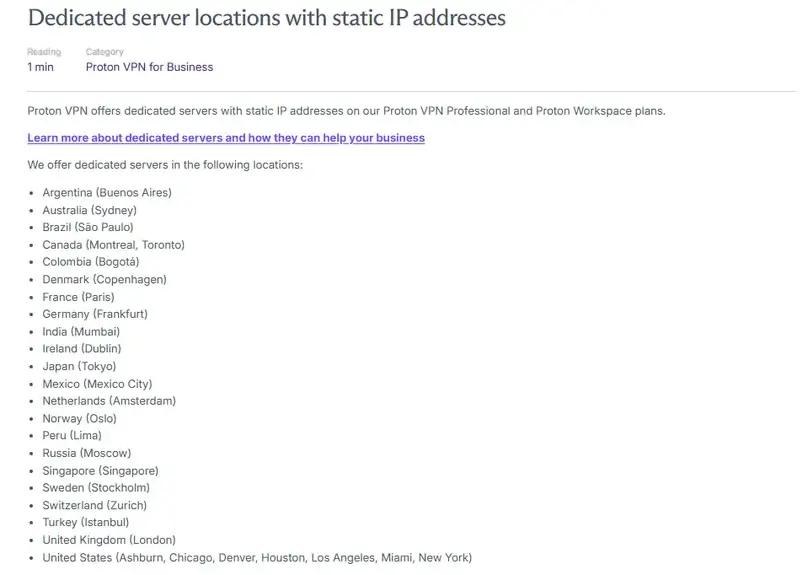
| Proton VPN | Business/organization Dedicated IP through a dedicated server; not included with consumer VPN Plus | VPN Professional: $9.99/user/month, minimum 2 users, plus at least one $39.99/server/month dedicated server; tax excluded | 20+ countries in current business pricing material | Organization-admin assignment; Proton says shared servers offer more crowd privacy | Paid consumer VPN; business docs and screenshot reviewed; business product not purchased |
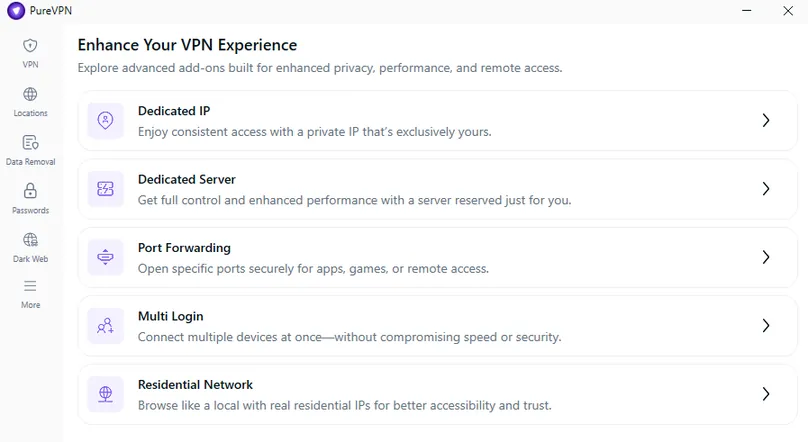
| PureVPN | Consumer paid Dedicated IP add-on; separate Dedicated Server, Teams, Residential, and Port Forwarding products | Product page: $4.45/month on 2 years, $7.73 on 1 year, $15.94 monthly; homepage separately says “from $2.49/month” | 7 countries in the current add-on support article; live inventory may differ | Comparable token/account separation not established in the sources reviewed | Paid base VPN; add-on menu and offer screens visible; add-on not purchased |
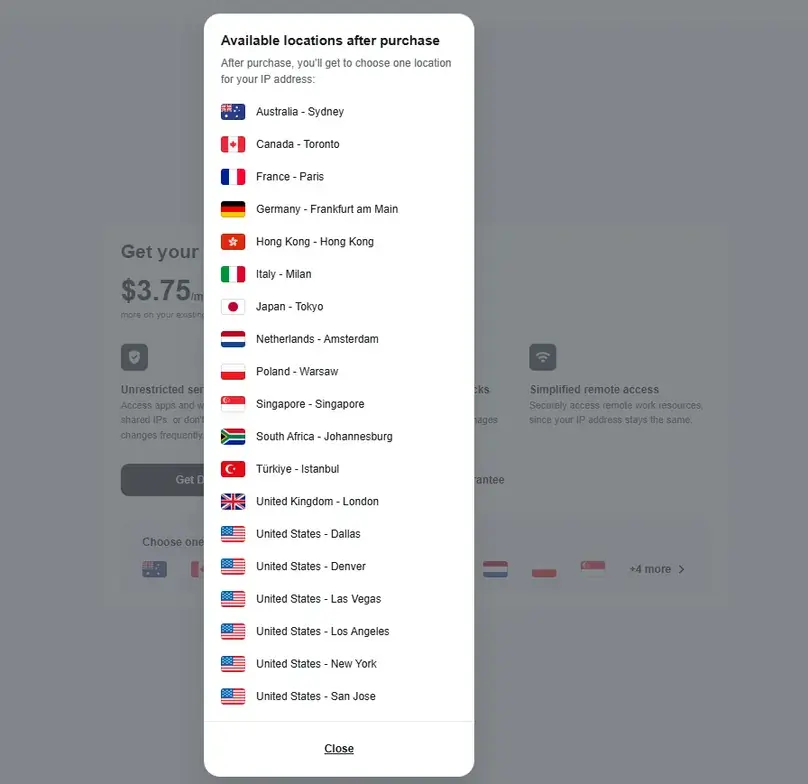
| Surfshark | Consumer paid Dedicated IP add-on; separate shared Static IP category | From $3.75/month on the current product page | 17 locations in the live inventory list; the FAQ on the same page still says 20 | Current page says closer account/email association may provide less privacy than a shared IP | Paid base VPN; price and locations visible; add-on not purchased; shared Static IP separately tested |
| Turbo VPN | No Dedicated IP or static-IP product found in our July 2026 paid workflow | Not applicable in the dated workflow | Not applicable | No product identified; no definitive current official no-offer statement located | Paid base VPN; feature not found. This is a dated finding, not a permanent promise |
| VPN.ac | Shared IPs only; official FAQ says no Dedicated IP | Not applicable | Not applicable | Shared pool by design | Paid base VPN plus current official FAQ confirmation |
Prices are U.S.-dollar figures or observations unless stated otherwise and may exclude the required base VPN, tax, renewal changes, or upfront commitment. Always verify the final checkout and add-on refund terms.
Paid access without evidence inflation
What we actually observed in accounts and apps
A menu proves that an option existed in a dated workflow. It does not prove that the purchased add-on connected, kept the same address for months, improved speed, or satisfied a bank. We keep those evidence levels separate.
- PIA exposed a Dedicated IP activation field requiring a token.
- Surfshark displayed Dedicated IP price and locations separately from its shared Static IP servers.
- CyberGhost displayed a Dedicated IP navigation area in its Windows app.
- PureVPN separated Dedicated IP from Dedicated Server, Port Forwarding, Residential Network, and other add-ons.
- Proton’s consumer workflow did not include Dedicated IP; its current offering is business-only.
- PrivateVPN’s label did not match a normal personal static add-on in the support evidence.
- VPN.ac and Turbo VPN did not expose a Dedicated IP product in our paid workflows.
- NordVPN’s add-on was available; current documentation says the email is linked to the IP.
- ExpressVPN is a current official-source update, not a paid ReviewsAlly workflow.
What we did not do: We did not activate a consumer Dedicated IP add-on. This page therefore contains no Dedicated IP speed benchmark, streaming pass, CAPTCHA count, banking result, allowlist deployment, assigned-IP screenshot, or long-term stability claim.
Before another recurring charge
How to compare Dedicated IP offers before paying
- Confirm the address is exclusive, not merely a shared static server.
- Identify whether the product is consumer, business, or a dedicated server bundle.
- Record the add-on price, term, total upfront charge, renewal, and required base plan.
- Check the exact country or city you need before payment.
- Ask whether the location is fixed after activation.
- Check what happens after outage, expiration, abuse response, or provider migration.
- Verify supported apps, protocols, simultaneous connections, and router/manual options.
- Understand whether the IP is account-linked, token-activated, or not documented.
- Store any one-time token or access code securely and learn whether it is recoverable.
- Read add-on-specific refund terms and purchase-channel exclusions.
- Confirm the target system accepts VPN or data-center addresses before the refund window ends.
- Recheck whether your real need is port forwarding, residential egress, or a dedicated server instead.
Scope, stated plainly
Limitations of this comparison
We purchased and spent substantial time testing the nine base VPN services in our current comparison. As that first review cycle progressed, our documentation became more structured, so some feature records are more detailed than others. The underlying evidence remains genuine and dated; we preserve those differences instead of filling gaps after the fact.
| Limitation | What is still supported | What is not inferred |
|---|---|---|
| No consumer add-on purchased | Dated availability, menu, price, location, and activation-flow observations | Real-use performance, stability, acceptance, or refund behavior |
| Provider-described assignment | What current official documentation says the token/account design does | Independent proof that the provider cannot associate buyer and IP |
| Volatile offers | Prices and inventories checked on August 11, 2026, plus dated ReviewsAlly captures | A permanent price, location count, platform list, or product name |
| No longitudinal address check | The intended static/consistent product behavior in current documentation | That an address can never be replaced after failure, expiration, migration, or abuse response |
| PrivateVPN setup failure | One dated Windows/protocol connection attempt did not complete | A universal performance or reliability verdict on its labeled category |
With more resources, we could buy several add-ons, repeat tests across platforms and networks, run long-term IP-stability checks, and measure service-specific friction over time. That would broaden the scope. It would not invalidate the hours spent purchasing, using, documenting, and comparing the underlying VPN services.
Primary sources + our own evidence
Sources and research notes
Product availability, pricing, locations, and assignment claims were rechecked against first-party sources on August 11, 2026. Provider statements are attributed; they are not silently converted into independent ReviewsAlly test results.
ReviewsAlly paid research
Our first-party source set includes nine paid VPN Evidence Logs, nine final research files, authenticated account/app observations from May–July 2026, and the four public-safe screenshots on this page. Read How We Test VPNs for the wider evidence system.
NordVPN and Surfshark
PIA and CyberGhost
PureVPN and Proton
PrivateVPN and VPN.ac
ExpressVPN and unresolved Turbo VPN status
- ExpressVPN: current Dedicated IP FAQ, assignment, and locations
- ExpressVPN: official tier and add-on price announcement
For Turbo VPN, no definitive current official Dedicated IP support or no-support page was identified. Its table row therefore preserves the dated July 2026 paid-workflow finding.
Hands-on base-VPN cycle: May–July 2026. Provider documentation and live product pages rechecked: August 11, 2026.
Common questions
Dedicated IP vs Shared IP FAQ
Is a Dedicated IP better than a shared VPN IP?
Only for a specific need. A Dedicated IP is a stronger fit for IP allowlisting and some recurring shared-address reputation problems. A shared IP is the better default for most people because it is included, offers more location flexibility, and blends many users behind one public identifier.
Is a Dedicated IP more private?
Not in the crowd-blending sense. A shared IP makes a basic IP observation less specific because many users present the same address. A Dedicated IP repeats across sessions and is easier to associate over time. Token-based assignment may reduce direct provider account linkage by design, but it does not turn the address into anonymity.
Is a Dedicated IP the same as a static IP?
No. Dedicated describes who can use the address; static describes whether it stays consistent. Consumer VPN Dedicated IP products are usually static as well, but the properties are conceptually separate.
Can a static VPN IP still be shared?
Yes. A shared Static IP can give repeat connections the same exit address while allowing multiple VPN subscribers to use it. Surfshark’s Static IP server category is a practical example and is separate from its paid Dedicated IP add-on.
Is a Dedicated IP faster?
Not inherently. Route distance, peering, server capacity, protocol, device, ISP, congestion, and test timing matter more than whether the public exit address is exclusive. ReviewsAlly did not buy the add-ons and has no Dedicated IP speed dataset for this comparison.
Will a Dedicated IP stop CAPTCHAs?
It may reduce challenges caused by the reputation or volume of a shared exit address, but it cannot guarantee zero CAPTCHAs. Websites also evaluate cookies, browser behavior, account history, automation signals, location, and data-center or VPN classification.
Can banks or streaming services still block a dedicated VPN IP?
Yes. A stable address is still a VPN or data-center address in most consumer products, and each service controls its own acceptance rules. Dedicated IP is not a promise of banking or streaming access.
Does a Dedicated IP include port forwarding?
No. A Dedicated IP gives you a stable public exit address; port forwarding maps inbound traffic to a device or service. A provider may sell both, but one feature does not automatically include the other.
Is a Dedicated IP a residential IP?
Usually not. Most VPN Dedicated IPs are hosted on VPN or data-center infrastructure. A residential address is associated with a consumer ISP or residential network and is a separate product category.
Did ReviewsAlly buy and test a Dedicated IP add-on?
No. We bought and used nine base VPN services and observed several Dedicated IP menus, prices, locations, and activation flows. We did not purchase or activate a consumer add-on, so we do not claim Dedicated IP performance, service acceptance, CAPTCHA, banking, streaming, or long-term stability results.
The practical conclusion
Buy consistency only when you have a consistency problem
If you cannot name a system that needs the same address, stay with the shared IP included in your VPN. If you need allowlisting or have documented repeat access problems, compare the location, assignment method, total price, platform support, and refund rules before adding a Dedicated IP.