
VPN technical guide
VPN Port Forwarding Explained and Compared
VPN port forwarding creates a controlled path for incoming traffic through a VPN server. We explain the mechanics, show a reproducible test method, and compare current support across nine VPNs from our paid-account research.
Evidence note: We purchased and researched the VPN subscriptions in this comparison, but port forwarding was not tested end-to-end on every service. The matrix separates what we directly observed from current provider documentation so an assigned port never quietly turns into a test result we did not record. See how we test VPNs for our wider evidence framework. Reviews Ally may earn a commission when you use some links elsewhere on our site. Read our advertising disclosure.
Start here
What You’ll Find on This Page
This is both an explainer and a comparison. You can jump straight to the provider matrix if you are checking a VPN feature, or follow the guide to understand what an open port actually proves and how to test one without confusing configuration with reachability.
Compare provider support
See which of nine researched VPNs include port forwarding, restrict it, sell it separately, or do not offer it.
Understand the traffic path
See where the forwarded port sits between the public VPN address and an application listening on your device.
Follow the test method
Reproduce the activation, listener, firewall, and outside-reachability checks we use to interpret the feature.
Diagnose a closed port
Work through the common causes before blaming the VPN, the app, the firewall, or networking in general.
Quick answer
What Is VPN Port Forwarding?
VPN port forwarding is a rule that allows selected incoming traffic arriving at a VPN server’s public IP address to be passed through to an application on your VPN-connected device. Without that rule, a consumer VPN’s NAT or stateful filtering normally rejects unsolicited inbound connections while still allowing replies to connections you initiated.
That distinction matters most for applications that benefit from being reachable from the outside: accepting inbound P2P peers, hosting certain services, or running a game server are common examples. Normal web browsing and video streaming generally do not need it.
Port forwarding is also not a speed button. It can improve reachability and, in some peer-to-peer situations, give an application access to more peers. It does not add VPN bandwidth, lower your baseline latency, or make an ordinary download faster by definition.
Provider matrix
VPN Port Forwarding Support: 9 VPNs Compared
The table is intentionally not a ranking. A provider can expose a port-forwarding control without us having verified an outside connection all the way to a listening application. We therefore show the current support model and our evidence scope separately. Provider availability was rechecked on August 7, 2026.
| Provider | Current support model | Key restriction or behavior | What ReviewsAlly verified |
|---|---|---|---|
| CyberGhost VPN | No. CyberGhost currently says it does not support port forwarding. | Its P2P workflow can still make outbound peer connections; it does not accept forwarded inbound connections through the VPN. | Paid-app research plus official/support confirmation. Our legal P2P download started, but port forwarding was unavailable. |
| NordVPN | Dedicated Server add-on only. NordVPN’s current documentation excludes standard servers and Dedicated IP. | Dedicated Server supports configurable TCP/UDP rules and up to 20 forwarding rules. It is a different product from NordVPN’s Dedicated IP add-on. | Official-source update only. Our May 2026 paid review predated this newer Dedicated Server feature, so we did not test its port forwarding. |
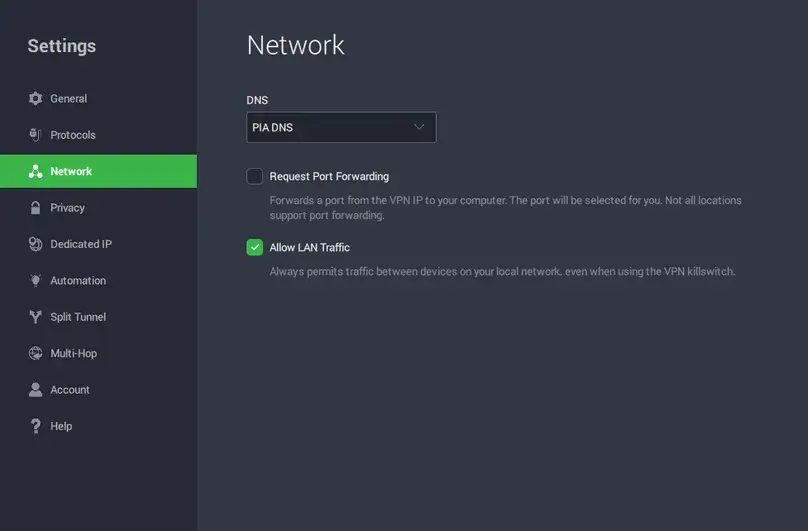
| Private Internet Access | Yes, in supported locations. PIA assigns the port automatically. | The app warns that not every location supports the feature. During our review, support told us U.S. servers were excluded. | Windows 10 + WireGuard hands-on: we enabled Request Port Forwarding and received port 46297. Our notes do not contain a separate outside-reachability pass. |
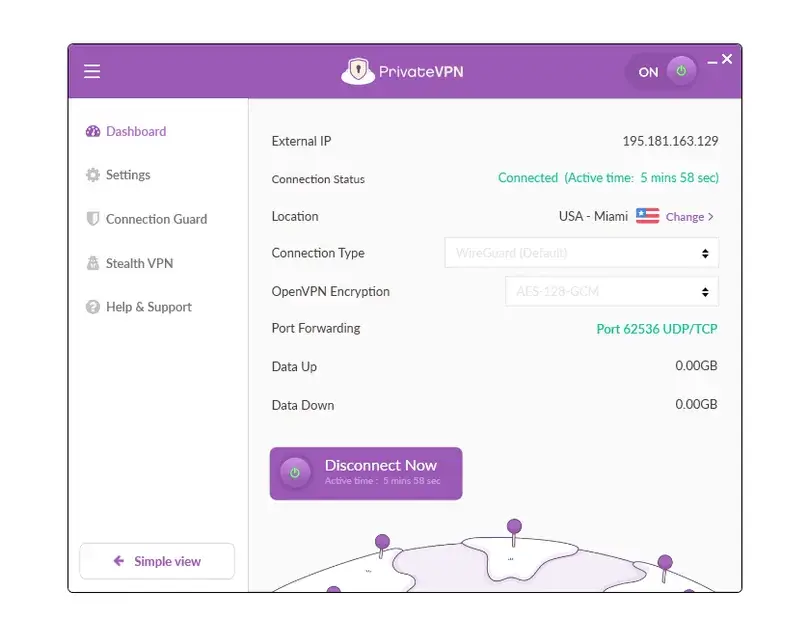
| PrivateVPN | Yes. Its current FAQ says selected VPN protocols and locations. | Our Windows test used WireGuard, where the connected dashboard displayed an assigned UDP/TCP port. | End-to-end hands-on case: port 62536 was displayed; a legal P2P test downloaded, uploaded/seeded, and showed an incoming connection. |
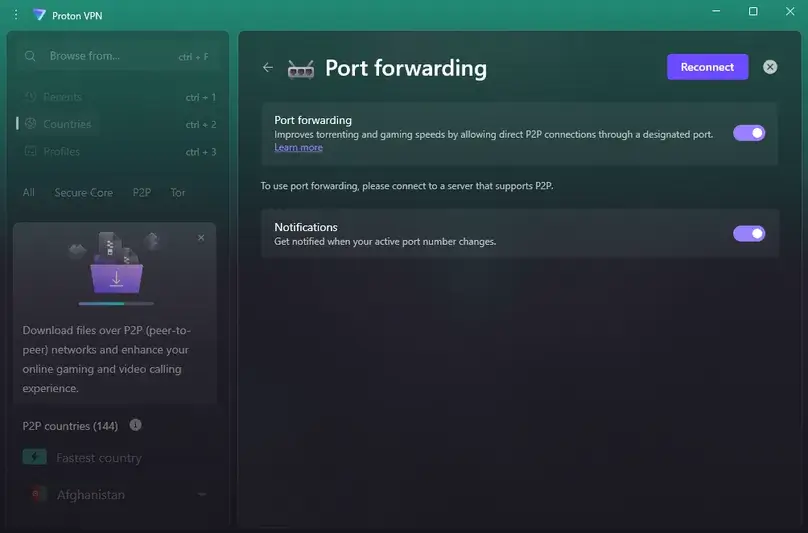
| Proton VPN | Yes, on paid plans. Current support covers native Windows, macOS, and Linux apps. | Requires an eligible P2P server in the app workflow and uses a random assigned port. Port forwarding and Moderate NAT cannot be enabled together. | Windows + WireGuard UDP hands-on: port 48297 was assigned and changed after reconnect. We did not record an end-to-end outside-probe pass. |
| PureVPN | Paid add-on. Current documentation limits it to selected locations. | PureVPN’s Member Area can apply all-port or specific-port policies depending on the setup. Availability is not uniform across locations. | We confirmed the add-on and port-forwarding location filter in our paid account, but did not purchase the add-on or test inbound functionality. |
| Surfshark | No. Surfshark says it does not support port forwarding. | The provider cites the additional inbound entry point as part of its reason for not offering the feature. | Paid-app research, support, and current official documentation all aligned on no port-forwarding support. |
| Turbo VPN | Not available in our tested paid workflow. | We did not find a port-forwarding control in the paid Windows app. We also did not find a current first-party product page establishing broader support. | Hands-on absence in our July 2026 paid workflow. We keep this wording scoped to what we actually checked rather than treating absence as a permanent product promise. |
| VPN.ac | No. VPN.ac’s current FAQ explicitly says it does not provide port forwarding. | VPN.ac describes the decision as a privacy/security choice. | Paid research plus support and current FAQ confirmation. |
Evidence scope matters more than a green checkmark: PrivateVPN is our documented end-to-end inbound case; PIA and Proton are hands-on configuration/assigned-port cases; PureVPN and NordVPN’s Dedicated Server are not functionality tests by ReviewsAlly.
Traffic path
How VPN Port Forwarding Actually Works
A normal VPN connection starts from your device and creates an encrypted tunnel to the VPN provider. To websites and peers, your traffic appears to come from the VPN server’s public IP rather than your home connection. Outbound replies can be associated with the connection you started, while unsolicited inbound traffic is normally blocked at the provider edge.
A forwarding rule adds a deliberate exception. Traffic addressed to a particular port on the VPN endpoint is mapped to your VPN session and delivered to the application listening for it.
No listener, no useful forward. The VPN can create the mapping correctly and a port checker can still report the port as closed if no application is listening or a local firewall blocks it. That is why “the app gave me a port” and “the port is reachable from outside” are separate test results.
VPN port forwarding is not router port forwarding
Practical value
When Port Forwarding Helps — and When It Doesn’t
P2P and seeding
An open inbound path can make a peer reachable to other peers that initiate connections. That can improve peer availability and seeding connectivity, but it does not guarantee higher download speed.
Self-hosted services
A forwarded port can make an intentionally exposed service reachable through the VPN address. Dynamic ports, provider rules, authentication, and application security all matter here.
Game-server hosting
Some hosted multiplayer services need inbound connectivity. Many modern games use relays or other NAT-traversal methods, though, so port forwarding is not a universal gaming requirement and it does not reduce ping by itself.
Browsing and streaming
Ordinary web browsing and video streaming normally initiate connections outbound. Opening an inbound port adds little to those workflows and introduces a service you now have to secure.
Reproducible method
How We Test VPN Port Forwarding
Our procedure starts with the provider’s feature and ends with the network path. That order is important. A randomly assigned number in a VPN app is useful evidence of configuration, but it is not an end-to-end reachability test by itself.
This last distinction is not theoretical hair-splitting. Proton’s current instructions explicitly note that an online port checker reports closed or filtered until an application is listening on the forwarded port. NordVPN’s Dedicated Server troubleshooting similarly tells users to verify the local listener and firewall when traffic does not arrive.
For P2P, we use legal content and record the server, protocol, assigned port, and behavior we actually observed. We do not treat ordinary outbound seeding as proof that an inbound port worked unless the evidence records the incoming side as well.
Our evidence
What We Observed in Our Paid VPN Research
The three hands-on examples below are useful precisely because they did not produce identical evidence. Networking rarely rewards tidy marketing checkboxes.
PrivateVPN: our end-to-end case
In our July 2026 paid Windows review, PrivateVPN displayed Port 62536 UDP/TCP on its connected dashboard while we were using WireGuard. We then used port forwarding during a legal P2P workflow. The download started, and our notes recorded upload/seeding plus an incoming connection. That makes PrivateVPN the clearest end-to-end port-forwarding case in our current nine-provider evidence set.
We still do not generalize that one Windows/WireGuard result to every PrivateVPN server, platform, or future app version. PrivateVPN’s current public FAQ uses the narrower wording that port forwarding is available on selected protocols and locations.
Private Internet Access: configuration and assigned port verified
In our June 2026 paid Windows 10 review, PIA exposed a Request Port Forwarding control in Network settings. We enabled it, connected with WireGuard, and PIA assigned port 46297. PIA’s app warned that not all locations support the feature; support told us during that review that U.S. servers were excluded.
That is solid hands-on evidence that the feature was available and a port was assigned in our workflow. Our research notes do not document a separate external port-checker pass, so we stop there rather than quietly upgrading the result to “end-to-end verified.” Current PIA documentation continues to describe the port as automatically assigned and limited to supported locations.
Proton VPN: a random port changing after reconnect
Proton gave us the clearest hands-on example of a dynamic assignment. In our June 2026 paid Windows test, we used a P2P server with WireGuard UDP, enabled port forwarding, and received random port 48297. After reconnecting, the port changed. Proton does not let users choose a fixed port in this normal app workflow.
We did not record an outside port-checker pass for that setup. And our later legal Proton P2P test was performed with port forwarding disabled, so that later torrent result is not evidence that the forwarded port worked end-to-end. It is exactly the kind of boundary we preserve in our testing methodology.
PureVPN and NordVPN: availability we did not functionally test
PureVPN
Our May 2026 paid account showed the Port Forwarding add-on and PF-filtered locations, but we did not purchase the add-on. Current PureVPN documentation still sells port forwarding separately and limits it to selected locations. This is availability evidence, not a hands-on open-port result.
NordVPN Dedicated Server
Our May 2026 paid NordVPN review correctly found no port forwarding in the standard service available to us at the time. NordVPN has since added it exclusively to its newer Dedicated Server add-on. Standard NordVPN servers and the separate Dedicated IP product still lack it. We have not purchased or tested Dedicated Server.
Providers in our set without a supported feature
Surfshark, CyberGhost, and VPN.ac currently state that they do not offer port forwarding. Our paid research agreed. Turbo VPN also had no port-forwarding control in our July 2026 paid workflow; because we did not find a current first-party product page making a broader promise, we report that as a dated hands-on absence rather than a universal forever-claim.
Port behavior
Dynamic vs Fixed Forwarded Ports
A forwarded port and a public IP are different pieces of state. “Static IP” does not automatically mean “fixed forwarded port,” and a shared VPN IP can still support an assigned forwarding rule.
PrivateVPN support described dynamic port behavior for its general server category, while our Windows/WireGuard session displayed a specific UDP/TCP port on the dashboard. One observed port staying the same for a short period is not enough evidence to call it permanently fixed.
The fine print that matters
Server, Protocol, OS, and Plan Restrictions
“Supports port forwarding” is often the beginning of the answer, not the end. The feature can depend on the VPN server, subscription, protocol, operating system, or an extra product entirely.
Security trade-off
Is VPN Port Forwarding Safe?
Port forwarding is not inherently a disaster, but it deliberately changes the inbound default. The service listening behind the forwarded port becomes reachable through the VPN endpoint, so the security of that application, its authentication, and your local firewall now matter.
A useful general principle comes from NIST’s firewall guidance: use a deny-by-default policy for inbound traffic and permit what is actually required. For a VPN user, the practical translation is simple: do not open more than the application needs, and do not keep a forwarding rule alive just because the switch exists.
Port forwarding also does not replace VPN encryption, a VPN kill switch, application security, or sane firewall rules. It solves one specific routing problem: letting selected inbound traffic reach you through the VPN.
Closed is a clue, not a verdict
Why Does My VPN Port Show as Closed?
A closed or filtered result means the test did not reach an accepting listener. It does not, by itself, tell you which layer rejected the connection. Check the path in this order:
- Check the VPN connection. Make sure you are still connected to the eligible VPN server/location.
- Recheck the current forwarded port. A reconnect may have assigned a different number.
- Test the VPN public IP. Do not probe your normal residential IP by mistake.
- Keep the listener running. The application has to be actively listening on the same port during the probe.
- Match TCP/UDP correctly. A TCP port-checking service is not proof that a UDP listener is reachable.
- Inspect the host firewall. The VPN mapping may be correct while the operating system blocks the application.
- Check provider restrictions. Confirm plan, server/location, protocol, app, and OS eligibility.
- Then retest from outside. An open result after those controls is much more meaningful than repeatedly clicking a checker against an unknown setup.
Testing tip: Do not create a “no VPN” port-forwarding baseline on your home IP just for comparison. It is unnecessary for this test and can expose a local service on an endpoint the VPN test does not need.
Decision guide
Do You Actually Need VPN Port Forwarding?
Browsing or streaming
Usually no. Those sessions are normally initiated outbound, so a publicly reachable inbound port does not solve a routine problem.
P2P and seeding
Maybe. It can improve inbound peer connectivity and seeding reachability. It is not required for every P2P download and does not guarantee higher speed.
Self-hosted or remote service
Maybe, with care. Confirm that the provider gives you stable enough mapping behavior and secure the service you intend to expose.
Hosting a game server
Depends on the game. Some services need inbound reachability; others use relays or NAT traversal and gain nothing from manual forwarding.
If port forwarding is a hard requirement, choose based on the implementation you need rather than the presence of a checkbox. A randomly assigned P2P port and a configurable Dedicated Server rule solve related but not identical problems. For the wider buying decision, see our Best VPN Services guide.
Common questions
VPN Port Forwarding FAQ
What is VPN port forwarding?
VPN port forwarding is a provider-side rule that permits selected incoming traffic arriving at the VPN endpoint and maps it to an application on your VPN-connected device. It is different from forwarding a port on your home router.
Is VPN port forwarding safe?
It can be used safely when the forwarded service is intentional, updated, authenticated where appropriate, and limited by sensible firewall rules. But it does increase inbound exposure compared with a deny-by-default setup, so forwarding unnecessary ports adds unnecessary attack surface.
Do I need port forwarding for torrenting?
Not necessarily. A torrent client can initiate outbound peer connections without a forwarded port. Port forwarding can make the client reachable to peers that initiate connections toward you, which can improve connectability and seeding in some swarms. It does not guarantee faster downloads.
Does port forwarding make a VPN faster?
No, not as a general rule. Port forwarding changes inbound reachability; it does not add VPN bandwidth or reduce the latency of the tunnel itself. In P2P, better peer reachability can sometimes change the peers available to an application, which is a different mechanism from making the VPN faster.
Why does my VPN port checker say closed?
A listener may not be running, the host firewall may be blocking it, the VPN may have assigned a new port after reconnecting, you may be on an unsupported server, or the test may use the wrong transport. A closed result is therefore not proof by itself that the provider’s forwarding rule failed.
Does Proton VPN Free include port forwarding?
No. Proton’s current documentation limits port forwarding to paid Proton VPN plans. In the native app workflow, an eligible connection receives a random forwarded port rather than a user-selected fixed port.
Does NordVPN support port forwarding?
Yes, but only through NordVPN’s newer Dedicated Server add-on as of our August 2026 research review. Standard NordVPN servers and the separate Dedicated IP add-on do not support port forwarding. Our May 2026 paid NordVPN review predated Dedicated Server port forwarding, so ReviewsAlly has not tested that implementation hands-on.
Which VPNs in this comparison support port forwarding?
Our paid research found port-forwarding controls or assigned ports with PrivateVPN, Private Internet Access, and Proton VPN. PureVPN currently sells the feature as an add-on, while NordVPN now offers it through Dedicated Server only; we did not functionally test those two add-on implementations. Surfshark, CyberGhost, and VPN.ac currently say they do not offer the feature, and we did not find it in our tested Turbo VPN paid workflow.
Research trail
Sources Reviewed
Provider-support claims were rechecked on August 7, 2026. Hands-on observations retain their original paid-review context instead of being rewritten as if we reran them on that date.