
VPN Review
Private Internet Access Review: Paid Hands-On Review of PIA’s Apps, Speed, Port Forwarding, Split Tunneling, and Refund Flow
Private Internet Access, often called PIA, is best for users who want a highly configurable VPN with open-source apps, unlimited device connections, WireGuard and OpenVPN controls, port forwarding, MACE, split tunneling, and a 30-day refund window.
Reviews Ally may earn a commission when you click some links on this page. Our reviews are based on editorial criteria, product documentation, public pricing, support resources, and hands-on checks where noted. Learn more about our advertising disclosure.
Quick verdict
Private Internet Access: Bottom Line
Private Internet Access is one of the strongest VPN choices for users who want technical control, unlimited devices, and a clean app experience without giving up mainstream usability.
After purchasing a 1-month PIA subscription and testing the paid account, we found the Windows app fast to install, easy to connect, and unusually strong for advanced controls. WireGuard was the best-performing protocol in our structured speed checks, split tunneling worked as expected, port forwarding was available outside U.S. servers, MACE was easy to enable, and the refund request was approved immediately through live chat.
PIA is not the simplest possible VPN, and buyers who only want a guided streaming-first app may prefer a more beginner-focused provider. But for users who value open-source apps, unlimited devices, split tunneling, port forwarding, multi-hop/obfuscation, custom DNS, MACE, automation rules, and transparent no-logs messaging, PIA is a serious contender.
At a glance
Private Internet Access Quick Facts
- Best for
- Advanced users, privacy-conscious buyers, households with many devices, and users who want open-source VPN apps
- Monthly plan
- $11.95/month listed at review time for the 1-month plan
- Money-back guarantee
- 30-day refund policy for eligible purchases; our direct-purchase refund was approved immediately through support
- Devices
- Unlimited simultaneous device connections on one subscription
- Server network
- PIA states it has NextGen servers in 90+ countries, with broad U.S. coverage and RAM-only/no-log infrastructure messaging
- Notable feature
- Open-source apps, split tunneling, MACE, port forwarding, dedicated IP, multi-hop/obfuscation, and advanced kill switch controls
Fit
Who Private Internet Access Is Best For
Consider it if you want…
- Unlimited device connections under one VPN subscription.
- Open-source VPN apps and a stronger transparency posture than closed-source-only providers.
- Advanced controls such as split tunneling, custom DNS, MACE, port forwarding, and multi-hop/obfuscation.
- A VPN that makes technical settings visible instead of hiding most controls.
- A direct-purchase refund window you can use to test the service on your own devices.
Look elsewhere if you need…
- The most simplified one-click VPN with very few settings.
- A streaming-first provider that emphasizes platform-specific shortcuts more prominently.
- Port forwarding on U.S. servers.
- A privacy provider outside the United States jurisdiction.
- A VPN where OpenVPN TCP speed is your main performance requirement.
Review process
How We Reviewed Private Internet Access
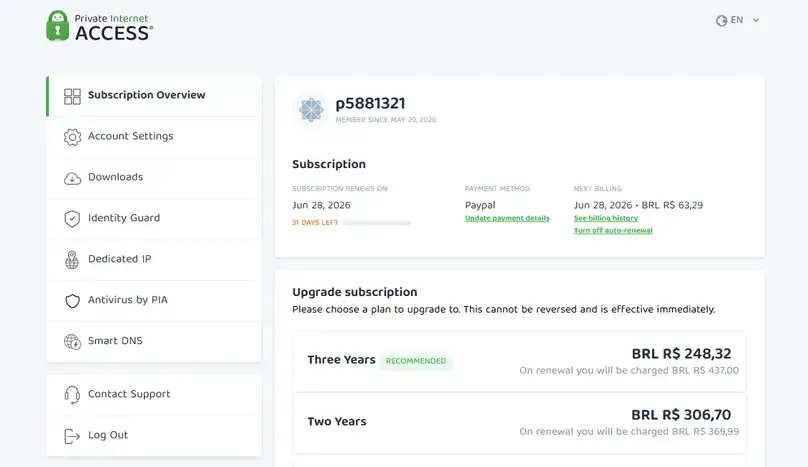
For this update, we purchased PIA directly from the official website and reviewed the paid account experience. We checked pricing, checkout, dashboard access, billing, support, refund flow, Windows app setup, Android app access, browser extension access, protocol controls, split tunneling, kill switch settings, MACE, custom DNS, multi-hop/obfuscation, port forwarding, dedicated IP options, DNS/WebRTC leak checks, streaming checks, and structured paid-account speed checks.
The speed checks were run from a Latin America-based test environment using the Speedtest by Ookla Windows app. They are practical paid-account checks, not a global laboratory benchmark. VPN performance can vary by device, ISP, Wi-Fi quality, protocol, location, server load, and time of day.
Plans and value
Private Internet Access Pricing and Plans
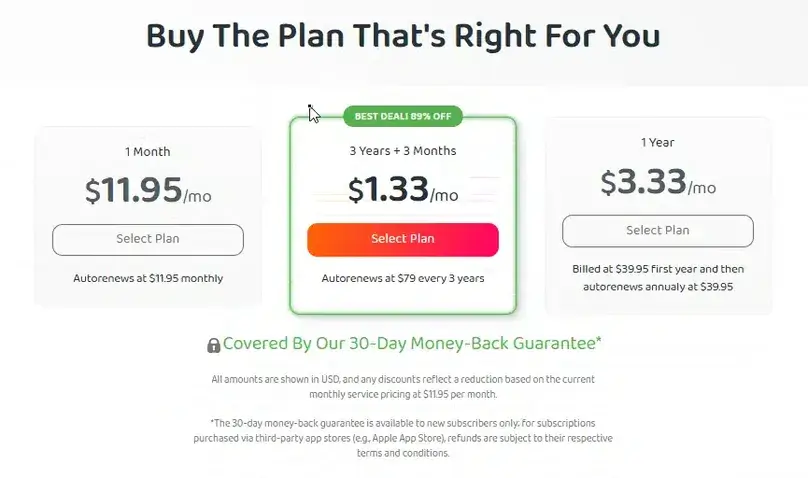
PIA keeps its plan structure simpler than bundle-heavy VPNs. The true monthly plan remained $11.95 in our August 14, 2026 recheck. The current long-term offer was advertised at $2.03/month, with $79 due for 39 months of initial access (36 paid + 3 bonus) and a $79 three-year renewal. Our VPN cost and renewal study separates that first-term average, upfront bill, bonus time, and renewal rate. Pricing can change, so verify the final checkout before buying.
PIA’s value improves if you use many devices because one subscription allows unlimited simultaneous device connections. Optional add-ons can change the final cost: Dedicated IP was shown at $5/month on the monthly cycle, with lower average pricing on longer cycles, and antivirus was offered as an optional upsell. The checkout showed card, PayPal, and BitPay crypto payment options in our buying flow.
| Pricing factor | What we found | What to check before buying |
|---|---|---|
| Monthly plan | $11.95/month at review time | Use this for apples-to-apples monthly VPN comparisons. |
| Annual plan | $3.33/month advertised; $39.95/year renewal noted in our research | Check total upfront charge and renewal terms. |
| 3-year plan | $2.03/month advertised; $79 due for 39 months (36 paid + 3 bonus); $79/3 years at renewal in the August 14 recheck | Lower first-term average, but verify the full upfront and renewal terms. |
| Dedicated IP | Optional add-on shown from $5/month on the monthly cycle | Useful for static-IP needs, but it changes the privacy/use-case profile. |
| Antivirus add-on | Optional checkout upsell shown from $4.50/month on the monthly cycle | Only add it if you specifically want PIA’s antivirus product. |
| Device limit | Unlimited simultaneous device connections | A major value advantage for households and multi-device users. |
*Prices and add-ons may change by region, payment method, promotion, tax, and renewal terms. Always confirm the final checkout page before purchasing.
Interested in PIA? Confirm the current monthly price, renewal terms, refund eligibility, server locations, and add-ons before choosing.
Visit Site Compare Top PicksPrivacy and security
Privacy, Security, and Transparency
PIA’s strongest privacy argument is its combination of transparency signals and technical controls. The provider points to open-source apps, a Deloitte no-logs audit, transparency reporting, court-proven no-logs messaging, RAM-only server infrastructure claims, colocated server infrastructure, and a public GitHub organization for its open-source work.
PIA is headquartered in the United States, which some privacy-focused users may consider a drawback because the U.S. is part of intelligence-sharing alliances. PIA’s response is that its no-logs model is designed so it has no activity logs to provide. Buyers should read the current privacy policy, terms, audit materials, and transparency reports before relying on any VPN for sensitive use.
Open-source apps
PIA publishes app source code through its GitHub presence, which is a useful transparency signal for technical users.
No-logs positioning
PIA points to audit, court, and transparency-report materials to support its no-logs claims.
RAM-only server claim
PIA says its servers run on volatile memory rather than traditional hard drives.
Advanced controls
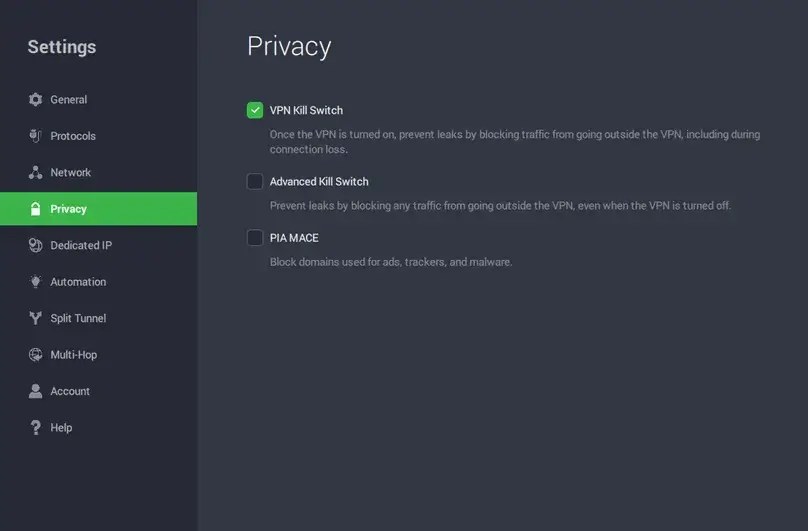
Kill switch, Advanced Kill Switch, MACE, custom DNS, multi-hop, obfuscation, and port forwarding were visible in the app.
Want to reproduce this safety check? Our VPN Kill Switch guide explains the Windows failure test, Pass / Fail / Inconclusive interpretation, manual-disconnect caveat, and the limits of browser-level evidence.
Network
Server Network, Locations, and Dedicated IP
PIA says it operates NextGen servers in 90+ countries. In the app, we found a large country/city list, visible latency information, favorites, and quick-connect options. The provider also emphasizes U.S. coverage, including broad state-level coverage, and its server materials reference 10-Gbps servers, RAM-only infrastructure, and no-log positioning.
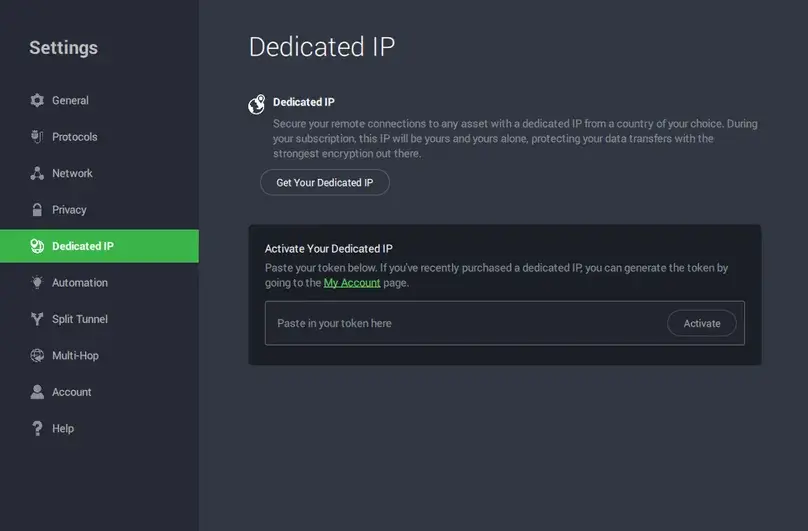
PIA offers Dedicated IP as a paid add-on. PIA uses a token-based activation flow for Dedicated IP, which is designed to separate the static IP activation token from the billing account. We did not purchase a Dedicated IP, but we verified that the Dedicated IP section was available in the app and that support provided a country/city list for Dedicated IP locations.

Server count alone should not drive the buying decision. What matters is whether PIA has the countries and cities you need, whether those locations support your intended use, and whether required advanced features such as port forwarding are supported in those regions.
Apps
Apps, Devices, and Ease of Use
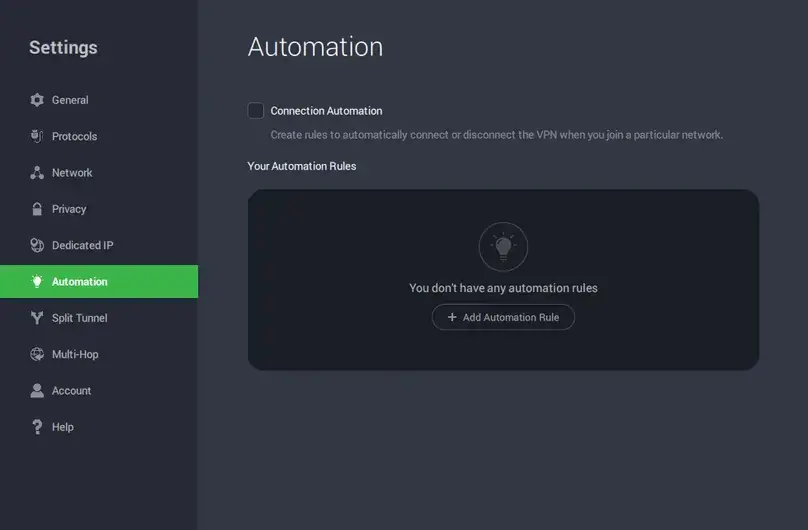
We tested the Windows app as the primary paid workflow and also checked Android and browser extension access. The Windows install was fast, login worked with the credentials received by email, and the app stayed compact in the system tray. Despite being highly configurable, the interface felt clean: the main connection window was small, organized, and fast to use, while advanced controls remained accessible in settings.
PIA supports Windows, macOS, Linux, Android, iOS, browser extensions, Fire TV, Smart DNS setup paths for some TVs/consoles, and router-related options. For users with many devices, unlimited simultaneous connections are one of PIA’s biggest practical advantages.
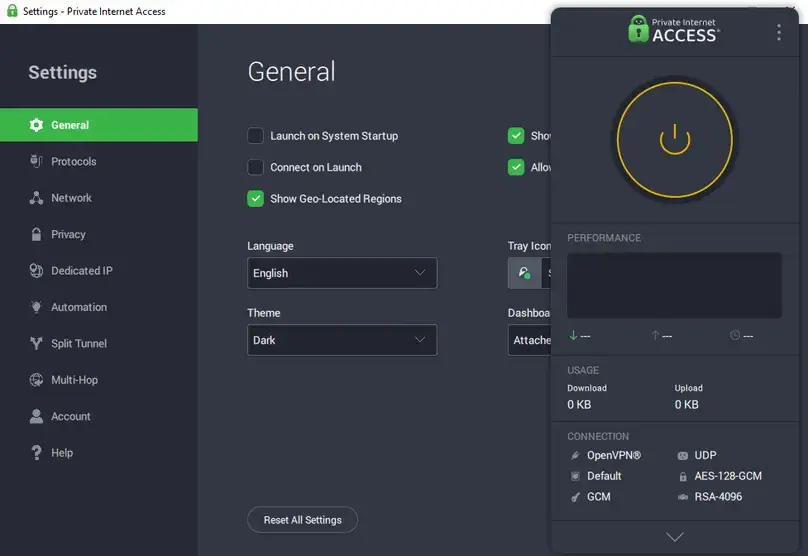
Protocol controls
Inside the Windows app, we found WireGuard and OpenVPN options. IKEv2 was not visible inside the Windows app during our check; PIA materials point users toward the Windows built-in VPN client for IKEv2 setup. In our paid tests, WireGuard was the strongest protocol for speed and stability. OpenVPN UDP was usable but slower, while OpenVPN TCP was much slower in our Miami protocol comparison.
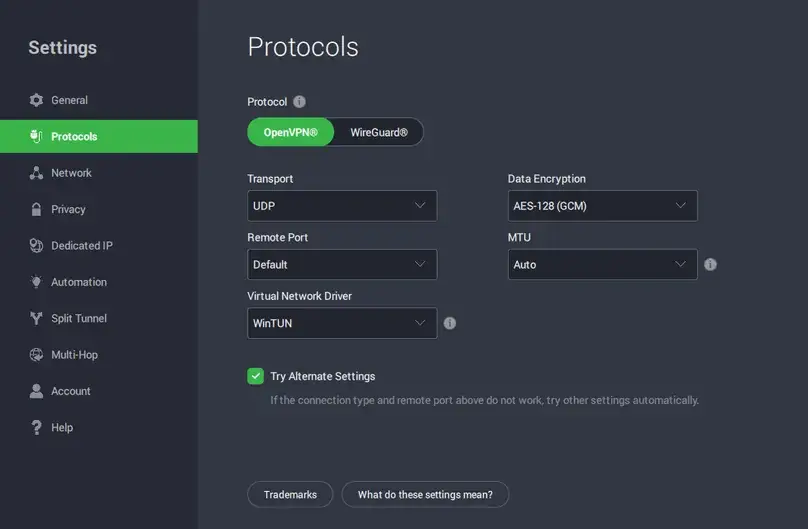
Automation and trusted networks
The Automation settings let users create rules for different networks. This is useful if you want the VPN to behave differently on trusted home Wi-Fi, public Wi-Fi, or networks where you always want protection enabled.
Performance checks
Structured Paid-Account Speed Checks
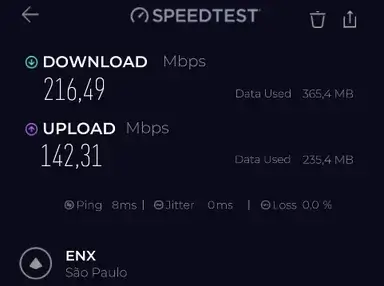
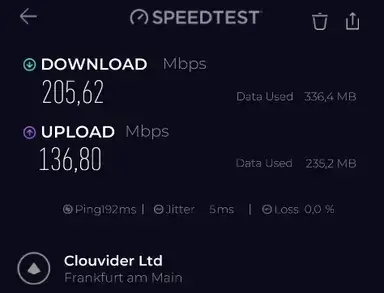
We ran structured paid-account speed checks using the Speedtest by Ookla Windows app on the same day, on the same internet connection, without heavy downloads running. The main VPN location checks used WireGuard. We also ran a protocol comparison on Miami using OpenVPN UDP, OpenVPN TCP, and WireGuard.
Because VPN performance varies by device, ISP, Wi-Fi quality, route, server load, and time of day, these results should be read as practical evidence from our test environment, not a universal speed guarantee. They still gave us a useful view of PIA’s real paid-account behavior.
| VPN location | Protocol | Avg. download | Avg. upload | Avg. ping | Download retention |
|---|---|---|---|---|---|
| São Paulo, Brazil | WireGuard | 197.77 Mbps | 128.71 Mbps | 8 ms | 70.6% |
| Miami, USA | WireGuard | 179.99 Mbps | 162.71 Mbps | 115 ms | 57.6% |
| New York, USA | WireGuard | 159.84 Mbps | 148.55 Mbps | 125 ms | 60.5% |
| UK streaming optimized | WireGuard | 154.62 Mbps | 151.99 Mbps | 191 ms | 57.5% |
| Germany streaming optimized | WireGuard | 200.40 Mbps | 145.13 Mbps | 192 ms | 74.2% |
| Hong Kong | WireGuard | 103.80 Mbps | 10.58 Mbps | 326 ms | 45.8% |
Want to compare this VPN against your own no-VPN baseline? Use our VPN speed test and speed-loss calculator for a repeatable at-home method and local, privacy-preserving calculation. Download retention was calculated against the closest no-VPN baseline recorded near each VPN test. Baseline screenshots are retained internally but not displayed here to avoid publishing unnecessary location-specific test details.
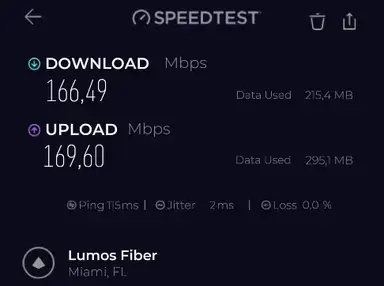
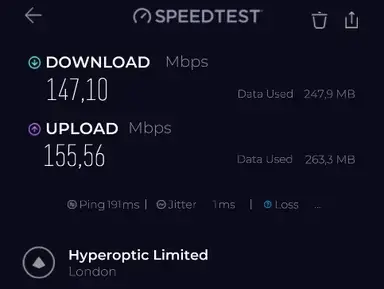
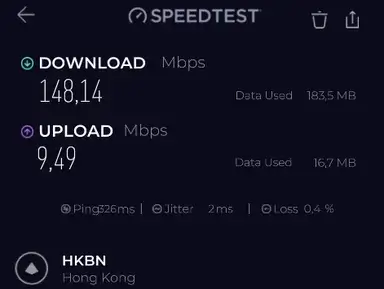
Protocol comparison
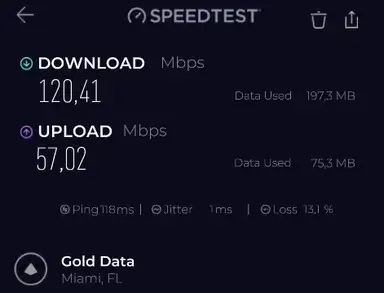
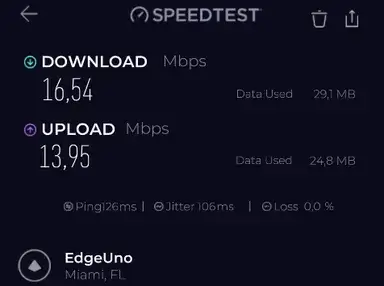
WireGuard was the best-performing protocol in our Miami protocol comparison. OpenVPN UDP remained usable but recorded much lower download speed and higher packet loss in the two test runs. OpenVPN TCP was dramatically slower in our tests, with much higher jitter, making it a poor default choice for speed-sensitive use in this setup.
| Protocol | Avg. download | Avg. upload | Avg. ping | Avg. packet loss | Readout |
|---|---|---|---|---|---|
| WireGuard | 171.55 Mbps | 164.29 Mbps | 118 ms | 0% | Best speed and stability in this check |
| OpenVPN UDP | 116.15 Mbps | 49.40 Mbps | 118 ms | 13.7% | Usable, but weaker than WireGuard here |
| OpenVPN TCP | 16.38 Mbps | 14.08 Mbps | 154 ms | 0% | Much slower in our setup |
For the broader technical context behind these results, see our VPN protocols comparison, including WireGuard, OpenVPN, IKEv2, TCP/UDP, provider-specific modes, and our paid protocol test data.
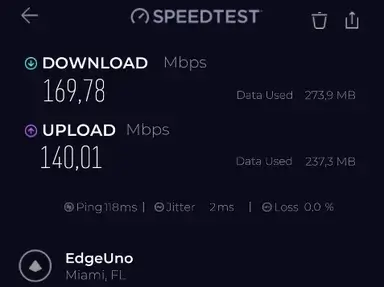
Controls
Advanced Features We Checked
Split tunneling
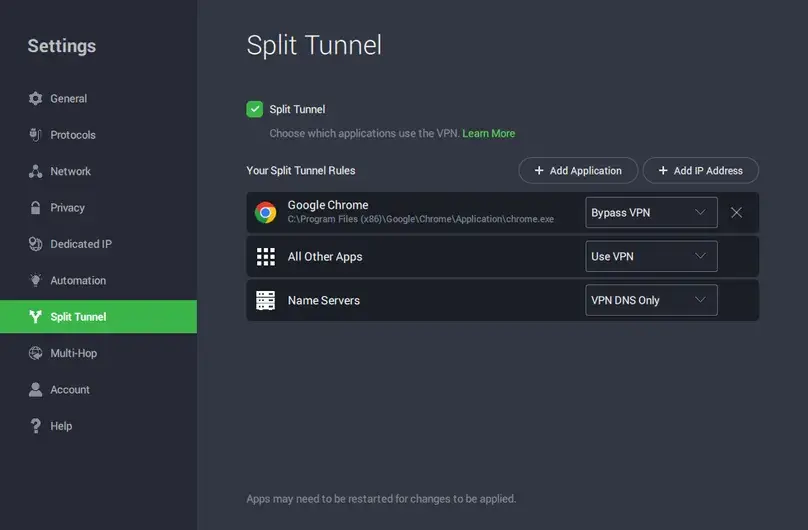
PIA’s split tunneling implementation was one of the strongest parts of the app experience. We added Google Chrome to the split tunnel rules and verified that app-level routing worked. PIA also lets users set behavior for “All Other Apps” and add IP address rules using IPv4, IPv6, or CIDR notation. We did not find a simple website/domain entry rule in the split tunneling interface, but the IP-rule option gives more technical users granular control. See our VPN split-tunneling guide for the difference between app, domain, and destination-IP rules.
Port forwarding
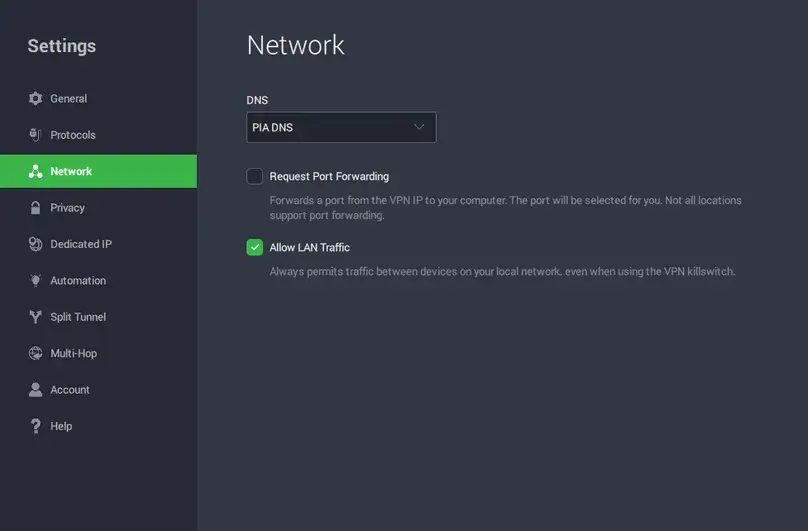
PIA includes port forwarding with the VPN subscription rather than selling it as a separate add-on. In support chat, PIA said port forwarding works on all servers except U.S. servers. In our Windows app check, the setting was visible under Network, and after enabling it we received an assigned port while using WireGuard. The assigned port did not change after reconnecting during our check.
MACE, kill switch, and custom DNS
PIA MACE was visible in the Privacy settings and was disabled by default. The app describes it as blocking domains used for ads, trackers, and malware. We treated it as a DNS-based protection layer, not as a perfect ad blocker or malware-testing result. The same Privacy area included VPN Kill Switch and Advanced Kill Switch options, both of which were visible and worked in our manual check.
Multi-hop and obfuscation
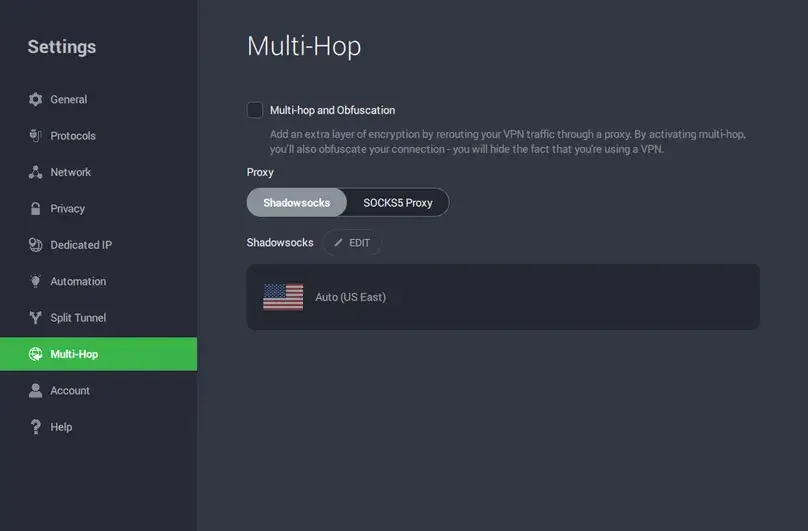
The Multi-hop area exposed proxy and Shadowsocks options designed to add an extra routing layer and help disguise VPN usage in restrictive environments. We verified that the controls were present but did not test PIA inside a censored or enterprise-filtered network, so we do not treat this as proof that it works in every restrictive environment.
Real-world fit
Streaming, P2P, Travel, and Everyday Use
Streaming checks
In our streaming checks using a U.S. East streaming optimized server, Amazon Prime Video, Apple TV, Disney Plus/Hulu, Netflix, and a live video stream all loaded and played during the test session. We do not treat that as a guarantee that every streaming platform will work for every user, account, server, or region, because streaming access changes frequently. But PIA performed well in our test environment.
P2P and port forwarding
PIA is more appealing for P2P-capable users than VPNs that do not expose port forwarding. We verified that P2P-related servers and documentation were available and that port forwarding could be requested in the app. We did not run a risky or copyrighted torrent test; any P2P testing should be limited to legal files only.
For the feature-level test method and the differences across providers, see our VPN port forwarding guide.
Travel and public Wi-Fi
For travel and public Wi-Fi, PIA’s main strengths are unlimited devices, fast connection behavior, kill switch controls, automation rules, and configurable DNS. Users who want the VPN to automatically behave differently on trusted and untrusted networks should pay special attention to the Automation section.
Support and refund
Support, Cancellation, and Refund Experience
Before purchase, we contacted PIA support and were transferred from the initial support flow to a sales representative. Support said the 30-day money-back guarantee applies to both renewal and recurring payments, that Dedicated IP is eligible for the 30-day refund policy, that port forwarding is included with any subscription, and that port forwarding is available on PC setups such as Windows, macOS, and Linux. Support also said port forwarding works on all servers except U.S. servers and that PIA subscriptions allow unlimited simultaneous device connections.
After testing, we requested a refund on June 1, 2026 through live chat. There was no self-serve refund button in our account area, but the chat process started the refund immediately. The refund was approved immediately, with a confirmation email arriving about three minutes later. PIA stated that the full amount would be refunded and that the refund could take 5 to 10 business days. Our final payment record confirms that the full PayPal payment returned on the request date; see the dated row in our VPN refund comparison.
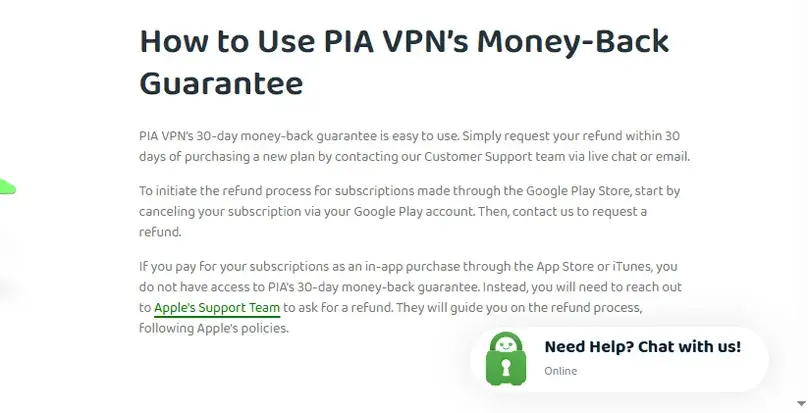
PIA’s account cancellation and refund request are separate steps. Canceling auto-renewal does not automatically issue a refund. App-store, gift-card, deal-site, crypto, and payment-processor rules may also affect refund handling, so confirm your own purchase route before relying on the guarantee.
Reputation
Reputation and User Signals
PIA has a large public footprint, including app-store ratings, Trustpilot reviews, Reddit discussions, transparency reports, and long-running VPN community debate. At the time of the research notes, the user-review signals included 4.3 stars on Trustpilot, 4.7 stars across a large App Store rating base, and 4.1 stars on Google Play. These are useful directional signals, but user-review platforms can be noisy and should not replace testing the app yourself.
Public complaints tend to focus on support, performance, account, or app-specific issues. Positive signals tend to emphasize configurability, price, device coverage, and long-running trust signals. For a technical VPN like PIA, the most reliable approach is to test the exact features you need during the refund window.
Alternatives
Private Internet Access vs Alternatives
| Alternative | Why consider it instead? | Where PIA may be stronger |
|---|---|---|
| NordVPN | Better fit if you want a polished mainstream VPN with strong security extras and broad brand recognition. | PIA gives more granular app controls, unlimited devices, and port forwarding. |
| Proton VPN | Better fit if you want a privacy-first ecosystem, a strong free plan, and Swiss privacy branding. | PIA is more compelling for unlimited devices and technical app controls. |
| PureVPN | Better fit if you want a feature-bundled VPN with platform-specific streaming Shortcuts and a 31-day refund policy. | PIA had a cleaner Windows app experience in our hands-on workflow and stronger split tunneling/port forwarding controls. |
| Surfshark | Better fit if you want a value-focused VPN with unlimited devices and a more consumer-friendly bundle feel. | PIA is stronger for open-source transparency and technical settings depth. |
Final verdict
Should You Choose Private Internet Access?
Choose PIA if you want a VPN that gives you more control than most mainstream providers. The paid account experience was strong in our review: the app installed quickly, connections worked without errors, WireGuard performed best, split tunneling was well-designed, port forwarding worked outside U.S. servers, advanced kill switch controls were visible, MACE was easy to enable, and the refund request was approved immediately.
PIA is not the best fit for users who want the simplest possible VPN with minimal decisions, and it is not ideal if you need port forwarding on U.S. servers or if you strongly prefer a provider outside U.S. jurisdiction. But if your priority is configurability, open-source apps, unlimited devices, technical controls, and a lower monthly price than many premium VPNs, PIA is one of the most credible options in the category.
Review checklist
What We Checked in This Review
Common questions
Private Internet Access FAQ
Is Private Internet Access worth it?
Yes, for users who want a configurable VPN with unlimited devices, open-source apps, strong app controls, port forwarding, MACE, split tunneling, WireGuard, OpenVPN, and a 30-day refund policy. It is less ideal for users who want the simplest possible interface or a streaming-first VPN with minimal technical settings.
How many devices can I use with PIA?
PIA allows unlimited simultaneous device connections on one subscription. That is one of its strongest value advantages compared with VPNs that cap devices at 5, 8, or 10.
Does PIA support port forwarding?
Yes. In our support interaction and Windows app check, port forwarding was available with the VPN subscription. PIA support said it works on all servers except U.S. servers. We enabled port forwarding in the Windows app and received an assigned port during testing.
Which PIA protocol was fastest in your test?
WireGuard was the strongest protocol in our paid-account speed checks. OpenVPN UDP was usable but slower, while OpenVPN TCP was much slower in our Miami protocol comparison.
Does PIA have a kill switch?
Yes. The Windows app showed both VPN Kill Switch and Advanced Kill Switch options. We manually checked the kill switch behavior and found it worked as expected in our test setup.
Does PIA include ad and tracker blocking?
PIA includes MACE, which the app describes as blocking domains used for ads, trackers, and malware. Treat it as a DNS-based protection layer rather than a complete replacement for browser security, antivirus, or careful browsing.
Does PIA work for streaming?
In our U.S. East streaming optimized server check, Amazon Prime Video, Apple TV, Disney Plus/Hulu, Netflix, and a live video stream loaded and played. Streaming access can change by account, platform, server, region, and time, so test your own services during the refund window.
How did the PIA refund process work?
We requested a direct-purchase refund through live chat after testing. There was no self-serve refund button in our account, but the live chat started the process immediately. Approval was immediate, and a confirmation email arrived about three minutes later with a stated 5 to 10 business day processing window.
Source notes
Sources Reviewed
This page was updated from PIA official pricing, refund, terms, privacy, server, download, help center, open-source, no-logs, audit, transparency, dedicated IP, port forwarding, MACE, split tunneling, kill switch, and support materials, plus our paid account workflow and screenshot evidence.
User opinions
Share Your Experience With Private Internet Access
If you have used PIA, your experience can help other readers compare setup, speed, port forwarding, split tunneling, Linux support, streaming, P2P, refunds, customer support, and everyday usability. Use the comment section below to share a specific, helpful opinion.