
VPN Review
PureVPN Review: Paid Hands-On Tests, Streaming Shortcuts, Add-Ons, and Refund Results
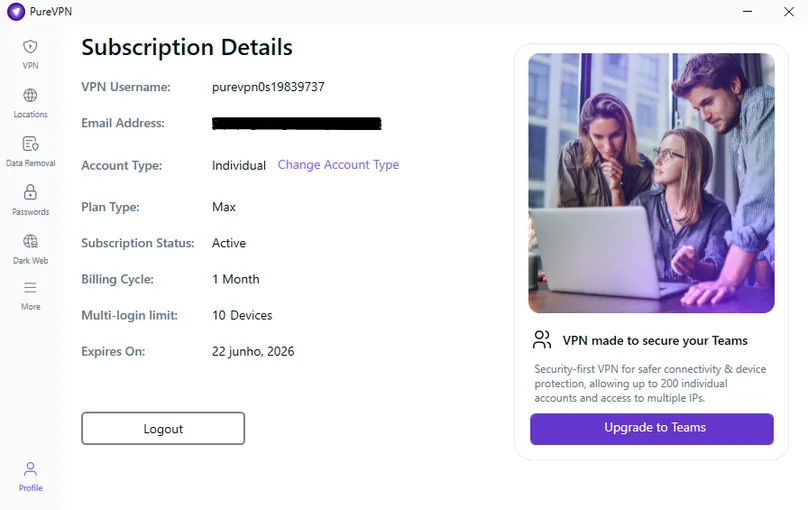
PureVPN is a feature-heavy VPN with broad app support, platform-specific streaming shortcuts, optional add-ons like dedicated IP and port forwarding, and a 31-day refund policy for eligible initial purchases. We purchased the Max monthly plan and tested the paid account experience before requesting a refund.
Reviews Ally may earn a commission when you click some links on this page. For this update, we purchased PureVPN directly, reviewed the paid account, tested the Windows, Browsers and Android apps, checked speed, leak, app-control, support, and refund workflows, and compared those findings with PureVPN’s public documentation. Learn more about our advertising disclosure.
Quick verdict
PureVPN: Bottom Line
PureVPN is strongest when you care about streaming shortcuts, server choice, and add-on flexibility, but our paid Windows/Android testing also found app reliability issues that buyers should understand before subscribing.
PureVPN impressed us most with its platform-specific “Shortcuts” feature, broad location list, optional dedicated IP and port forwarding add-ons, and a refund process that was approved quickly in our direct-purchase test. It is less convincing if your priority is the cleanest, most trouble-free desktop app experience. During our Windows testing, PureVPN delivered strong speeds in some routes, especially WireGuard on a nearby U.S. server, but it also showed inconsistent protocol performance, packet loss on some tests, Firefox-specific connection issues on one server, and a Windows firewall rule problem that temporarily blocked internet access until we disabled the PureVPN-related rule.
At a glance
PureVPN Quick Facts
- Best for
- Users who want streaming shortcuts, add-ons, many locations, and broad app/device support
- Plan tested
- Max monthly plan purchased directly from PureVPN in May 2026
- Monthly pricing checked
- Standard $12.95/month, Plus $17.95/month, Max $19.95/month at review time
- Refund policy checked
- 31-day policy for eligible initial purchases; our refund was approved in about 15 minutes
- Devices
- Up to 10 concurrent devices according to PureVPN’s support documentation
- Notable features
- Shortcuts, WireGuard, kill switch, split tunneling, tracker blocker, port forwarding add-on, dedicated IP add-on
Fit
Who PureVPN Is Best For
Consider it if you want…
- A VPN with platform-specific streaming shortcuts inside the app.
- Optional add-ons such as dedicated IP, port forwarding, residential network, dedicated server, and extra logins.
- Apps and setup paths across Windows, macOS, Android, iOS, Linux, browser extensions, Android TV, Fire TV, Apple TV, and routers.
- A direct-purchase refund window that was easy to trigger in our account test.
- A VPN that includes tracker blocking on Standard and adds password manager, dark web monitoring, and data-removal tools on higher tiers.
Look elsewhere if you need…
- The smoothest Windows desktop app experience with the fewest troubleshooting risks.
- Consistent speeds across every long-distance route and protocol.
- A very minimalist VPN without add-ons, upsells, or bundled security tools.
- Unlimited device connections on one account.
- A Linux experience equal to Windows/macOS; support told us some Linux features may be limited or unavailable.
Editorial process
How We Reviewed PureVPN
For this update, we purchased PureVPN’s Max monthly plan directly from the official website and reviewed the full paid-account path from signup through refund request. We tested the Windows app, used the Android app for several days, checked the browser extension briefly, reviewed the account dashboard, compared plan pages and add-on pricing, contacted support before purchase, and requested a refund after testing.
Our tests were designed to evaluate the paid-account experience, app clarity, practical speed behavior, feature access, leak-check results, streaming workflows, support answers, and refund flow. They should not be read as a global lab benchmark or a promise that every user, ISP, protocol, device, platform, or region will get the same result.
Plans and value
PureVPN Pricing and Plans
PureVPN uses a layered pricing model with Standard, Plus, and Max plans, plus several paid add-ons. For a clean buyer comparison, we looked at the monthly prices, long-term discount positioning, and add-on costs rather than relying only on the lowest advertised multi-year average.
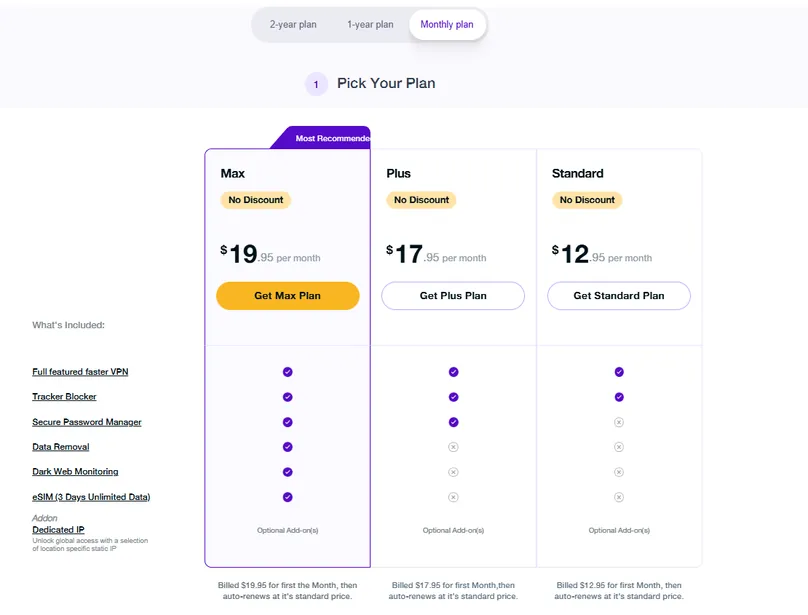
| Plan / item | Monthly | Annual promo | 2-year promo | What it means |
|---|---|---|---|---|
| Standard | $12.95/mo | $2.55/mo shown | $2.15/mo shown | VPN plus tracker blocker; the simplest plan to compare against other VPN-only offers. |
| Plus | $17.95/mo | $4.55/mo shown | $3.15/mo shown | Adds secure password manager on top of the VPN and tracker blocker. |
| Max | $19.95/mo | $5.55/mo shown | $3.55/mo shown | The plan we purchased; adds data removal, dark web monitoring, and a short eSIM benefit at review time. |
| Dedicated IP add-on | $5.99/mo | $3.74/mo shown | $2.66/mo shown | Optional static IP for access consistency; available in selected countries. |
| Port forwarding add-on | $1.49/mo | $1.49/mo shown | $1.49/mo shown | Optional feature for inbound-connection use cases; not included by default. |
*Prices reflect the pricing views documented during our May 2026 review. Final checkout terms may vary by promotion, region, tax, coupon, plan, payment method, renewal terms, and selected add-ons.
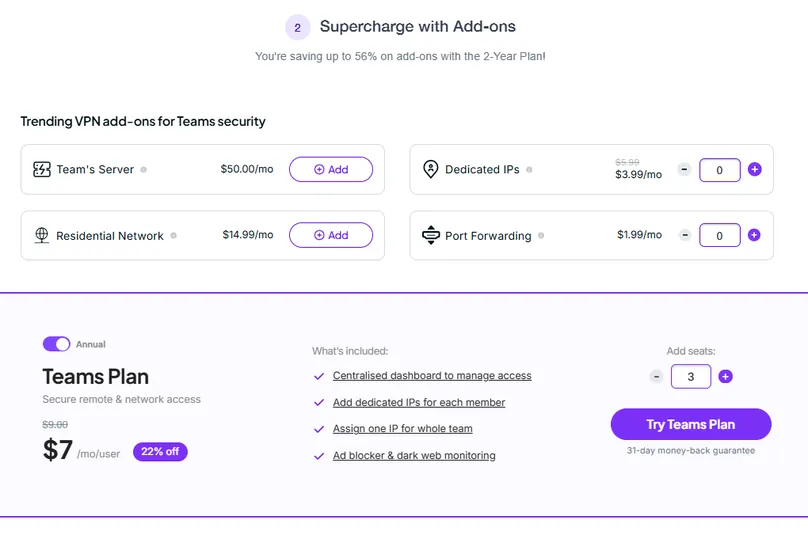
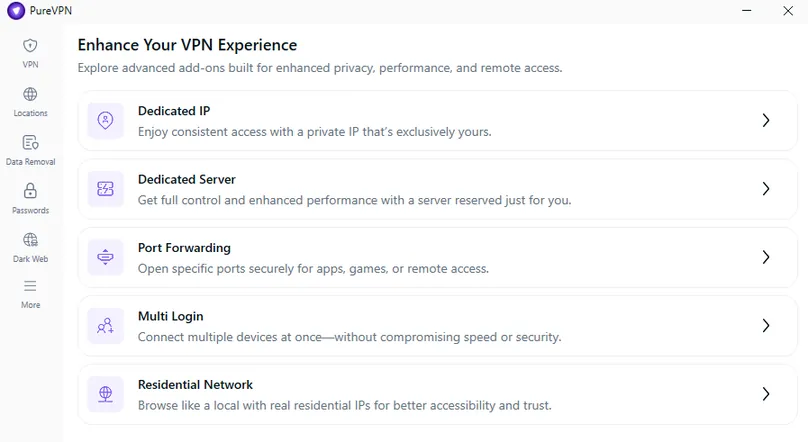
PureVPN also showed add-ons such as Residential Network, Dedicated Server, Team Server, and Multi-Login. Those can be useful for specific technical or business use cases, but most consumer VPN buyers should first decide whether they need the base VPN, streaming shortcuts, and standard app features before adding extras.
Interested in PureVPN? Check the current monthly price, renewal terms, 31-day refund eligibility, and whether you need add-ons before choosing.
Visit Site Compare Top PicksHands-on checks
PureVPN Speed and Performance Checks
We ran structured paid-account speed checks using the Speedtest by Ookla Windows app from a Windows device over Wi-Fi. We tested no-VPN baselines and PureVPN connections across nearby and long-distance routes, including U.S., UK, Germany, and Hong Kong locations, plus a protocol comparison on a U.S. route.
| Test | Protocol | Download | Upload | Ping | Download retention | Notes |
|---|---|---|---|---|---|---|
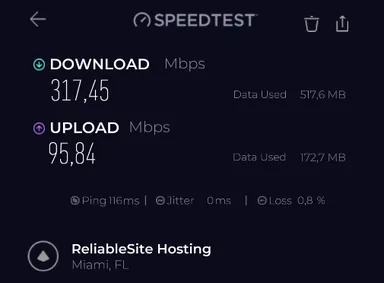
| Miami, U.S. | Automatic, WireGuard selected | 317.45 Mbps | 95.84 Mbps | 116 ms | 94.7% | Strong download result, but we saw Firefox DNS/page-load issues on this server while Chrome and Edge worked. |
| New York, U.S. | Automatic, WireGuard selected | 180.17 Mbps | 186.60 Mbps | 144 ms | 52.9% | Lower download than the Miami route, but upload remained strong. |
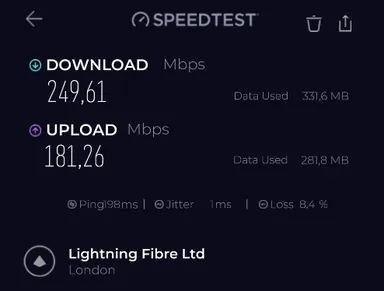
| London, UK | Automatic, WireGuard selected | 249.61 Mbps | 181.26 Mbps | 198 ms | 77.1% | Good download and upload, but packet loss was shown at 8.4% in this run. |
| Frankfurt, Germany | Automatic, IKEv2 selected | 72.54 Mbps | 8.18 Mbps | 211 ms | 22.0% | Much weaker than the WireGuard routes in our test. |
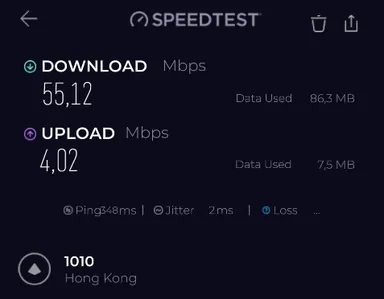
| Hong Kong | Automatic, IKEv2 selected | 84.14 Mbps | 1.84 Mbps | 348 ms | 26.0% | Long-distance route with very high latency and weak upload in our run. |
Want to compare this VPN against your own no-VPN baseline? Use our VPN speed test and speed-loss calculator for a repeatable at-home method and local, privacy-preserving calculation.
In our protocol comparison on a U.S. route, WireGuard was the strongest speed result: 219.64 Mbps download, 114.38 Mbps upload, and 88.2% download retention against its same-session baseline. IKEv2, OpenVPN UDP, and OpenVPN TCP were much slower in our checks, with TCP showing the weakest result at 26.23 Mbps download.
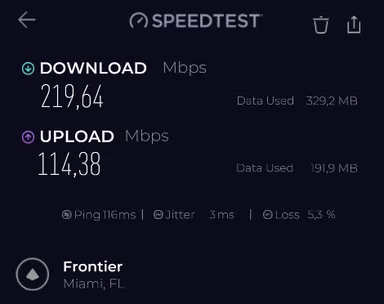
For the broader technical context behind these results, see our VPN protocols comparison, including WireGuard, OpenVPN, IKEv2, TCP/UDP, provider-specific modes, and our paid protocol test data.
These are practical paid-account speed checks, not a global lab benchmark. Speeds can change based on your ISP, router, device, distance to the VPN server, protocol, server load, test server, time of day, and whether the app chooses WireGuard, IKEv2, UDP, or TCP.
Apps and controls
PureVPN Apps, Protocols, Kill Switch, and Split Tunneling
PureVPN offers broad app coverage and a mainstream interface. We primarily tested the Windows app, used the Android app for several days, and briefly checked the browser extension. The Windows app exposed important settings clearly: General, Connection, Protocol, and Security Suite. It also showed protocol selection options including IKEv2, UDP, TCP, and WireGuard after disabling automatic protocol selection.
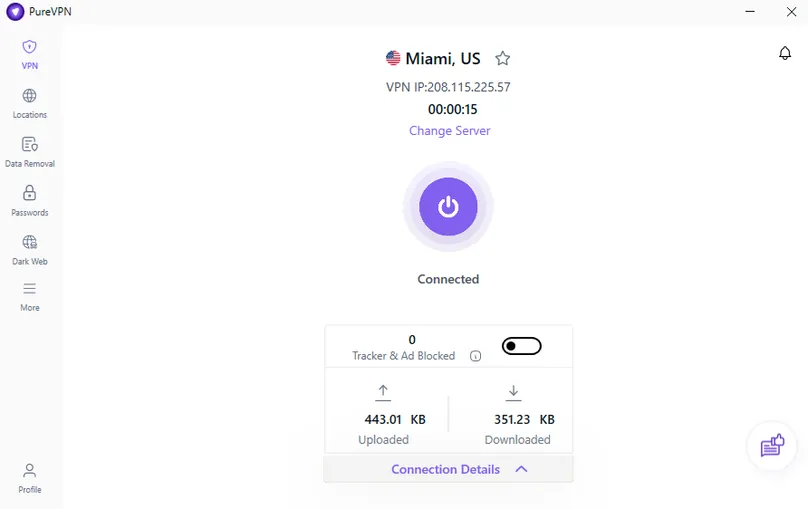
Protocol visibility is a plus
One detail we liked: when PureVPN used Automatic protocol selection, we could still see which protocol was chosen during testing. In our Miami automatic test, PureVPN selected WireGuard, which also aligned with the stronger speed results we saw. This is useful for users who want an easy mode but still care about what the app is doing.
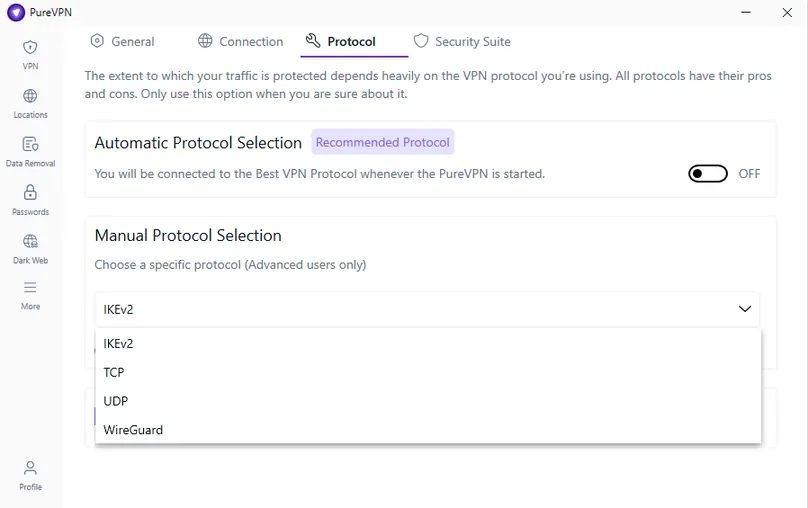
Kill switch and split tunneling
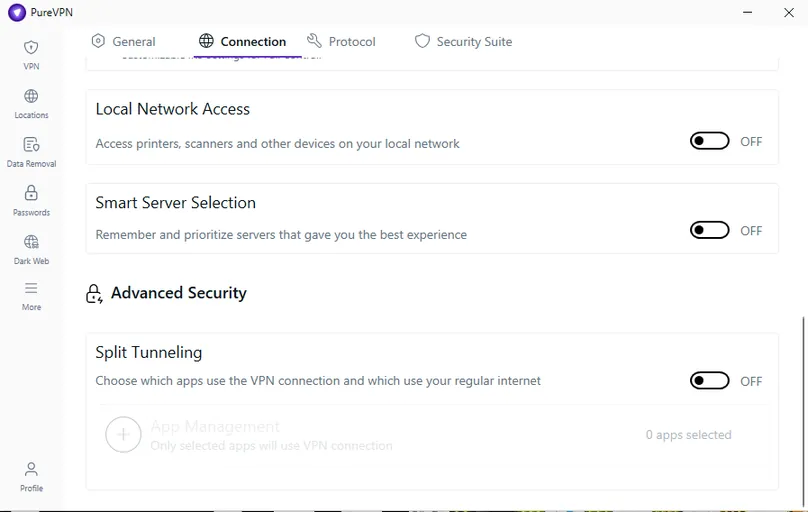
PureVPN’s Windows app included internet kill switch and app kill switch controls, and both worked as expected in our manual checks. Split tunneling also worked, but the behavior is important to understand: in our test, the apps added to PureVPN’s split tunneling list were the apps routed through the VPN connection. That is the opposite of some VPN apps where selected apps are excluded from the VPN. Our VPN split-tunneling guide calls this an include or inverse model and contrasts it with bypass routing.
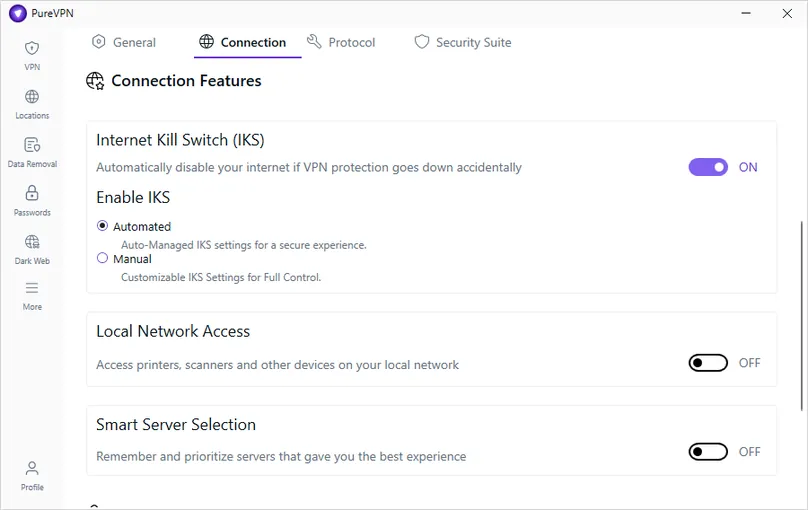
Want to reproduce this safety check? Our VPN Kill Switch guide explains the Windows failure test, Pass / Fail / Inconclusive interpretation, manual-disconnect caveat, and the limits of browser-level evidence.
Windows reliability issue we encountered
Our biggest concern was reliability. During testing, the Windows app produced connection errors, including 5132/5027, and at one point our Windows PC could connect to networks but had no internet access. Windows diagnostics pointed to a PureVPN-related Windows Defender Firewall rule, described as a rule blocking private IPs. Disabling the PureVPN-related firewall rule resolved the problem in our setup, and we did not see the same issue afterward.
This does not prove every Windows user will experience the same problem, but it is a serious enough issue to mention. Users who are not comfortable with Windows firewall troubleshooting may want to test PureVPN early in the refund window and contact support quickly if the app interferes with local connectivity.
Privacy and security
Privacy, Security, and Leak Checks
PureVPN positions itself as a no-log VPN and publishes trust, transparency, and vulnerability disclosure materials. We reviewed PureVPN’s privacy policy, terms, trust center, transparency report, vulnerability disclosure policy, server information, protocol documentation, and help center resources. PureVPN’s public materials also discuss no-log assessment work, encryption, and protocol tradeoffs.
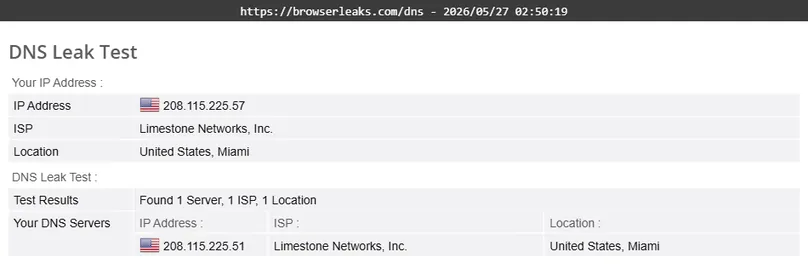
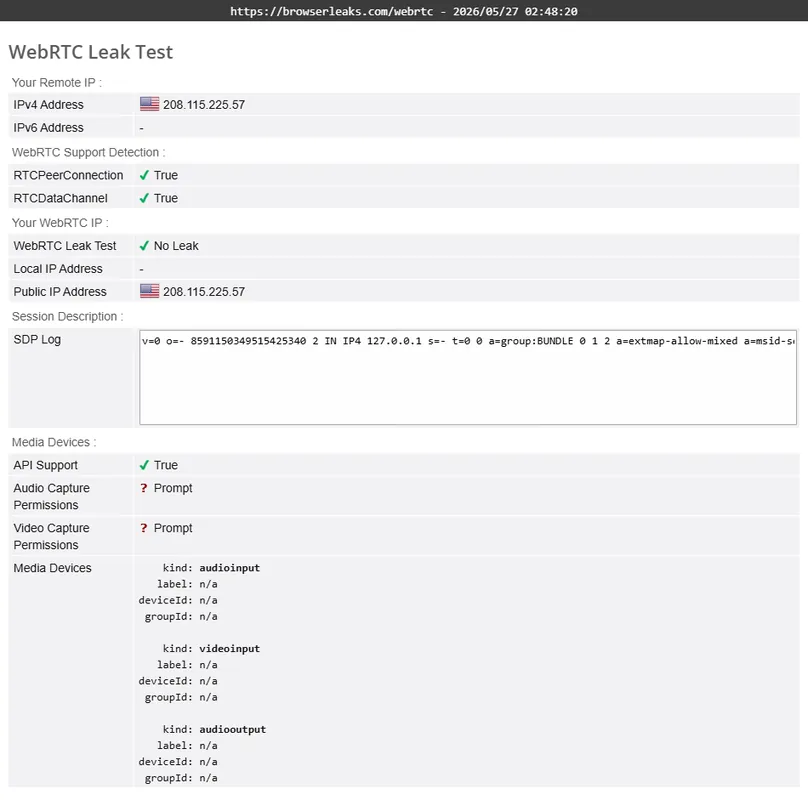
We also performed basic DNS, WebRTC, and IP-change checks while connected to a U.S. server. In those checks, the real ISP DNS and real IP did not appear; the visible DNS and WebRTC results showed the VPN location instead.
Security Suite and tracker blocking
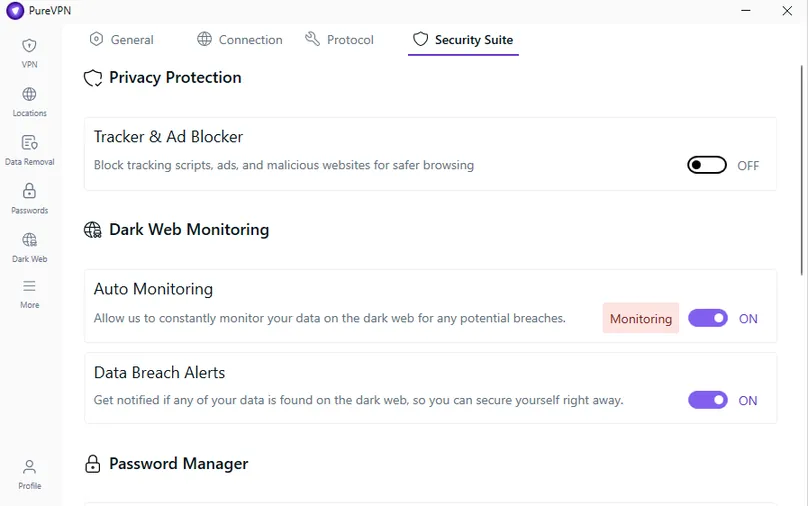
PureVPN’s Standard plan included tracker blocker at review time, while higher tiers bundled additional tools such as password manager, dark web monitoring, data removal, and eSIM benefits. Support described PureVPN’s blocking functionality as primarily DNS-level rather than a browser extension or endpoint antivirus engine, with availability depending on platform, protocol, and enabled features.
Linux caution
PureVPN may still be useful for Linux users, but Linux buyers should verify current functionality before relying on it for sensitive use. PureVPN support told us Linux supports core VPN functionality such as OpenVPN and WireGuard, but some Windows/macOS features may be limited or unavailable, including a full graphical experience depending on distro/setup, split tunneling, automation features, advanced convenience tools, and streaming-oriented GUI features.
Network
Server Network, Locations, and Server Types
PureVPN showed a broad country and city list in the app and on its public server page. In the Windows app, we saw locations across the United States, United Kingdom, Australia, Germany, Canada, Netherlands, Hong Kong, Malaysia, Belgium, France, Sweden, Japan, Singapore, Italy, Ireland, Luxembourg, India, Brazil, South Africa, and many more. U.S. city options included Miami, New York, Ashburn, Washington DC, Atlanta, Charlotte, Newark, Houston, Dallas, Chicago, Los Angeles, and others.
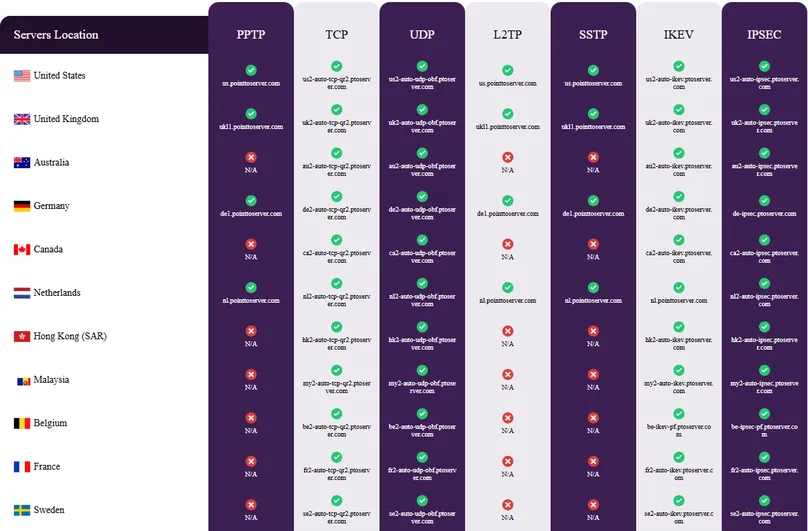
The app also included filters for all servers, P2P, quantum-resistant servers, port forwarding, and virtual servers. That makes PureVPN more configurable than a very simple consumer VPN, but it also means users should understand which server type is appropriate for their use case.
Streaming and routing
PureVPN Streaming Checks and Shortcuts
PureVPN’s most distinctive feature in our paid test was its “Shortcuts” area. Instead of only showing generic countries, the app displayed platform-specific shortcuts for services and regions, including Amazon Prime, Netflix, Disney Plus, Hulu, BBC, ESPN Plus, Paramount Plus, Peacock TV, Channel 4, CBC Gem, BritBox, Discovery Plus, Roku Channel, Tubi TV, SonyLIV, JioCinema, Stan AU, ABC iview AU, and others.
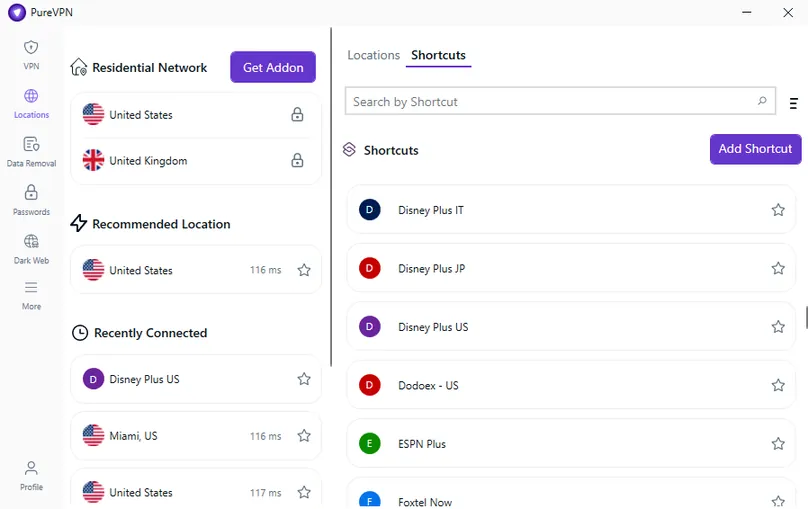
In our checks, Amazon Prime Video, Apple TV, Netflix, Disney Plus/Hulu through platform-specific shortcuts, and a live video stream loaded and played successfully in at least one tested setup. We did not treat this as a permanent guarantee: streaming platforms frequently update VPN detection, and results can vary by account, region, server, protocol, browser, app, and time.
PureVPN performed better for streaming workflows than for some general long-distance speed tests in our review. Still, no VPN should be purchased solely on the assumption that every streaming platform, catalog, and region will work permanently.
Optional extras
PureVPN Add-Ons: Dedicated IP, Port Forwarding, Residential Network, and More
PureVPN’s add-on ecosystem is a major differentiator. During our review, we found optional add-ons for Dedicated IP, port forwarding, residential network, dedicated server, team server, and extra multi-login capacity. Support confirmed that port forwarding is sold separately and is not included by default in standard plans, while dedicated IP is treated as an add-on attached to eligible plans.
For the feature-level test method and the differences across providers, see our VPN port forwarding guide.
| Add-on | Price checked | What we found |
|---|---|---|
| Dedicated IP | $5.99/month | Available in selected countries including U.S., UK, Australia, Germany, Canada, Netherlands, Hong Kong, Singapore, New Zealand, and Malta. |
| Port Forwarding | $1.49/month | Sold as an add-on; support said refund eligibility generally follows the same refund window if requested within the applicable period. |
| Residential Network | From $19.99/month for 12GB | Residential IP routing option; in our account view, U.S. and UK appeared as available choices. |
| Dedicated Server | $15/month | Shown with many cities, including multiple U.S. options and locations in countries such as UK, Australia, Canada, Germany, Japan, Singapore, and more. |
| Multi-Login | From $5.18/month | Expands beyond the base 10 concurrent sessions; higher add-on tiers were shown for 20, 30, 40, and 50 sessions. |
Support and refund
Support, Cancellation, and Refund Experience
Before subscribing, we contacted PureVPN support by live chat and asked about refund eligibility, port forwarding, dedicated IP, Linux limitations, router device counts, obfuscation, blocking features, and streaming inconsistency. The first response came through the chat system, and a human support agent answered the detailed questions within a few minutes.
Support told us that direct purchases through PureVPN’s order page have a refund window, that port forwarding is a separate add-on, that dedicated IP renews separately alongside the subscription, that router use generally counts as one active connection while protecting devices behind the router, that Linux may have limitations compared with Windows/macOS, and that streaming compatibility can vary because platforms update VPN detection systems.
Refund process in our test
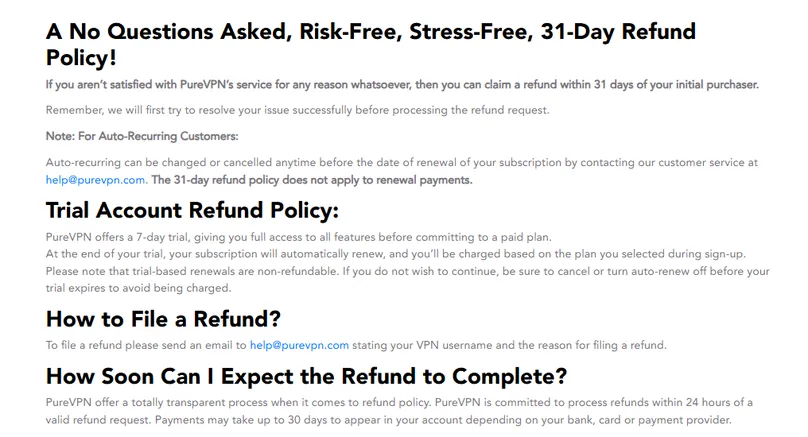
After testing, we requested a refund through the Subscriptions area in the PureVPN member dashboard. We did not need a bot or human agent for the request. The refund button was available in the account area, no questions were asked, and we received confirmation about 15 minutes later. The refund was approved for the full amount, with PureVPN stating that the money would return to the original payment method in 5 to 7 working days. Our final record confirms that the full PayPal payment returned on the May 27 request date; see the dated result in our VPN refund comparison.
This was a positive refund experience, but it should be read carefully. The documented 31-day refund window does not apply to every possible payment situation. Trial-based renewals and renewal payments can have different rules, and purchases through app stores or certain processors may follow separate handling.
Comparisons
PureVPN vs Alternatives
| Alternative | Choose it instead if… | PureVPN advantage |
|---|---|---|
| NordVPN | You want a more polished premium mainstream VPN experience and stronger overall app confidence from our paid testing. | PureVPN has stronger add-on flexibility and an unusually visible Shortcuts feature for platform-specific routing. |
| Proton VPN | You care more about privacy-first positioning, a strong free plan, and open-source/audit transparency. | PureVPN is more focused on streaming shortcuts and paid add-ons such as port forwarding and dedicated IP. |
| Surfshark | You want unlimited devices and a simpler value story for households with many devices. | PureVPN gives more granular add-ons and platform-specific shortcut options. |
| Private Internet Access | You want deeper technical customization and a more advanced-user VPN profile. | PureVPN is easier to position for streaming-route discovery and bundled privacy/security tools. |
Final verdict
Should You Use PureVPN?
PureVPN is worth considering if you specifically want a VPN with streaming shortcuts, broad country coverage, many device paths, and paid add-ons such as dedicated IP and port forwarding. The refund process was easy in our direct-purchase test, and the app’s Shortcuts feature stood out as genuinely useful for users who want to route by platform rather than only by country.
However, PureVPN is not the VPN we would frame as the smoothest all-around desktop experience. Our Windows testing found real reliability concerns, including connection errors and a PureVPN-related firewall rule that temporarily blocked internet access. Speed results were also mixed: WireGuard performed well in some tests, while IKEv2, UDP, TCP, and longer-distance routes were much weaker in our checks.
Bottom line: PureVPN is best for users who value streaming-oriented routing and add-on flexibility enough to test the app carefully during the refund window. It is less ideal if you want a simpler VPN with fewer settings, fewer add-ons, and fewer troubleshooting concerns.
Review checklist
What We Checked in This Review
Common questions
PureVPN FAQ
Is PureVPN good for streaming?
PureVPN was one of the more interesting VPNs we tested for streaming workflows because its Windows app included platform-specific Shortcuts for services such as Amazon Prime, Netflix, Disney Plus, Hulu, BBC, ESPN Plus, and more. In our checks, several streaming workflows worked, including platform-specific shortcuts, but streaming results can change by service, account, server, protocol, and time.
Is PureVPN fast?
PureVPN can be fast on the right route and protocol. In our paid Windows test, the Miami automatic route selected WireGuard and reached 317.45 Mbps download, while a separate WireGuard protocol comparison reached 219.64 Mbps. Other routes and protocols were much weaker, especially Frankfurt, Hong Kong, and TCP in our checks. Treat PureVPN speed as highly route- and protocol-dependent.
Does PureVPN have a money-back guarantee?
PureVPN publishes a 31-day refund policy for eligible purchases. In our direct-purchase test, the refund request was approved about 15 minutes after submission. However, trial-based renewals, renewal payments, app-store purchases, and certain payment routes may have different rules, so confirm the current policy before buying.
How many devices can I use with PureVPN?
PureVPN support documentation says one account can connect up to 10 devices concurrently using the same login credentials. Support also told us that a compatible router generally counts as one active connection while protecting devices behind that router.
Does PureVPN support port forwarding?
Yes. PureVPN offers port forwarding as a paid add-on, not as a default feature in standard plans. During our review, port forwarding was listed at $1.49/month and was supported on selected locations.
Does PureVPN offer dedicated IP?
Yes. PureVPN sells dedicated IP as an add-on. During our review, it was listed at $5.99/month, with lower promotional monthly equivalents on longer terms. Dedicated IP was available in selected countries including the U.S., UK, Australia, Germany, Canada, Netherlands, Hong Kong, Singapore, New Zealand, and Malta.
What problems did we find during testing?
We found mixed speed results, packet loss in some runs, Firefox DNS/page-load issues on one U.S. server, and a serious Windows connectivity problem tied to a PureVPN-related Windows Defender Firewall rule. After disabling the PureVPN-related rule, the internet connection worked again in our setup, and the app did not show the same problem afterward.
Who should avoid PureVPN?
Consider another VPN if you want the simplest desktop app experience, the most consistent long-distance performance, unlimited device connections, or a VPN with fewer add-ons and less troubleshooting risk. PureVPN is stronger for users who value streaming shortcuts and connection add-ons enough to test it carefully during the refund window.
Source notes
Sources Reviewed
This review combines our paid-account testing with PureVPN’s official pricing, refund, support, privacy, Trust Center, app, add-on, and feature materials. Recheck provider pages before final purchase because VPN prices, server lists, plan features, refunds, and add-ons can change quickly.
User opinions
Share Your Experience With PureVPN
If you have used PureVPN, your experience can help other readers compare setup, pricing, refunds, support, app reliability, server locations, streaming, P2P, add-ons, and everyday usability. Use the comment section below to share a specific, helpful opinion.