
VPN Review
Proton VPN Review: A Privacy-First VPN With a Strong Free Plan, Fast Paid Tests, and Advanced Security Tools
Proton VPN is best for users who care about privacy, open-source apps, transparent security claims, a useful free plan, and paid features such as Secure Core, NetShield, port forwarding, Stealth, and strong WireGuard performance.
Reviews Ally may earn a commission when you click some links on this page. Our reviews are based on editorial criteria, product documentation, paid-account testing, support interactions, public pricing, and research available at the time of review. Learn more about our advertising disclosure.
Quick verdict
Proton VPN: Bottom Line
Proton VPN is one of the strongest VPN choices for privacy-focused users, and our paid-account testing made the recommendation stronger for people who also care about speed, streaming, and advanced security controls.
It is not the simplest VPN interface and it does not offer unlimited simultaneous device connections, but Proton VPN combines a meaningful free plan, open-source app positioning, no-logs audit messaging, Swiss privacy branding, Secure Core, NetShield, port forwarding, Stealth, VPN Accelerator, P2P support, and a large paid server network. In our structured paid-account speed checks, WireGuard UDP performed especially well across several regions, while Secure Core added a noticeable speed penalty as expected for a multi-hop privacy feature.
At a glance
Proton VPN Quick Facts
- Best for
- Privacy-focused users, free VPN users, streaming users who want stronger privacy posture, and paid users who want advanced controls
- Monthly plan
- VPN Plus monthly plan listed at $9.99/month at review time; Proton Unlimited monthly plan listed at $12.99/month
- Money-back guarantee
- 30-day money-back guarantee for eligible purchases; direct-purchase refund was processed through live chat in our test
- Devices
- Free plan supports 1 active connection; paid Proton VPN plans support up to 10 active connections
- Server network
- 20,000+ servers in 140+ countries on paid plans, based on Proton’s public pages at review time
- Notable features
- Secure Core, NetShield, VPN Accelerator, Stealth, port forwarding, P2P, Tor servers, open-source apps, and manual WireGuard/OpenVPN configuration
Fit
Who Proton VPN Is Best For
Consider it if you want…
- A VPN from a company strongly associated with privacy-focused products.
- A real free VPN plan before upgrading to a paid plan.
- Paid-plan access to Secure Core, NetShield, port forwarding, Stealth, P2P, and VPN Accelerator.
- Open-source and audited app positioning rather than vague privacy claims.
- Strong WireGuard UDP performance in practical paid-account checks.
- Streaming support that worked well in our U.S. server spot checks.
Look elsewhere if you need…
- The fewest possible settings and the simplest beginner-only VPN experience.
- Unlimited simultaneous device connections.
- A dedicated IP add-on for an individual consumer plan.
- Live chat before you become a paid user.
- Visible per-server latency in the app’s location list.
- Secure Core-level privacy routing without a major speed penalty.
Hands-on research
How We Reviewed Proton VPN
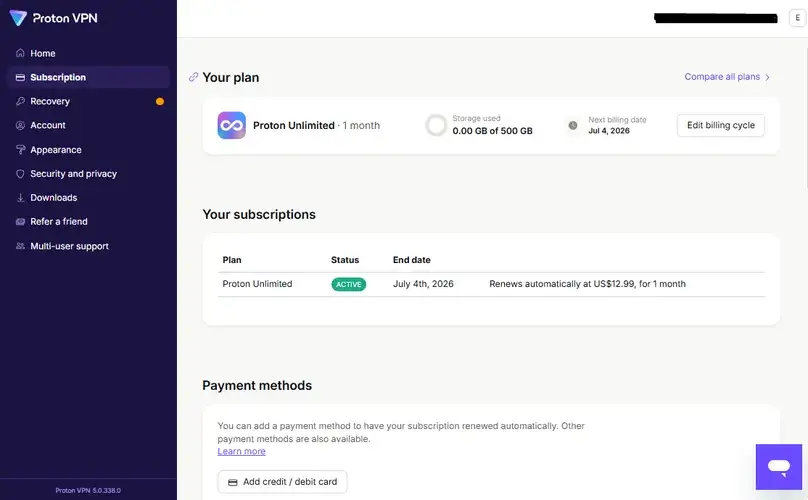
For this update, we purchased a one-month Proton VPN plan directly from Proton’s website and reviewed the paid account experience from a Latin America-based test environment. We checked the Proton account dashboard, billing and renewal details, download center, Windows app, Android app, browser extension, manual OpenVPN/WireGuard configuration availability, support documentation, live chat, refund request path, and official feature pages.
We also ran structured paid-account speed checks using the Speedtest by Ookla Windows app on a Windows 10 device over Wi-Fi. These tests covered a nearby/automatic connection, U.S. servers, European servers, distant servers, protocol comparisons, and Secure Core. We also performed basic DNS and WebRTC leak checks, IP-change checks, NetShield review, kill switch checks, split tunneling checks, port forwarding review, and streaming spot checks.
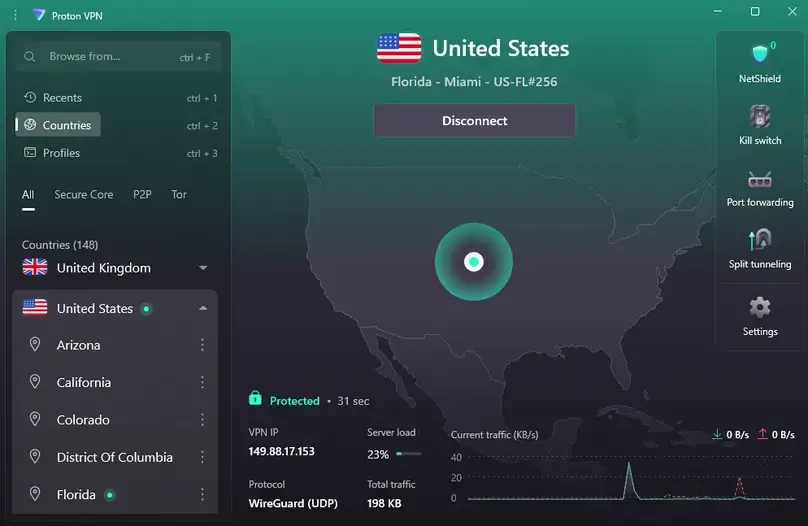
Our speed checks are practical paid-account checks, not a laboratory benchmark or a guarantee that every user will see the same speeds. VPN performance varies by ISP, device, router, protocol, server load, region, time of day, and the specific Speedtest route selected.
Plans and value
Proton VPN Pricing and Plans
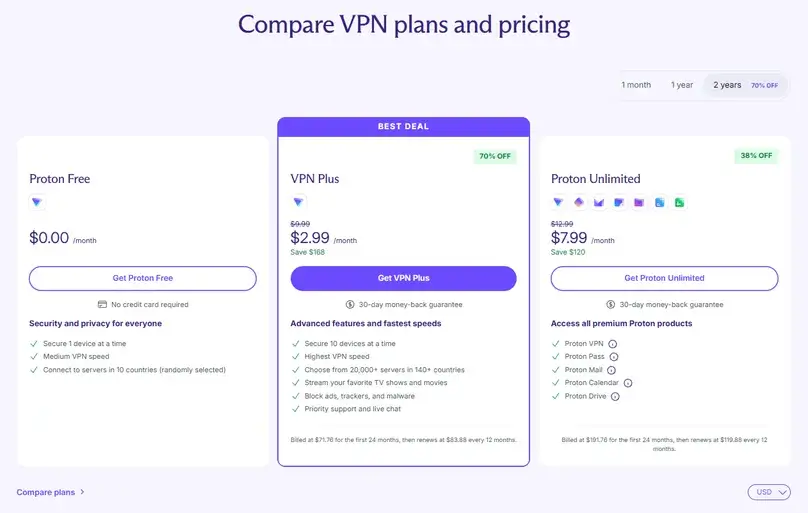
Proton VPN has a clearer pricing structure than many VPNs because it offers a real free plan, a dedicated VPN Plus plan, and broader Proton ecosystem bundles such as Proton Unlimited. For an apples-to-apples VPN comparison, the most important number is the true one-month VPN Plus price, not the advertised monthly equivalent of a long-term plan.
At review time, Proton VPN Plus was listed at $9.99/month for the monthly plan. The annual VPN Plus offer was listed at $3.99/month, billed at $47.88 for the first 12 months, then renewing at $83.88 every 12 months. The 2-year VPN Plus offer was listed at $2.99/month, billed at $71.76 for the first 24 months, then renewing at $83.88 every 12 months. Proton Unlimited was listed at $12.99/month monthly, with annual and 2-year options for users who want Proton Mail, Drive, Calendar, Pass, and the broader ecosystem.
| Plan / factor | Price checked | What it means |
|---|---|---|
| Free plan | Free; no credit card required in our review notes | Good for basic privacy use, but limited to 1 active connection and fewer paid-plan features. |
| VPN Plus monthly | $9.99/month | The cleanest paid VPN comparison point against other true monthly VPN plans. |
| VPN Plus annual | $47.88 first 12 months; renews at $83.88 every 12 months | Lower first-year average, but renewal terms matter. |
| VPN Plus 2-year | $71.76 first 24 months; renews at $83.88 every 12 months | Lowest initial VPN Plus average, but it requires a longer upfront commitment. |
| Proton Unlimited monthly | $12.99/month | Relevant if you also want Proton Mail, Drive, Calendar, Pass, and the broader privacy suite. |
| Dedicated IP | Not available for individual VPN Plus users in our support check | Dedicated servers/IPs are positioned for business plans rather than normal consumer VPN Plus. |
Want to compare this VPN against your own no-VPN baseline? Use our VPN speed test and speed-loss calculator for a repeatable at-home method and local, privacy-preserving calculation. Prices are based on the pricing view and account/billing checks available during our June 2026 review. VPN prices, tax, region, promotional discounts, and renewals can change. Always confirm the checkout price before subscribing.
Interested in Proton VPN? Check current pricing, free-plan limits, paid-plan features, refund terms, and renewal details before choosing.
Visit Site Compare Top PicksPrivacy and security
Privacy, Security, and Trust Signals
Proton VPN’s strongest appeal is its privacy posture. The company positions Proton VPN around Swiss privacy law, a strict no-logs policy, open-source apps, independent audits, and security features designed for people who want more than a basic location-changing VPN.
No-logs, open-source apps, and audits
We reviewed Proton’s no-logs, audit, transparency, open-source/GitHub, privacy, and terms materials. A no-logs claim is most useful when it is backed by public policy language, independent audit history, transparency reporting, and apps that can be inspected. That does not mean users should treat any VPN as magic anonymity, but Proton’s privacy documentation is stronger than many basic consumer VPNs.
NetShield
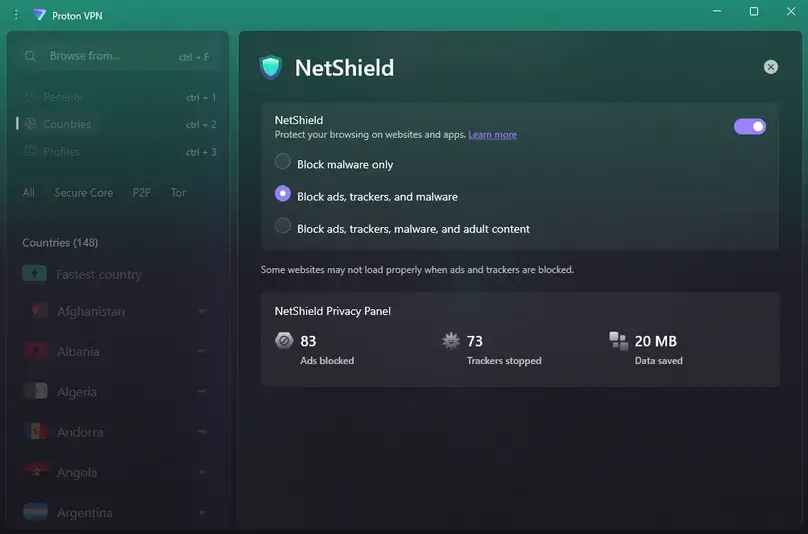
NetShield is Proton VPN’s DNS-based blocker for known malware, ads, and trackers. In our Windows app review, NetShield was visible and the mode Block ads, trackers, and malware was enabled. We also reviewed NetShield statistics in the app. We did not run malware tests; we treated NetShield as a browsing and privacy layer, not as a replacement for browser hygiene, device updates, or security software.
Secure Core
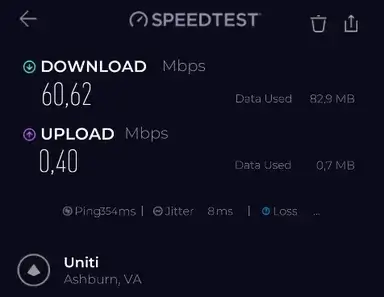
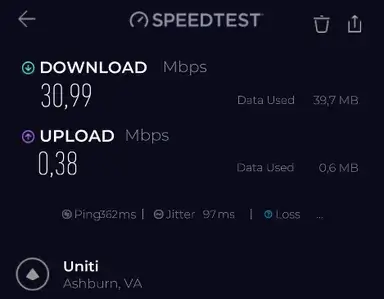
Secure Core is Proton VPN’s multi-hop privacy feature. It routes traffic through selected Proton-controlled Secure Core infrastructure before sending traffic to the final VPN exit server. It is valuable for higher-risk privacy scenarios, but our speed checks showed the expected tradeoff: a U.S. Secure Core route via Iceland was substantially slower than normal WireGuard connections.
Speed and performance
Structured Paid-Account Speed Checks
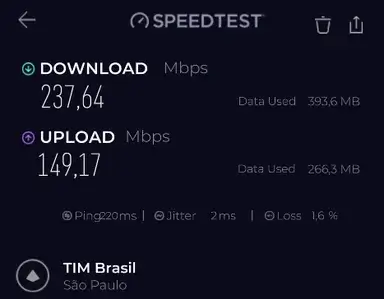
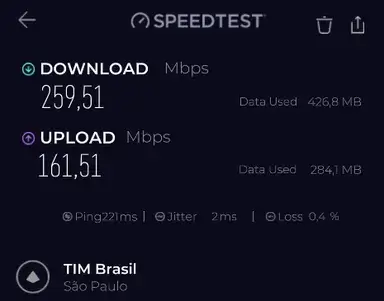
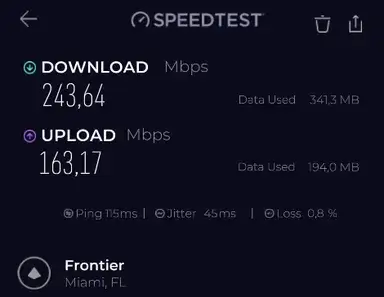
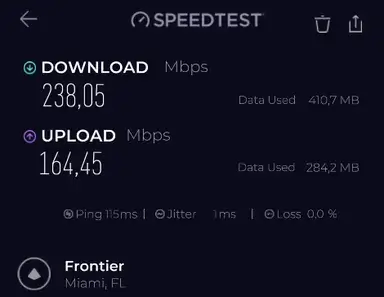
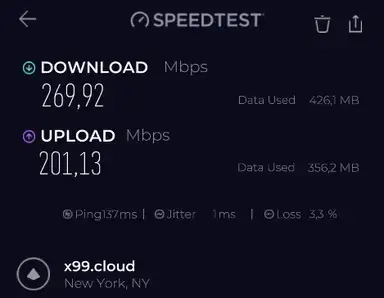
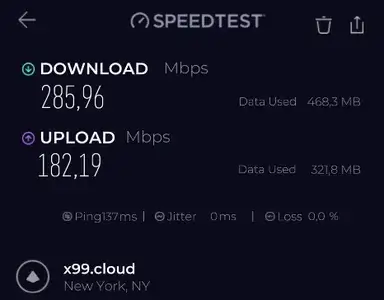
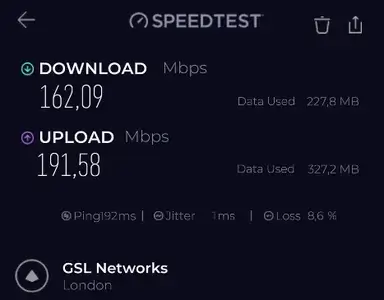
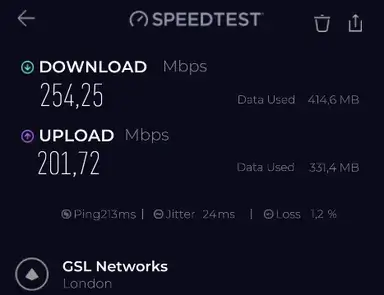
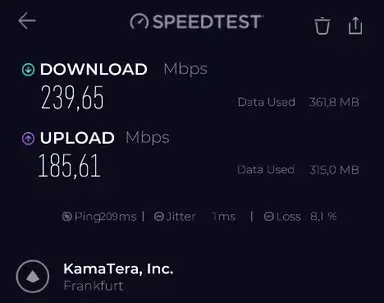
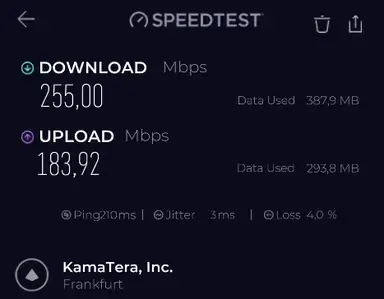
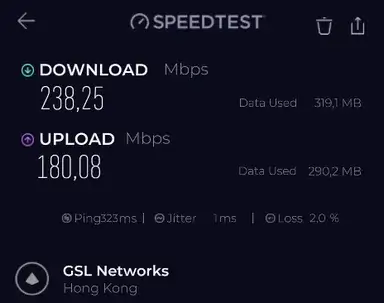
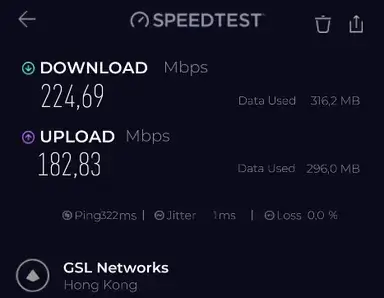
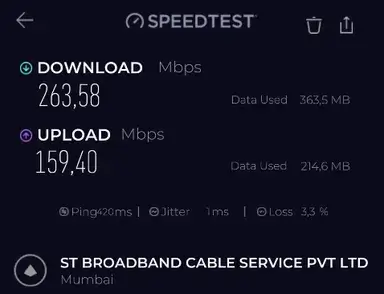
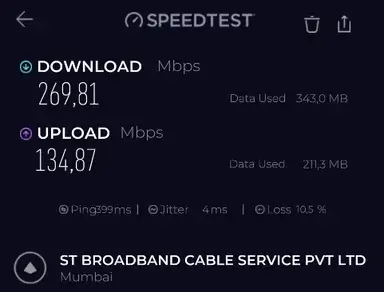
We tested Proton VPN with the Speedtest by Ookla Windows app on a Windows 10 device over Wi-Fi, with VPN Accelerator on and NetShield set to block ads, trackers, and malware. Our no-VPN baseline across 12 checks averaged about 326.10 Mbps download and 195.26 Mbps upload. We do not publish the baseline screenshots because they expose unnecessary local test-environment details.
WireGuard UDP was the clear performance winner in our protocol checks. It retained strong download speeds on nearby, U.S., European, and distant routes. Upload retention was also strong on several international routes. The one standout downside was latency visibility: the Proton VPN Windows app showed server load and connection details, but it did not show per-server latency in the location list the way several competing VPN apps did in our testing.
| VPN location | Protocol | Avg. ping | Avg. download | Avg. upload | Download retention | Upload retention |
|---|---|---|---|---|---|---|
| São Paulo, Brazil | WireGuard UDP | 220 ms | 248.57 Mbps | 155.34 Mbps | 76.2% | 79.6% |
| Miami, USA | WireGuard UDP | 115 ms | 240.84 Mbps | 163.81 Mbps | 73.9% | 83.9% |
| New York City, USA | WireGuard UDP | 137 ms | 277.94 Mbps | 191.66 Mbps | 85.2% | 98.2% |
| London, UK | WireGuard UDP | 202 ms | 208.17 Mbps | 196.65 Mbps | 63.8% | 100.7% |
| Frankfurt, Germany | WireGuard UDP | 210 ms | 247.32 Mbps | 184.76 Mbps | 75.8% | 94.6% |
| Hong Kong | WireGuard UDP | 322 ms | 231.47 Mbps | 181.46 Mbps | 71.0% | 92.9% |
| Mumbai, India | WireGuard UDP | 410 ms | 266.69 Mbps | 147.13 Mbps | 81.8% | 75.4% |
Retention is calculated against the average of our 12 no-VPN baseline checks from the same review session. These figures should be read as practical paid-account results from one environment, not universal performance guarantees.
Protocol comparison
On a Miami server, WireGuard UDP was the fastest and most balanced option in our testing. OpenVPN UDP was usable but slower. WireGuard TCP, OpenVPN TCP, and Stealth were much slower for upload in this session, which is not surprising because TCP-based or restrictive-network-oriented protocols often trade speed for compatibility.
| Protocol | Avg. ping | Avg. download | Avg. upload | Download retention |
|---|---|---|---|---|
| WireGuard UDP | 114 ms | 267.82 Mbps | 165.50 Mbps | 82.1% |
| OpenVPN UDP | 115 ms | 200.28 Mbps | 130.64 Mbps | 61.4% |
| WireGuard TCP | 116 ms | 102.20 Mbps | 4.49 Mbps | 31.3% |
| OpenVPN TCP | 116 ms | 139.12 Mbps | 4.81 Mbps | 42.7% |
| Stealth | 114 ms | 114.42 Mbps | 3.67 Mbps | 35.1% |
For the broader technical context behind these results, see our VPN protocols comparison, including WireGuard, OpenVPN, IKEv2, TCP/UDP, provider-specific modes, and our paid protocol test data.
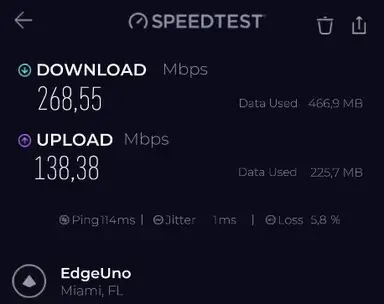
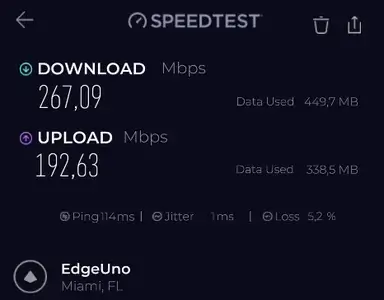
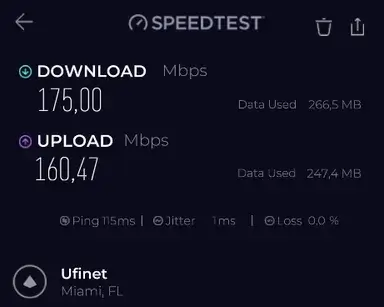
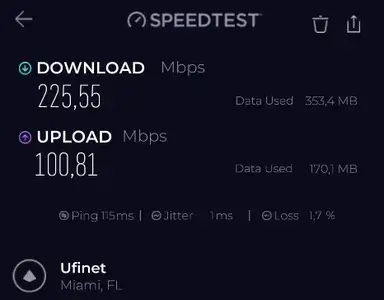
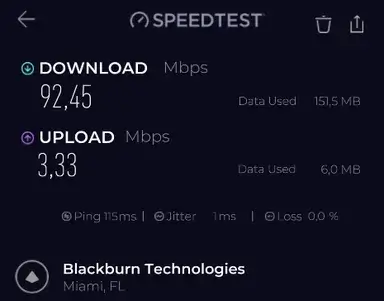
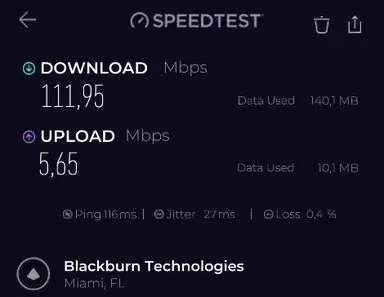
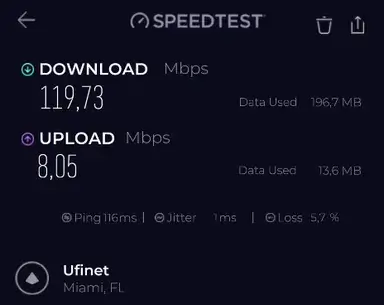
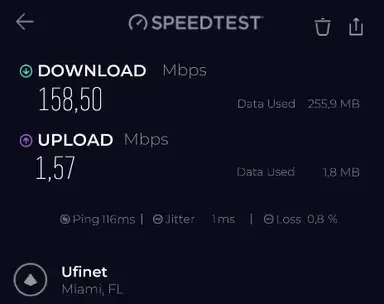
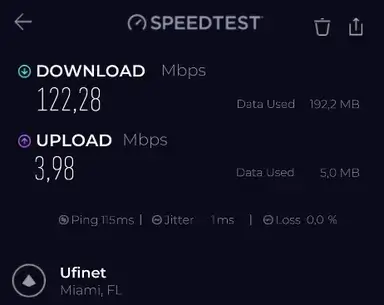
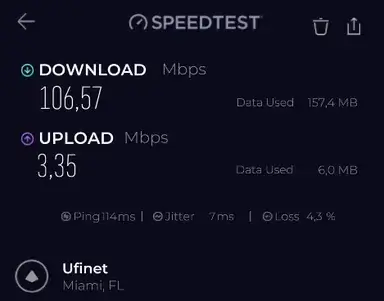
For most users, WireGuard UDP should be the first protocol to try. Stealth is still valuable, but more as a restrictive-network option than as the fastest default protocol.
Network
Server Network and Locations
Proton VPN’s public pages describe a very large paid-plan server network, with 20,000+ servers in 140+ countries at the time of review. In the Windows app, we confirmed a broad list of countries and special server categories, including P2P, Tor, and Secure Core tabs.
Server count alone should not decide the purchase. What matters is whether Proton VPN has reliable locations in the countries you need, whether those servers support your specific use case, and whether the app makes it easy to choose the right location. Proton’s missing per-server latency display was one of the few app-level drawbacks we noted because it made manual server selection less transparent than in some competing VPN apps.
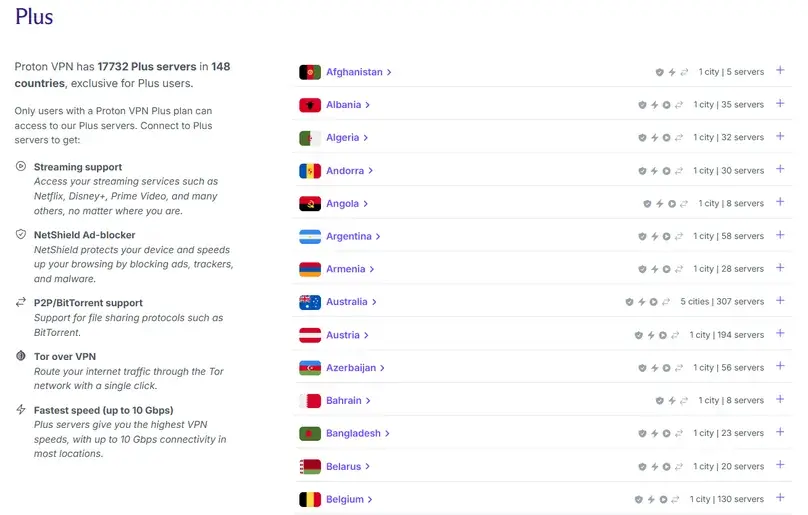
During the refund window, test a nearby server, one U.S. server, one European server, one distant server, and any country you need for travel, banking, work, or region-specific content.
Apps
Apps, Devices, and Ease of Use
We tested Proton VPN on Windows 10, Android 13, and browser extensions, with the Windows app as the primary review environment. The Windows app version tested was 4.4.1. Login, installation, Quick Connect, manual country selection, server selection, profiles, NetShield, Secure Core, split tunneling, kill switch, port forwarding, VPN Accelerator, custom DNS, Moderate NAT, P2P, and Tor servers were reviewed.
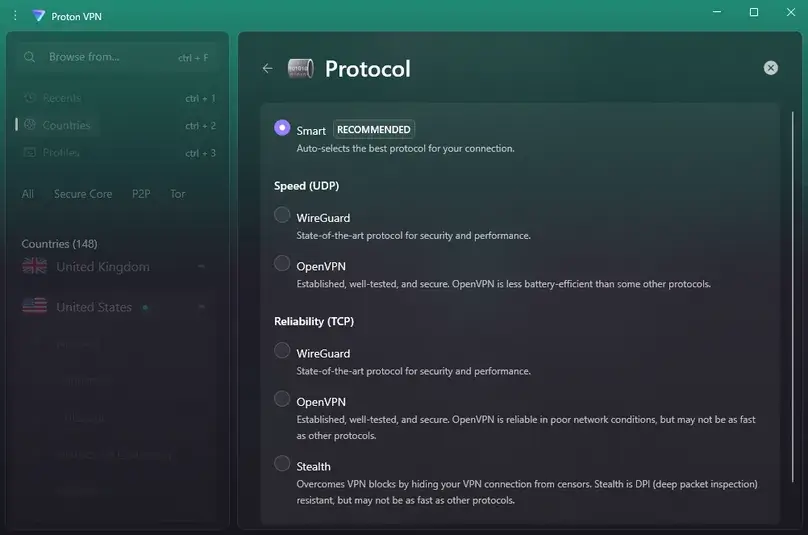
The app is polished, but not the simplest in the category. It exposes meaningful privacy and performance controls, which is good for careful users, but beginners may need to understand the difference between normal servers, Secure Core, Tor servers, P2P servers, profiles, NetShield modes, protocols, and port forwarding.
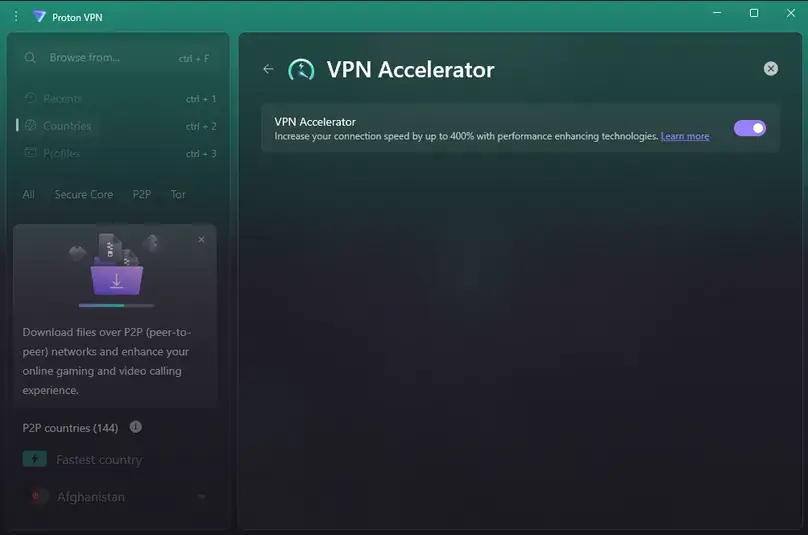
Protocols and VPN Accelerator
We checked Smart/Automatic, WireGuard, OpenVPN UDP, OpenVPN TCP, and Stealth. WireGuard UDP was the fastest and most stable in our tests. Stealth was available and useful as a restrictive-network option, but it was not needed for the streaming checks we performed because the normal U.S. WireGuard server worked well.
Advanced controls
Advanced settings included VPN Accelerator, NAT type, custom DNS, kill switch modes, and other controls. Moderate NAT is particularly relevant for users who care about gaming or peer-to-peer connectivity. Custom DNS is useful, but users should understand that changing DNS behavior can affect leak protection, NetShield, and troubleshooting.
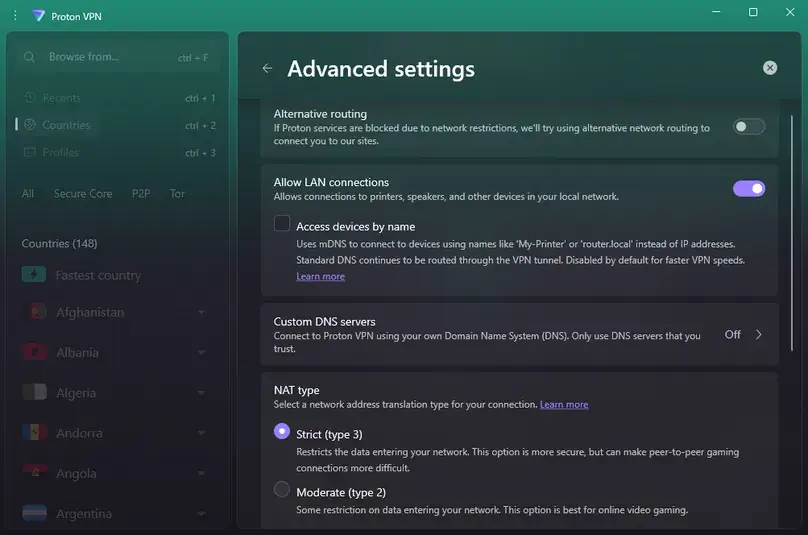
Advanced features
Secure Core, NetShield, Split Tunneling, Port Forwarding, and Dedicated IP
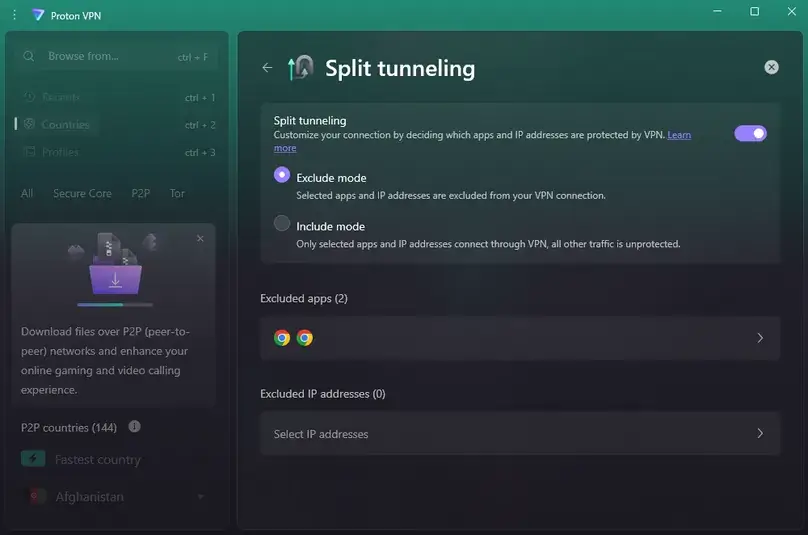
Split tunneling
Split tunneling worked in our checks. We added Chrome and other apps to test routing behavior, and Proton’s implementation was especially flexible because it allowed both Exclude and Include modes. That makes it easier to create either a “most apps use VPN except these” setup or an “only these apps use VPN” setup. Our VPN split-tunneling guide compares those two route directions and shows how to verify both.
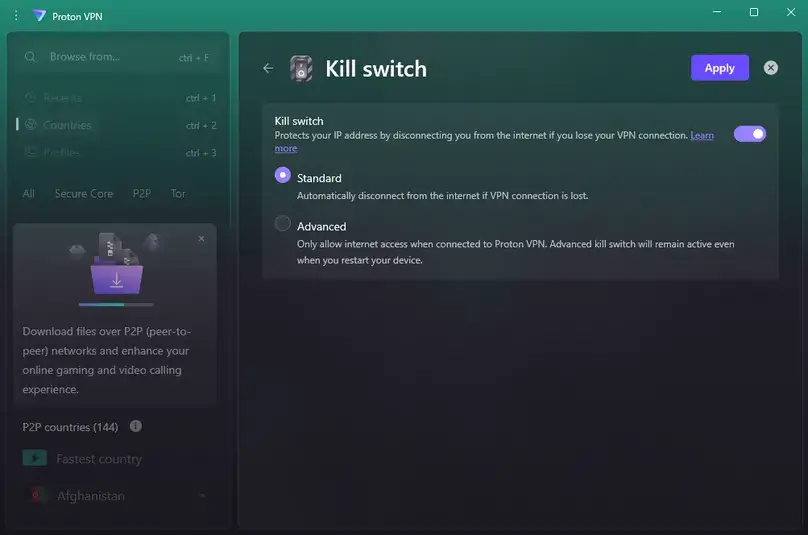
Kill switch
Proton VPN offered both standard and advanced/permanent kill switch modes. The standard mode automatically disconnects internet access if the VPN connection is lost. The advanced mode is stricter and only allows internet access when connected to Proton VPN, even after a device restart. In our manual check, the kill switch worked as expected.
Want to reproduce this safety check? Our VPN Kill Switch guide explains the Windows failure test, Pass / Fail / Inconclusive interpretation, manual-disconnect caveat, and the limits of browser-level evidence.
Port forwarding
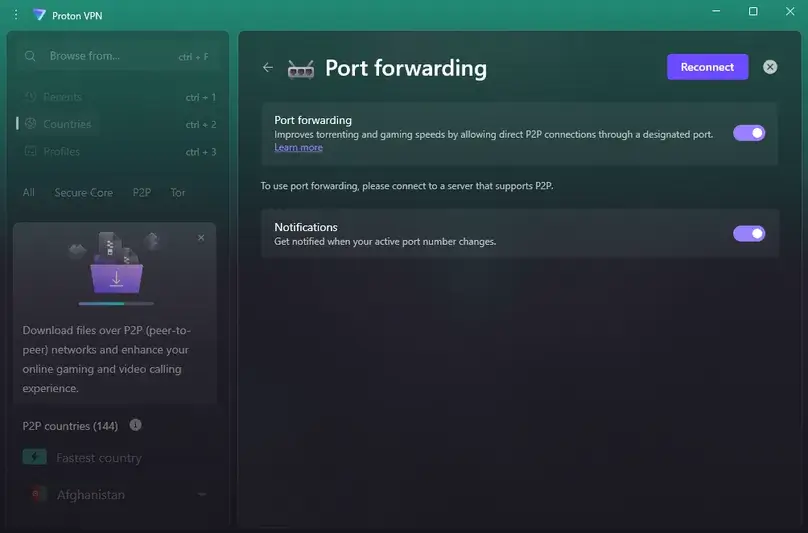
Port forwarding is available on paid Proton VPN plans, not on the free tier. In our Windows app test, port forwarding required P2P servers and assigned a random port. The assigned port changed after reconnecting, and we confirmed that users cannot manually choose a fixed port in the normal app flow. This is useful for P2P and inbound-connectivity use cases, but it is less convenient for users who need a stable port.
For the feature-level test method and the differences across providers, see our VPN port forwarding guide.
Dedicated IP
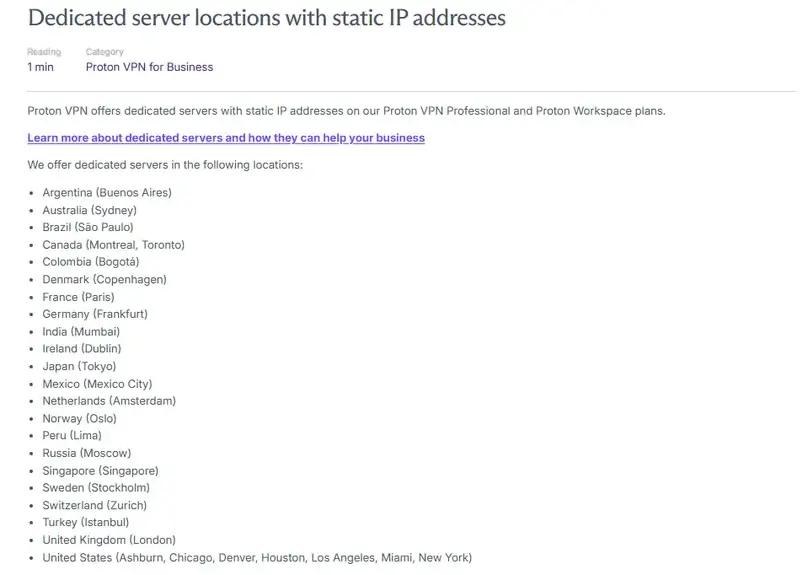
Dedicated IP was the least clear feature to verify. Proton VPN support clarified that dedicated servers/IPs are not offered to normal individual VPN Plus users at the moment; they are tied to business plans such as VPN Professional and related Proton business plans. We did not purchase a business dedicated server.
Leak checks
DNS, WebRTC, and IP Change Checks
We performed browser-based DNS and WebRTC checks while connected to a New York City Proton VPN server. In those checks, the VPN DNS/location appeared and the real ISP DNS or real IP did not appear. We also confirmed that IP/location changed when connecting to a U.S. VPN server.
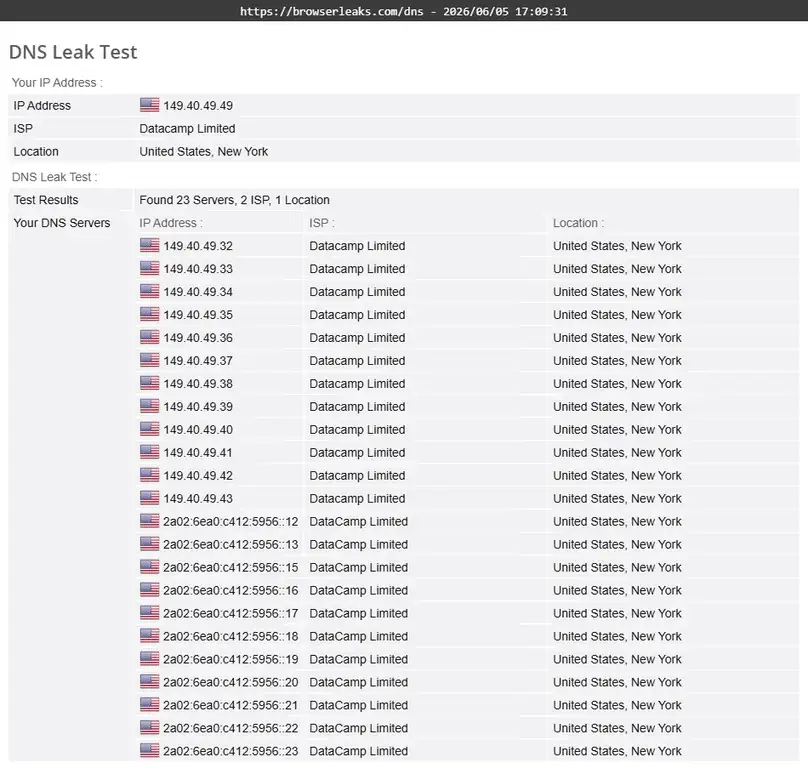
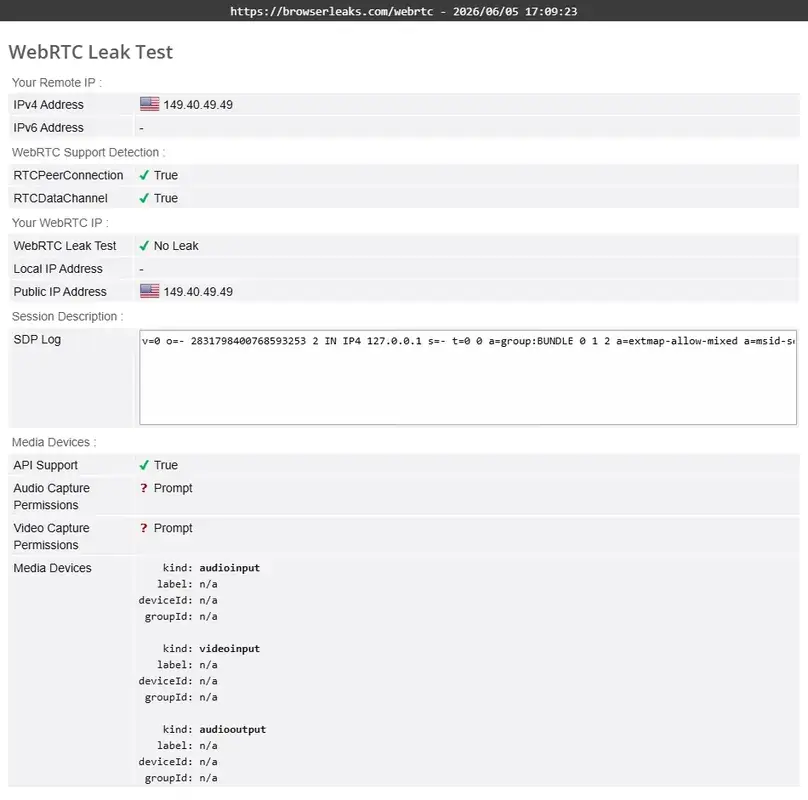
These checks are useful spot checks for browser and DNS behavior in our test setup. They do not prove every browser, protocol, app, router, or device configuration will behave identically.
Use cases
Best Use Cases for Proton VPN
Everyday privacy and public Wi-Fi
Proton VPN is a strong fit for everyday encrypted browsing, public Wi-Fi use, and general privacy-conscious browsing. A VPN can encrypt the connection between your device and the VPN server, reducing exposure to local network operators and some common public Wi-Fi risks. It does not make you fully anonymous or protect you from every account, browser, device, or website-level risk.
Streaming
Streaming worked very well in our paid-account spot checks. Using a normal New York City Proton VPN server with NetShield enabled, Amazon Prime Video, Apple TV+, Netflix, Disney Plus/Hulu, and a live video stream loaded and played successfully in our test environment. We did not need Secure Core or Stealth for those checks. Streaming access can change by platform, region, account, server, and time, so treat this as a strong result from our test setup rather than a permanent guarantee.
P2P and torrenting
Proton VPN supports P2P on paid plans and showed P2P server categories in the app. Port forwarding also appeared in the Windows app and was tested as a setting. We did not need to perform a real torrent download to evaluate the basic visibility of P2P and port forwarding controls.
Higher-risk privacy use cases
Secure Core is Proton VPN’s main higher-risk privacy differentiator. It is not necessary for every casual user, and it can add significant latency and reduce speeds, but it gives Proton a stronger privacy architecture story than basic single-hop VPNs.
Support and refund
Customer Support, Billing, and Refund Experience
Proton’s support experience was useful but different from other VPNs we tested. Live chat was available after becoming a paid user; the free plan did not provide the same live chat access in our experience. For pre-purchase questions, a support agent named Austen moved the detailed technical and billing questions to email and replied after a few hours with specific answers.
Support clarified important details: direct website purchases are eligible for the 30-day refund policy, the refund applies to monthly, annual, and 2-year plans, renewals are not covered the same way because refunds can only be requested once per user, Apple subscriptions must go through Apple, Google Play in-app subscriptions can be handled by Proton, cash and bank transfer payments are not refundable, Bitcoin follows the support process, port forwarding uses a random port, and dedicated IP/dedicated servers are for business plans rather than normal consumer VPN Plus.
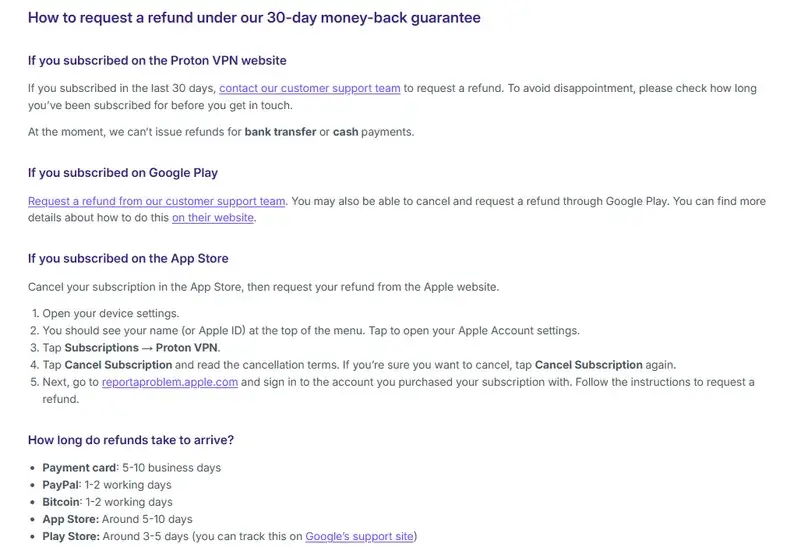
Our refund process
We requested a refund on June 8, 2026 through live chat. A human support agent processed the request, no refund button was available in the account dashboard, and no additional questions were asked. The agent stated that the refund should be processed immediately and returned to the original payment method. Because the account reverted to the free tier after refund processing, the live chat disconnected before we could review every final message. Our final payment record separately confirms that the full PayPal payment returned on the request date; see the dated row in our VPN refund comparison.
Cancellation and refund are separate concepts. Cancelling a subscription prevents future billing, but a refund request still needs to be submitted through the appropriate support or app-store path. Payment method and purchase channel matter.
Reputation
Reputation and User Reviews
Proton VPN has a strong reputation among privacy-focused reviewers and users who value open-source apps, Swiss jurisdiction, audits, and a free plan that is not just a short trial. Its broader public user-review footprint can still include complaints around billing, support expectations, app behavior, or confusion between Proton ecosystem plans.
Positive themes
Privacy-focused positioning, useful free plan, strong paid speed checks in our review, streaming success in our U.S. tests, Secure Core, NetShield, P2P, open-source apps, and audit/no-logs documentation.
Negative themes
No live chat for free users in our experience, no individual dedicated IP add-on, limited visible latency data in the app, 10-device limit, and Secure Core speed tradeoffs.
Alternatives
Proton VPN Alternatives
NordVPN
Choose NordVPN if you want a highly polished mainstream premium VPN with strong app usability, broad features, and excellent paid-account speed results in our prior review.
Read our NordVPN reviewPrivate Internet Access
Choose PIA if you want unlimited device connections, deeper customization, MACE, split tunneling, port forwarding, and open-source app positioning with a more technical interface.
Read our Private Internet Access reviewPureVPN
Choose PureVPN if you want a mainstream VPN with broad add-ons, platform-specific shortcuts, dedicated IP options, port forwarding, and a 31-day refund window.
Read our PureVPN reviewSurfshark
Choose Surfshark if you want a value-focused VPN with unlimited devices and broad bundled security features, especially if you plan to protect many devices.
Compare VPN top picksFinal verdict
Should You Choose Proton VPN?
Proton VPN is an excellent fit if you want a privacy-first VPN with a real free plan, strong paid features, and a company that invests in transparency signals. Our paid-account checks were positive overall: WireGuard UDP performed very well, streaming worked smoothly in our U.S. server tests, DNS and WebRTC leak checks did not expose the real IP/DNS in our setup, NetShield was easy to review, split tunneling worked, and support provided detailed billing/technical answers.
The main drawbacks are not dealbreakers, but they matter. The app does not show latency in the server list the way some competitors do. Free users do not get the same live chat access. Dedicated IP is not available for individual VPN Plus users. Secure Core is valuable but much slower in our test. And Proton’s broader ecosystem can make pricing decisions more complex if you are comparing VPN Plus against Proton Unlimited.
For privacy-first users who also want a fast paid VPN, Proton VPN is one of the strongest options we have reviewed so far. For users who prioritize unlimited devices, dedicated IP, or the simplest possible app, compare it with PIA, NordVPN, PureVPN, and Surfshark before deciding.
Review checklist
What We Checked in This Review
Common questions
Proton VPN FAQ
Is Proton VPN good for most users?
Yes, Proton VPN is a strong choice for many users, especially if privacy, open-source apps, a free plan, and advanced paid features matter. It is less ideal if you want unlimited device connections, individual dedicated IP, or the simplest possible interface.
Does Proton VPN have a free plan?
Yes. Proton VPN has a free plan that does not require a credit card in our review notes. The free plan is useful for basic privacy, but it has fewer locations, fewer active connections, and does not include the full paid feature set.
How much does Proton VPN cost?
At review time, Proton VPN Plus was listed at $9.99/month for the monthly plan. The annual and 2-year offers had lower first-term averages but different renewal terms. Proton Unlimited was listed at $12.99/month monthly for users who want the broader Proton ecosystem.
Is Proton VPN fast?
In our structured paid-account checks, Proton VPN was fast on WireGuard UDP. New York averaged 277.94 Mbps download, Miami averaged 240.84 Mbps, and even distant servers such as Hong Kong and Mumbai stayed above 230 Mbps download in our test environment. Results vary by user, ISP, device, and route.
Does Proton VPN work for streaming?
Streaming worked well in our U.S. server spot checks. Amazon Prime Video, Apple TV+, Netflix, Disney Plus/Hulu, and a live stream loaded and played successfully. Streaming access can change quickly, so test the specific service and region you need during the refund window.
Does Proton VPN include port forwarding?
Yes, port forwarding is included on paid Proton VPN plans. In our Windows app test, it required a P2P server and assigned a random port. Support said users cannot manually choose a fixed port in the normal app flow.
Does Proton VPN offer dedicated IP?
Not for normal individual VPN Plus users in our support check. Proton support said dedicated servers/IPs are available through business plans such as VPN Professional and related Proton business plans.
What is Secure Core?
Secure Core is Proton VPN’s multi-hop privacy feature. It routes traffic through selected Secure Core infrastructure before the final exit server. It can improve privacy for higher-risk use cases, but our speed test showed a major performance penalty compared with normal WireGuard connections.
What is NetShield?
NetShield is Proton VPN’s DNS-based blocker for malware, ads, and trackers. In our Windows app review, it showed modes for malware-only blocking, ads/trackers/malware blocking, and adult-content filtering. It is useful, but it is not a complete replacement for normal device and browser security practices.
Does Proton VPN have a 30-day refund policy?
Yes, eligible purchases have a 30-day refund policy. In our support check, Proton said the refund applies to monthly, annual, and 2-year subscriptions, but renewals are not treated the same way because refunds can only be requested once per user. Cash and bank transfers were not refundable, and Apple subscriptions must be handled through Apple.
Source notes
Sources Reviewed
This page was updated from Proton VPN official pricing, refund, terms, privacy, server, app, feature, Linux, router, support, no-logs, audit, transparency, and paid-account materials, plus our own paid hands-on workflow and screenshots from June 2026.
- Proton VPN pricing page
- Proton VPN cancellation and refund support
- Proton VPN privacy policy
- Proton VPN server network
- Proton VPN no-logs support page
- Proton VPN no-logs audit information
- Proton VPN Secure Core support
- Proton VPN NetShield support
- Proton VPN port forwarding support
- Proton VPN split tunneling support
- Proton VPN P2P support
- Proton VPN GitHub
User opinions
Share Your Experience With Proton VPN
If you have used Proton VPN, your experience can help other readers compare free-plan limits, paid-plan features, speed, support, setup, billing, streaming, P2P, and everyday usability. Use the comment section below to share a specific, helpful opinion.