
VPN Review
NordVPN Review: A Paid Hands-On Look at Speed, Apps, Privacy Features, and Refund Flow
NordVPN is a strong all-around VPN for users who want polished apps, broad server coverage, fast modern protocols, extra security tools, and a refund-backed way to evaluate the paid experience before committing long term.
For this update, we purchased NordVPN and reviewed the paid account experience, app settings, speed checks, leak checks, support interaction, and refund flow in May 2026. Reviews Ally may earn a commission when you click some links on this page. Learn more about our advertising disclosure.
Quick verdict
NordVPN: Bottom Line
NordVPN remains one of the easiest premium VPNs to recommend for most mainstream users.
After purchasing NordVPN and reviewing the paid account, Windows app, protocol settings, speed results, DNS/WebRTC checks, support answers, and refund flow, our view became stronger: NordVPN is not the cheapest VPN and it still requires users to pay attention to renewal terms, but the paid experience is polished, fast on the right protocol, and broad enough for privacy, public Wi-Fi, travel, streaming flexibility, and everyday security use.
At a glance
NordVPN Quick Facts
- Best for
- Most users who want a balanced premium VPN with strong apps and security extras
- Hands-on status
- Paid account, billing dashboard, Windows app, support chat, refund flow, speed, DNS, and WebRTC checks reviewed in May 2026
- Pricing model
- Subscription plans with promotional long-term pricing, region-specific checkout, renewal terms, and paid add-ons such as Dedicated IP
- Money-back guarantee
- 30-day refund window for eligible new direct purchases; app-store and renewal conditions may differ
- Devices
- Up to 10 simultaneous devices per account; support told us a router counts as one device
- Notable features
- NordLynx, Meshnet, Threat Protection on eligible plans, Dark Web Monitor, kill switch, split tunneling, and obfuscated/restrictive-network options
Fit
Who NordVPN Is Best For
Consider it if you want…
- A premium VPN that feels polished in account setup, billing, desktop app navigation, and core VPN settings.
- Fast practical speeds on modern protocols, especially NordLynx, based on our paid Windows app checks.
- Security extras beyond a basic VPN tunnel, such as kill switch, split tunneling, Meshnet, Dark Web Monitor, and Threat Protection on eligible plans.
- A provider with public no-logs assurance work, broad server coverage, and a 30-day refund route for new direct purchases.
Look elsewhere if you need…
- The lowest month-to-month VPN cost above all other factors.
- Unlimited simultaneous devices on one account.
- Port forwarding included with the standard VPN subscription; the feature now requires the separate Dedicated Server add-on, which was not part of our May 2026 paid test.
- A privacy-only VPN with fewer bundled security, identity, password, or cloud-storage upsells.
Review process
How We Reviewed NordVPN
For this update, we purchased NordVPN and reviewed the paid-account workflow in May 2026. We checked official pricing and policy pages, account dashboard, billing screen, Windows app setup, protocol settings, kill switch, split tunneling, Meshnet, Threat Protection Pro, DNS and WebRTC leak behavior, support chat, and refund request flow.
What we paid for
We purchased a paid NordVPN subscription, accessed the account dashboard and billing area, and downloaded the Windows app from the account flow.
What we checked in the app
We reviewed Automatic protocol, NordLynx, NordWhisper, OpenVPN UDP, kill switch controls, split tunneling, Meshnet, Threat Protection Pro, and account settings.
What we measured
We ran structured paid-account speed checks from a Latin America-based Wi-Fi connection using the Speedtest by Ookla Windows app, then compared selected VPN results against no-VPN baselines.
What we did not overclaim
We did not treat one test environment as a universal speed guarantee, and we do not present one streaming result as proof that every streaming platform will work in every country.
Plans and value
NordVPN Pricing and Plans
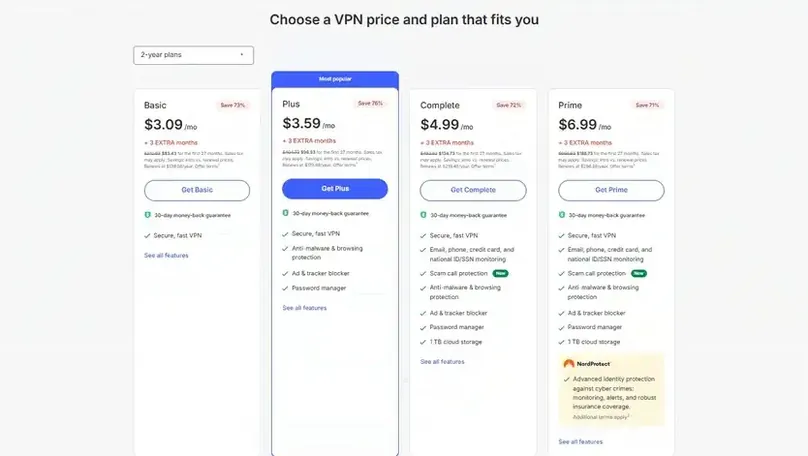
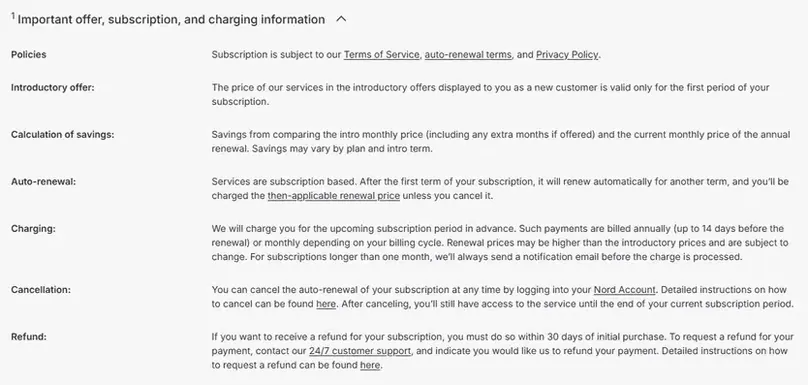
NordVPN’s pricing is heavily promotion-driven. The company offers different plan tiers, longer-term discounts, regional checkout views, renewal pricing, and add-ons. In our May 2026 U.S. pricing view, Basic started at $3.09/month for the promotional 2-year offer. Our August 14 recheck found Basic at $3.49/month equivalent, with $94.23 due for 27 months and a $139.08 annual renewal. Our VPN cost and renewal study keeps the historical screenshot separate from the current dated row and normalizes the renewal to $11.59/month. Buyers should not treat any long-term equivalent as a true month-to-month price or guaranteed future renewal.
In a localized checkout view, we also saw local-currency pricing, local payment options, and a tax/identity requirement at checkout. Payment methods can vary by country. The practical lesson is simple: compare the plan tier, the billing term, the renewal price, taxes, add-ons, and refund eligibility before paying.
| Pricing factor | What we found | Why it matters |
|---|---|---|
| Plan tiers | Basic, Plus, Complete, and Prime appeared in our U.S. pricing view. | More expensive tiers bundle password manager, cloud storage, identity monitoring, and other Nord services. |
| Promotional pricing | The May 2026 screenshot showed Basic from $3.09/month; the August 14 recheck showed $3.49/month equivalent and $94.23 due for 27 months. | Promotional monthly equivalents are not the same as true month-to-month pricing or renewal pricing. |
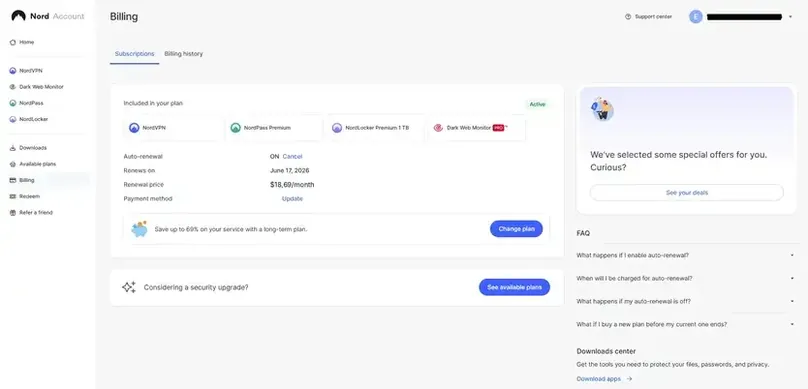
| Renewal visibility | The billing dashboard showed renewal timing and renewal price details after purchase. | VPN users should verify renewal terms before the first discounted term ends. |
| Dedicated IP | Dedicated IP was visible as a paid add-on rather than included by default. | Users who need a stable personal IP should budget separately and check supported countries. |
| Refund window | NordVPN’s policy and support path pointed to a 30-day refund route for eligible new direct purchases. | Our direct-purchase refund request was accepted about three hours after submission. |
Pricing checked in May 2026. NordVPN may change prices, discounts, renewal terms, plan names, taxes, and checkout conditions by country, device, promotion, or account status.
Interested in NordVPN? Check the current plan tier, renewal price, add-ons, and refund terms before choosing.
Visit Site Compare Top PicksPrivacy and security
Privacy, Security, and Trust Signals
NordVPN’s strongest argument is not just that it offers a VPN tunnel. It combines mainstream usability with a number of privacy and security signals that make it easier to evaluate than smaller providers with vague claims.
No-logs assurance work
NordVPN says its no-logs claims have been independently assessed multiple times. Repeated third-party assurance work is a meaningful trust signal compared with a provider that only says “no logs” without supporting documentation. It does not mean users should blindly trust every claim, but it does raise the standard of evidence.
Protocols and connection options
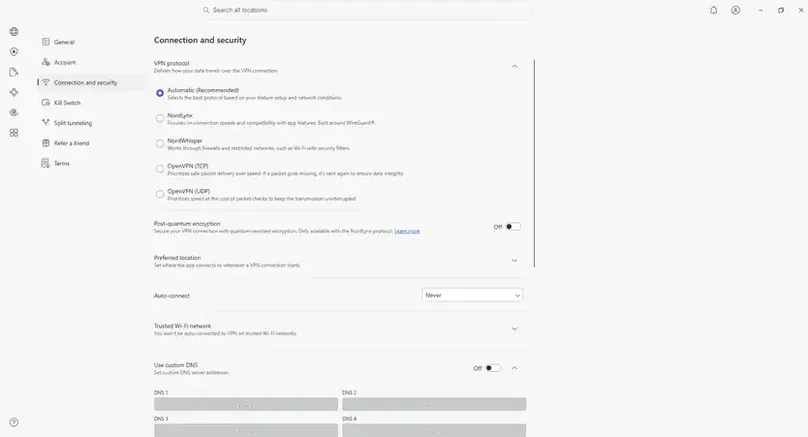
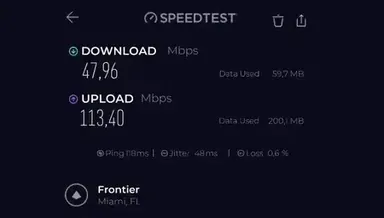
In the Windows app, we reviewed Automatic protocol selection, NordLynx, NordWhisper, OpenVPN TCP, and OpenVPN UDP. NordLynx produced the strongest speed results in some of our checks, while OpenVPN UDP was much slower on the Miami route we tested. NordWhisper was useful in our restrictive-network spot checks, but users should choose protocols based on their own device, country, network, and use case.
Threat Protection Pro and browsing protection
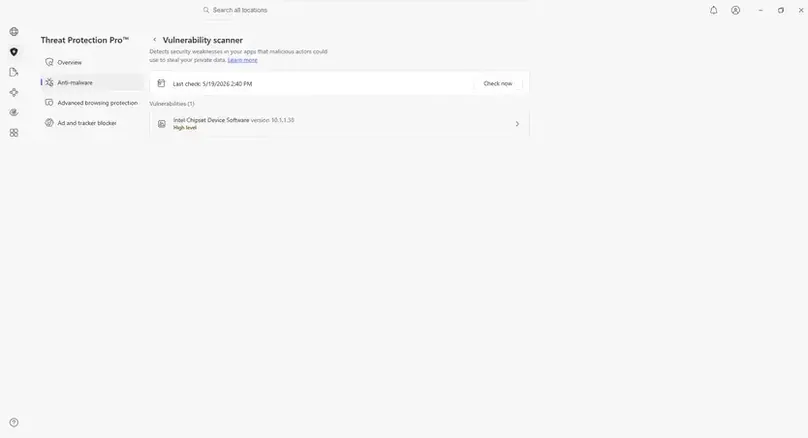
Threat Protection Pro was visible in the Windows app for the paid plan we reviewed. We checked the settings and vulnerability scanner area, but we did not run malware samples or treat the feature as a replacement for safe browsing, operating system updates, password hygiene, or dedicated endpoint protection where needed.
Paid checks
NordVPN Speed, DNS, and WebRTC Checks
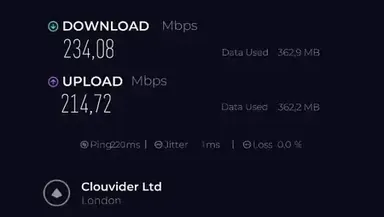
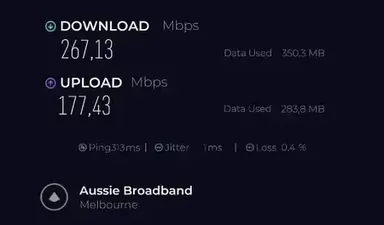
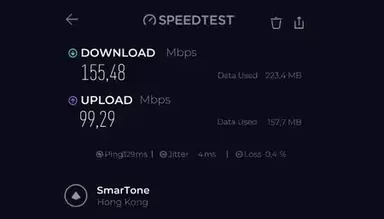
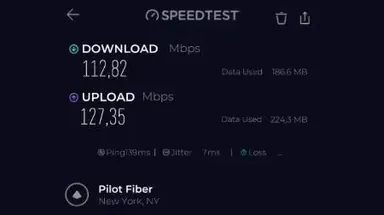
We ran practical paid-account speed checks from a Windows device over Wi-Fi using the Speedtest by Ookla Windows app. We compared selected NordVPN server results against no-VPN baselines from the same connection and session. These checks help show the paid experience we saw, but VPN performance still varies by internet provider, device, router, server load, protocol, distance, and time of day.
| Location | Status | Protocol | Download Mbps | Upload Mbps | Ping ms | Download retention | Editorial note |
|---|---|---|---|---|---|---|---|
| Miami, United States | No VPN baseline | None | 326.09 | 203.10 | 9 | — | Baseline for Miami comparison |
| Miami, United States | NordVPN on | Automatic | 253.08 | 214.06 | 116 | 77.6% | Strong download retention; packet loss appeared in the Speedtest result |
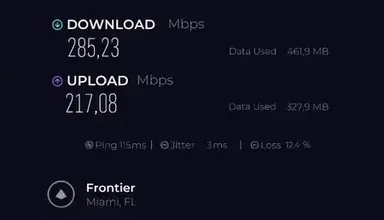
| Miami, United States | NordVPN on | NordLynx | 285.23 | 217.08 | 115 | 87.5% | Best Miami download result in our check |
| Miami, United States | NordVPN on | OpenVPN UDP | 47.96 | 113.40 | 118 | 14.7% | Much slower on this route |
| São Paulo, Brazil | No VPN baseline | None | 302.41 | 239.26 | 9 | — | Baseline for nearby-server comparison |
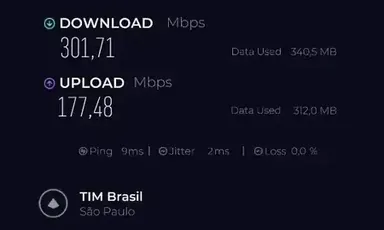
| São Paulo, Brazil | NordVPN on | NordLynx | 301.71 | 177.48 | 9 | 99.8% | Near-baseline download speed |
| São Paulo, Brazil | NordVPN on | Automatic | 261.62 | 215.45 | 9 | 86.5% | Strong practical result |
| London, United Kingdom | No VPN baseline | None | 312.86 | 228.45 | 9 | — | Baseline for London comparison |
| London, United Kingdom | NordVPN on | NordLynx | 234.08 | 214.72 | 220 | 74.8% | Good long-distance result with expected latency increase |
| London, United Kingdom | NordVPN on | Automatic | 240.42 | 219.73 | 220 | 76.8% | Slightly higher download than NordLynx in this run |
| Melbourne, Australia | No VPN baseline | None | 312.04 | 242.76 | 7 | — | Baseline for Melbourne comparison |
| Melbourne, Australia | NordVPN on | NordLynx | 242.05 | 174.36 | 314 | 77.6% | Good long-distance result |
| Melbourne, Australia | NordVPN on | Automatic | 267.13 | 177.43 | 313 | 85.6% | Best distant-location download result in our check |
| Hong Kong | NordVPN on | Automatic | 155.48 | 99.29 | 329 | N/A | No matching no-VPN baseline captured for Hong Kong |
| New York, United States | NordVPN on | Automatic | 112.82 | 127.35 | 139 | N/A | Additional U.S. check without a matching no-VPN baseline |
For the broader technical context behind these results, see our VPN protocols comparison, including WireGuard, OpenVPN, IKEv2, TCP/UDP, provider-specific modes, and our paid protocol test data.
Download retention = NordVPN download speed divided by the matching no-VPN baseline. Packet loss appeared in some Speedtest screenshots, which can vary by test server and route; we used these results as practical paid-account checks rather than a universal speed guarantee.
Want to compare this VPN against your own no-VPN baseline? Use our VPN speed test and speed-loss calculator for a repeatable at-home method and local, privacy-preserving calculation.
DNS and WebRTC leak checks
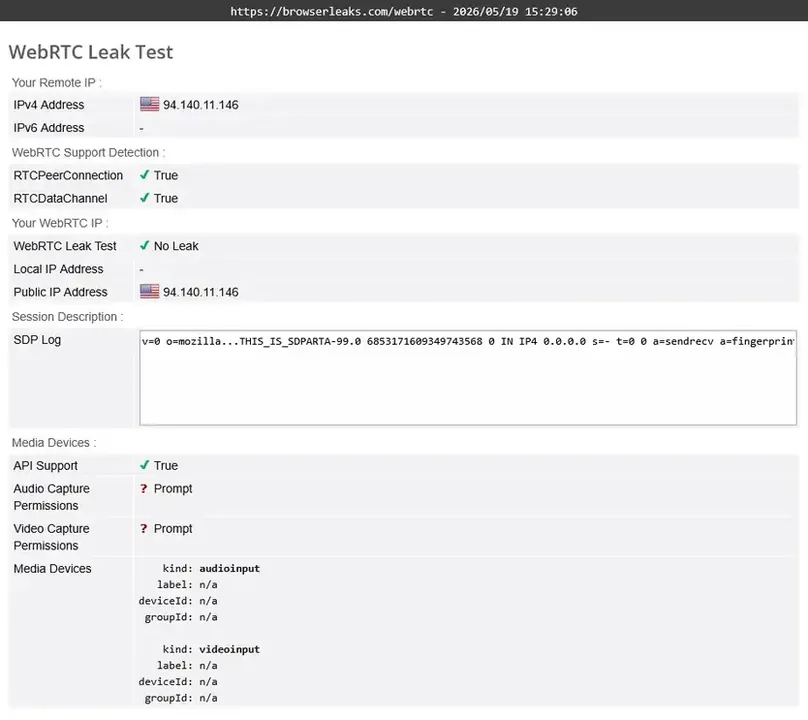
With NordVPN connected to a U.S. server, public IP lookup tools showed a U.S. IP. BrowserLeaks DNS results showed NordVPN-related DNS servers in the selected location rather than our original ISP DNS, and the WebRTC test reported “No Leak.” We do not publish the original IP or sensitive account identifiers in this review.
Network
Server Network and Locations
NordVPN publishes a large global server network across many regions, and the Windows app showed many country options during our paid-account check. In practical terms, NordVPN gives mainstream users enough coverage for common VPN needs: public Wi-Fi, travel, remote browsing, streaming flexibility, P2P-friendly routing, and testing how websites behave from different regions.
For most buyers, the headline server count matters less than whether the provider has the countries, device apps, and specialty settings they actually need. If you need a stable personal VPN IP, check availability separately because NordVPN sells it as an add-on and does not offer it in every country.
Apps and setup
Apps, Devices, and Ease of Use
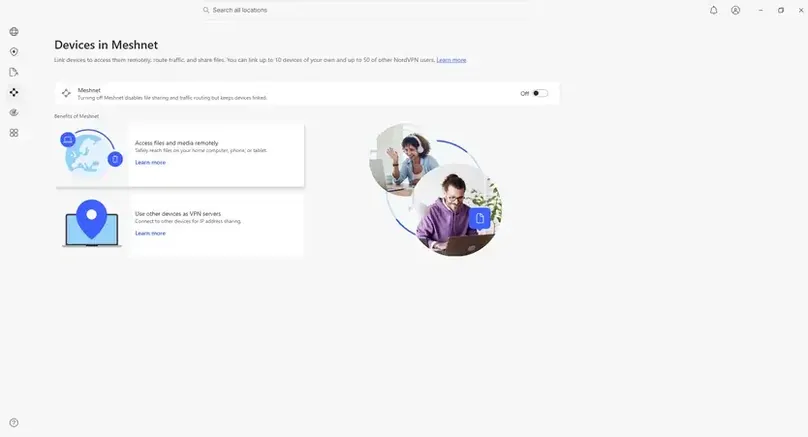
NordVPN’s paid account gave us access to the Windows app, NordPass, NordLocker, and Dark Web Monitor areas. We focused on the VPN app experience because that is the core buying reason for most readers. Installation was straightforward, and the Windows app made the key settings easy to find: protocol, account, connection and security, kill switch, split tunneling, Meshnet, and Threat Protection.
Protocols checked
Automatic, NordLynx, NordWhisper, OpenVPN TCP, and OpenVPN UDP were visible in the Windows app. NordLynx delivered the strongest results in several of our speed checks.
Kill switch checked
Internet Kill Switch and App Kill Switch were visible and worked in our Windows app check.
Split tunneling checked
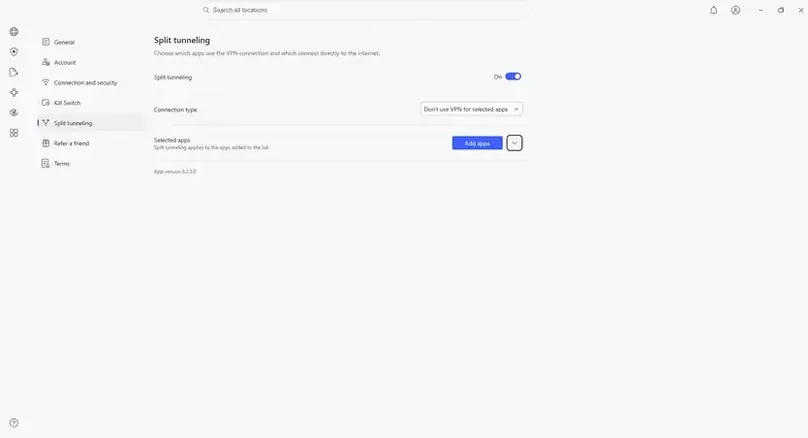
We added Chrome and other apps to split tunneling, and the selected apps continued using the original connection instead of the VPN route. Our VPN split-tunneling guide explains this bypass direction and shows how to compare it with include-only routing.
Router device count
Support told us a router counts as one device toward the 10-device limit, regardless of how many devices connect behind that router.
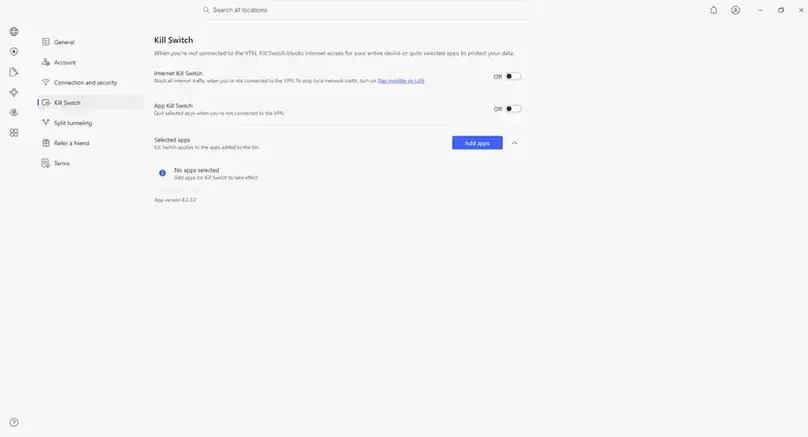
Want to reproduce this safety check? Our VPN Kill Switch guide explains the Windows failure test, Pass / Fail / Inconclusive interpretation, manual-disconnect caveat, and the limits of browser-level evidence.
Use cases
Streaming, Travel, P2P, and Everyday Use
NordVPN is strongest as an all-around VPN rather than a one-feature product. Based on our paid-account review, it is suitable for everyday privacy, public Wi-Fi, travel, region testing, and users who want a polished app with modern protocols and security extras.
Streaming checks
In our U.S. server check using NordWhisper, Amazon Prime Video, Netflix, DisneyPlus and AppleTV loaded and played from the U.S. catalog during our session succesfully. A separate sports live video stream also loaded smoothly and played without visible quality loss in that test environment.
P2P and port forwarding
During our May 2026 paid review, NordVPN support told us the standard service did not support port forwarding. NordVPN has since introduced a separate Dedicated Server add-on with configurable port-forwarding rules; standard NordVPN servers and the Dedicated IP add-on still do not support the feature. We have not tested Dedicated Server hands-on. That distinction matters for users who specifically need inbound connection control, advanced torrent seeding, or technical remote-access workflows. See our VPN port forwarding guide for the current comparison.
Restrictive networks
NordWhisper was useful in our spot checks where other connection routes triggered more friction, including a YouTube bot-challenge scenario. We would not treat that as proof that NordVPN works in every restrictive country, school, workplace, or filtered network, but it is a meaningful feature for users who run into network-level blocking.
Support and refund
Customer Support, Billing, and Refund Experience
We contacted NordVPN support before purchase and asked for a temporary test account for editorial review. The bot and then a live agent said they could not provide a free test account, but pointed us to the 30-day money-back guarantee. We then purchased a paid subscription and used the account/support flow to request a refund after testing.
| Question area | What support clarified | Why it matters |
|---|---|---|
| Refund eligibility | Support said new direct purchases requested within 30 days are eligible for refund. | This supported our decision to complete a paid review. |
| Recurring payments | Support noted recurring monthly payments are not refundable on their end. | Users should distinguish the initial 30-day purchase window from later renewals. |
| Dedicated IP | Support said the refund procedure for Dedicated IP and other services is the same, subject to the recurring-payment caveat. | Add-on buyers should still confirm terms before purchase. |
| Port forwarding | Available only through NordVPN’s newer Dedicated Server add-on; standard VPN servers and Dedicated IP do not support it. Our May 2026 paid review did not test Dedicated Server. | Technical users who require inbound connectivity should factor in the separate product and our untested evidence scope. |
| Linux | Support said Linux has fewer GUI features and lacks some functionality available on Windows/macOS. | Linux users should check feature parity before buying. |
| Threat Protection | Support said Threat Protection services are included in Standard, Plus, or higher tiers, not Basic. | Buyers should not assume every security extra is included in the entry plan. |
For the refund flow, we used the Support Center chat, received a billing-history link that exposed a refund button, answered a few short questions, and received confirmation that the refund request was accepted about three hours later. The confirmation said the refund would return to the original payment method within up to 10 business days. Our final payment record confirms that the full PIX payment returned on the request date; see the dated result in our VPN trial and refund comparison.
Reputation
Reputation and User Reviews
NordVPN has a large public review footprint, but public review sites should be read as directional evidence rather than proof that every user’s experience will match the average. A VPN can perform very differently by country, device, server location, internet provider, protocol, and intended use.
Positive themes
NordVPN’s strengths line up with what we saw in the paid workflow: polished apps, clear account flow, broad feature set, strong speeds on modern protocols, and a refund-backed purchase path.
Negative themes
Common reasons to pause include renewal pricing, billing confusion, platform-specific feature differences, streaming variability, no port forwarding on standard servers without the separate Dedicated Server add-on, and the fact that some security extras require higher tiers.
Alternatives
NordVPN Compared With Alternatives
NordVPN is a strong overall pick, but it is not automatically the best choice for every user. The right alternative depends on why you are buying a VPN.
Surfshark
Consider Surfshark if unlimited device support matters more than NordVPN’s specific security extras or if you want a value-focused household VPN.
Proton VPN
Consider Proton VPN if you want a privacy-first ecosystem, a strong free plan, open-source positioning, and a less discount-driven brand experience.
ExpressVPN
Consider ExpressVPN if you prioritize simple premium apps, travel ease, and broad device compatibility over lower pricing.
Private Internet Access
Consider PIA if you want more customization, advanced settings, or a provider that may fit technical users differently.
Final verdict
Should You Choose NordVPN?
Yes, NordVPN is a strong choice for most mainstream VPN buyers. Our paid review made the recommendation stronger because the account dashboard, app setup, protocol options, speed checks, leak checks, support answers, and refund process were consistent with a mature premium VPN service.
The main reasons to compare alternatives first are price sensitivity, renewal terms, the 10-device limit, the need for a separate, currently untested Dedicated Server add-on if port forwarding is essential, and whether you actually need the broader Nord bundle. For users who want a polished all-around VPN with strong speeds on NordLynx, broad app support, useful security extras, and a refund-backed purchase path, NordVPN is one of the best places to start.
Final check: confirm current pricing, plan tier, renewal terms, add-ons, and refund eligibility before purchasing.
Visit Site View Our VPN Top PicksEditorial checklist
What We Checked in This Review
Review checks completed in May 2026.
FAQ
NordVPN FAQ
Is NordVPN worth it?
For many mainstream VPN users, yes. NordVPN is worth considering if you want a premium VPN with polished apps, strong speeds on modern protocols, broad server coverage, privacy/security extras, and a direct-purchase refund window. It may not be the best fit if you need the cheapest plan, unlimited devices, or port forwarding included with the standard VPN subscription.
Did Reviews Ally actually test NordVPN?
Yes. For this update, we purchased NordVPN and reviewed the paid account, billing dashboard, Windows app, protocol settings, speed results, DNS/WebRTC behavior, support chat, and refund flow in May 2026.
How fast was NordVPN in your test?
In our Speedtest by Ookla Windows app checks over Wi-Fi, NordVPN kept strong download speeds on NordLynx and Automatic protocol in several locations. The strongest result was a nearby NordLynx check that retained nearly all of the no-VPN download baseline, while OpenVPN UDP on the Miami route was much slower in our test.
Does NordVPN have a free plan?
No. We did not find a full free NordVPN plan. Support also told us they could not provide a temporary free test account for our review, and pointed us to the 30-day money-back guarantee instead.
Does NordVPN support port forwarding?
Yes, but only through NordVPN’s newer Dedicated Server add-on. NordVPN’s current documentation says standard NordVPN servers and the separate Dedicated IP add-on do not support port forwarding. Our May 2026 paid review predated this Dedicated Server feature, so we have not tested that implementation hands-on. For the broader comparison, see our VPN port forwarding guide.
Does NordVPN work with streaming services?
Streaming can vary by platform, account region, server, and time. In our final U.S. NordWhisper workflow, Netflix, Amazon Prime Video, Disney+/Hulu, and Apple TV+ reached stable playback, and a separate live sports/video stream also played smoothly. We count those as five successful workflows for this test window, not a permanent guarantee.
How did the NordVPN refund process work in your test?
We requested a refund through the Support Center and billing flow after testing. The refund request was accepted about three hours after submission, and NordVPN said the refund would return to the original payment method within up to 10 business days. Refund eligibility can depend on purchase channel, timing, renewal status, and payment conditions.
Sources
Sources Reviewed
We reviewed NordVPN’s official site, pricing page, refund documentation, support documentation, server information, account dashboard, Windows app, and support chat during this update.
- NordVPN pricing page
- NordVPN refund policy
- NordVPN protocol guidance
- NordVPN Kill Switch documentation
- NordVPN split tunneling documentation
- NordVPN server locations page
- Reviews Ally paid NordVPN account review, Windows app review, speed checks, DNS/WebRTC checks, support chat, and refund flow, May 2026.