
ReviewsAlly VPN testing methodology
How We Test VPNs
We buy the VPNs we review, use them through a real consumer workflow, and record what happens across speed, leak, streaming, app, support, cancellation, and refund checks. Our current nine-provider comparison is built from paid Level 4 reviews, 268 Speedtest records, 45 streaming workflows, and nine real refund requests.
Method last reviewed: August 2026. Reviews Ally may earn a commission when you use some links on our site. Providers did not control the test results or findings documented here. Read our advertising disclosure.
What this page covers
See the process, the evidence, and the limits
This is the working methodology behind our current VPN reviews and Best VPN Services comparison. It explains what we buy and inspect, how we calculate speed results, what counts as a streaming result, how we handle leak checks and refunds, and where our evidence stops.
Follow the review workflow
See how a provider moves from purchase and account setup to recorded tests, support, cancellation, and refund.
Read the test methods
See the speed formula plus the boundaries we use for DNS, WebRTC, kill switch, split tunneling, and streaming checks.
Compare evidence scope
Check the review month, evidence level, speed-record count, streaming scope, and refund state for all nine ranked VPNs.
Download the scope CSV
The public file is sanitized: no account data, real-IP baselines, private support transcripts, billing details, or internal filenames.
Paid review process
Our VPN review workflow
The current ranked providers were not scored from feature pages alone. We purchased a public plan from each provider, worked through the account and app experience, ran recorded checks, reviewed official documentation, contacted support where it helped resolve a buying question, and submitted a refund request after testing.
- Select a relevant provider. We choose services that represent meaningful buyer needs, technical approaches, or market positions.
- Purchase through the public customer path. We record the plan, checkout terms, billing visibility, renewal information, and material add-ons; our VPN cost and renewal study publishes the normalized price fields and formulas.
- Set up the real account and apps. We review onboarding, downloads, Windows app behavior, and secondary platforms when they are part of the documented workflow.
- Run the recorded checks. Speed, protocol, IP/DNS/WebRTC, kill switch, split tunneling, streaming, and relevant advanced features are tested or reviewed according to what the product actually offers.
- Check the buying-risk details. We use official policies and support answers to clarify pricing, renewal, platform limits, cancellation, refunds, and feature restrictions.
- Close the workflow honestly. We submit the refund request, record the outcome we can actually observe, keep unresolved outcomes unresolved, and publish with dated limitations.
Evidence Levels 1–5
Our Evidence Level describes the strongest access achieved for a review. It is not a quality score, and a higher number is not automatically better. A Level 4 review can still rely on Level 1 official documentation for facts that are better answered by a policy or support page.
| Level | Name | What it means | What it does not mean |
|---|---|---|---|
| 1 | Official-source editorial review | Current official site, pricing, documentation, help center, policies, terms, app stores, trust material, and related first-party sources. | No claim that we accessed an account or used the paid product. |
| 2 | Public workflow research | A workflow reconstructed from official onboarding material, public screenshots, API or setup documentation, policies, and other public evidence. | No claim that we personally completed the authenticated workflow. |
| 3 | Account-accessible / demo / trial review | Real access to an account, dashboard, demo, sandbox, trial, or other authenticated area. | No paid-workflow claim unless a purchase actually happened. |
| 4 | Paid workflow review | We purchased the service and used important parts of the paid customer workflow. | No claim of months or years of continuous use. |
| 5 | Long-term use review | Real longitudinal use over a period long enough to support long-term observations. | Never inferred from a short paid test, renewal history, or an old account. |
All nine VPNs in our current ranked comparison reached Level 4. We do not label any of those reviews as Level 5.
Recorded conditions
Test environment and session controls
Our current VPN work uses a Latin America-based consumer test environment, with Windows 10 as the primary desktop platform. Speed sessions used Wi-Fi or cable according to the provider’s recorded research session, and the individual reviews preserve those network details where they matter. Android and browser checks were added when relevant; untested platforms are described from official documentation rather than presented as hands-on findings.
We try to keep a provider’s speed checks within the same session conditions: same connection, similar time window, no deliberate heavy background downloads, and documented protocol or feature settings. We do not claim that every review used an identical number of routes, repeated runs, secondary metrics, or connection type. That difference is part of the evidence record, not something we smooth over later.
Test matrix
What we check in a VPN review
The matrix is intentionally broader than a speed benchmark. A VPN is also an account, an app, a billing relationship, a set of privacy claims, and a collection of platform-specific controls. We test the parts most likely to change a buying decision and label unavailable or untested features instead of treating a missing test as a pass.
| Area | What we do | Evidence recorded | What it can support | Main limit / update trigger |
|---|---|---|---|---|
| Purchase & plan | Buy through the normal public customer path. | Plan, initial charge, checkout conditions, add-ons. | What we actually purchased and the buying flow we saw. | Promotions, tax, currency, and plan names can change. |
| Pricing & renewal | Compare true monthly pricing, long-term terms, total first charge, and renewal. | Pricing pages, checkout, account billing, terms. | Accurate price framing at the checked date. | Recheck before major updates. |
| Account & onboarding | Activate the account, find downloads, billing controls, and cancellation paths. | Dashboard observations and safe screenshots. | Usability and visibility in the tested account. | Dashboard design can change. |
| Apps & devices | Use Windows deeply and add secondary device/browser checks when relevant. | App version, device, settings, observed behavior. | Hands-on claims for the platform actually tested. | Never transfer a Windows result to every OS. |
| Protocols & servers | Record automatic/manual modes, relevant protocols, and server-selection behavior. | Protocol, route, app setting, connection result. | Observed protocol and route behavior. | Availability varies by app, plan, and version. |
| Speed | Record no-VPN baselines, VPN routes, and protocol comparisons where available. | Ping, download, upload, plus secondary metrics when captured. | Practical performance in the recorded environment. | Not a global or permanent speed guarantee. |
| IP / DNS / WebRTC / IPv6 | Check public-IP change and browser-visible DNS/WebRTC behavior; record IPv6 where captured. | Tool output, server context, screenshots, notes. | A documented spot check for that configuration. | Not a full penetration test or universal no-leak claim. |
| Kill switch & split tunneling | Inspect availability and manually exercise behavior when the workflow supports it. | Setting state, routing/disconnect behavior, exceptions. | What the tested app did in that check. | Controls vary by OS; availability alone is not a behavior test. |
| Streaming | Work through five defined playback workflows and distinguish normal from specialized routes. | Platform, route/protocol, result stage, notes. | Playback behavior in the test window. | Streaming access can change quickly. |
| Advanced use cases | Check relevant P2P, port forwarding, Dedicated IP, obfuscation, multi-hop, blockers, or custom DNS. | Observed feature state plus official/support evidence. | Feature-specific findings for the tested scope. | Not every feature exists on every provider or plan. |
| Support | Ask factual questions when documentation leaves a buying-risk gap. | Channel, month, response, follow-up, unresolved points. | What support clarified in that interaction. | One contact does not prove universal support quality. |
| Cancellation & refund | Separate stopping renewal from asking for money back and submit a real request. | Request path, approval/processing state, stated timing, unresolved outcome. | What happened to our direct-purchase request. | Approval is not the same as bank settlement; eligibility varies. |
| Privacy & trust | Review privacy/no-logs language, audits, transparency, ownership, open-source material, and incidents where relevant. | Current official documents and credible external evidence. | Strength and limits of the evidence available to a buyer. | Not an independent audit of the provider’s entire infrastructure. |
Measured performance
How we run and calculate VPN speed tests
The current comparison contains 268 recorded Speedtest by Ookla Windows app rows: 86 no-VPN baseline records, 117 VPN route records, and 65 protocol-comparison records. Every row contains ping, download, and upload. Packet loss, jitter, data usage, and exact timestamps are secondary fields and were not captured consistently enough across the full first cycle to force into one universal score.
Baseline, route, and protocol records serve different jobs
A baseline describes the connection without the VPN. A route record describes the VPN-on performance for a selected location and protocol. A protocol comparison holds the destination more tightly and changes the protocol or connection mode so we can see how the app behaves under a more controlled comparison. Those rows stay separate in the underlying dataset.
If your question is which tunnel to choose rather than how our full review system works, see our VPN protocols comparison. It uses the 65 protocol-comparison records to examine WireGuard-family versus OpenVPN results, OpenVPN UDP versus TCP, provider-specific modes, and availability boundaries.
Where a route has repeated runs, we average those runs before using the route in a provider-level comparison. Some earlier sessions contain fewer repeats or a smaller route set. We use the recorded run that exists, mark the lower repeatability as a confidence limitation, and never manufacture a missing second run.
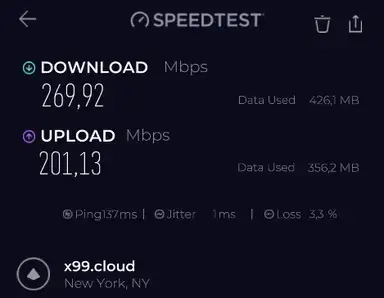
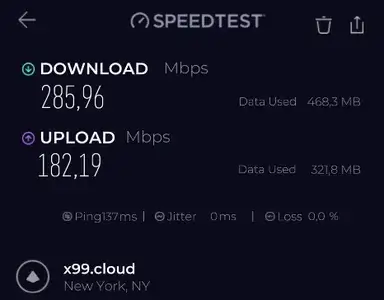
The screenshots show additional secondary Speedtest fields. If a secondary field was not entered in the consolidated research row, we leave that field missing rather than backfilling it from an image after the fact.
Our current speed index
Raw Mbps alone would favor providers tested on the faster baseline connection. Retention percentage alone could understate the practical value of a high-throughput result. The index used in the current Best Picks balances both:
For each provider, we average the recorded no-VPN baseline download and upload values for that review session. Each VPN route is reduced to its recorded run average when repeats exist. Download retention is the route download divided by the provider baseline; upload retention is calculated the same way. We then use the median across the provider’s ranked routes.
Practical throughput score = median route download ÷ 300 Mbps × 100, capped at 100. Final speed index = (0.65 × median download-retention score) + (0.25 × practical-throughput score) + (0.10 × median upload-retention score).
Differences below one index point are treated as technical ties. We resolve those first by evidence completeness and repeatability, then by practical throughput. Ping and packet loss can still change our written caution about a provider, but they are not forced into the universal index because route conditions and measurement completeness differ across the first cycle.
See the current nine-provider speed ranking for the result of this formula. For a repeatable at-home comparison, use our VPN speed test and speed-loss calculator; it calculates throughput retention and latency changes locally in your browser and includes the sanitized 268-row speed dataset behind this cycle. This methodology page stays focused on how ReviewsAlly produces review evidence.
Leak checks and safety controls
How we check IP, DNS, WebRTC, kill switch, and split tunneling
A VPN can connect successfully and still route something in an unexpected way. Our leak-oriented workflow therefore checks the public IP change and uses BrowserLeaks DNS and WebRTC tools while the VPN is active. IPv6 is recorded when it is part of the captured check. We compare the visible result with the original network information privately and avoid publishing the real baseline IP or unnecessary local details.
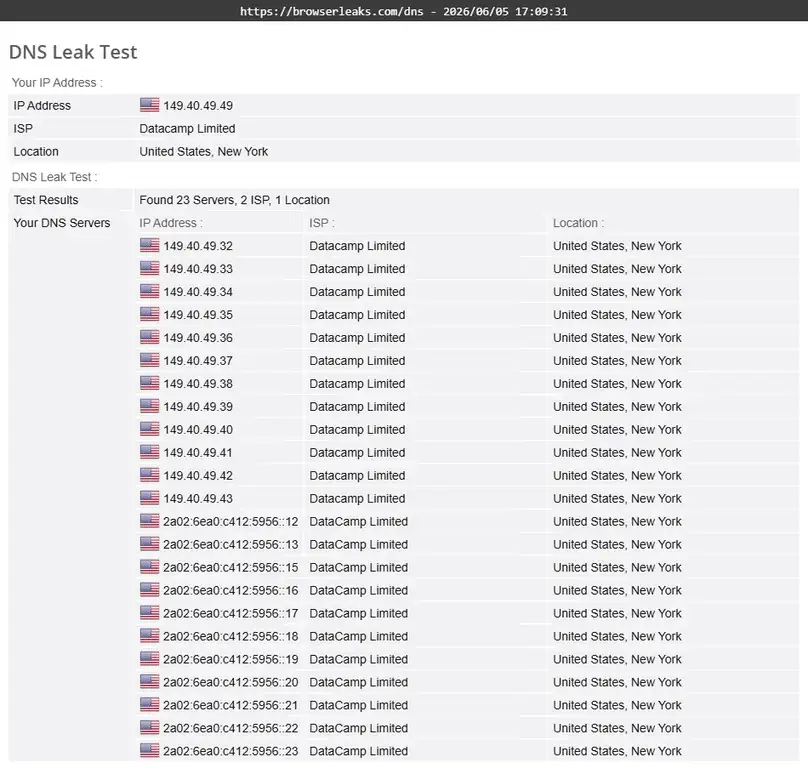
Kill switch and split tunneling are different questions. For a kill switch, we care about what happens to traffic when the tunnel is interrupted or the relevant control is engaged. For split tunneling, we care about whether selected apps, sites, or rules take the VPN or non-VPN path as configured. Availability, manual behavior, and OS support are recorded separately when the evidence requires it. Our VPN split-tunneling guide publishes the privacy-preserving dual-route check and the dated Windows findings behind that distinction.
For the full reader-facing failure test, see our VPN Kill Switch guide. It shows the Windows forced-interruption procedure, separates unexpected drops from manual Disconnect, and explains when a result is Pass, Fail, or Inconclusive.
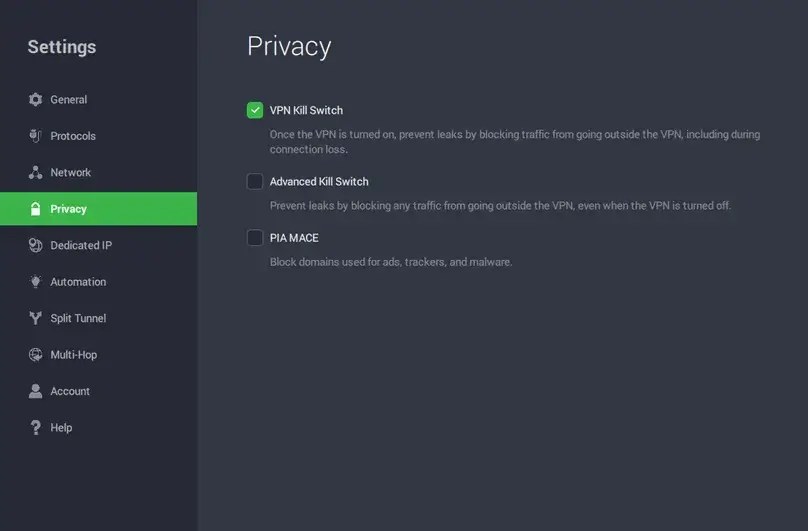
These are consumer-facing configuration checks, not a source-code review, penetration test, cryptographic audit, or independent inspection of a provider’s full network. If a documented check does expose the original resolver or public IP, that finding is kept in the review rather than averaged away.
Playback workflows
How we test VPN streaming
Each of the nine ranked providers has five rows in the current streaming matrix: Netflix, Amazon Prime Video, Disney+/Hulu, Apple TV+, and a live sports/video stream. That gives us 45 documented workflows across the May–July 2026 cycle.
We record the stage actually reached. Stable playback is stronger evidence than a homepage loading, and a login or catalog view is not silently upgraded to a playback pass. The current matrix contains 38 stable-playback results, three stable results that required specialized streaming servers, one additional playback-confirmed result, one partial login/catalog result where playback was blocked, and two failures before playback.
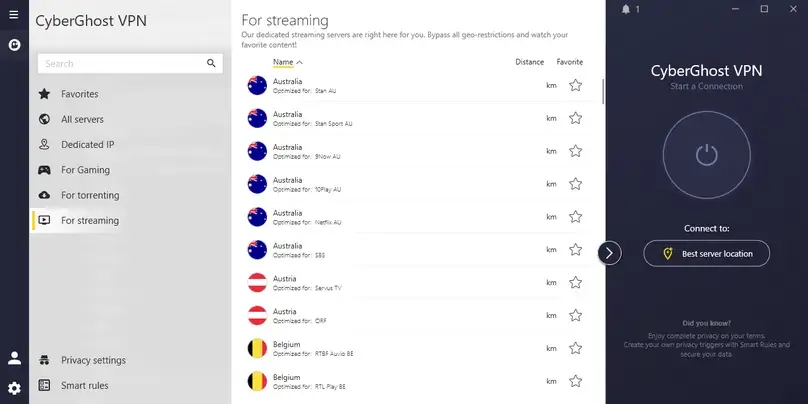
Streaming is volatile. A result can change with the service, catalog, account region, app, browser, server, protocol, or time. The result tells you what happened in our documented workflow, not what every subscriber will see forever.
Platform boundaries
How we handle apps, protocols, and advanced features
Windows 10 is the deepest common hands-on platform in the current nine-provider cycle. We use relevant Android or browser workflows when they add evidence, but we do not turn a Windows result into a macOS, iOS, Linux, TV, or router claim. For an untested platform, we rely on current official documentation and label the statement accordingly.
The same rule applies to features. A native WireGuard result is not treated as identical to a workflow that requires the official WireGuard app and an imported configuration. App-based split tunneling is not equated with a command-line method we did not run. A dedicated-IP menu being visible does not mean we purchased the add-on.
Port forwarding being documented does not mean we successfully opened an inbound port unless the review says we did. For the feature-level test method and the differences across providers, see our VPN port forwarding guide.
This product-specific treatment is deliberate. Standardization matters for comparison, but forcing every VPN into the same feature labels can be less accurate than preserving how the feature actually works.
Buying-risk workflow
How we check support, cancellation, and refunds
Support is most useful to our methodology when it resolves a concrete uncertainty: refund eligibility, renewal treatment, a platform limitation, a missing feature, or a setup problem that the public documentation does not settle. We record what the agent clarified in that interaction. We do not call a provider’s support universally excellent or terrible from one conversation.
Cancellation and refund are also kept separate. Turning off auto-renewal can stop a future charge without returning the current payment. A money-back policy can have limits based on timing, renewal status, purchase channel, payment method, add-ons, or app-store rules. Our reviews document the path we actually used rather than treating the guarantee headline as the whole story.
The final confirmation record shows that all nine payments were returned in full. Six arrived on the request date, two on the next calendar date, and Turbo VPN arrived seven calendar days later. VPN.ac did not provide a written approval before the account became inaccessible, but the full PayPal payment returned on the request date. We still keep request, approval or processing, access ending, and actual receipt separate because those events answer different questions. See the dated rows in our VPN trial and money-back guarantee comparison.
Claims versus evidence
How we review privacy and trust claims
Privacy claims need a different evidence standard from an app setting. We separate what the provider says from what a policy states, what an independent audit reports, what open-source code makes inspectable, what a support agent clarified, and what our own consumer checks can directly observe.
Provider claim
No-logs, encryption, RAM-only infrastructure, threat blocking, and similar statements begin as company claims until supporting evidence is reviewed.
Policy or public record
Privacy policies, terms, transparency reports, ownership information, and incident history help define what is promised and what has been disclosed.
Independent evidence
Audit reports and other credible external assessments can strengthen or qualify a provider claim, but their scope and date still matter.
Direct observation
Our IP, DNS, WebRTC, app, and routing checks show what happened in the tested setup. They cannot independently verify the provider’s entire server fleet or logging architecture.
We therefore avoid turning a clean browser leak check into “this VPN never leaks,” or a no-logs page into “we independently proved no logs exist.” Strong privacy evidence is useful; its boundary is part of the finding.
Current evidence by provider
ReviewsAlly VPN testing scope matrix — 2026
This table is about evidence scope, not ranking. Providers are listed alphabetically. “Speed records” counts every consolidated row for that provider, including baseline, VPN-route, and protocol-comparison records. Each provider has five streaming workflows in the final matrix.
| Provider | Reviewed | Evidence | Speed records | Streaming workflows | Refund record | Review |
|---|---|---|---|---|---|---|
| CyberGhost VPN | June 2026 | Level 4 | 33 | 5 | Approved in test | CyberGhost review |
| NordVPN | May 2026 | Level 4 | 15 | 5 | Request accepted | NordVPN review |
| Private Internet Access | May 2026 | Level 4 | 27 | 5 | Approved in test | PIA review |
| PrivateVPN | July 2026 | Level 4 | 34 | 5 | Approved in test | PrivateVPN review |
| Proton VPN | June 2026 | Level 4 | 36 | 5 | Processed by support | Proton VPN review |
| PureVPN | May 2026 | Level 4 | 18 | 5 | Approved in test | PureVPN review |
| Surfshark | June 2026 | Level 4 | 35 | 5 | Approved in test | Surfshark review |
| Turbo VPN | July 2026 | Level 4 | 35 | 5 | Full refund received; 7-calendar-day lag | Turbo VPN review |
| VPN.ac | July 2026 | Level 4 | 35 | 5 | Full refund received; no written approval preserved | VPN.ac review |
The downloadable CSV adds check-level fields for DNS, WebRTC, kill switch, split tunneling, support contact, and refund-request status without exposing private research data.
Download the ReviewsAlly VPN Testing Scope Matrix — 2026 (CSV)
Evidence hygiene
How we handle screenshots, raw data, and missing fields
Public evidence should help a reader verify the method without exposing the reviewer. We publish screenshots that are safe and relevant, such as VPN-on Speedtest results, app settings, and sanitized browser-check outputs. We keep real-IP baselines, private billing information, account identifiers, email addresses, payment details, streaming profiles, credentials, private support transcripts, and internal source filenames out of public assets.
Raw research files and the full internal speed dataset also stay private because they contain local-environment details and working notes that are unnecessary for readers. The public CSV is a scope matrix, not a dump of the internal research database. When we later publish a dedicated VPN speed-test dataset, it should receive its own sanitization and methodology review.
Missing data stay missing. We do not infer a jitter value from a neighboring run, copy a protocol label across rows, or reconstruct a timestamp because it looks obvious. If a field is important to a future comparison, the right fix is a new documented test or an explicit limitation.
Method evolution and limits
What our VPN tests can and cannot prove
Our VPN testing framework became more structured as we completed the first nine paid reviews. Earlier sessions may contain fewer repeated routes or fewer captured secondary metrics than later sessions, but every published number comes from a real recorded test. We keep those differences visible instead of filling gaps after the fact, and we consider evidence completeness when it materially affects interpretation or a close comparison.
Our goal is careful, reproducible consumer evidence, not to imitate a carrier-grade laboratory. Each provider’s speed-test session took hours, and the first completed cycle produced 268 speed records across nine paid services. More devices, networks, countries, and recurring retests would widen the evidence; they do not change the integrity of the tests already completed.
What the evidence can support
What we bought; what appeared in the tested account/app; measured results from recorded sessions; whether a documented streaming or leak workflow reached its stated result; what support told us; and what happened to our refund request.
What the evidence cannot support
Permanent global speed; universal streaming access; every-device no-leak guarantees; a full code or infrastructure audit; long-term reliability without long-term use; or a promise that another customer’s refund will follow the same path.
From evidence to recommendation
How test evidence informs our VPN rankings
Our overall VPN ranking is not the speed table with a different heading. Speed is measured with the formula above, while the editorial ranking also considers buyer fit, streaming behavior, app reliability, privacy/security evidence, usability, platform coverage, pricing and renewal clarity, refund experience, and the severity of any documented caveat.
We do not convert those judgments into invented star ratings or a fake universal score. A fast VPN can rank lower if a material leak, app failure, unresolved refund, or narrow use case outweighs its performance advantage. Conversely, a provider does not become “best” merely because it has the longest feature list.
The ranking criteria, top-three emphasis, commercial relationship note, and current provider order live in Our VPN Methodology on the Best Picks page. Keeping the ranking logic there avoids turning this evidence page into a second Best VPN list.
Maintenance policy
How we update the methodology and correct evidence
We review this methodology when the testing process materially changes, when a new test type becomes part of the shared workflow, or when the evidence model needs a clearer boundary. Provider-specific facts such as pricing, renewal terms, app capabilities, streaming access, server claims, and refund policies are updated on their own schedules because they can change faster than the methodology itself.
When a new test supersedes an earlier result, the public page should identify the newer evidence rather than preserve a known contradiction for the sake of history. When the evidence is unresolved, we say so. Corrections should change the affected claim, table, FAQ, and related comparison language together so readers do not encounter two incompatible versions of the same finding.
See the evidence in context
Read our current VPN findings
The methodology tells you how the evidence is collected. The Best VPN Services of 2026 page shows how we compare the current providers, while each individual review keeps the plan, platform, screenshots, measured results, support notes, and caveats for that service.
Current comparison
Sources and tools
Tools and evidence sources used in this methodology
Testing tools
- Speedtest by Ookla for Windows — recorded download, upload, and ping measurements; secondary metrics were retained when captured.
- BrowserLeaks DNS Leak Test — browser-visible DNS resolver checks.
- BrowserLeaks WebRTC Leak Test — browser-visible WebRTC/public-IP checks.
ReviewsAlly evidence
Our internal evidence set includes the nine Evidence Logs, final dictated research files, the 268-row speed dataset, the 45-row streaming matrix, safe screenshot manifest, and paid-workflow notes. Public provider-policy and documentation sources are linked in the corresponding individual reviews so readers can check the provider-specific claim at its source.
Research cycle: May–July 2026. Method reviewed: August 2026.
Common questions
VPN testing methodology FAQ
Does ReviewsAlly buy the VPNs it reviews?
All nine providers in the current ranked VPN comparison reached Evidence Level 4: we purchased the service and used important parts of the paid customer workflow. That includes account/app work plus a real refund request after testing.
Why don’t you publish the no-VPN baseline screenshots?
The baseline values are necessary for speed calculations, but the screenshots can expose unnecessary local test-environment details. We keep the underlying baseline records internally and publish VPN-on examples that demonstrate the measurement without revealing the real baseline location or IP.
Do all VPNs get exactly the same number of speed runs?
No. The first paid-review cycle became more structured over time, so route counts and repeat depth are not identical. We preserve the measurements that exist, use repeated-run averages when they are available, and consider evidence completeness when interpreting close results.
Does a clean DNS or WebRTC check prove a VPN never leaks?
No. It supports the documented result for the tested server, protocol, app/browser, and environment. It does not prove that every device, server, network, or future version will behave the same way.
Does an approved refund mean the money reached your bank?
Not necessarily. We distinguish request, approval or processing, access ending, and financial settlement. In this review cycle all nine full payments ultimately returned, but approval and receipt were still separate events; see our dated VPN refund results.