
VPN Review
VPN.ac Review 2026: Paid Hands-On Tests, Speed, Double-Hop, Support, and Refund
VPN.ac is a smaller, technical VPN with deep OpenVPN controls, external WireGuard profiles, Double-Hop routes, SecureDNS, and a browser-only SecureProxy. We bought the monthly plan and tested its apps, protocols, speed, leak protection, streaming, legal P2P use, support, and refund workflow.
Reviews Ally may earn a commission if you click some links on this page. This does not change our editorial process. We purchased and tested VPN.ac, and we distinguish our hands-on findings from provider claims and documentation.
Quick verdict
VPN.ac Is Technically Capable — but Support Friction Still Weakens the Recommendation
VPN.ac is a capable niche VPN for technical users who want detailed OpenVPN modes, Double-Hop routes, SecureDNS, P2P-labelled servers, and a browser-only encrypted proxy.
Our paid July 2026 testing found a stable Windows app, a working kill switch, clean DNS and public-IP leak results, reliable streaming in the platforms we checked, and excellent WireGuard throughput once we configured the separate official WireGuard app. The service also exposes far more protocol and obfuscation controls than many mainstream VPNs.
The main caveats are substantial. WireGuard is not integrated into the VPN.ac Windows app, there is no split tunneling, Dedicated IP, port forwarding, blocker suite, or Meshnet-style feature, and most OpenVPN download results were much lower than our baseline. More importantly, the ticket support experience was slow and dismissive, and our account was closed during the refund exchange without a written approval or payment-return timeframe. Our final record nevertheless confirms that the full PayPal payment returned on the request date. See the complete chronology in our VPN trial and refund comparison.
At a glance
VPN.ac Quick Facts
- Best for
- Technical users who want granular OpenVPN modes, Double-Hop, SecureDNS, and manual WireGuard profiles
- Plan tested
- 1 Month Plan purchased directly from VPN.ac
- Monthly price checked
- $9/month
- Other pricing checked
- $24/3 months, $58/year, and $90/2 years; provider materials showed renewal at the same cycle totals
- Refund window
- 7 days, with a reason and support contact required
- Connections
- Provider/support describe six OpenVPN/IPsec plus six WireGuard sessions for one user; we did not stress-test the combined limit
- WireGuard
- Worked through the separate official WireGuard app and generated VPN.ac profiles, not inside the VPN.ac Windows app
- Important caveat
- No written refund approval was preserved before the account closed; the full PayPal payment nevertheless returned on the request date
Fit
Who VPN.ac Is Best For — and Who Should Skip It
Consider it if you want…
- OpenVPN ECC, AES-128, AES-256, XOR, TCP/UDP port choices, and proxy-based obfuscation controls.
- Double-Hop routes without moving to a large consumer security bundle.
- SecureDNS options and a browser-only encrypted proxy for selected browser traffic.
- Manual WireGuard profiles that can be imported into the official WireGuard client.
- A smaller service with labelled P2P-optimized locations and technical documentation.
Look elsewhere if you need…
- Fast and friendly pre-sales/refund support or live chat.
- WireGuard integrated directly into the provider’s Windows app.
- Easy split tunneling, Dedicated IP, port forwarding, ad blocking, dark web monitoring, or antivirus.
- A large country footprint and mainstream beginner-focused interface.
- A 30-day or longer refund period with a clearly documented tested outcome.
Review methodology
How We Reviewed VPN.ac
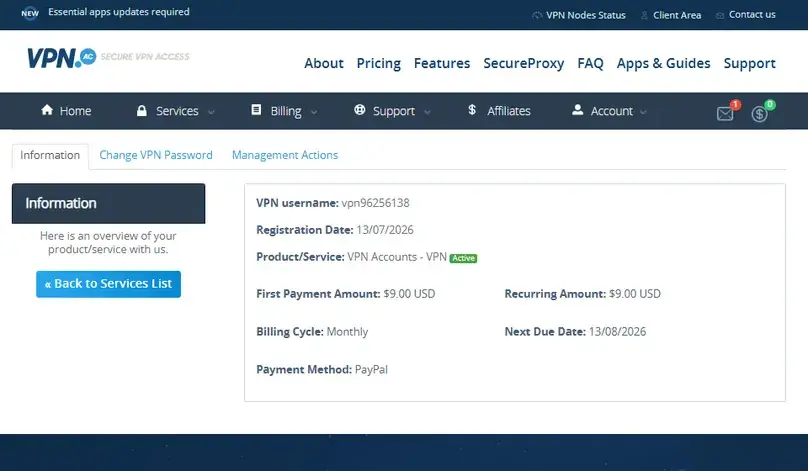
We completed a paid hands-on review in July 2026. We purchased the 1 Month Plan from the official website, reviewed pricing and billing, inspected the account area, installed VPN.ac Windows app v4.5, checked Android and Chrome/SecureProxy access, tested OpenVPN variants, IKEv2/IPsec, Double-Hop, SecureDNS, the kill switch, obfuscation, and WireGuard through the official WireGuard app.
We also ran structured paid-account speed checks with the Speedtest by Ookla Windows app on a cable connection, tested DNS/WebRTC/public-IP behavior, checked multiple streaming services and a live video stream, downloaded a legal Ubuntu file on a P2P-labelled server, contacted support before purchase, and initiated a real refund request after testing.
These results are not a global laboratory benchmark. They reflect one Latin America-based test environment, the routes and servers available during the test window, and the exact protocols documented below. Results can change with location, ISP routing, server capacity, protocol, device, and time of day.
Plans and value
VPN.ac Pricing: Simple Plan Choices, but Only a 7-Day Refund Window
VPN.ac keeps its plan list simpler than providers with several security bundles. In our July 2026 check, the true monthly plan cost $9, the 3-month plan cost $24, the 1-year plan cost $58, and the 2-year plan cost $90. The longer terms reduce the equivalent monthly cost, but require more money upfront.
We also found a $2 paid 7-day trial. Support told us the trial does not automatically renew and does not affect eligibility for a later refund on a regular subscription. The normal paid plan has a 7-day refund window rather than the 30- or 45-day periods common among larger VPNs.

| Plan | Price checked | Renewal/buying note |
|---|---|---|
| 1 Month | $9 total | Best for short testing without a long commitment. |
| 3 Months | $24 total ($8/month equivalent) | Research notes showed renewal at $24 every 3 months. |
| 1 Year | $58 total (about $4.80/month) | Research notes showed renewal at $58/year. |
| 2 Years | $90 total ($3.75/month equivalent) | Lowest equivalent monthly cost; research notes showed renewal at $90 every 2 years. |
| Paid trial | $2 for 7 days | Support said it does not auto-renew; trial device allowance is lower than the normal account. |
Prices and checkout conditions can change by country, taxes, payment method, and promotion. Confirm the current total and renewal text before buying.
Refund and billing
VPN.ac Refund, Cancellation, and the Account-Closure Experience
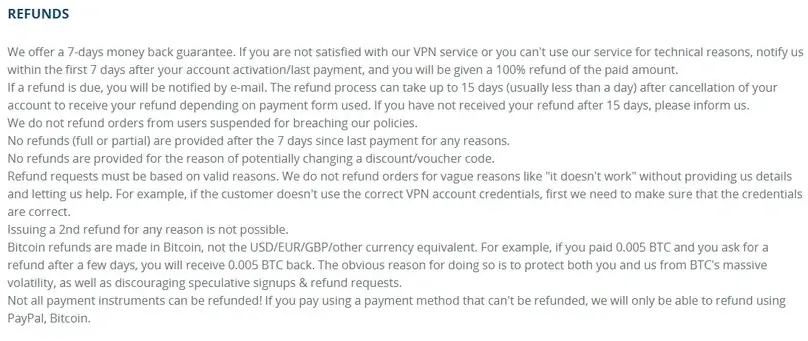
VPN.ac’s published refund period is 7 days from payment. The terms reviewed require a reason for the request and give support an opportunity to address the issue. The same terms say processing can take up to 15 days, although it is usually faster. Our research notes also recorded that recurring renewals were not refundable, while cryptocurrency purchases could be refunded under the provider’s method-specific rules.
Canceling automatic renewal and requesting a refund are separate actions. The account area exposed cancellation controls, but the refund had to be requested through support. There was no live chat; the available route was a ticket.
What happened in our real refund request
We requested a refund on July 16, 2026, four days after subscribing, and explained that the paid testing for this review was complete. During the exchange, support made clear that a refund would result in immediate account closure. Our account then became inaccessible.
We did not receive a written refund approval, refund amount, payment-return timeframe, or confirmation email before losing account access. The final payment record nevertheless confirms that the full PayPal payment returned on July 16, the request date. We therefore describe the result precisely as full refund received; no written approval preserved before account closure — not as a denial and not as proof that a confirmation message existed.
Considering VPN.ac? Check the current protocol setup, refund terms, server list, and support route before paying.
Check VPN.ac Compare VPN ServicesApps and account
The VPN.ac Windows App Is Stable and Technical, but the Login and WireGuard Workflows Feel Dated
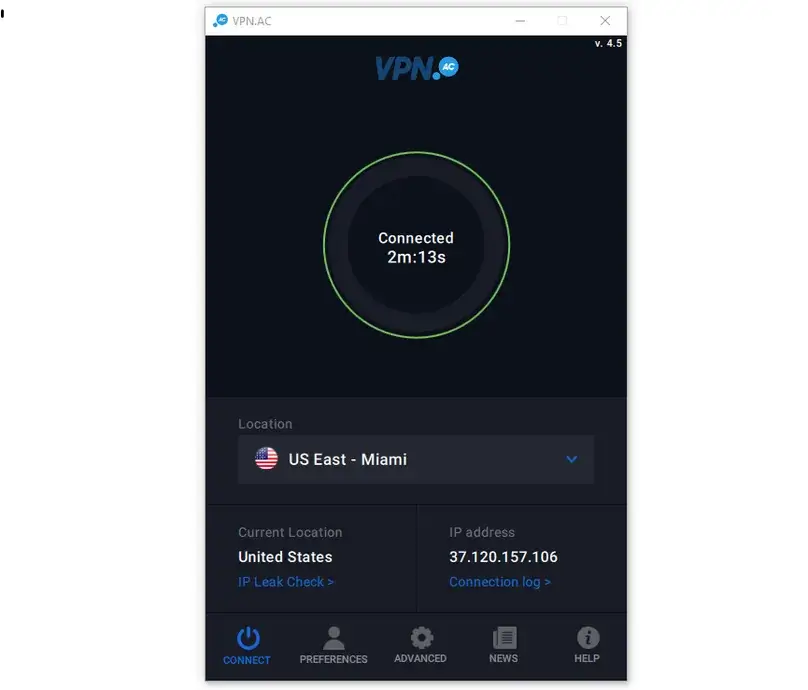
VPN.ac Windows app v4.5 installed quickly on Windows 10. The first OpenVPN connection prompted us to install the TUN/TAP driver, after which the app remained stable during testing. The interface exposes server latency, favorites, connection time, IP information, connection logs, startup options, protocol modes, SecureDNS, kill switch controls, Double-Hop routes, and P2P-labelled nodes.
The login flow is less polished than mainstream apps. There is no obvious standalone login screen: the app initially displays its interface, then asks for the VPN username and password stored in the Preferences fields when the user tries to connect. Those VPN credentials are separate from the Client Area login.
Platforms and device rules
We directly used Windows, Android, Chrome SecureProxy, and a quick Android TV/Fire TV setup. VPN.ac also publishes setup paths for macOS, Linux, iOS, and routers, but we did not hands-on test every platform. Support described the connection allowance as six OpenVPN/IPsec sessions plus six WireGuard sessions for a single user. We did not connect 12 devices simultaneously, so we treat that as a provider rule rather than a stress-tested claim.
Support also said a router counts as one connection and SecureProxy counts toward the allowance. The terms and support language position the account for one user, not unrestricted account sharing.
Protocols and advanced controls
OpenVPN Is Highly Configurable; WireGuard Requires a Separate App
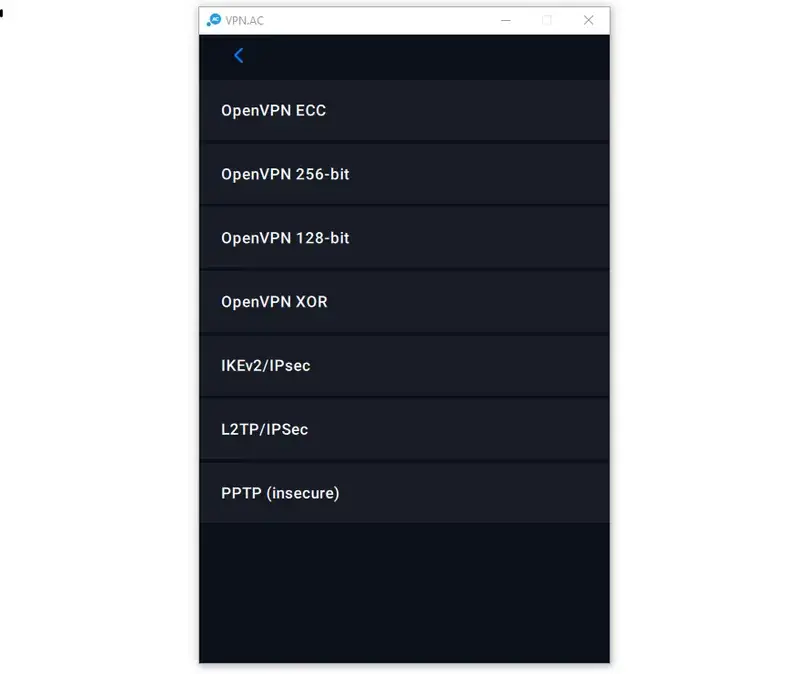
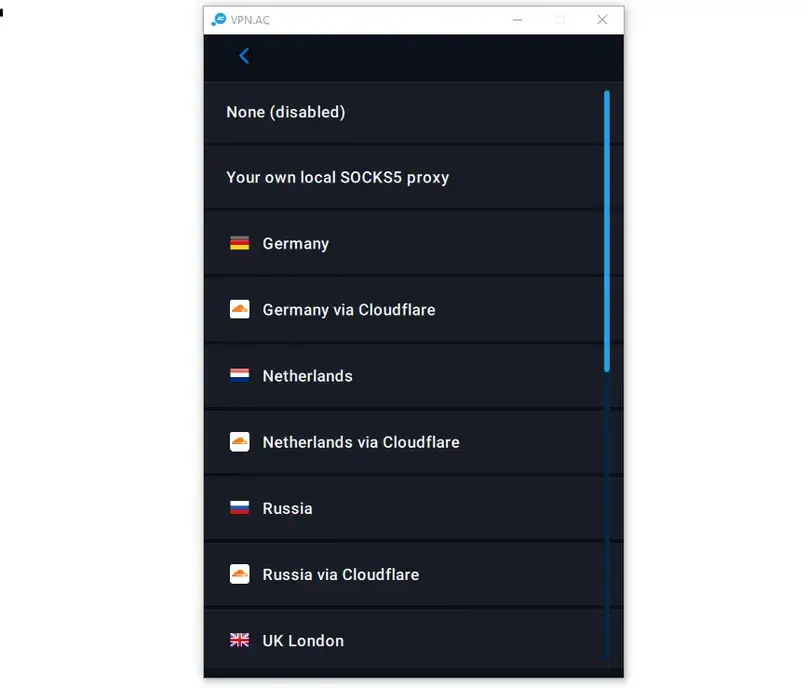
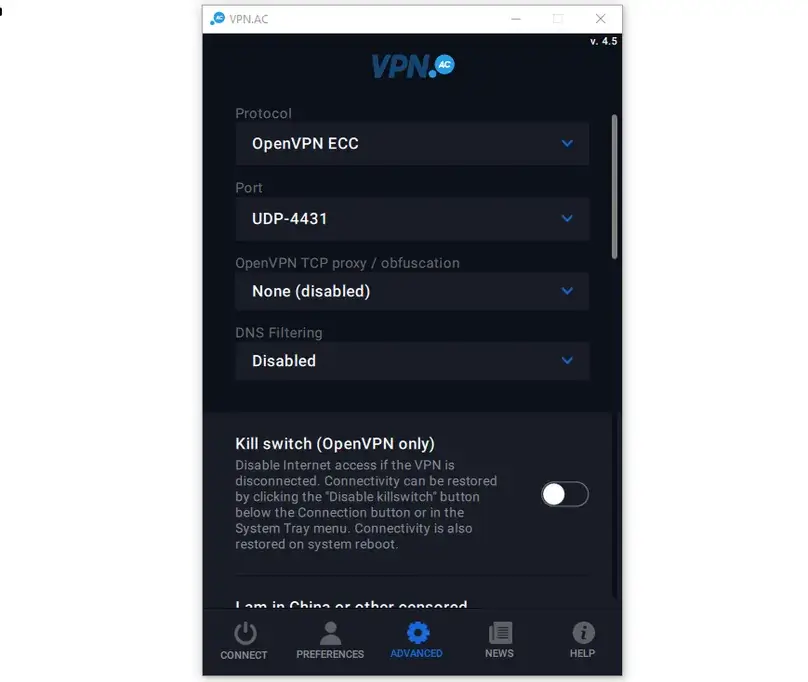
The strongest part of the native Windows app is protocol control. We found OpenVPN ECC, AES-128, AES-256, XOR, UDP and TCP port choices, IKEv2/IPsec, L2TP/IPsec, and PPTP marked as insecure. The Advanced area also includes SOCKS5/proxy-based OpenVPN obfuscation, including provider routes and some routes labelled through Cloudflare.
WireGuard setup
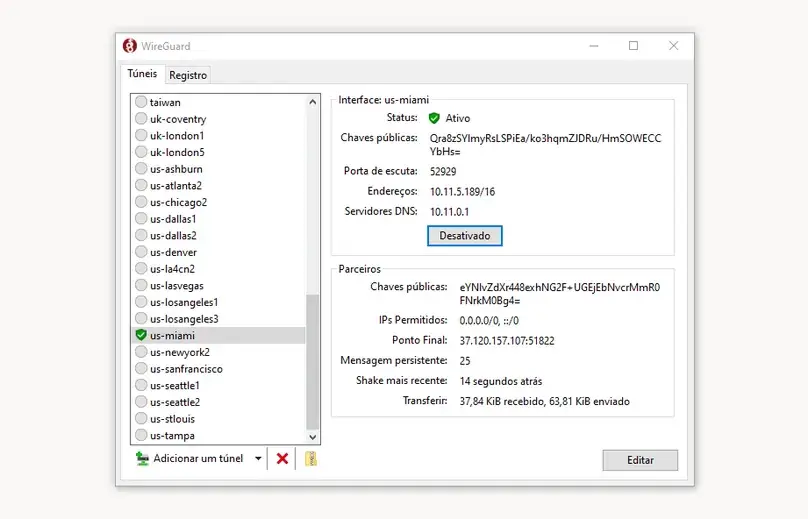
WireGuard was not integrated into VPN.ac’s Windows app. We generated a device profile through VPN.ac’s WireGuard manager, downloaded the profile package, imported it into the official WireGuard Windows application, and connected successfully. This approach worked well, but it is more manual than a single WireGuard toggle inside the provider app.
Obfuscation and restrictive-network controls
We tested OpenVPN XOR and the proxy/obfuscation option. XOR connected and produced usable results. A proxy-obfuscation route through Seattle also connected, although some Germany and Netherlands proxy choices failed in that particular check. These controls are useful for technical troubleshooting, but we did not test them inside a censored country and do not claim they bypass every restrictive network.
Privacy and security
VPN.ac Is Candid About Temporary Session Metadata, and Its Core Leak Controls Worked in Our Checks
VPN.ac says it does not log browsing activity such as websites visited, DNS queries, messages, files, or passwords. It does, however, describe temporary connection/session metadata such as the real IP used during an active session, connection start/end times, and traffic volume for security and troubleshooting, with removal after the session.
That is more nuanced than a blanket “zero logs” slogan. We did not find a public independent audit or transparency report in the material reviewed. This does not prove the privacy claims false; it means buyers are relying primarily on the provider’s policies, technical explanations, Romanian jurisdiction, shared-IP model, and operational history.
Kill switch
The OpenVPN kill switch was disabled by default. We enabled it, disconnected the VPN, and confirmed that internet access was blocked without exposing the public VPN connection. Internet access returned normally afterward, and the firewall-based protection behaved as expected in this test.
Want to reproduce this safety check? Our VPN Kill Switch guide explains the Windows failure test, Pass / Fail / Inconclusive interpretation, manual-disconnect caveat, and the limits of browser-level evidence.
SecureDNS and leak checks
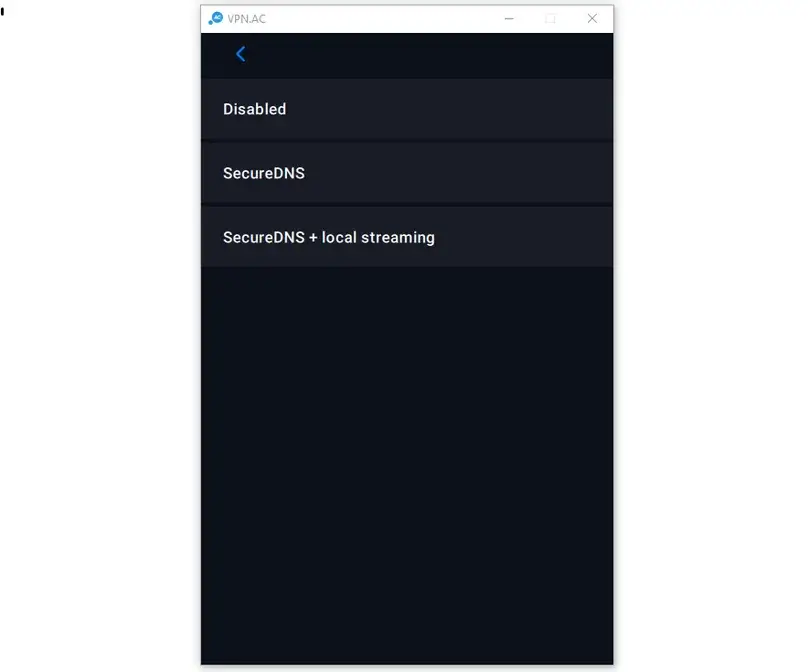
SecureDNS was also off by default. The app offered “Secure DNS” and “Secure DNS + local streaming.” With SecureDNS enabled, VPN.ac resolvers appeared and our real ISP DNS did not.
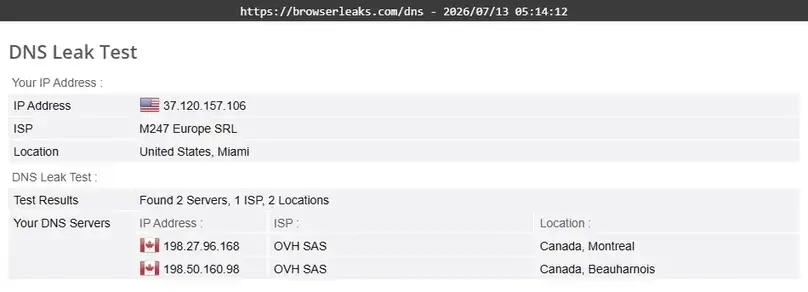
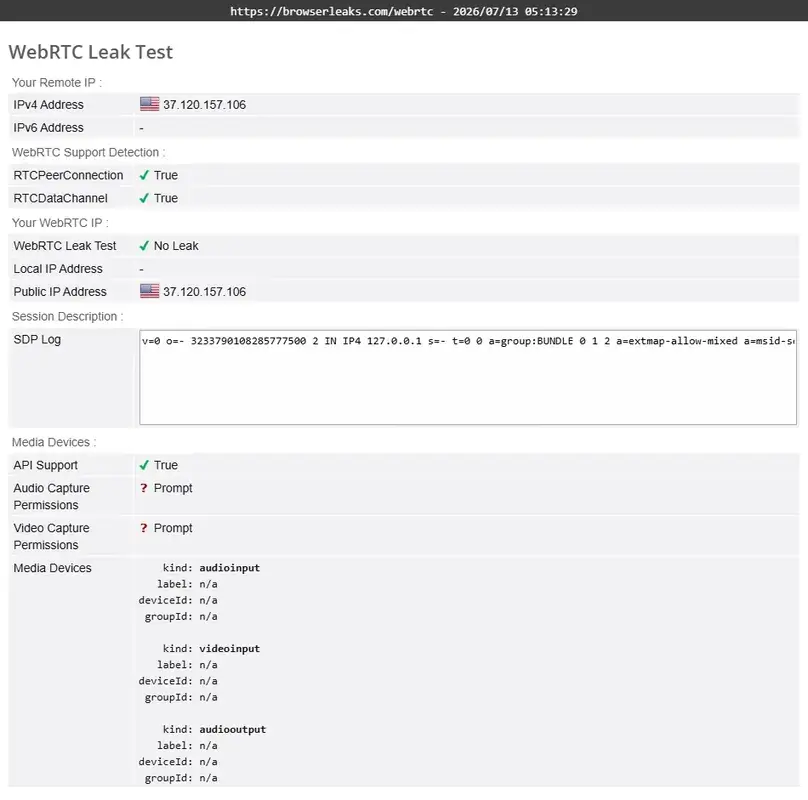
In the WebRTC check, the real public IP did not appear and the VPN public IP did. A local/private IP appeared, which is not the same as exposing the public ISP address. We did not observe a public-IP WebRTC leak in the tested browsers.
Missing security extras
We found no ad blocker, tracker blocker, malware blocker, antivirus, dark web monitor, Meshnet-style network, Dedicated IP, port forwarding, or easy Windows split tunneling. SecureDNS is a DNS/privacy control, not a substitute for a full blocker suite.
Structured paid-account speed checks
WireGuard Was Strong; Native OpenVPN Download Throughput Was Much Lower
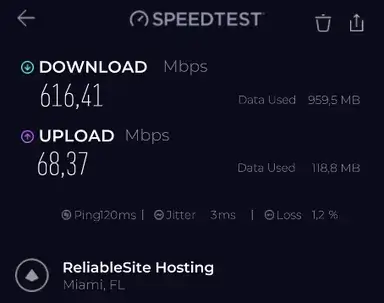
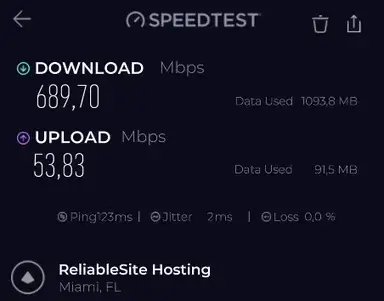
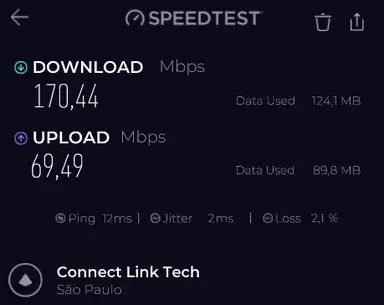
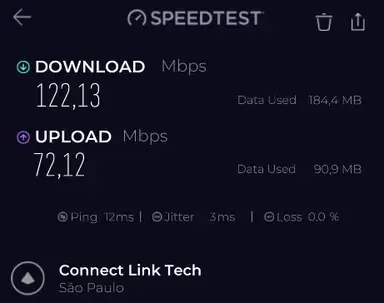
We ran nine no-VPN baselines and multiple VPN checks with the Speedtest by Ookla Windows app on the same cable connection and within the same approximate test window. The baseline average was 904.4 Mbps download, 74.2 Mbps upload, and 18.9 ms ping.
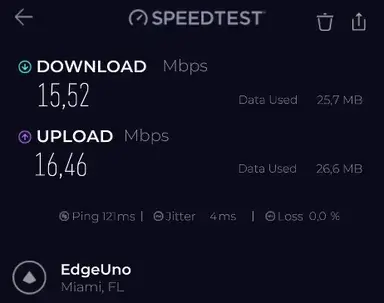
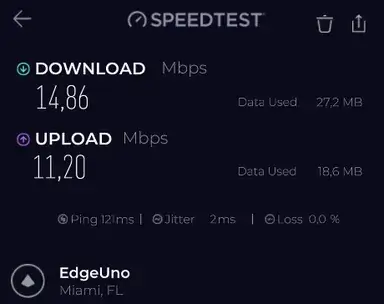
The central finding is clear: VPN.ac’s external WireGuard workflow was far faster than the native OpenVPN modes in this environment. WireGuard on Miami averaged 653.1 Mbps download, retaining about 72.2% of baseline download speed. The comparable OpenVPN UDP check averaged 198.4 Mbps, while OpenVPN TCP averaged only 15.2 Mbps.
| VPN route / mode | Average ping | Average download | Average upload | Download retention |
|---|---|---|---|---|
| São Paulo — OpenVPN ECC | 12 ms | 146.3 Mbps | 70.8 Mbps | 16.2% |
| Miami — OpenVPN ECC | 130 ms | 180.7 Mbps | 64.4 Mbps | 20.0% |
| London — OpenVPN ECC | 204 ms | 153.9 Mbps | 43.3 Mbps | 17.0% |
| Hong Kong — OpenVPN ECC | 321 ms | 121.8 Mbps | 51.9 Mbps | 13.5% |
| Sydney — OpenVPN ECC | 374 ms | 126.8 Mbps | 33.2 Mbps | 14.0% |
| Miami → Germany Double-Hop | 232.5 ms | 130.1 Mbps | 37.1 Mbps | 14.4% |
Want to compare this VPN against your own no-VPN baseline? Use our VPN speed test and speed-loss calculator for a repeatable at-home method and local, privacy-preserving calculation.
Miami protocol comparison
| Protocol/mode | Average download | Average upload | Download retention | What we observed |
|---|---|---|---|---|
| WireGuard, official app | 653.1 Mbps | 61.1 Mbps | 72.2% | Fastest and most stable workflow in this test. |
| OpenVPN UDP ECC | 198.4 Mbps | 56.6 Mbps | 21.9% | Usable, but much slower than WireGuard. |
| OpenVPN XOR | 137.4 Mbps | 69.1 Mbps | 15.2% | Obfuscation worked; upload retention was comparatively strong. |
| IKEv2/IPsec | 172.1 Mbps | 14.5 Mbps | 19.0% | Download was moderate; upload was weak in this sample. |
| OpenVPN TCP | 15.2 Mbps | 13.8 Mbps | 1.7% | Severe throughput drop in this route/test window. |
For the broader technical context behind these results, see our VPN protocols comparison, including WireGuard, OpenVPN, IKEv2, TCP/UDP, provider-specific modes, and our paid protocol test data.
Interpretation: VPN.ac should not be described as uniformly slow or fast. In our environment, the native OpenVPN modes were the bottleneck, while the separate WireGuard workflow delivered strong throughput. Different routes and devices may behave differently.
Network and routing
A Smaller Network With Clear Technical Categories and Working Double-Hop Routes
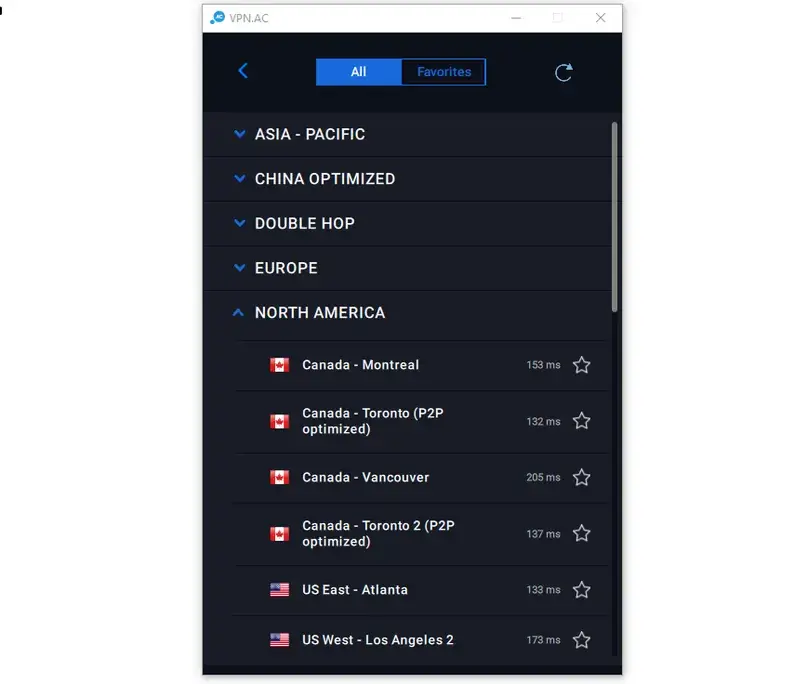
VPN.ac has a smaller country footprint than NordVPN, Surfshark, CyberGhost, or PureVPN. The Windows app grouped servers into Asia-Pacific, China Optimized, Double-Hop, Europe, North America, and South America, and displayed latency before connection. It did not display server load in our test.
We found a São Paulo location, several US/Canadian cities, multiple UK locations, Germany, Netherlands, Romania, Switzerland, Japan, Hong Kong, Singapore, and Australia. SecureProxy had a broader separate country list, including locations that were not necessarily full VPN nodes.
Double-Hop
Double-Hop routes were integrated into the native app. We tested a Miami-to-Germany route, which averaged 130.1 Mbps download, 37.1 Mbps upload, and 232.5 ms ping. That extra route produced more overhead than direct WireGuard and did not make us “anonymous”; it simply routed the connection through two VPN locations.
P2P locations
The app marked several locations as P2P optimized. Our documentation/app review found permitted nodes across a limited set of countries, including Romania, Netherlands, Germany, Luxembourg, Sweden, France, Lithuania, and Switzerland, although the exact list should be checked in the current app because provider materials and support responses were not perfectly consistent.
Browser-only proxy
SecureProxy Worked Well, but It Protects Browser Traffic Only
We tested SecureProxy v3.0.1 in Chrome with a Miami location. The browser public IP changed, DNS and WebRTC checks did not reveal our real public IP, streaming worked in the browser, and non-browser applications remained on the normal connection as expected.
That separation is useful when you intentionally want only browser traffic routed through the proxy. It is not full-device VPN protection, and it should not be described as a Meshnet feature, antivirus, ad blocker, or replacement for the VPN app.
Everyday use
Streaming Worked Across Every Platform We Checked; Legal P2P Also Worked on an Allowed Node
Using the Miami server with OpenVPN UDP/ECC, we successfully logged in, loaded catalogs, and started playback on Amazon Prime Video, Apple TV, Disney+/Hulu, Netflix, and the UK/EU platform available to us. A live video stream also loaded quickly and played without buffering in that test.
This is a strong practical result, but it is not a promise that VPN.ac works with every streaming platform, region, server, or future detection system. Streaming access changes frequently, and VPN.ac does not present itself as a large catalog of service-specific streaming servers.
Legal P2P check
We downloaded an Ubuntu desktop image on a Bucharest P2P-labelled server using OpenVPN. The download connected to peers immediately, data transferred without an obvious provider-side throttle, outbound seeding functioned, and the kill switch was enabled. VPN.ac does not offer port forwarding, so this should not be treated as equivalent to a provider with user-configurable inbound ports.
To find VPN providers that support port forwarding, feature-level test methods, and the differences across providers, check out our VPN port forwarding guide.
Support and reputation
Support Was the Weakest Part of Our VPN.ac Review
VPN.ac did not offer live chat in our test; support was handled through tickets. We submitted a detailed pre-sales question list on July 13. The first staff response arrived after roughly 41 hours and told us to be patient because problem reports were prioritized. Substantive answers arrived about 65 hours after the original ticket.
A staff member identified in the ticket as Alex F. repeatedly emphasized that the answers were already available on the website and used terse replies such as “of course it does” for the router and Double-Hop questions. The answers did clarify several points, but the tone was dismissive and the delay disrupted the review workflow.
The later refund exchange was less clear than it should have been. The account was closed during the discussion, while no written approval, refund amount, return method, or expected payment date was provided. The full PayPal payment ultimately returned on the request date, so the financial outcome is confirmed even though the support confirmation was not.
Help center
The knowledge base covers OpenVPN, WireGuard, routers, SecureProxy, SOCKS5, DNS, billing, and troubleshooting. It is useful for experienced users, but we found important topics fragmented or difficult to locate, including a clear refund workflow, split tunneling, current P2P rules, and a buyer-friendly explanation of how the connection allowances combine.
Public reputation signals
The research captured small or mixed public-review samples: 4.1/5 from 12 Trustpilot reviews, 3.3/5 from 48 US App Store ratings, and 3.7/5 from 651 Google Play ratings at the time checked. These are context signals, not a substitute for product testing, and the Trustpilot sample in particular was very small.
Other VPNs to compare
VPN.ac Alternatives
Private Internet Access
Compare PIA if you want easier split tunneling, broader app controls, and port forwarding on supported locations.
Proton VPN
Compare Proton VPN if public trust resources, a broader privacy ecosystem, and a free plan matter more than VPN.ac’s protocol knobs.
Surfshark
Compare Surfshark if you want a more polished consumer app, unlimited device connections, easier split tunneling, and broader bundled tools.
PrivateVPN
Compare PrivateVPN if you still want a smaller technical provider but specifically need port forwarding and a longer refund window.
Final verdict
VPN.ac Has Real Technical Strengths, but Support Friction Keeps It Niche
The VPN product itself performed better than the support experience. The Windows app stayed stable, the kill switch and SecureDNS worked, DNS/public-IP checks were clean in the tested setup, Double-Hop and obfuscation were available, streaming worked across the services we checked, SecureProxy was useful, and external WireGuard delivered strong speed.
For a technically experienced user who already understands OpenVPN, separate WireGuard profiles, proxy routing, and server selection, VPN.ac can be a capable tool. But the short refund window, manual WireGuard workflow, limited consumer features, weak native OpenVPN download results, ticket-only support, dismissive communication, and lack of a written refund approval make it difficult to recommend over better-supported alternatives. The full payment did return, so that support caveat must not be misread as a failed refund.
Our bottom line: VPN.ac is a niche technical option, not a safe default recommendation. Buyers who still choose it should use the $2 trial first, preserve all support and payment records, and avoid assuming the refund process will be as clear as it is with larger providers.
Compare before buying. The protocol depth is real, but support quality and refund clarity matter too.
Visit VPN.ac View Our VPN Top PicksEvidence summary
What We Checked in This Review
Not tested or not available: We did not test macOS, Linux, iOS, routers, pfSense/OPNSense, or every server. VPN.ac did not offer split tunneling, Dedicated IP, port forwarding, blocker tools, dark web monitoring, antivirus, or Meshnet-style networking in the tested workflow.
Common questions
VPN.ac FAQ
Is VPN.ac good?
VPN.ac has strong technical controls, stable apps in our test, working Double-Hop and SecureDNS, useful SecureProxy access, and strong WireGuard speed through the official WireGuard app. Its weaker support, short refund period, manual WireGuard setup, and limited consumer features make it a niche choice rather than a broad recommendation.
How much does VPN.ac cost?
In our July 2026 check, the monthly plan was $9, the 3-month plan was $24, the annual plan was $58, and the 2-year plan was $90. A separate 7-day trial cost $2. Confirm current pricing and renewal terms at checkout.
Does VPN.ac have a money-back guarantee?
VPN.ac publishes a 7-day refund window. A reason and support contact are required. In our real test, the account was closed during the exchange and we did not receive written approval or a payment-return timeframe, but the full PayPal payment returned on the request date.
Does VPN.ac keep logs?
VPN.ac says it does not log browsing activity. Its documentation describes temporary connection/session metadata, including the real IP during an active session, connection times, and traffic volume, which it says is removed after the session. We did not find a public independent audit.
Does VPN.ac include WireGuard?
Yes, but WireGuard was not integrated into the VPN.ac Windows app in our test. We generated VPN.ac profiles and imported them into the official WireGuard Windows client. This workflow produced the best speed results in our checks.
Does VPN.ac have split tunneling?
We did not find Windows split tunneling in the tested app, and support confirmed that it was not available. SecureProxy can route browser traffic separately, but it is a browser proxy rather than full app-based split tunneling.
Does VPN.ac support port forwarding or Dedicated IP?
No. VPN.ac support and documentation indicated that Dedicated IP and port forwarding were not available in the tested service.
Did VPN.ac work for streaming in the review?
Yes. The platforms we tested loaded and played on a Miami OpenVPN server, and a live stream played without buffering. That result applies only to our test window and is not a guarantee for every service, region, or future server.
Is VPN.ac fast?
Performance depended heavily on protocol. Miami WireGuard averaged about 653.1 Mbps download in our environment, while most native OpenVPN download results were much lower and OpenVPN TCP was especially slow. We would choose WireGuard for speed when the separate setup is acceptable.
How many devices can use VPN.ac?
Provider materials and support described six OpenVPN/IPsec connections plus six WireGuard connections for one user. We did not run a 12-device concurrency stress test, so this is reported as a provider rule rather than a hands-on maximum.
Sources reviewed
Sources Reviewed for This VPN.ac Review
Our paid account evidence was combined with VPN.ac’s official pages and help documentation checked during July 2026.
- VPN.ac homepage and feature overview
- VPN.ac pricing and account plans
- Terms of service and refund conditions
- VPN.ac privacy policy
- VPN.ac FAQ and technical policy explanations
- Windows app documentation
- WireGuard documentation
- SecureProxy overview
- P2P-optimized location documentation
- VPN.ac company information
User opinions
Share Your VPN.ac Experience
If you have used VPN.ac, your experience with its protocols, speed, support, SecureProxy, refund process, or long-term reliability can help other readers. Comments are moderated before publication.