
VPN Review
PrivateVPN Review 2026: Paid Hands-On Tests, Pricing, Port Forwarding, Speed Checks, Refund, and Alternatives
PrivateVPN is a smaller, more technical VPN than the biggest mainstream brands. We bought the 1-month plan, tested the Windows app, Android/iOS access, dashboard, WireGuard speed checks, port forwarding, leak checks, streaming, legal P2P behavior, support, and refund flow to see whether its simplicity and port-forwarding focus outweigh its limitations.
Reviews Ally may earn a commission if you click some links on this page. This does not change our editorial process. We purchased and tested PrivateVPN as part of our review process, and we describe only the checks we actually performed.
Quick verdict
PrivateVPN Is a Lean, Technical VPN With Useful Port Forwarding — But Our Paid Tests Found Important Caveats
PrivateVPN is worth considering if you specifically want port forwarding, a simple app, a lower true monthly price than many mainstream VPNs, and a smaller-provider experience.
In our paid July 2026 review, PrivateVPN felt more technical and less bundle-heavy than NordVPN, Surfshark, CyberGhost, PureVPN, or Proton VPN. The Windows app is simple, the dashboard exposes manual configuration options, the plan includes up to 10 simultaneous connections, and port forwarding worked in our legal P2P check using WireGuard.
The trade-off is that PrivateVPN is not as polished or as feature-rich for everyday users. We found no in-app split tunneling, no ad/tracker/malware blocker, no dark web monitor, no Meshnet-style feature, no obvious third-party audit page, and no specialized streaming server category in the Windows app. More importantly, our DNS leak check showed our real ISP DNS appearing while connected to a Miami server, and several protocols we tried — including OpenVPN UDP/TCP and Stealth VPN — did not connect during our test session.
At a glance
PrivateVPN Quick Facts
- Best for
- Technical users, P2P users who need port forwarding, and buyers who prefer a simple VPN over a large security bundle
- Plan tested
- 1 Month Plan purchased from the official website
- Monthly price checked
- $9.90/month for the monthly plan
- Long-term pricing checked
- $17.99 billed every 3 months; promotional long-term plan listed at $72.00 for the first 36 months, renewing at $72.00/year
- Refund policy checked
- 30-day money-back guarantee for eligible direct purchases; reason required; renewals and crypto payments have caveats
- Devices
- Up to 10 simultaneous connections
- Server network
- 200+ server locations in 63 countries, checked against official pages and the Windows app
- Important caveat
- We observed a DNS leak in our BrowserLeaks DNS check while connected to Miami over WireGuard
Fit
Who PrivateVPN Is Best For — and Who Should Skip It
Consider it if you want…
- A lower true monthly VPN price than many mainstream competitors.
- Port forwarding for legal P2P, seeding, or other workflows where an open port matters.
- A smaller, simpler VPN app without a crowded security suite.
- Manual configuration options, proxy/SOCKS5 access, router setup resources, and a technical feel.
- A VPN that supports 10 simultaneous connections without moving to a family plan.
Look elsewhere if you need…
- Strong in-app split tunneling like PIA or Surfshark.
- Ad blocking, tracker blocking, malware blocking, or dark web monitoring inside the VPN bundle.
- Streaming consistency across every platform you use.
- A large public audit and transparency footprint.
- A VPN where every major protocol worked reliably in our Windows test.
Review methodology
How We Reviewed PrivateVPN
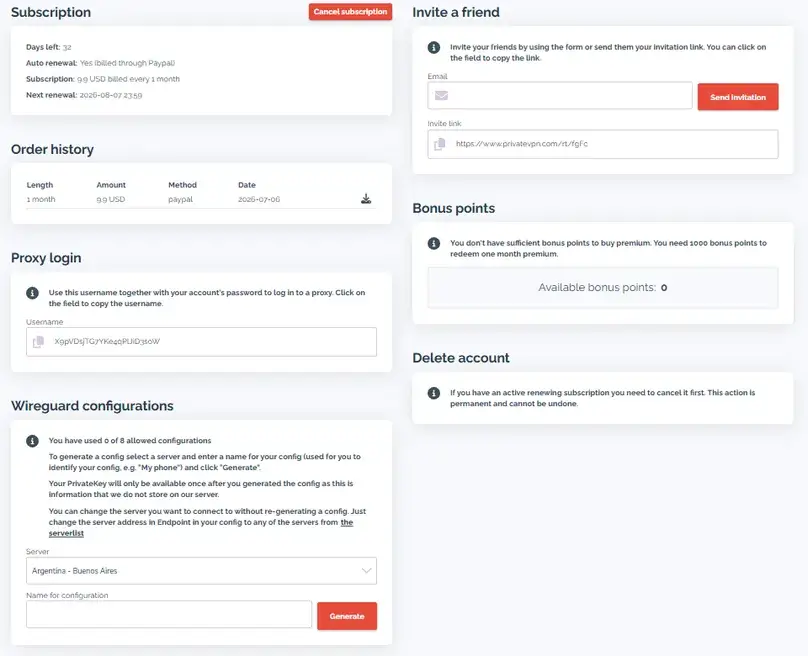
We completed a paid hands-on review of PrivateVPN in July 2026. We purchased the 1 Month Plan from the official PrivateVPN website, reviewed the account dashboard, checked pricing and refund language, installed and tested the Windows app, reviewed Android/iOS/browser setup availability, ran Speedtest by Ookla Windows app checks on a cable connection, performed DNS/WebRTC/IP leak checks, tested port forwarding and legal P2P behavior, checked several streaming platforms, contacted support before purchase, and requested a real refund after testing.
This is not a global laboratory benchmark. The speed results below are structured paid-account speed checks from a Latin America-based test environment using the same internet connection and approximate test window. VPN performance can change by country, route, server load, protocol, device, ISP, time of day, and the services being accessed.
Plans and value
PrivateVPN Pricing and Plans
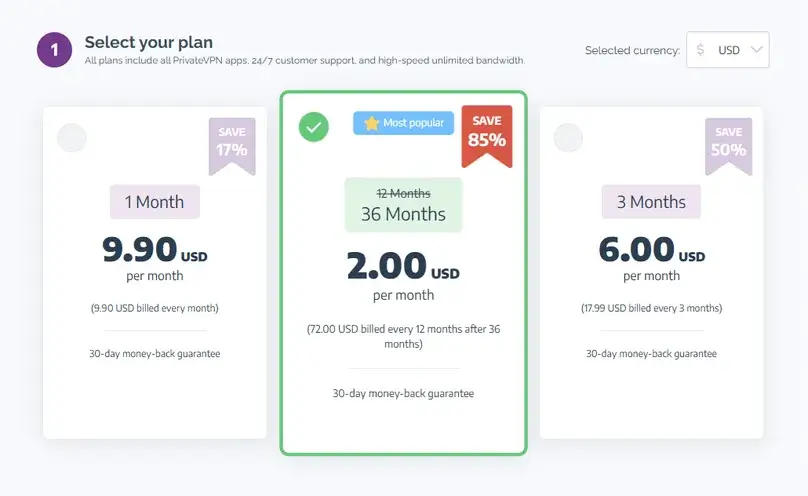
PrivateVPN is easier to understand than many VPNs because it does not present a large bundle matrix. In our July 2026 check, the monthly plan was listed at $9.90/month, the 3-month plan at $17.99 billed every 3 months, and the promotional long-term plan at $72.00 total for the first 36 months, renewing at $72.00/year after that promotional period.
The monthly plan is the cleanest comparison point because it avoids hiding the real cost behind a long discounted commitment. In our dated sample, PrivateVPN’s $9.90 true monthly price was below several larger brands, while its $72 introductory total averaged $2.00 across 36 months and its $72 annual renewal averaged $6.00; see our VPN cost and renewal study. Buyers should still read renewal and refund terms carefully, especially because renewals and cryptocurrency payments have refund caveats.
| Pricing item | What we checked | Editorial takeaway |
|---|---|---|
| 1 Month Plan | $9.90/month | Good for testing without committing to a long subscription. |
| 3-month plan | $6.00/month equivalent, $17.99 billed every 3 months | Lower average monthly cost, but not month-to-month billing. |
| Long-term promotional plan | $72.00 total for the first 36 months, then $72.00/year renewal in our pricing check | Very low advertised average price, but renewal and refund terms matter. |
| Payment methods | Apple Pay, Google Pay, credit card, PayPal, Bitcoin, and Ethereum via Coinify were shown/advertised | Useful variety, but cryptocurrency payments were listed as non-refundable in the refund notes we reviewed. |
| Add-ons | No paid upsells found at checkout | PrivateVPN is simpler than bundled providers such as Surfshark One+, PureVPN Max, or NordVPN Ultimate. |
Pricing note: VPN prices can change by country, promotion, payment method, taxes, and checkout path. Confirm the total charged today and the renewal language before buying.
Refund and billing
Refund, Billing, and Cancellation
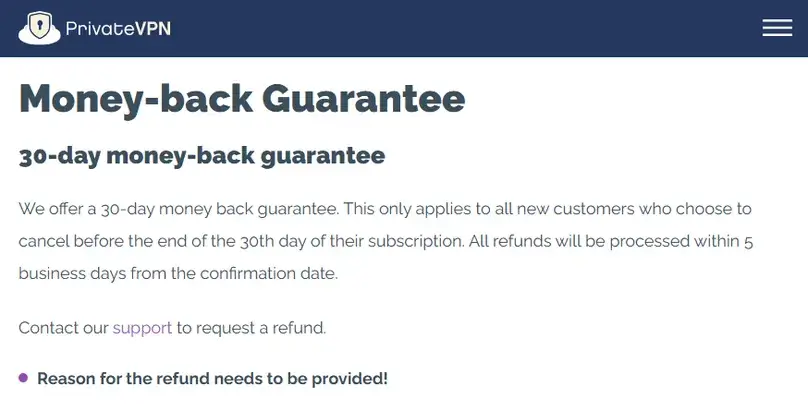
PrivateVPN has a 30-day money-back guarantee for eligible direct purchases, but it is not a no-questions-asked self-service flow in the way some buyers might expect. The refund policy we reviewed says the customer needs to provide a reason, and our actual refund request required contact with support rather than a dashboard refund button.
In our test, canceling auto-renewal and requesting a refund were separate actions. Support told us that disabling automatic renewal is not a formal refund request; the refund needs to be submitted via support email or chat within 30 days from account registration. We requested a refund by live chat on July 8, 2026. PrivateVPN asked for troubleshooting context, approved the refund around 13 hours later, processed a full refund, ended access immediately, and stated that PayPal refunds may be immediate while bank-account refunds can take 5 to 10 business days. Our final record confirms that the full PayPal payment returned on July 9, the next calendar date; see our nine-provider VPN refund comparison.
| Refund factor | What we found | Buyer impact |
|---|---|---|
| Direct purchase refund window | 30 days | Enough time to test apps, speed, port forwarding, streaming, leak behavior, and support. |
| Refund request path | Support contact, not a self-service refund button in our review | Expect to talk to support and provide a reason/context. |
| Recurring payments | Not refundable in the policy notes we reviewed | Cancel renewal before the next billing date if you do not want to continue. |
| Crypto payments | Listed as non-refundable | Use PayPal/card if refund flexibility matters. |
| Our refund test | Approved after about 13 hours; full refund; access ended immediately | Positive result, but other users should not assume every case will be identical. |
Interested in PrivateVPN? Confirm the current price, refund caveats, supported protocols, port forwarding behavior, and streaming needs before choosing.
Visit PrivateVPN Compare VPN Top PicksApps and devices
PrivateVPN App Experience and Device Support
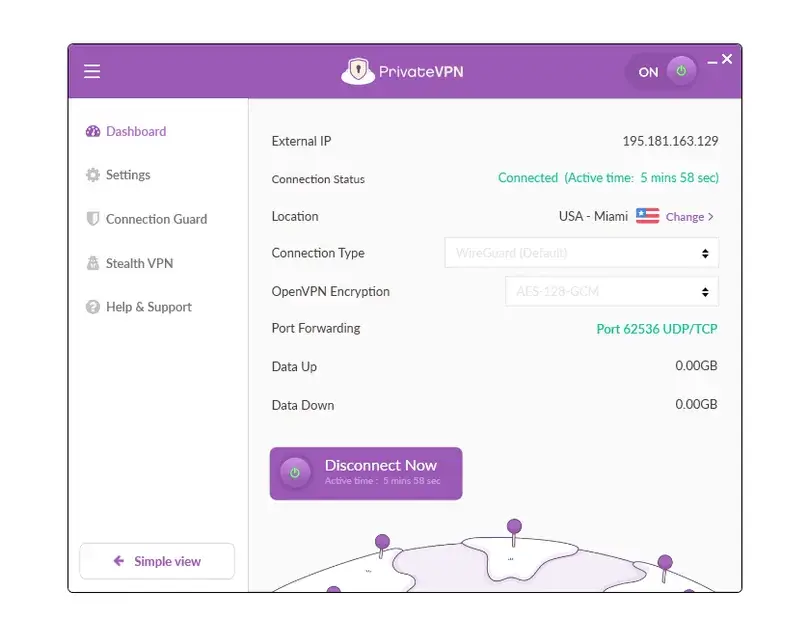
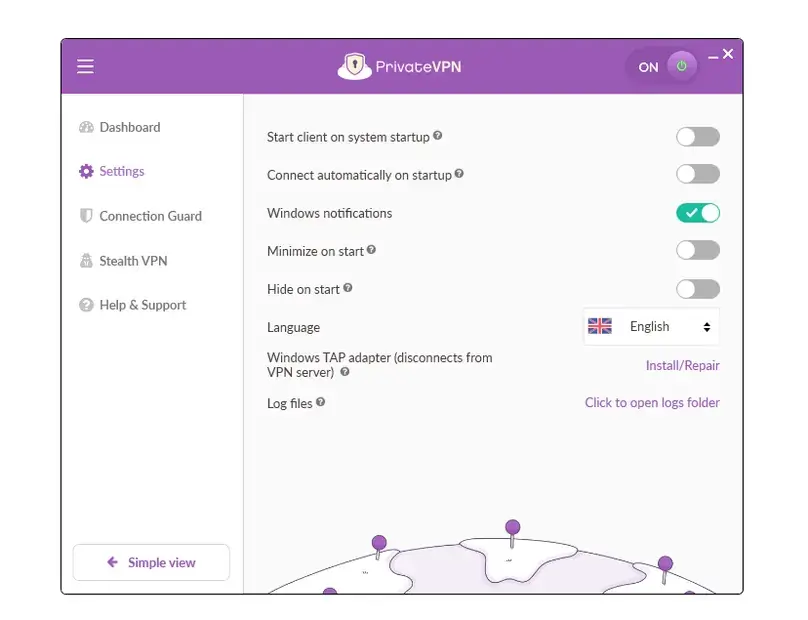
The PrivateVPN Windows app is simple and somewhat technical. It does not feel like the polished consumer dashboards from Surfshark or NordVPN, but it exposes practical VPN controls such as protocol selection, port forwarding, kill switch, Application Guard, Stealth VPN, DNS/IPv6 leak settings, and server selection. We tested Windows app version 3.1.2 and also checked Android, iOS, browser extension, manual configuration, and router setup availability.
The app does not include a quick “fastest connection” button in the way some mainstream VPNs do. That may feel less beginner-friendly, but it also fits the product: PrivateVPN expects users to choose a country/server. The app showed manual country and city selection, favorites, port forwarding visibility, a dedicated IP server category, and technical protocol options. It did not show in-app app-based split tunneling, website split tunneling, server load, latency, or the kind of bundled privacy tools available in Surfshark or NordVPN.
What felt strong
The app was simple, practical, and focused on VPN basics. Port forwarding visibility and manual configuration options make it more developer-friendly than many mainstream VPN apps.
What felt weak
PrivateVPN lacks easy in-app split tunneling, ad/tracker blocking, malware blocking, dark web monitoring, server load, and the refined onboarding of bigger competitors.
Technical features
Port Forwarding, Dedicated IP Category, and Manual Configuration
Port forwarding is the biggest reason PrivateVPN deserves a serious look from technical users. Surfshark and CyberGhost do not support port forwarding; PrivateVPN does. In our Windows test, port forwarding was visible in the app while connected, and we received a port assignment of 62536 UDP/TCP. We also performed a legal P2P check using WireGuard, port forwarding, and a legal test source; download started and upload/seeding/incoming behavior was observed.
That said, the “Dedicated IP” wording needs care. PrivateVPN support told us it does not sell static/private IP services as a paid add-on. We found a dedicated IP server category included in the app, but those servers did not connect during our test. The support explanation described dynamic IP behavior rather than a paid, personal static IP product like the Dedicated IP add-ons sold by some larger VPNs. For the public review, we should not overstate PrivateVPN as offering a true paid static IP add-on.
For the feature-level test method and the differences across providers, see our VPN port forwarding guide.
| Feature | What we checked | Result |
|---|---|---|
| Port forwarding | Windows app, WireGuard, legal P2P check | Worked in our check; the app showed an assigned UDP/TCP port. |
| OpenVPN port forwarding | OpenVPN UDP/TCP protocol checks | Support said OpenVPN supports it, but OpenVPN did not connect in our Windows test. |
| Dedicated IP category | App server category and dashboard/context review | Included category was visible, but dedicated IP servers did not connect in our test. |
| Manual configuration | Account control panel, proxy login, WireGuard configuration generation | PrivateVPN exposed more manual configuration than some mainstream consumer VPNs. |
Privacy and security
Privacy, Security, and VPN Controls
PrivateVPN positions itself around no-logs messaging, Swedish jurisdiction, encryption, kill switch protection, DNS/IP/WebRTC leak protection, Stealth VPN, port forwarding, and manual configuration options. In our review, we checked the no-log page, privacy policy, protocol resources, kill switch resources, port-forwarding notes, help center, and the actual Windows app.
We did not find a public audit page or transparency report in the material reviewed. That does not prove the no-logs claim is false; it means the public trust evidence is thinner than providers that publish third-party audits or broader transparency resources. For a privacy-sensitive buyer, PrivateVPN should be treated as a provider with a no-logs claim and practical controls, not as a VPN with a deeply documented audit program.
Kill switch and Application Guard
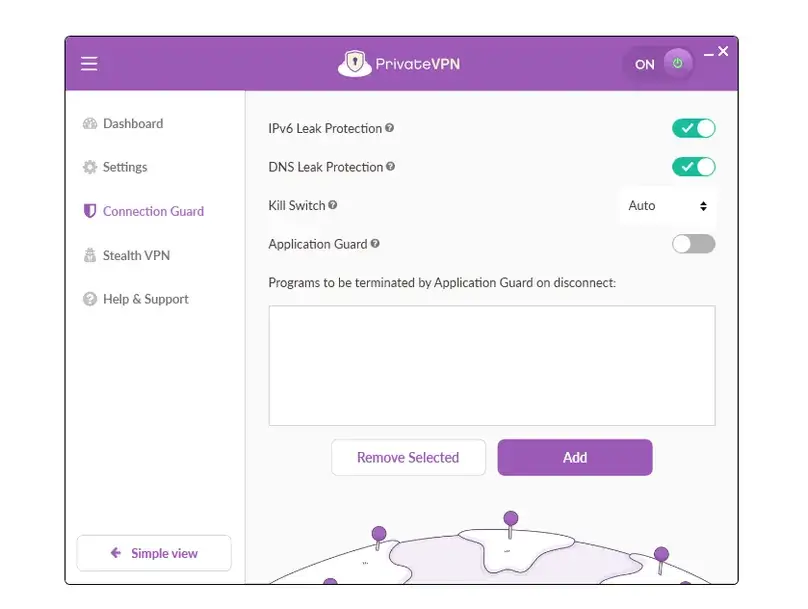
The Windows app included a kill switch with “None,” “Auto,” and “Always” behavior, plus Application Guard for closing selected programs if the VPN disconnects. In our manual check, the kill switch worked as expected. This is one of PrivateVPN’s better technical features because it gives users both system-level and app-level protection options.
Want to reproduce this safety check? Our VPN Kill Switch guide explains the Windows failure test, Pass / Fail / Inconclusive interpretation, manual-disconnect caveat, and the limits of browser-level evidence.
Stealth VPN
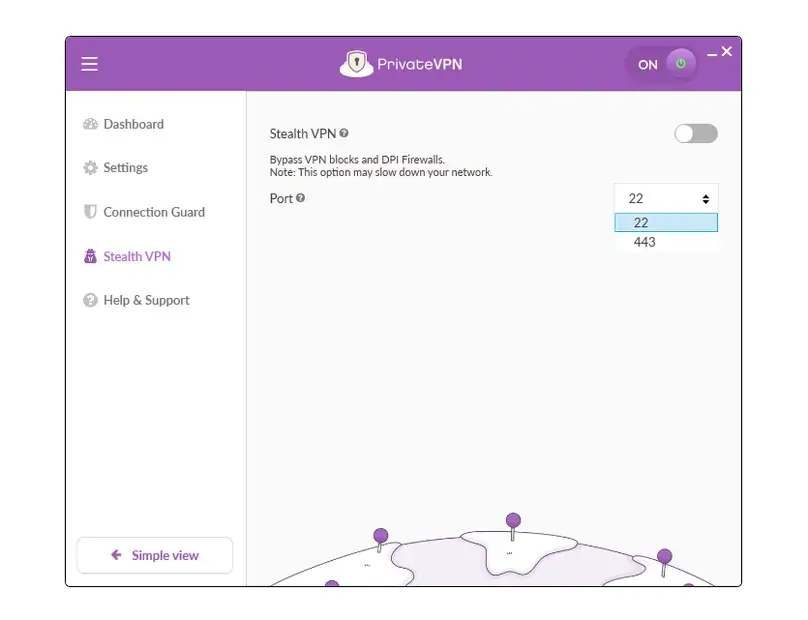
PrivateVPN also includes Stealth VPN for restrictive-network scenarios. Support confirmed the feature, and we found it in the app. However, Stealth VPN automatically changed to an OpenVPN mode, and that protocol did not connect during our test session. Because of that, we cannot claim Stealth VPN worked in our environment; we can only say the feature was visible and attempted.
Performance
PrivateVPN Speed and Performance Checks
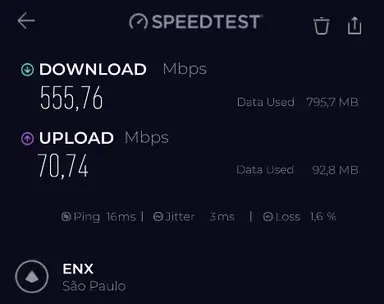
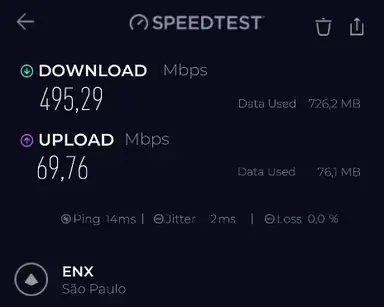
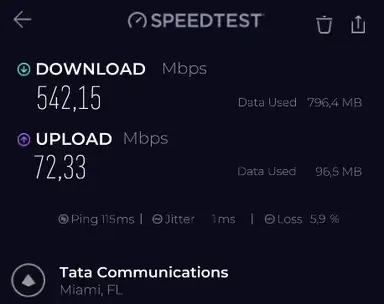
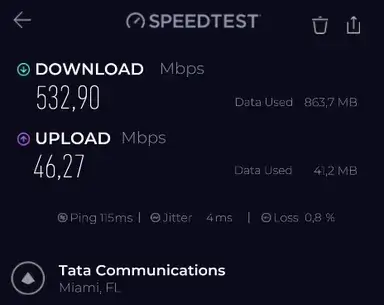
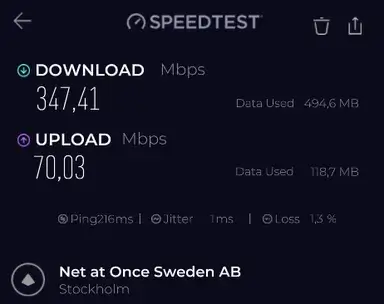
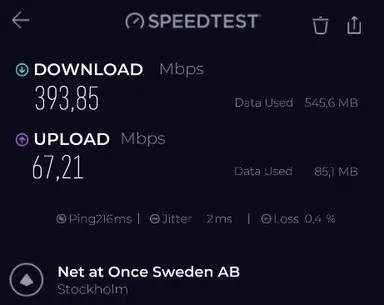
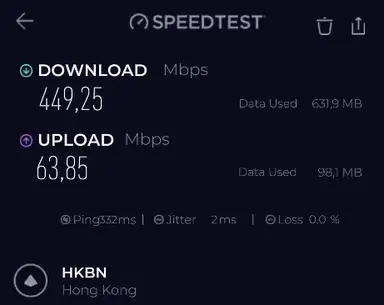
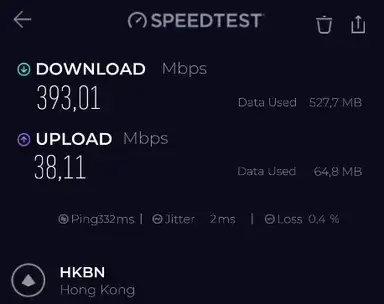
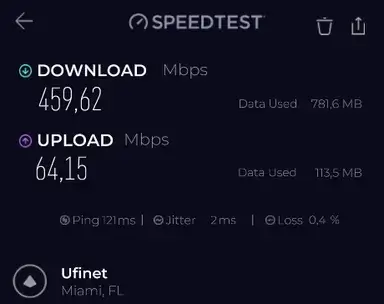
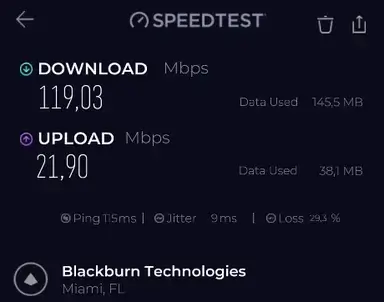
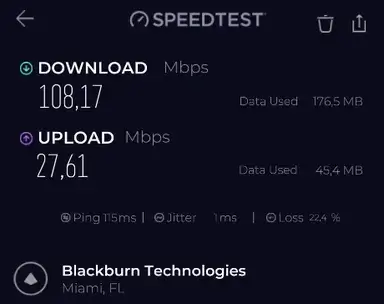
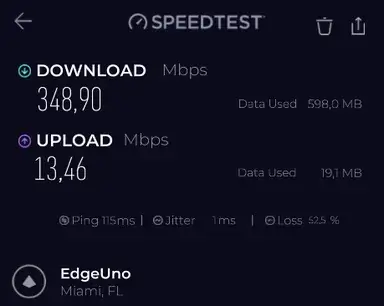
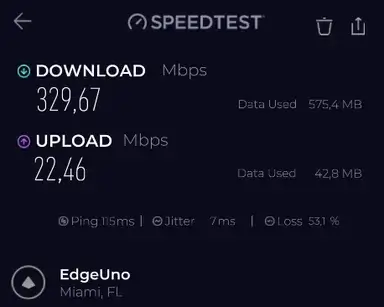
We ran structured paid-account speed checks with the Speedtest by Ookla Windows app on July 8, 2026, using a cable connection and the same approximate test window. Our no-VPN baseline averaged about 813.9 Mbps download, 72.6 Mbps upload, and 17.8 ms ping across 12 baseline tests. We then tested PrivateVPN locations using WireGuard, plus a protocol comparison in Miami.
The best part of the performance story was WireGuard. São Paulo and Miami retained about two-thirds of baseline download speed, while upload retention stayed strong in several locations. The most concerning part was protocol reliability and packet loss. OpenVPN UDP/TCP did not connect in our checks, Stealth VPN did not connect because it depends on OpenVPN, PPTP was slow with high packet loss, and L2TP produced high packet loss in the Miami protocol comparison.
| PrivateVPN test | Protocol | Avg download | Download retention | Avg upload | Upload retention | Notes |
|---|---|---|---|---|---|---|
| São Paulo, Brazil | WireGuard | 525.5 Mbps | 64.6% | 70.3 Mbps | 96.7% | Strong local result with one run showing 1.6% packet loss. |
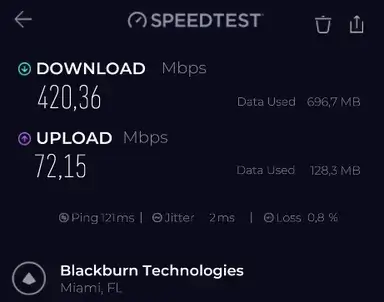
| Miami, United States | WireGuard | 537.5 Mbps | 66.0% | 59.3 Mbps | 81.6% | Best long-distance practical result; packet loss varied from 0.8% to 5.9%. |
| New York, United States | WireGuard | 215.3 Mbps | 26.5% | 71.4 Mbps | 98.2% | Download was much weaker than Miami despite strong upload. |
| London, United Kingdom | WireGuard | 370.6 Mbps | 45.5% | 68.6 Mbps | 94.5% | Usable European result with high latency due to distance. |
| Paris, France | WireGuard | 468.7 Mbps | 57.6% | 57.2 Mbps | 78.7% | Better download than London, but packet loss appeared in both runs. |
| Hong Kong | WireGuard | 421.1 Mbps | 51.7% | 51.0 Mbps | 70.2% | Surprisingly usable distant result from our location. |
| Bangalore, India | WireGuard | 213.7 Mbps | 26.3% | 57.9 Mbps | 79.7% | High latency and 7.6%–8.4% packet loss. |
| Perth, Australia | WireGuard | 225.4 Mbps | 27.7% | 54.3 Mbps | 74.8% | Very distant route with high latency and 8.8%–12.9% packet loss. |
Want to compare this VPN against your own no-VPN baseline? Use our VPN speed test and speed-loss calculator for a repeatable at-home method and local, privacy-preserving calculation.
How to read these numbers: These are practical paid-account checks, not a universal speed ranking. Packet loss, jitter, route quality, Wi-Fi/cable differences, local ISP behavior, and server load can change results substantially.
Protocol comparison
Protocol behavior was one of the most important findings. In our Miami comparison, WireGuard averaged 440.0 Mbps download and 68.2 Mbps upload. OpenVPN UDP, OpenVPN TCP, and OpenVPN TAP UDP did not connect in our test session. PPTP connected but had weak performance and high packet loss. L2TP connected with better download than PPTP but extremely high packet loss. We do not recommend choosing PPTP as a modern privacy/security default.
For the broader technical context behind these results, see our VPN protocols comparison, including WireGuard, OpenVPN, IKEv2, TCP/UDP, provider-specific modes, and our paid protocol test data.
Leak checks
DNS, WebRTC, and IP Checks
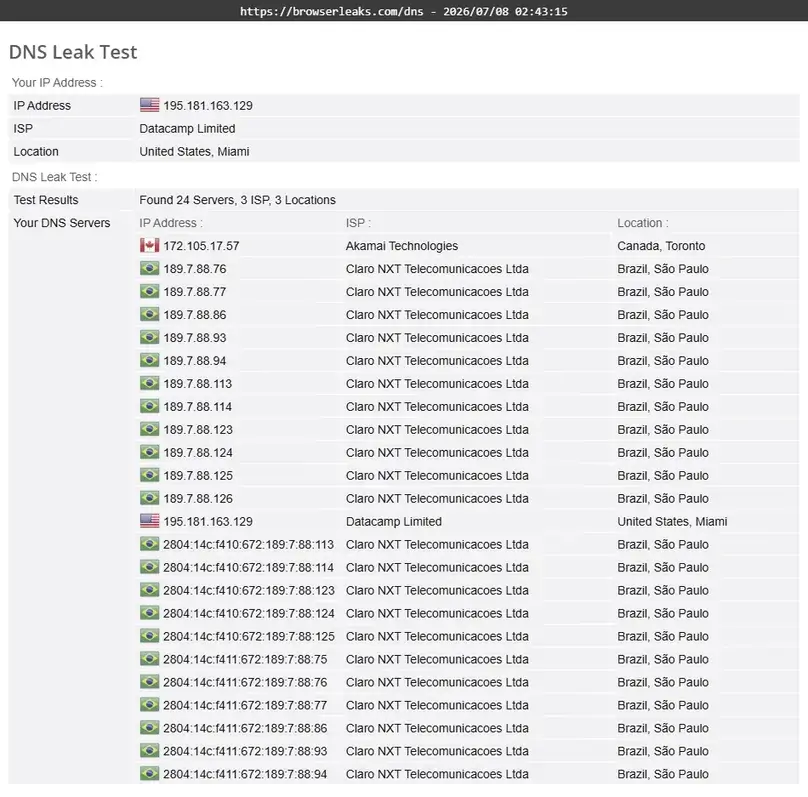
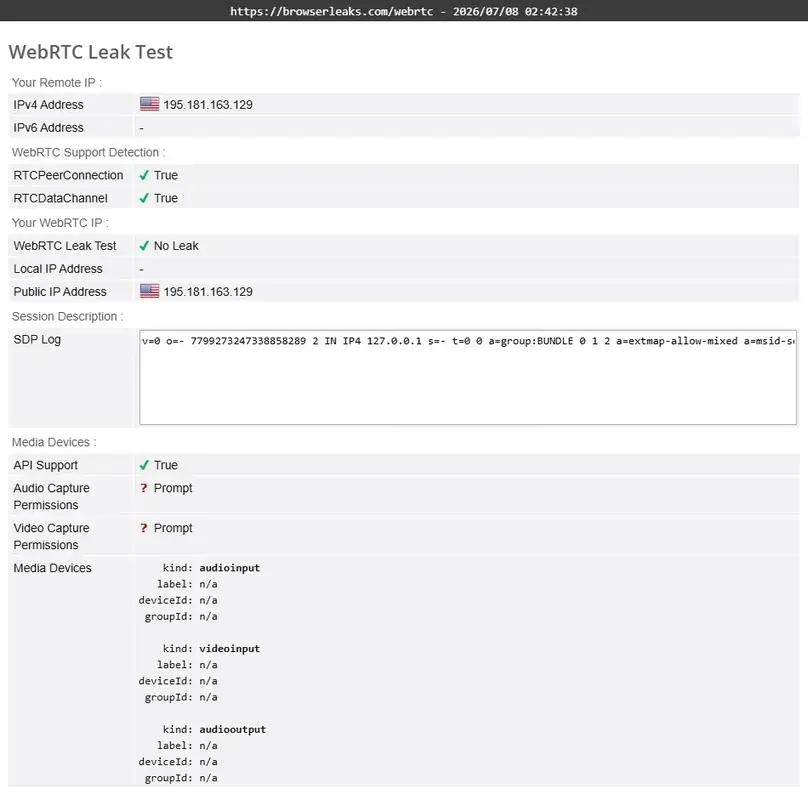
This was the most serious issue in our PrivateVPN test. In the BrowserLeaks DNS check while connected to a Miami server, our real ISP DNS appeared. That means we observed a DNS leak in our test environment. WebRTC behaved better: BrowserLeaks WebRTC did not show our real IP, and the VPN IP/location appeared as expected. Our IP check also showed that the public IP changed from the baseline location to Miami.
A single DNS leak check does not prove every PrivateVPN connection will leak for every user, but it is too important to bury. If you test PrivateVPN yourself, run your own DNS and WebRTC checks immediately after connecting and after changing protocols or servers. If your ISP DNS appears, contact support or choose another VPN for privacy-sensitive use.
Network
Server Network and Locations
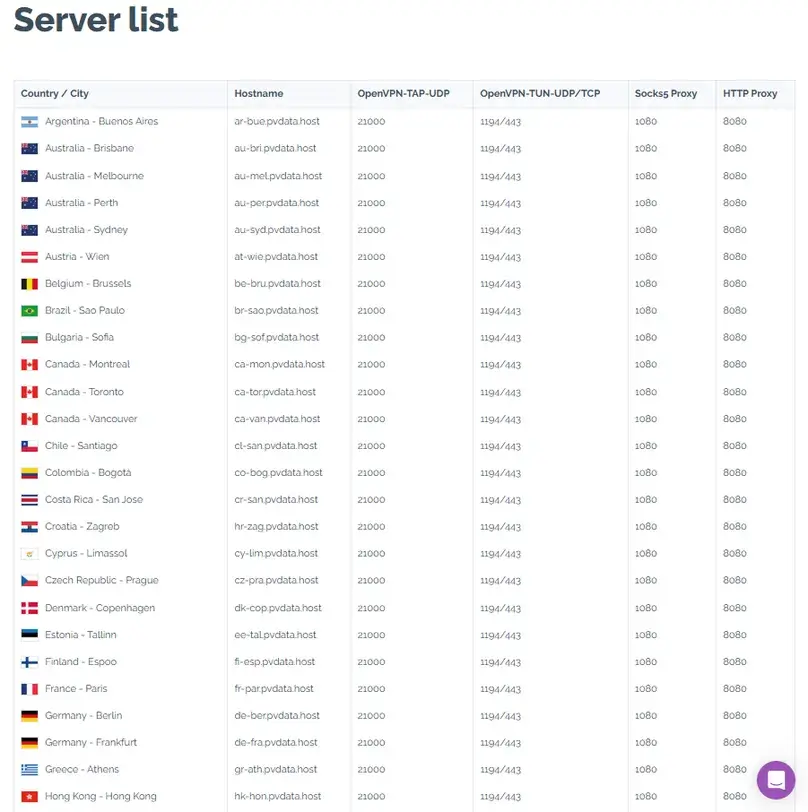
PrivateVPN lists 200+ server locations in 63 countries. In our check, the in-app list appeared consistent with that claim. The network is smaller than NordVPN, Surfshark, CyberGhost, Proton VPN, and PIA, but it still covered important regions: Brazil, multiple U.S. cities, London and Manchester in the UK, many European countries, Hong Kong, India, Japan, Singapore, South Korea, Australia/New Zealand, Nigeria, and South Africa.
The bigger limitation is not the country count; it is specialization and reliability. We did not find dedicated streaming or P2P server categories in the Windows app. PrivateVPN’s port forwarding appeared broadly available after connection, but dedicated IP servers did not connect in our checks. That makes PrivateVPN more interesting for technical users who can troubleshoot than for users who want labeled one-click streaming/P2P presets.
Use cases
Streaming, Live Video, and P2P Checks
Streaming checks
Our streaming results were mixed. Apple TV worked normally using WireGuard on Miami, and Netflix loaded and played normally using the same setup. A live video stream also loaded and played smoothly. Amazon Prime Video loaded the catalog, but playback failed with a VPN/proxy warning. Disney Plus/Hulu did not load normally in our check. We tried other protocols, but Stealth VPN/OpenVPN did not connect in our environment, and PPTP/L2TP did not solve the streaming errors.
| Streaming check | Server/protocol | Result | What we can safely say |
|---|---|---|---|
| Apple TV | Miami, WireGuard | Catalog loaded and playback worked | Worked in our check. |
| Netflix | Miami, WireGuard | Catalog loaded and playback worked | Worked in our check. |
| Live video stream | Miami, WireGuard | Loaded and played smoothly | Worked in our check. |
| Amazon Prime Video | Miami, WireGuard; other protocols attempted | Catalog loaded, playback failed with VPN/proxy warning | Did not work in our check. |
| Disney Plus/Hulu | Miami, WireGuard; other protocols attempted | Homepage/platform access error | Did not work in our check. |
Streaming caveat: We do not claim PrivateVPN works with all streaming platforms. Streaming access changes often, and our results were mixed even within one paid test window.
P2P and legal torrenting
PrivateVPN performed better in the P2P/port-forwarding part of the review. We confirmed P2P/torrenting is allowed, used a legal test source, connected with WireGuard, used the assigned port, and observed download plus upload/seeding/incoming behavior. That is a real practical advantage over VPNs that do not offer port forwarding at all.
Support
Support Experience
We contacted PrivateVPN before purchase using live chat. The chat began with an AI agent and then moved to a human agent named Jim. The support response was useful and unusually detailed: Jim clarified that auto-renewal cancellation is separate from a refund request, PrivateVPN does not sell a paid static/private IP add-on, port forwarding is supported on all plans, WireGuard port forwarding had recently arrived for Windows and Mac, Linux uses manual WireGuard/OpenVPN configurations, one router counts toward the 10-connection limit, Stealth VPN is available on supported devices, and PrivateVPN does not include ad/tracker/malware blocker or dark web monitoring features.
The support result was good, but the help center itself felt weaker than the largest VPN brands. We found useful categories and articles, but the documentation does not feel as complete or polished as NordVPN, Proton VPN, PIA, Surfshark, or CyberGhost. For PrivateVPN, support chat may matter more because the product exposes technical features that some users will need help configuring.
Alternatives
PrivateVPN Alternatives to Compare
NordVPN
Choose NordVPN if you want a more polished mainstream app, Meshnet, broader security add-ons, and stronger overall consumer positioning. PrivateVPN is simpler and more port-forwarding focused.
Surfshark
Choose Surfshark if unlimited devices, Bypasser, CleanWeb, Dynamic MultiHop, IP Rotator, and a broader security bundle matter more than port forwarding.
Private Internet Access
Choose PIA if you want advanced settings, open-source apps, unlimited devices, strong split tunneling, MACE, and port forwarding with a much richer configuration interface.
Proton VPN
Choose Proton VPN if privacy posture, Secure Core, open-source/audited apps, NetShield, and the broader Proton ecosystem are more important than PrivateVPN’s simpler technical app.
CyberGhost VPN
Choose CyberGhost if you want a more beginner-friendly app, streaming-oriented server labels, and a broader mainstream VPN experience. PrivateVPN is more technical and less polished.
PureVPN
Choose PureVPN if you want a broad feature set, Shortcuts, add-ons, and more visible app extras. PrivateVPN is simpler, leaner, and more focused on core VPN controls.
Final verdict
Should You Choose PrivateVPN?
PrivateVPN is not the VPN we would position as the safest all-around pick for every reader. The DNS leak we observed, failed OpenVPN/Stealth checks, failed dedicated IP server connections, weak help-center depth, and mixed streaming results are significant caveats. Buyers who want polished consumer features, rich split tunneling, ad/tracker blocking, audited trust resources, or maximum streaming consistency should compare other VPNs first.
PrivateVPN still deserves a place in the comparison because it is different. It is simple, relatively affordable on the true monthly plan, includes up to 10 simultaneous connections, exposes manual configuration, and — most importantly — gave us working port forwarding in a legal P2P check. For technical users who understand the trade-offs and are willing to verify DNS behavior immediately after setup, PrivateVPN can be interesting. For privacy-sensitive everyday users who want the cleanest hands-off experience, the issues we found make it harder to recommend without caution.
Want to test PrivateVPN yourself? Use the refund window to check your own DNS/WebRTC results, preferred streaming services, port forwarding, and protocols before relying on it long term.
Visit PrivateVPN Compare VPN ServicesEditorial checks
What We Checked in This Review
Review checks completed in July 2026.
Common questions
PrivateVPN FAQ
Is PrivateVPN good?
PrivateVPN can be good for technical users who want a simple VPN with port forwarding and a lower true monthly price. It is less compelling for users who want polished mainstream apps, easy split tunneling, built-in blockers, broad audits, or consistent streaming across every platform.
Did ReviewsAlly test PrivateVPN with a paid account?
Yes. We purchased the 1 Month Plan from the official PrivateVPN website and tested the account dashboard, Windows app, speed checks, leak checks, port forwarding, legal P2P behavior, selected streaming services, support, and refund process in July 2026.
Does PrivateVPN support port forwarding?
Yes, PrivateVPN support told us port forwarding is supported on all plans, and in our Windows test the app showed an assigned UDP/TCP port while connected with WireGuard. Our legal P2P check used port forwarding successfully.
Does PrivateVPN have a DNS leak?
In our test, BrowserLeaks DNS showed our real ISP DNS while connected to a Miami server, so we observed a DNS leak in our environment. This is a major caveat. Users should run their own DNS leak checks immediately after setup and after changing servers or protocols.
Does PrivateVPN work with streaming?
Our streaming results were mixed. Apple TV and Netflix worked in our checks using Miami over WireGuard, and a live video stream played smoothly. Amazon Prime Video playback failed with a VPN/proxy warning, and Disney Plus/Hulu did not load normally in our check.
Does PrivateVPN have split tunneling?
We did not find easy in-app split tunneling in the Windows app. The research found manual split-tunneling resources, but we did not test them because they require command-line/manual setup rather than a normal app toggle.
Does PrivateVPN include ad blocker, malware blocker, or dark web monitoring?
No equivalent feature was found in our app/dashboard review, and support told us PrivateVPN does not currently include ad blocker, tracker blocker, malware blocker, threat protection, or dark web monitor features.
How many devices does PrivateVPN allow?
PrivateVPN lists up to 10 simultaneous connections. Support also told us one router can be supported per account and counts toward the 10-connection limit.
Does PrivateVPN offer a refund?
PrivateVPN offers a 30-day money-back guarantee for eligible direct purchases. In our test, the refund required support contact and a reason/context. Our refund was approved after about 13 hours, but crypto payments, app-store purchases, renewals, and other situations can have caveats.
Source notes
Sources Reviewed
This review combines our paid hands-on account checks with official PrivateVPN pricing, refund, terms, privacy, server, app, protocol, port forwarding, no-log, and help-center resources reviewed in July 2026.
Reader feedback
Share Your PrivateVPN Experience
Have you used PrivateVPN for port forwarding, streaming, P2P, travel, privacy, or everyday browsing? Leave a comment below to help other readers understand where PrivateVPN works well and where it may fall short. Comments are moderated before publication.