
VPN Review
Surfshark Review 2026: Paid Hands-On Tests, Pricing, Apps, Speed Checks, Refund, and Alternatives
Surfshark is a polished mainstream VPN with unlimited devices, a very broad feature set, and strong value on longer plans. We bought Surfshark One+, tested the Windows app, Android, browser extensions, dashboard, speed checks, leak checks, streaming, P2P behavior, support, and refund flow to see where it is genuinely strong and where buyers should be careful.
Reviews Ally may earn a commission if you click some links on this page. This does not change our editorial process. We purchased and tested Surfshark as part of our review process, and we describe only the checks we actually performed.
Quick verdict
Surfshark Is One of the Strongest VPNs We Tested for Everyday Users, Streaming, and Multi-Device Coverage
Surfshark earned a strong Level 4 review result in our paid testing. The Windows app was polished, the feature set was deep, unlimited devices remained a major differentiator, streaming checks worked smoothly on a regular Miami server, and our refund request was approved quickly through Surfshark’s support flow.
The main caveats are not small-print details: the checkout showed a confusing local-price discrepancy during our purchase, Surfshark does not support port forwarding, recurring payments are not refundable under the policy we reviewed, and some features are tied to higher plans such as Surfshark One or One+. If you only need a basic VPN, Surfshark can feel broader than necessary.
At a glance
Quick Facts
- Best for
- Households, heavy multi-device users, travelers, streaming-focused users, and buyers who want VPN plus extra privacy/security tools.
- Plan tested
- Surfshark One+ purchased directly from Surfshark’s website in June 2026.
- Monthly pricing checked
- Starter $16.45/month, One $18.95/month, One+ $21.85/month in the pricing research.
- Refund policy
- 30-day money-back guarantee for eligible direct purchases; recurring payments were listed as non-refundable in the reviewed terms.
- Devices
- Unlimited devices on paid subscriptions, with fair-use/personal-use caveats from support.
- Server network checked
- 4,500+ servers in 100 countries, with static IP, Dynamic MultiHop, and Dedicated IP options reviewed.
- Windows app tested
- Surfshark Windows app v6.12.0, plus Android 13, Chrome, and Edge checks.
- Biggest limitation
- No port forwarding, and renewal/refund terms need attention before purchase.
Fit
Who Surfshark Is Best For
Best for
- Families and users with many devices.
- People who want a polished, modern VPN app.
- Streaming-focused users who want a broad server network to test.
- Buyers who want VPN plus tools such as Alternative ID, Alert, Search, and Antivirus.
- Users who value Dynamic MultiHop, IP Rotator, NoBorders, Bypasser, and CleanWeb in one app.
Not ideal for
- Users who require port forwarding.
- People who want the simplest possible VPN-only product.
- Buyers who dislike promotional pricing and renewal caveats.
- Users who need every add-on to be refundable.
- People who expect a VPN to guarantee access to every streaming platform.
Methodology
How We Reviewed Surfshark
We completed a paid hands-on Surfshark review in June 2026. We purchased Surfshark One+ directly from Surfshark’s official website, tested the account dashboard, checkout, billing, Windows app, Android 13, browser extensions, VPN settings, speed checks, leak checks, streaming behavior, P2P behavior, support, and refund flow.
Our speed results are structured paid-account speed checks, not a global benchmark. They are useful for understanding how Surfshark behaved in our paid test environment, but they should not be read as proof of universal speed. Routing, server load, protocol, device, local ISP, Wi-Fi/cable, and time of day can change results.
Pricing
Surfshark Pricing and Plans
Surfshark’s pricing is useful but more complex than a single “cheap VPN” headline suggests. In our June 2026 review, the monthly prices we recorded were $16.45/month for Starter, $18.95/month for One, and $21.85/month for One+. We purchased Surfshark One+, which includes more than the base VPN.
The longer plans had much lower monthly-equivalent pricing, especially for 2-year terms, but those prices require upfront payment and can renew differently. For example, we recorded One at $2.79/month for the first 27 months with $75.33 due for that first term and a renewal at $75.33/year. We recorded One+ at $4.49/month for the first 27 months, but not every renewal field was fully clear in the notes.
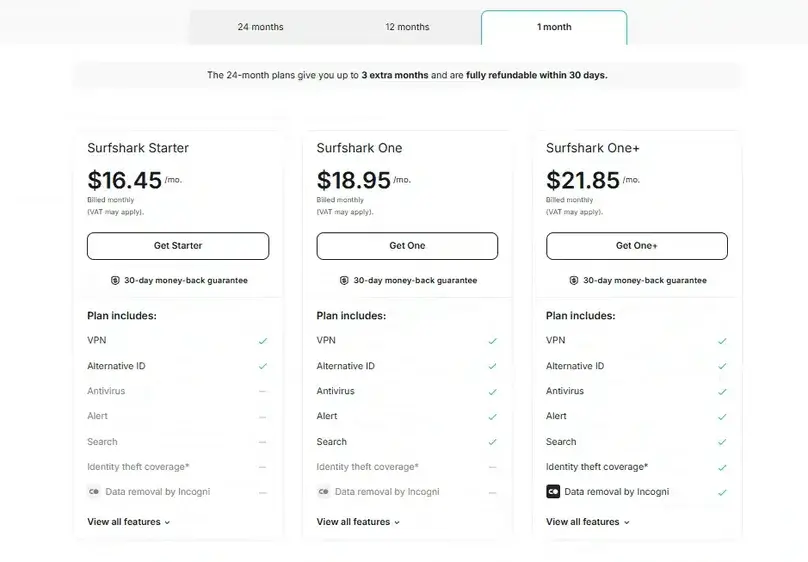
| Plan / pricing item | What we recorded | Editorial note |
|---|---|---|
| Starter monthly | $16.45/month | Base VPN tier; best comparison point if you only want VPN access. |
| One monthly | $18.95/month | Adds more security/privacy tools than Starter. |
| One+ monthly | $21.85/month | The plan we purchased; strongest feature coverage, but more expensive month to month. |
| One 2-year plan | $2.79/month; $75.33 total for first 27 months; renews at $75.33/year in our notes | Much cheaper monthly equivalent, but it is not the same as paying monthly. |
| One+ 2-year plan | $4.49/month; $121.23 total for first 27 months | More feature-rich, but buyers should verify renewal before checkout. |
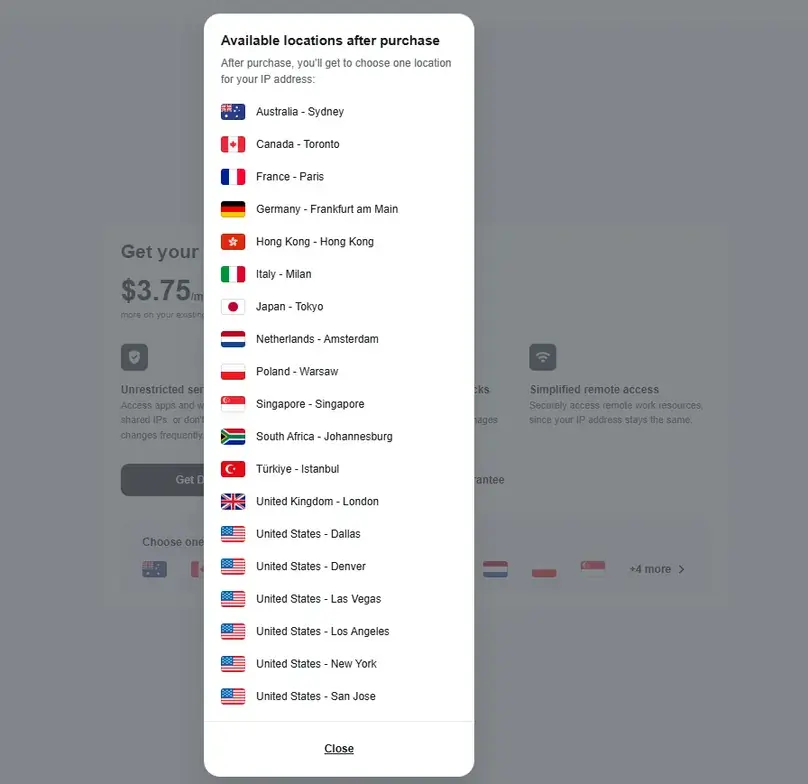
| Dedicated IP | $3.75/month in our check | Available as an add-on; we reviewed visibility and locations but did not buy it. |
| Alternative Number | $2.29/month in our check | Not refundable according to the support answer we received. |
Pricing can vary by promotion, checkout location, currency, taxes, payment method, and plan term. Use our VPN cost and renewal study to compare Surfshark Starter’s true monthly plan, current first charge, included months, and renewal on the same basis before buying.
During our checkout, the cart showed one price for the One+ plan, but the payment step showed other. We treated this as a pricing/checkout clarity issue rather than a universal Surfshark price claim, but it is exactly why buyers should confirm the final payment screen before paying.
Interested in Surfshark? Confirm the current plan, renewal, add-ons, and refund terms before checkout.
Check Surfshark Pricing Compare VPNsBilling and refund
Refund, Billing, and Cancellation
Surfshark’s refund policy looked straightforward at first glance: eligible direct purchases have a 30-day money-back guarantee. The important nuance is that the terms we reviewed say the 30-day guarantee applies to the initial purchase and that recurring payments are non-refundable. App store purchases can also be handled under platform rules rather than Surfshark’s direct refund process.
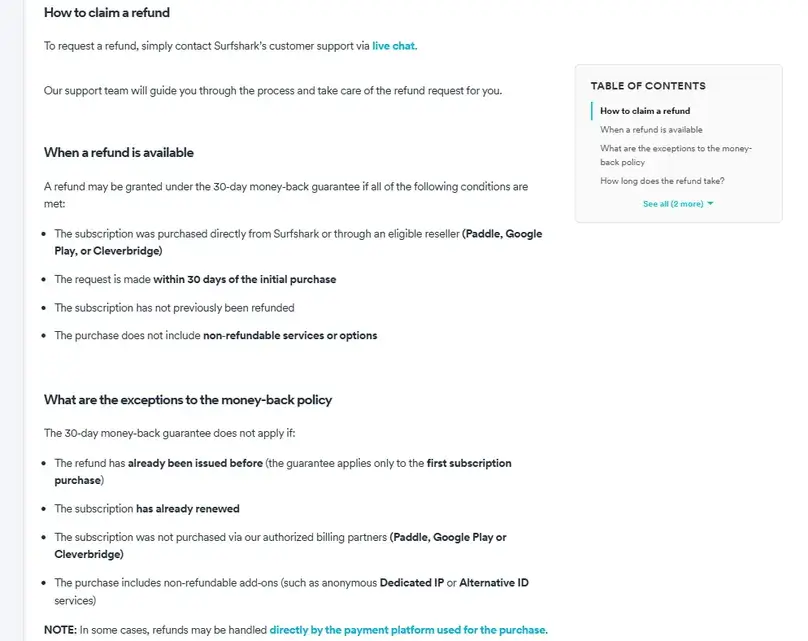
Canceling auto-renewal
Support told us auto-renewal cancellation and refund requests are separate processes. Canceling renewal does not automatically request a refund.
Refund request
On July 1, 2026, we accessed live chat. The bot sent a refund form link, asked standard “why are you leaving?” questions, and approved the refund in about 1 minute.
Money received
Surfshark estimated 1 to 10 business days. Our final record confirms that the full PIX payment returned on July 2, the next calendar date after the request. See the dated row in our VPN refund comparison.
Add-on caveats
Support said Dedicated IP follows the base refund policy, while Alternative Number is not refundable. Anonymous Dedicated IP had a separate caveat in the support answer.
Apps and usability
Surfshark App Experience and Device Coverage
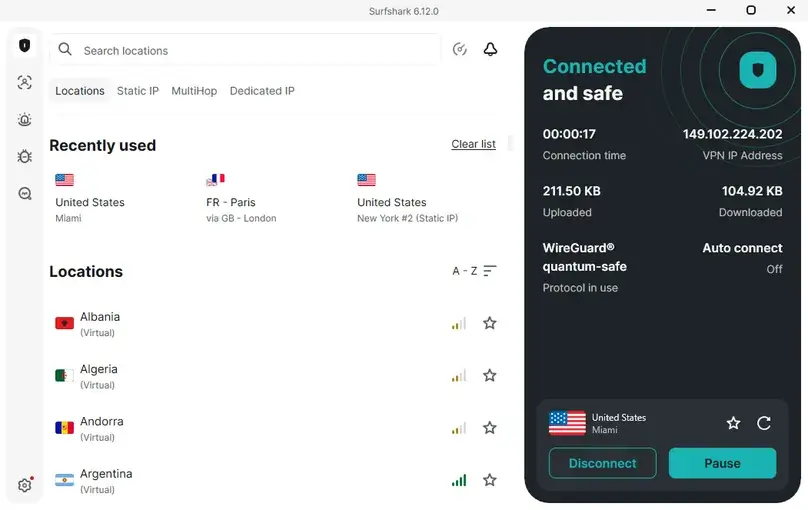
Surfshark’s app experience was one of the strongest parts of our review. The Windows app looked polished, login was easy, Quick Connect was simple, the feature list was deep, and Surfshark was the only provider in this testing sequence that warned us about another VPN’s leftover network adapters. That was a useful detail: after removing the leftover adapter, the warning stopped.
We tested the Windows app v6.12.0 and also checked Android 13, Chrome, and Edge. We did not test macOS, iOS, smart TV apps, router setup, or Smart DNS in a live device workflow. The paid subscription was positioned around unlimited devices, while support also mentioned personal-use/fair-use caveats for unusually high active-session behavior.
Bypasser, IP Rotator, and NoBorders
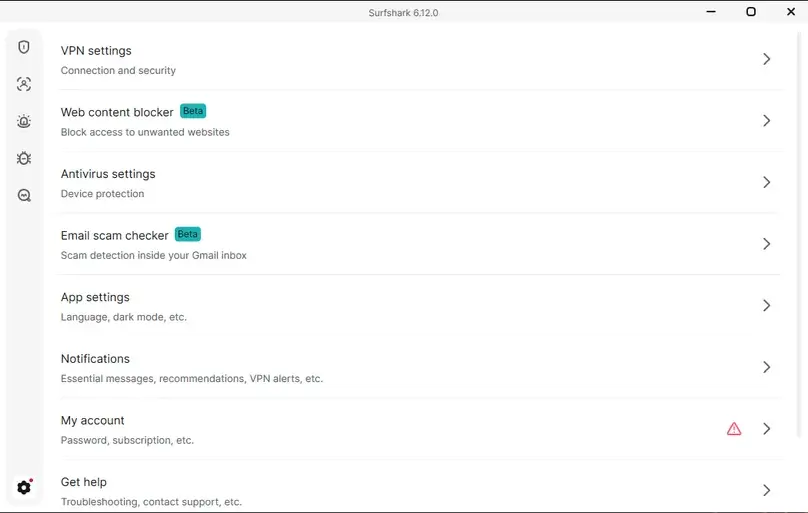
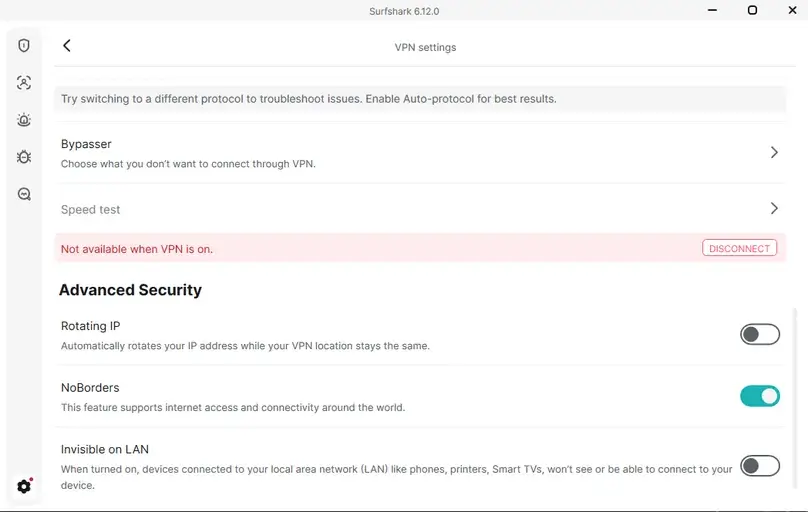
Surfshark’s Bypasser split tunneling was significantly better than the website-only exception system we found in CyberGhost. In our Windows app test, Bypasser supported app rules, website/domain rules, and IP rules. We disabled Chrome, WhatsApp, Notion, and ChatGPT in the app rules and confirmed the feature behaved normally. Our VPN split-tunneling guide explains how those rule types differ and how to verify the intended route.
We also tested IP Rotator and NoBorders. IP Rotator changed the IP after some time in our check. NoBorders was visible in the app and enabled by default. Support also told us obfuscation works when using OpenVPN, while NoBorders is included in the app settings.
Security features
Privacy, Security, and Surfshark One+ Tools
Surfshark positions itself around no-logs, RAM-only servers, modern encryption, leak protection, and a large privacy/security bundle. We reviewed official trust and transparency pages, checked the app settings, and tested practical app features. This does not mean Surfshark makes a user “fully anonymous”; no commercial VPN can guarantee that. It does mean Surfshark has a more complete security-tool bundle than many VPN-only competitors.
Protocols, Kill Switch, and CleanWeb
In the Windows app, we found Automatic/default, WireGuard, OpenVPN UDP, and OpenVPN TCP. We did not find IKEv2 or Dausos in the Windows app during this test. WireGuard was the fastest and most stable protocol in our checks. Kill Switch was available and worked as expected, but we did not find an advanced/strict kill switch mode comparable to some other providers’ more granular settings.
CleanWeb was available in the VPN settings area, disabled by default, and described in-app as blocking ads, trackers, and malware when the VPN is connected. We enabled it and performed safe checks, but we do not use YouTube ad behavior as proof of ad blocking.
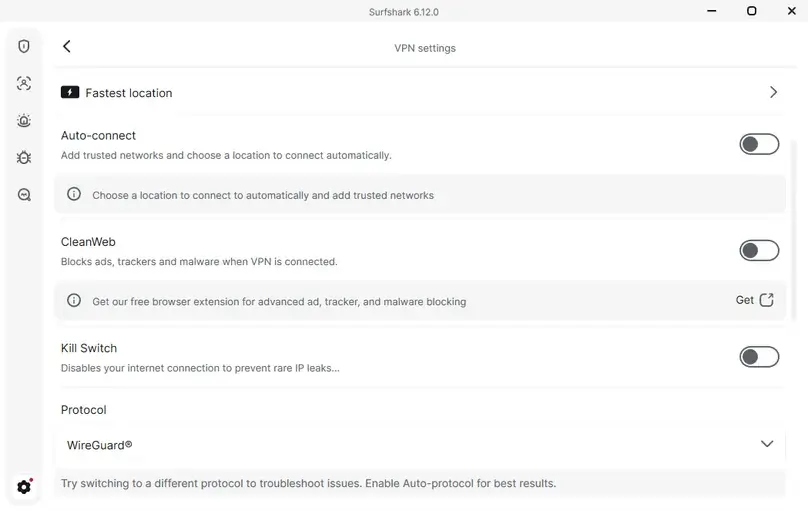
Want to reproduce this safety check? Our VPN Kill Switch guide explains the Windows failure test, Pass / Fail / Inconclusive interpretation, manual-disconnect caveat, and the limits of browser-level evidence.
Alternative ID, Alert, Antivirus, Search, and Incogni
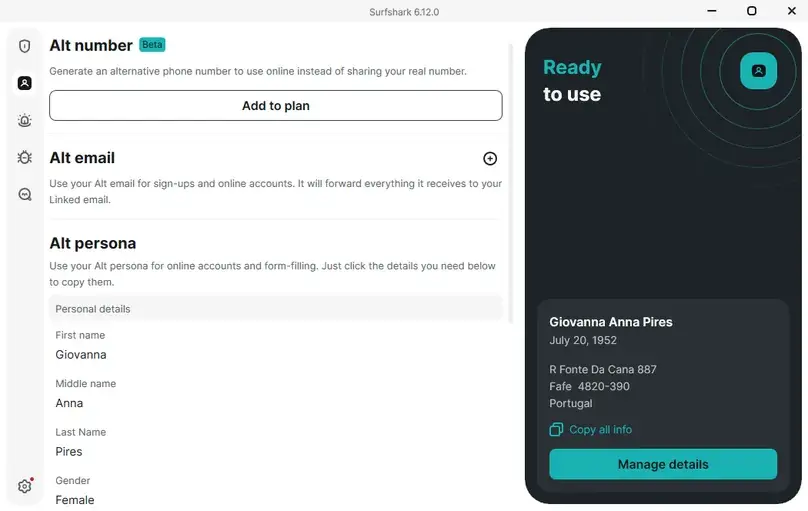
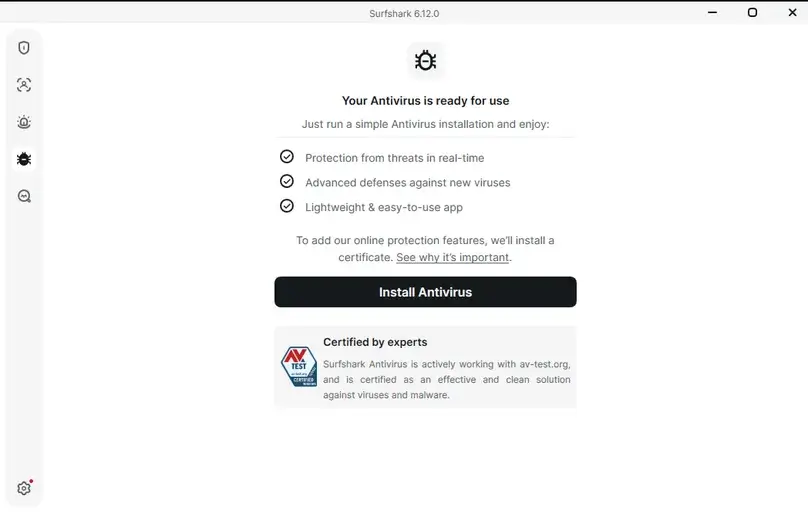
Because we purchased Surfshark One+, we had access to more than VPN. We checked Alternative ID, Surfshark Alert, Antivirus, Search, and Incogni visibility. Alternative ID looked useful and was included. Alternative Number appeared as a paid add-on in our notes. Surfshark Alert was available on One+ and One; we tested it, but we avoided publishing sensitive monitoring details. Antivirus and Search were tested; Incogni was observed as a separate service rather than a feature inside the VPN app.
Performance
Speed and Performance Checks
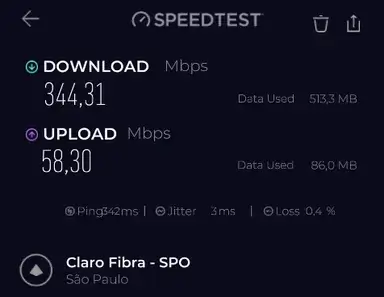
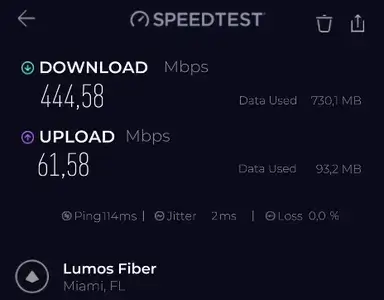
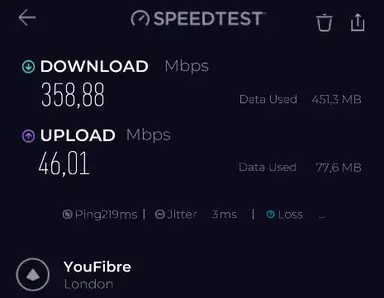
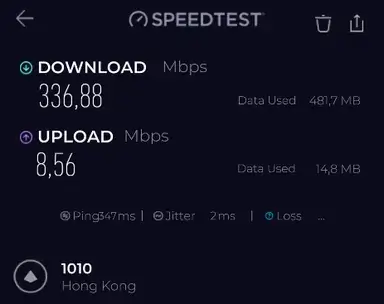
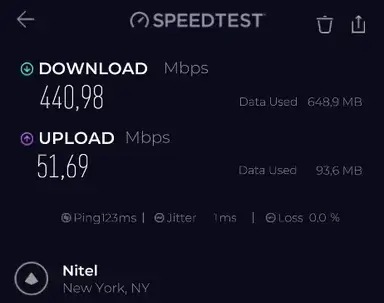
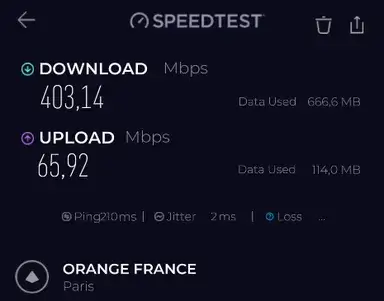
We ran Surfshark speed checks on June 26, 2026 using the Speedtest by Ookla Windows app on a cable connection from a Latin America-based test environment. We ran 13 no-VPN baseline tests and then tested Surfshark locations including Brazil, Miami, New York, London, Frankfurt, Hong Kong, India, Australia, Static IP New York, Dynamic MultiHop London → Paris, and protocol comparison checks in Miami.
The no-VPN baseline averaged 921.4 Mbps download, 68.7 Mbps upload, and about 18 ms ping. We did not publish no-VPN baseline screenshots because those can expose local testing context; the data is still used for retention calculations.
| Location / route | Protocol | Server type | Avg. download | Avg. upload | Avg. ping | Notes |
|---|---|---|---|---|---|---|
| No VPN baseline | VPN off | 13 local checks | 921.4 | 68.7 | 18 | Reference only; baseline screenshots were not uploaded/published. |
| São Paulo, Brazil | WireGuard | Fastest location / Quick Connect | 343.8 (37.3%) | 58.3 (84.9%) | 342 | Very high ping for a local/fastest-location result; one test showed 7.9% packet loss. |
| Miami, United States | WireGuard | Regular server | 433.6 (47.1%) | 55.2 (80.3%) | 114 | Strong everyday result from Latin America; one run showed 3% packet loss. |
| New York, United States | WireGuard | Regular server | 377.8 (41.0%) | 40.2 (58.6%) | 123 | Lower upload retention than Miami in our checks. |
| London, United Kingdom | WireGuard | Regular server | 319.3 (34.6%) | 54.7 (79.6%) | 220 | One run had very high jitter, so we treat this as variable rather than a clean result. |
| Frankfurt, Germany | WireGuard | Regular server | 372.4 (40.4%) | 43.6 (63.5%) | 210 | Better than London for download in this test window. |
| Hong Kong | WireGuard | Distant server | 305.2 (33.1%) | 9.4 (13.7%) | 348 | Download remained usable, but upload retention was low. |
| India | WireGuard | Distant server | 410.0 (44.5%) | 1.4 (2.0%) | 339 | Download was strong for a distant route; upload was extremely low. |
| Australia | WireGuard | Distant server | 368.9 (40.0%) | 47.0 (68.4%) | 331 | Variable but still usable in our cable-based check. |
| Static IP New York | WireGuard | Static IP server | 435.0 (47.2%) | 53.9 (78.4%) | 123 | Clean static-IP result in our checks; we did not purchase Dedicated IP. |
| Dynamic MultiHop London → Paris | WireGuard | MultiHop route | 430.5 (46.7%) | 61.7 (89.8%) | 210 | Surprisingly strong for a routed MultiHop check. |
Want to compare this VPN against your own no-VPN baseline? Use our VPN speed test and speed-loss calculator for a repeatable at-home method and local, privacy-preserving calculation. Retention percentages compare each VPN average to our no-VPN baseline average from the same test session. Packet loss and jitter can vary by ISP, route, server load, protocol, and test server, so we treat single-route anomalies cautiously.
Representative speed screenshots
Protocol comparison
The protocol comparison was especially clear. In Miami, OpenVPN TCP was far slower than OpenVPN UDP and WireGuard. WireGuard produced the strongest result in this protocol set, with an average of 491.4 Mbps download and 68.3 Mbps upload. That supports using WireGuard as the default practical choice when it works reliably.
| Miami protocol | Avg. download | Avg. upload | Avg. ping | Editorial interpretation |
|---|---|---|---|---|
| OpenVPN TCP | 30.8 Mbps | 17.7 Mbps | 121 ms | Very slow in our Miami check; useful only when compatibility matters. |
| OpenVPN UDP | 291.0 Mbps | 61.4 Mbps | 122 ms | Much better than TCP, but still behind WireGuard for download. |
| WireGuard | 491.4 Mbps | 68.3 Mbps | 121 ms | Best protocol result in our Miami comparison. |
For the broader technical context behind these results, see our VPN protocols comparison, including WireGuard, OpenVPN, IKEv2, TCP/UDP, provider-specific modes, and our paid protocol test data.
Leak checks
DNS, WebRTC, and IP Change Checks
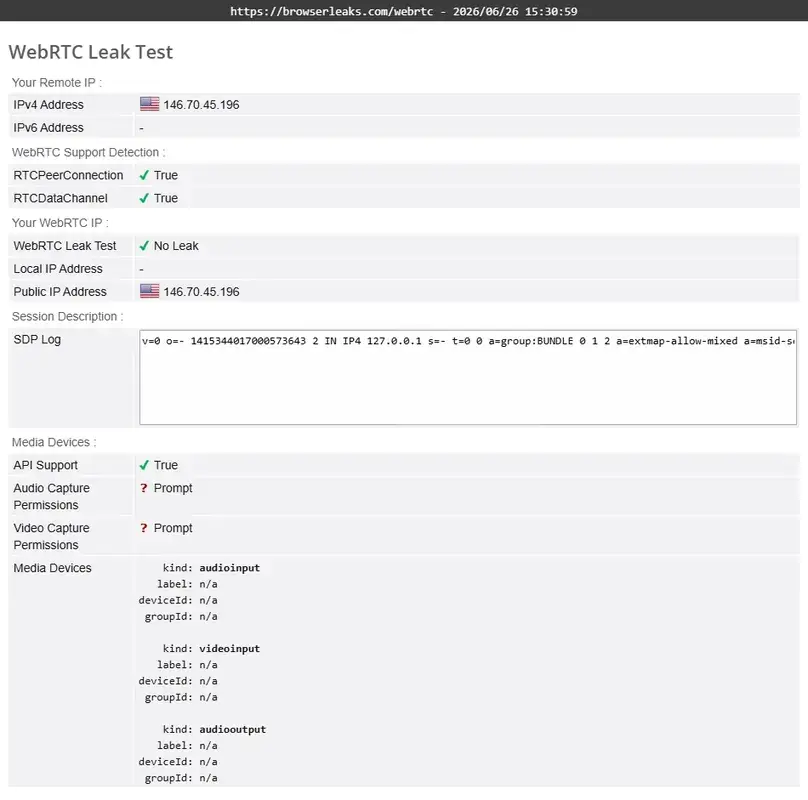
We ran DNS, WebRTC, and IP-location checks using a Miami, USA Surfshark server over WireGuard. In our checks, the real ISP DNS did not appear, the VPN DNS/location appeared, the real IP did not appear in the WebRTC check, and the visible IP changed from São Paulo, Brazil to Miami, Florida.
We do not publish no-VPN baseline images that reveal local IP or ISP context. We also treat leak checks as practical point-in-time checks, not proof that every browser, extension, protocol, device, and network will always behave identically.
Network
Server Network, Static IP, Dedicated IP, and MultiHop
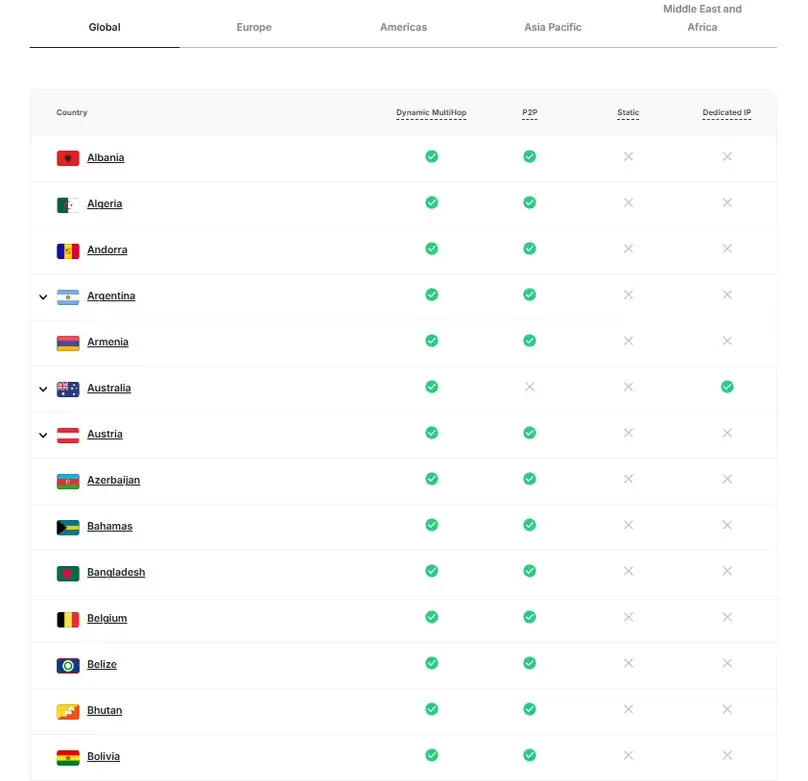
Surfshark’s official network claim of 4,500+ servers in 100 countries was reviewed against the official server page and in-app location list. The app showed countries and cities, plus specialty areas such as Static IP and MultiHop. Surfshark’s network coverage is one of its clearest advantages over smaller VPNs.
Static IP and Dedicated IP
Surfshark’s Static IP servers were visible in countries such as Germany, Japan, the United States, Singapore, the United Kingdom, and the Netherlands. We tested a Static IP server in New York and recorded a clean result compared with many other locations.
Surfshark Dedicated IP was available at $3.75/month in our review. We reviewed its price and locations but did not buy or test the add-on. Support told us Dedicated IP follows the same refund policy as the base subscription, while anonymized Dedicated IP had a different non-refundable caveat after anonymization.
Dynamic MultiHop
Dynamic MultiHop was available and tested. We checked the London → Paris route and saw strong results for a multi-hop path in our environment: about 430.5 Mbps download and 61.7 Mbps upload. This does not make MultiHop faster universally, but it did not feel like a token feature in our hands-on check.
Use cases
Streaming, Live Video, Travel, and P2P
Surfshark performed very well in our streaming checks. Amazon Prime Video, Apple TV, Disney+/Hulu, Netflix, and a live video stream loaded and played smoothly in our checks using a regular Miami, USA server over WireGuard. That is a strong result because we did not need a specialized streaming server workflow to make the checks work.
We still do not claim Surfshark “works with all streaming platforms.” Streaming access depends on account region, platform rules, licensing, server choice, and VPN-detection changes. The safe claim is that these services loaded and playback started smoothly in the specific checks we performed.
P2P and port forwarding
Surfshark allowed P2P in our review and did not show a separate P2P server category; our notes indicate P2P is allowed on every server. We performed a legal P2P test using marketing content from a creator and the download worked. However, Surfshark does not support port forwarding, so users who depend on incoming connections, seeding optimization, or self-hosted access should compare alternatives such as PIA or Proton VPN.
To find VPN providers that support port forwarding, feature-level test methods, and the differences across providers, check out our VPN port forwarding guide.
Support
Support Experience
Before purchase, we contacted Surfshark via live chat and reached a human agent, Kevin Scott, after the AI assistant. The response was fast and useful. Support clarified that auto-renewal cancellation and refund requests are separate; Dedicated IP follows the base refund policy; Alternative Number is not refundable; Surfshark does not offer port forwarding; Linux support includes the app and WireGuard manual connection depending on distribution; and NoBorders is available in the app.
We do not turn one support interaction into a broad “support is excellent” claim. The accurate conclusion is narrower: in our pre-purchase support check, Surfshark answered detailed buying questions clearly and quickly.
When we requested a refund on July 1, 2026, the chatbot provided a refund form link. We answered standard cancellation questions, received approval in about 1 minute, and were told to expect the money back in 1 to 10 business days.
Reputation
Reputation Notes
Public reputation signals were broadly positive but not perfect. In the notes reviewed for this update, Surfshark had 4.3/5 on Trustpilot with about 30,000 reviews, 4.7/5 on the App Store with about 120,000 reviews, and 4.5/5 on Google Play with about 273,000 reviews. Reddit discussions were mixed, with some complaints about website blocking and privacy concerns and other users saying Surfshark fits their needs because of value and ease of use.
We treat public reviews as reputation signals, not as proof that every user experience will match them. The strongest evidence in this page is still our own paid-account workflow, app testing, speed checks, support interaction, and refund result.
Comparison
Surfshark Alternatives and Comparisons
NordVPN
Choose NordVPN if you want a strong all-around mainstream VPN with a polished app ecosystem and a different feature mix, including Meshnet-style functionality.
Proton VPN
Choose Proton VPN if privacy posture, a strong free plan, Secure Core, open-source/audited apps, and the broader Proton ecosystem matter more than unlimited-device positioning.
Private Internet Access
Choose PIA if advanced settings, port forwarding, unlimited devices, MACE, custom DNS, and configuration depth matter more than Surfshark’s broader One+ identity/security bundle.
CyberGhost VPN
Choose CyberGhost if you want simple streaming/server categories and a longer refund window on longer plans, but note that Surfshark was stronger in our review for split tunneling and advanced app features.
PureVPN
Compare PureVPN if you want broad add-ons and shortcut-style streaming/app workflows, but our PureVPN testing found some system/network issues that Surfshark did not reproduce.
Best VPN Services
Use the full VPN comparison page if you want to compare pricing, device limits, refund terms, port forwarding, streaming positioning, and privacy features side by side.
Bottom line
Final Verdict
Surfshark is one of the strongest VPNs in our current paid review set for mainstream users. The app felt polished, the feature set was deep, unlimited devices are a real buyer advantage, streaming checks were smooth, Bypasser worked well, Dynamic MultiHop and IP Rotator were visible and testable, and the refund process was fast.
The honest caveats are also clear. Surfshark does not support port forwarding. The pricing page and checkout can require careful reading because Starter, One, One+, monthly plans, long-term plans, add-ons, local currency, and renewal terms all matter. Recurring payments were not refundable under the policy reviewed. And while the One+ bundle is powerful, users who only want a basic VPN may prefer a simpler or cheaper option.
Our practical recommendation is to shortlist Surfshark if you want a polished, feature-rich VPN for many devices and you are willing to verify checkout/renewal details before paying. Avoid it if port forwarding is required or if you prefer a minimal VPN with fewer bundled tools.
Review scope
What We Checked in This Review
Review checks completed in June 2026. This checklist reflects the areas actually reviewed for this Level 4 paid hands-on Surfshark review.
Common questions
Surfshark FAQ
Is Surfshark good?
Yes, Surfshark performed very well in our paid review for mainstream VPN use. We found a polished app, strong feature depth, unlimited devices, strong streaming checks, and a fast refund approval. It is not ideal if you need port forwarding or a minimal VPN-only product.
How much does Surfshark cost?
In our June 2026 pricing research, monthly prices were $16.45/month for Starter, $18.95/month for One, and $21.85/month for One+. Longer plans showed much lower monthly-equivalent prices, but buyers should verify total upfront cost and renewal terms before paying.
Which Surfshark plan did ReviewsAlly test?
We purchased Surfshark One+ directly from Surfshark’s official website and tested the dashboard, Windows app, Android, browser extensions, speed, leak checks, streaming, support, and refund workflow.
Does Surfshark have unlimited devices?
Yes, Surfshark’s paid subscription supports unlimited devices. Support also mentioned personal-use/fair-use caveats if activity greatly increases active sessions in an abusive way.
Does Surfshark support port forwarding?
No. Surfshark does not support port forwarding. Support confirmed this in our pre-purchase chat, and Surfshark’s own port-forwarding page describes the decision as security-related.
Did Surfshark work for streaming in your tests?
Yes. In our checks, Prime Video, Apple TV, Disney+/Hulu, Netflix, and a live video stream loaded and played smoothly on a regular Miami server over WireGuard. We do not claim Surfshark works with every streaming platform, account region, or server.
Is Surfshark faster than other VPNs?
We do not call Surfshark the fastest VPN. In our structured paid-account speed checks, Surfshark produced strong results on WireGuard, but speed depends on route, server, protocol, device, ISP, and time of day. OpenVPN TCP was much slower in our Miami comparison.
Does Surfshark have a kill switch?
Yes. Kill Switch was available in the Windows app and worked as expected in our manual check. We did not find an advanced/strict kill switch mode in the Windows app during this review.
What is Surfshark Bypasser?
Bypasser is Surfshark’s split tunneling feature. In our Windows app test, it supported app rules, website/domain rules, and IP rules, and it worked normally in the checks we performed.
Did ReviewsAlly test Surfshark Dedicated IP?
No. We reviewed Dedicated IP availability, price, locations, and refund/support answers, but we did not purchase or test a dedicated IP address. We do not make dedicated-IP performance claims.
Did ReviewsAlly test Surfshark’s refund process?
Yes. On July 1, 2026, we requested a refund through Surfshark’s chat/refund form flow. The refund was approved in about 1 minute, the amount was full, and Surfshark estimated 1 to 10 business days for the money to return.
Research basis
Sources Reviewed
Sources reviewed in June 2026 included official Surfshark pages, support documentation, policy pages, account/dashboard screenshots, paid account tests, and public reputation signals.
- Surfshark homepage
- Surfshark pricing page
- Surfshark refund policy
- Surfshark terms of service
- Surfshark privacy policy
- Surfshark server network
- Surfshark Dedicated IP
- Surfshark port forwarding explanation
- Surfshark CleanWeb documentation
- Surfshark Bypasser on Windows
- Surfshark MultiHop documentation
- Surfshark NoBorders
- Surfshark transparency report
- Surfshark trust center
- Surfshark support center
Reader feedback
Share Your Surfshark Experience
Have you used Surfshark for streaming, travel, public Wi-Fi, many devices, privacy tools, or everyday browsing? Leave a comment below to help other readers understand where Surfshark works well and where it may fall short. Comments are moderated before publication.