
Paid hands-on VPN review
Turbo VPN Review 2026: Paid Tests, Speed, Streaming, Refund, and Free vs. Paid
We bought Turbo VPN Platinum, tested the Windows and Android apps, compared the free and paid experience, ran structured speed and leak checks, tried streaming and legal P2P, contacted support, and requested a refund.
Reviews Ally may earn a commission when you click some links on this page. We purchased and tested Turbo VPN independently. Affiliate relationships do not change our testing process or conclusions. Learn more about our advertising disclosure.
Quick verdict
Turbo VPN: Our Bottom Line After Paid Testing
Turbo VPN is easy to understand, supports many devices, includes useful Windows controls, and worked well with several streaming services—but speed was the clear weak point in our July 2026 tests.
We bought the one-month Platinum plan and tested the paid Windows app, Android app, Chrome extension, free Windows tier, Smart DNS, support, and refund process. The app has a friendly layout, a functional kill switch, app- and website-based split tunneling, special streaming servers, and a broad server list. Prime Video, Apple TV, Netflix, and a live video stream worked on the USA “All Videos” server in our checks.
The trade-offs were substantial. Our seven no-VPN baseline runs averaged about 930.8 Mbps download. Turbo VPN averaged about 191.3 Mbps on its São Paulo server, 104.1 Mbps in Miami, and 51.2 Mbps in London. The “Optimal Location” chose Toronto from our Latin America test environment and averaged only 74.7 Mbps. Dubai was effectively unusable in this session, and V2Ray did not connect.
We also spent hours resolving a TAP adapter conflict before OpenVPN-related connections behaved normally. The issue was ultimately solved by removing conflicting TAP/OpenVPN adapters and reinstalling the required components. That may not affect a clean Windows installation, but it matters for users who have installed several VPN clients.
At a glance
Turbo VPN Quick Facts
- Plan tested
- Platinum, 1 month, purchased directly
- Monthly pricing
- Gold $11.99; Platinum $13.99 at review time
- Devices
- Gold 10; Platinum 20
- Refund policy
- 30 days for eligible first direct purchases; renewals excluded
- Free tier tested
- Windows, no account, 7 server countries, no observed data/time cap
- Windows protocols found
- Automatic, OpenVPN, V2Ray, Lepus, and LinkSentinel
- Server claim
- 21,000+ servers in 111 locations; 113 entries counted in our app lists
- Not available
- Port forwarding, Dedicated IP, native Linux app, dark web monitor
Fit
Who Turbo VPN Is Best For
Consider it if you want…
- A straightforward Windows or mobile VPN with a low learning curve.
- A paid plan covering 10 or 20 devices.
- Special streaming and live-video server categories.
- A free Windows option that does not require account creation.
- App- and website-based split tunneling.
- Fast access to live chat and a tested refund path.
Look elsewhere if you need…
- High download retention on a fast broadband connection.
- WireGuard in the Windows app or clear control over OpenVPN UDP/TCP.
- Port forwarding, Dedicated IP, manual configurations, or a native Linux app.
- A prominent independent no-logs audit or transparency report.
- Ad/tracker blocking, antivirus, or dark web monitoring.
- A VPN that is unlikely to conflict with older TAP adapters already installed on Windows.
Methodology
How We Reviewed Turbo VPN
We purchased Turbo VPN’s Platinum one-month plan from the official website. The purchase was completed with PIX after the PayPal button returned an error. Activation was immediate. Our primary environment was a Windows 10 desktop on a wired connection, with additional checks on Android 13 and the Chrome extension.
Speed checks used the Speedtest by Ookla Windows app under the same connection and approximate time window. These are structured paid-account speed checks, not a global benchmark. Results can change with location, ISP routing, server load, protocol, device, and time of day.
We did not test long-term reliability, macOS, Linux, routers, smart TVs, consoles, every server, every streaming catalog, or every app-store purchase path. We did not test a Dedicated IP or port forwarding because neither was available.
Plans and value
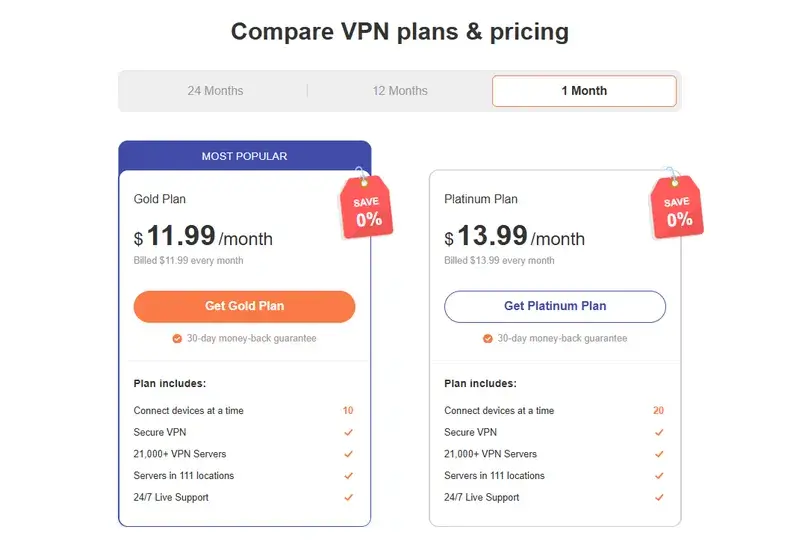
Turbo VPN Pricing: Gold vs. Platinum
Turbo VPN showed two paid tiers during our review. Both advertised the same VPN network, VIP servers, special streaming/gaming access, and 24/7 live support. The practical difference we found was the device allowance: 10 devices on Gold and 20 on Platinum.
| Plan | Monthly | Annual | Long term | Devices |
|---|---|---|---|---|
| Gold | $11.99; renews monthly | $59.99/year ($5.00/month equivalent) | $89.99 for 27 months, including 3 free months; listed to renew every 27 months | 10 |
| Platinum | $13.99; renews monthly | $69.99/year ($5.83/month equivalent) | $109.99 for 24 months ($4.58/month equivalent) | 20 |
Prices observed in July 2026. Promotions, currencies, taxes, payment methods, and renewal terms can change. Confirm the final checkout before paying.
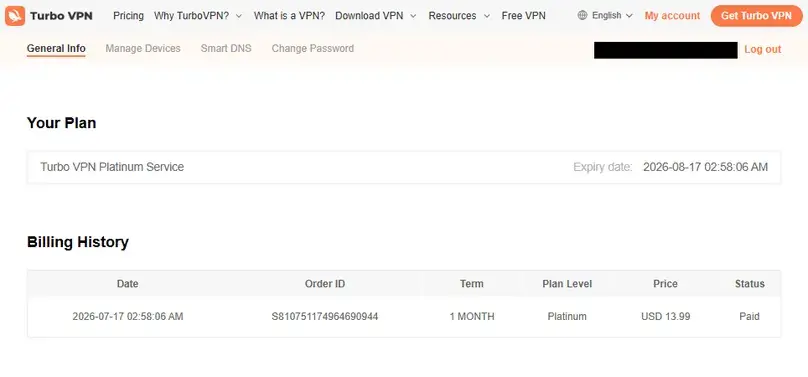
We purchased the Platinum monthly plan for $13.99. No add-ons or upsells appeared before payment. The checkout offered cards, PayPal, cryptocurrencies, PIX, boleto, regional banks, digital wallets, and many other local methods. Because we paid with PIX, our purchase did not create a normal recurring-payment flow, although the public monthly offer listed a $13.99 monthly renewal.
Billing and cancellation
Refund Policy and Our Real Refund Experience
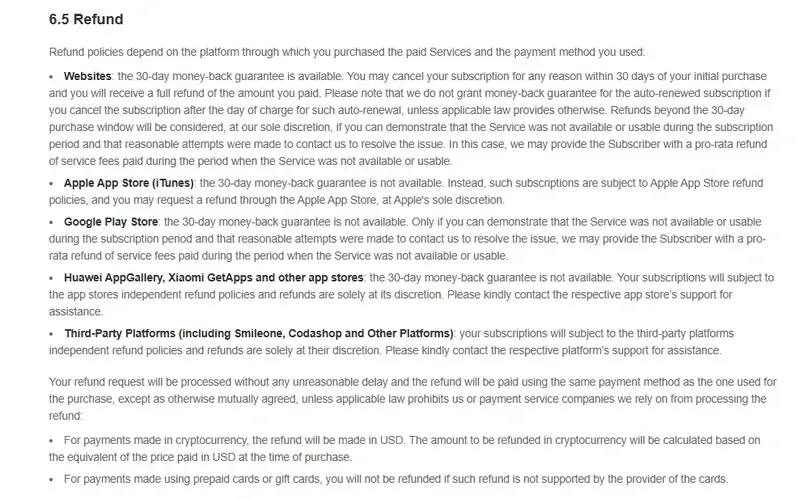
Turbo VPN’s direct-purchase guarantee covered eligible first purchases requested within 30 days. The policy we reviewed excluded renewals, previous customers, and customers who had already received a refund. Apple and Google Play purchases followed different platform rules, so buyers should not assume the website guarantee applies to an app-store subscription.
Canceling and requesting a refund were separate actions. Support told us that canceling a subscription leaves paid access active until the next renewal date. For the actual refund, we contacted live chat, provided a reason and a receipt screenshot, and answered troubleshooting questions.
What happened
We requested a full refund through live chat within the guarantee window. The request was approved approximately one day later.
What ended
Premium access ended and connected devices were logged out after approval.
Refund amount
The research record identifies the approval as a full refund to the PIX purchase.
Money received
Turbo VPN gave a maximum estimate of 14 business days. Our final record confirms that the full PIX payment returned on July 27, seven calendar days after the request. See our nine-provider VPN refund comparison.
For cryptocurrency payments, Turbo VPN’s terms described a USD-based refund calculation converted back to cryptocurrency. Recurring payments were not eligible under the policy reviewed.
Considering Turbo VPN?
Check the current tier, device allowance, payment method, renewal terms, and refund route before purchasing.
Apps and onboarding
Windows App, Dashboard, and Free vs. Paid Experience
Account and dashboard
Account creation and activation were quick. The website dashboard showed the plan, activation and expiration dates, renewal information, billing history, device allowance, registered devices, removal controls, downloads, Smart DNS, support, and live chat. We did not find a self-service cancellation or refund button.
Windows app
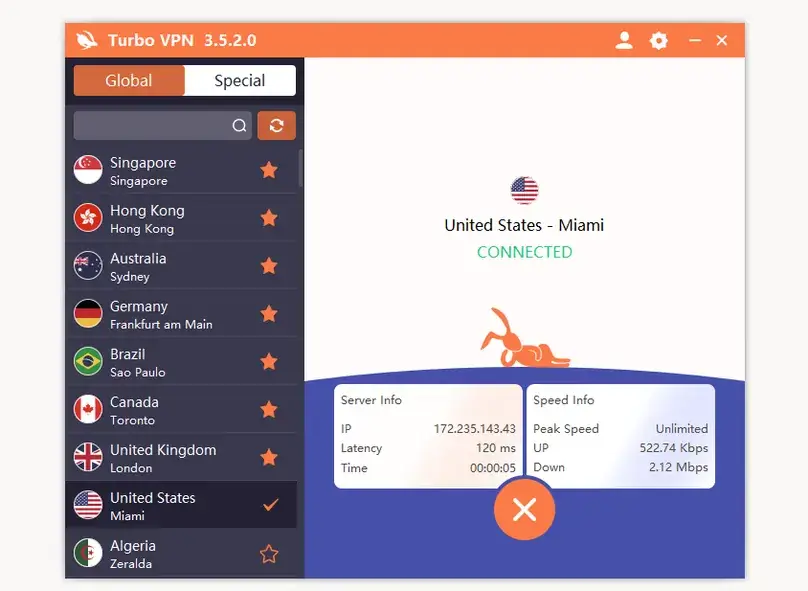
We tested Windows app version 3.5.2.0. Login used an email and password through the profile icon. The interface grouped normal locations under “Global” and streaming/sports locations under “Special.” It displayed latency, server load, favorites, server IP, connection duration, peak speed, upload speed, and download speed.
The interface is friendly but fairly simple. More importantly, the first setup was not simple: repeated TAP adapter errors prevented reliable connections. Installing OpenVPN Connect temporarily helped, but the durable fix required removing conflicting TAP/OpenVPN adapters from previous VPN installations and reinstalling Turbo VPN. Once the driver conflict was cleaned up, locations and protocols connected normally.
Free Windows tier
The free Windows tier did not require an account and did not display ads during our test. It offered seven country choices—Australia, Canada, Germany, the Netherlands, Singapore, the United Kingdom, and the United States—with no data, speed, or time cap visible to us. However, protocol selection, kill switch, split tunneling, special streaming servers, and Smart DNS were unavailable.
This is narrower than the paid experience, but more usable than a “free” button that immediately asks for a card. Our observation applies to the Windows app at the time tested; the mobile free tier and advertising model can differ.
Structured speed checks
Turbo VPN Speed and Performance Results
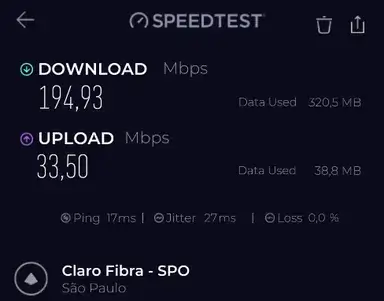
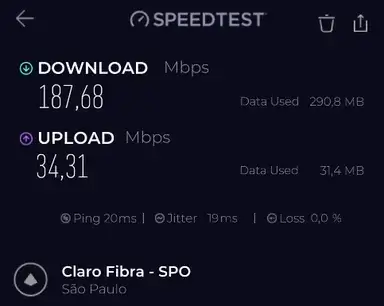
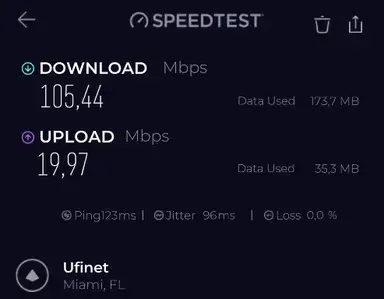
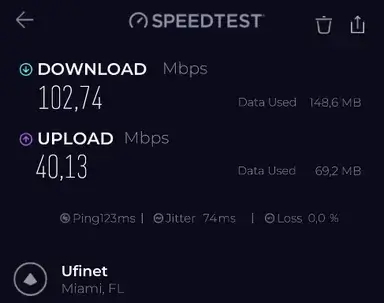
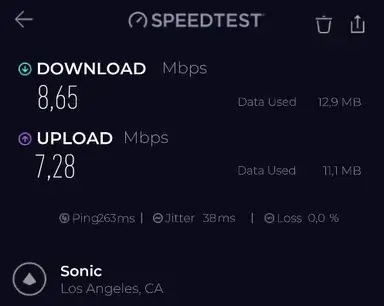
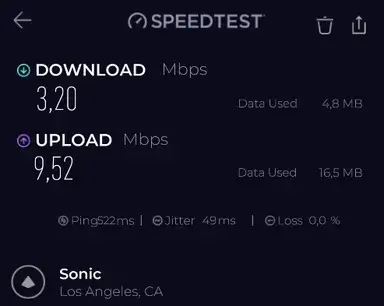
Seven no-VPN baseline tests averaged 930.8 Mbps download, 61.3 Mbps upload, 12.7 ms ping, and 3.7 ms jitter. The table below uses the average of two paid VPN runs per location.
| Location | Protocol | Avg. download | Download retention | Avg. upload | Avg. ping |
|---|---|---|---|---|---|
| São Paulo | Automatic | 191.3 Mbps | 20.6% | 33.9 Mbps | 18.5 ms |
| Miami | Automatic | 104.1 Mbps | 11.2% | 30.1 Mbps | 123 ms |
| “Optimal Location” — Toronto | Automatic | 74.7 Mbps | 8.0% | 57.1 Mbps | 138.5 ms |
| London | Automatic | 51.2 Mbps | 5.5% | 26.6 Mbps | 226 ms |
| Frankfurt | Automatic | 108.0 Mbps | 11.6% | 62.1 Mbps | 241.5 ms |
| Sydney | Automatic | 93.0 Mbps | 10.0% | 21.5 Mbps | 393 ms |
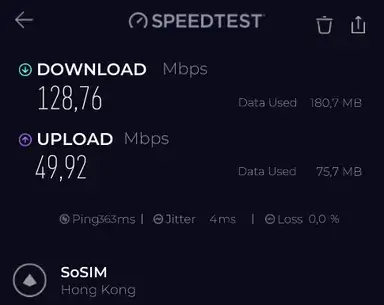
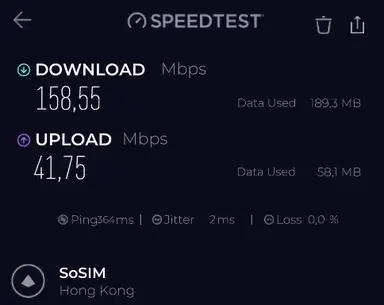
| Hong Kong | Automatic | 143.7 Mbps | 15.4% | 45.8 Mbps | 363.5 ms |
| Singapore | Automatic | 35.0 Mbps | 3.8% | 47.7 Mbps | 361.5 ms |
| Dubai | Automatic | 2.7 Mbps | 0.3% | 0.6 Mbps | 301 ms |
| USA “All Videos” | Automatic | 108.4 Mbps | 11.7% | 33.4 Mbps | 172.5 ms |
Want to compare this VPN against your own no-VPN baseline? Use our VPN speed test and speed-loss calculator for a repeatable at-home method and local, privacy-preserving calculation.
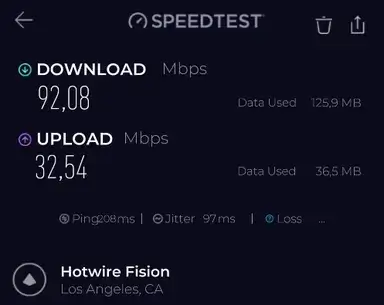
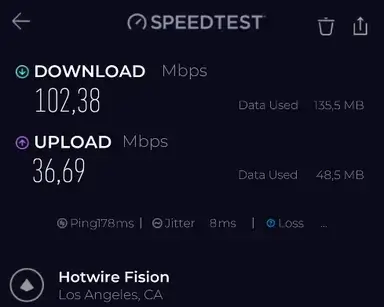
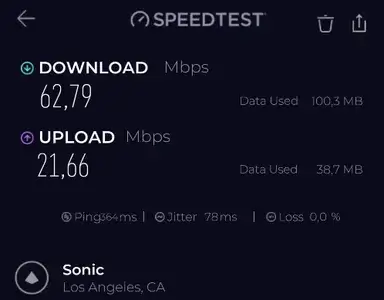
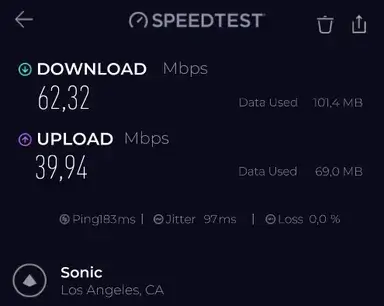
The local São Paulo server was the best nearby result but still retained only about one-fifth of baseline download speed. Dubai also showed roughly 44%–49% packet loss, making that session effectively unusable. Sydney was inconsistent, jumping from 35.7 to 150.4 Mbps between two immediate runs.
Representative location screenshots
Protocol comparison in Los Angeles
| Protocol | Avg. download | Download retention | Avg. upload | Avg. ping | What happened |
|---|---|---|---|---|---|
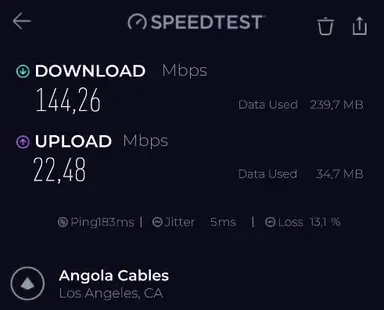
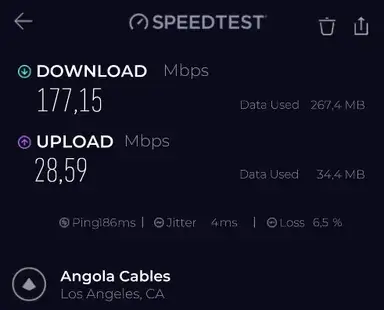
| Lepus | 160.7 Mbps | 17.3% | 25.5 Mbps | 184.5 ms | Fastest completed protocol, but packet loss averaged about 9.8% |
| Automatic | 97.2 Mbps | 10.4% | 34.6 Mbps | 193 ms | Most stable overall choice in our app use |
| OpenVPN | 62.6 Mbps | 6.7% | 30.8 Mbps | 273.5 ms | Much slower; UDP/TCP mode was not user-selectable |
| LinkSentinel | 5.9 Mbps | 0.6% | 8.4 Mbps | 392.5 ms | Extremely slow in this comparison |
| V2Ray | — | — | — | — | Did not connect |
For the broader technical context behind these results, see our VPN protocols comparison, including WireGuard, OpenVPN, IKEv2, TCP/UDP, provider-specific modes, and our paid protocol test data.
Security checks
Kill Switch, DNS, WebRTC, and IP Change
Kill switch
The premium Windows kill switch was disabled by default. We enabled it and tested manual disconnection, closing the app process, and changing servers. Internet access was blocked when expected, the real public IP did not appear, connectivity returned normally afterward, and we did not encounter a lingering firewall or network problem.
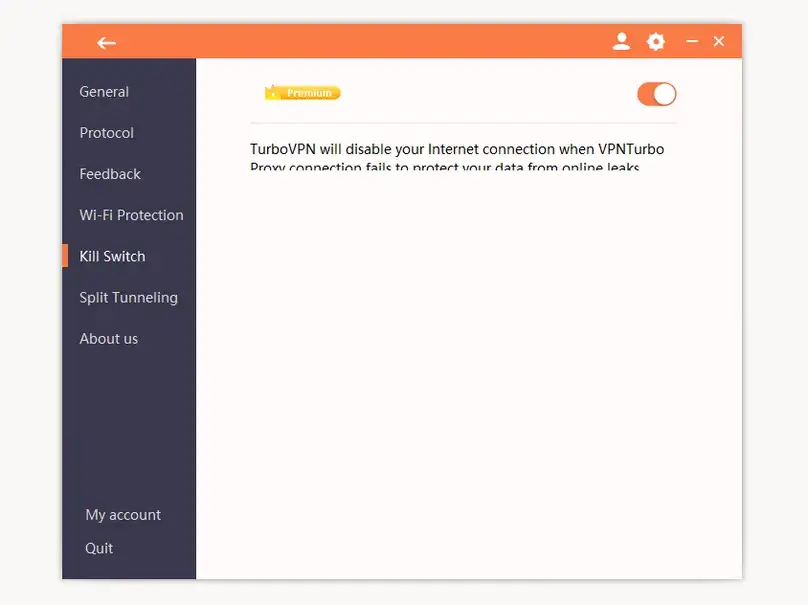
Want to reproduce this safety check? Our VPN Kill Switch guide explains the Windows failure test, Pass / Fail / Inconclusive interpretation, manual-disconnect caveat, and the limits of browser-level evidence.
DNS and WebRTC checks
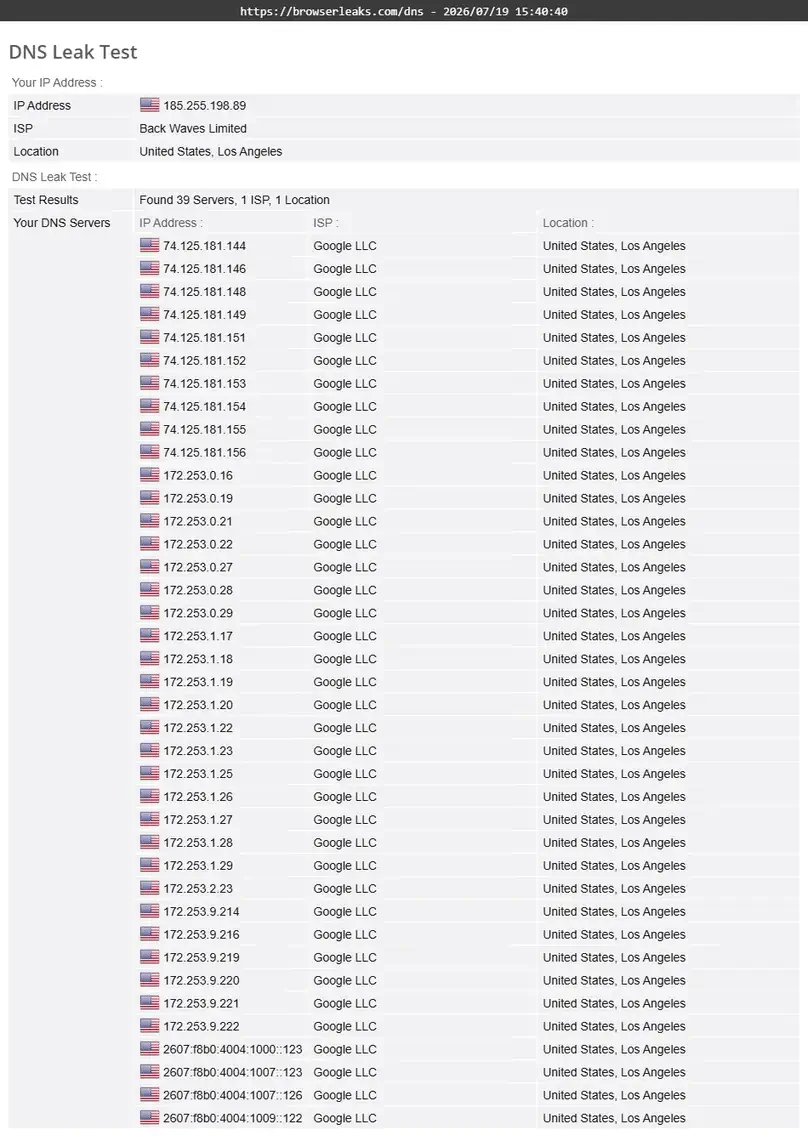
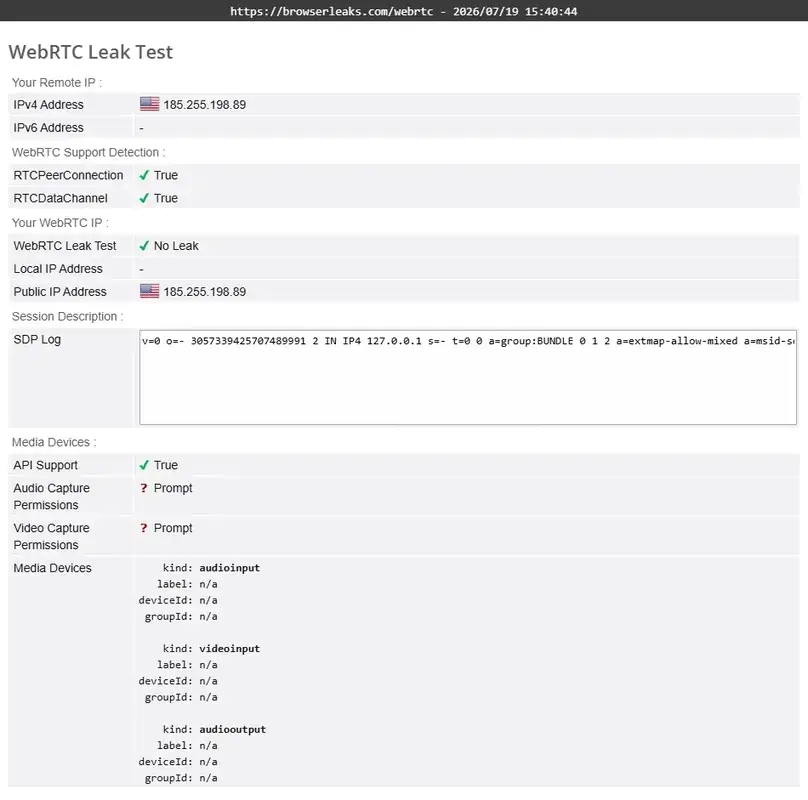
Using the USA “All Videos” server with the Automatic protocol, BrowserLeaks did not show our real ISP DNS or real public IP. The VPN IP appeared in the WebRTC test. A local/private IP was visible, which is common in WebRTC results and is not the same as exposing the public ISP address.
Privacy controls we did not find
We did not find a custom DNS field, ad blocker, tracker blocker, dark web monitor, antivirus, Meshnet-style private networking, Dedicated IP, static IP, or port forwarding. Turbo VPN markets Private DNS, but the Windows app did not provide an explicit Private DNS control or resolver selection.
Protocols and controls
Protocols, Split Tunneling, Wi-Fi Protection, and Smart DNS
Protocol selection
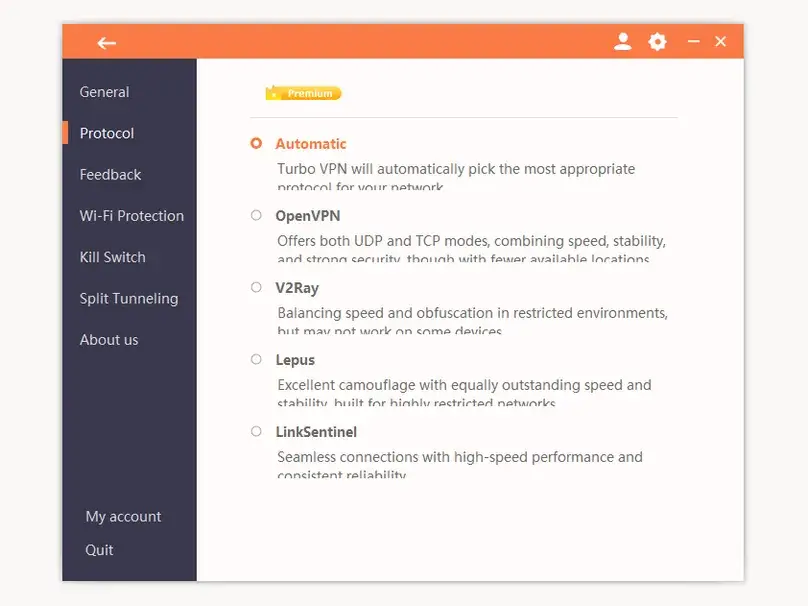
The Windows app offered Automatic, OpenVPN, V2Ray, Lepus, and LinkSentinel. WireGuard, IKEv2/IPSec, IPSec, and ISSR did not appear in the Windows build we tested, although Android showed Automatic, OpenVPN, IPSec, and ISSR. OpenVPN was described as supporting UDP and TCP, but the app did not let us select between them.
Protocol choice also changed the location list. Some modes supported only a small subset of locations, which is why our broad location checks used Automatic. V2Ray did not connect during our test.
Split tunneling
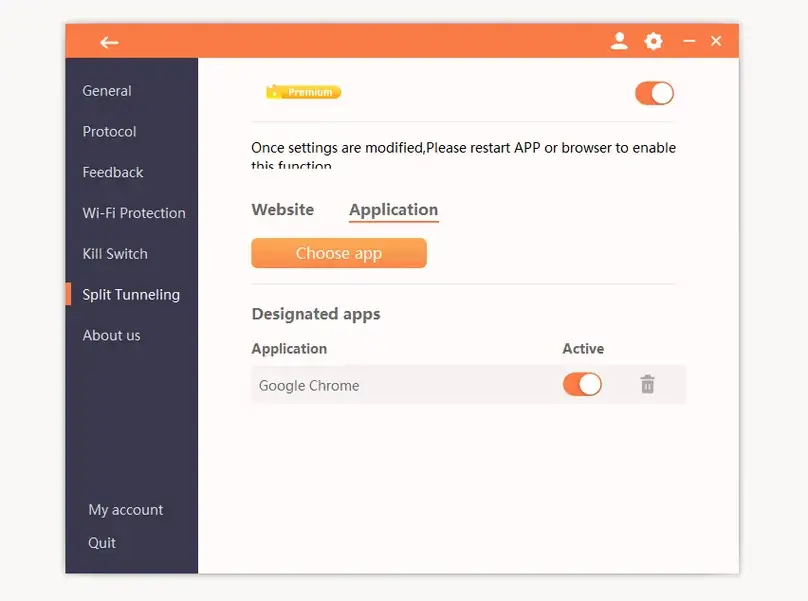
Turbo VPN’s Windows split tunneling worked for both applications and websites. It used a bypass model: selected items went outside the VPN. We successfully tested an app rule and a website rule. We did not find a reverse “only these items use the VPN” mode or a dedicated IP-address rule interface.
Wi-Fi Protection
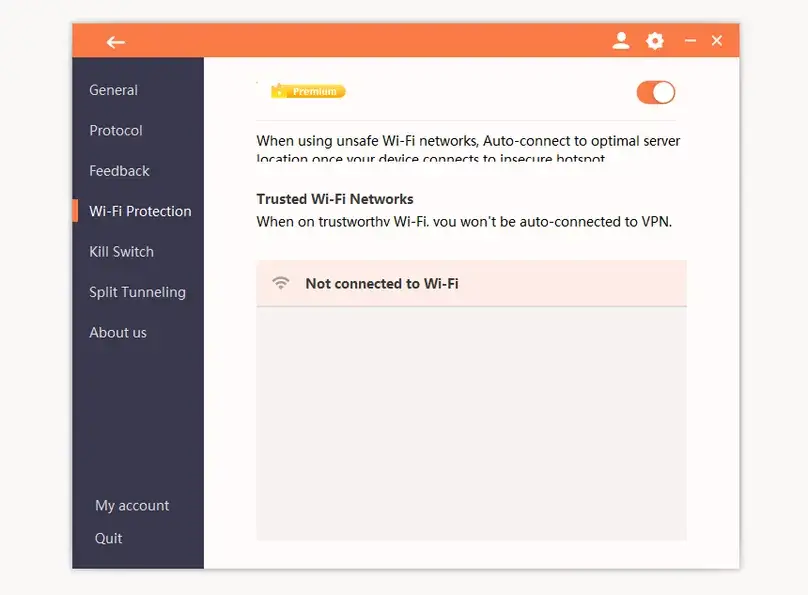
Wi-Fi Protection could be enabled from the Windows settings. We observed the control but did not simulate multiple hostile or captive-portal networks, so this review does not claim it was validated across public Wi-Fi environments.
Smart DNS
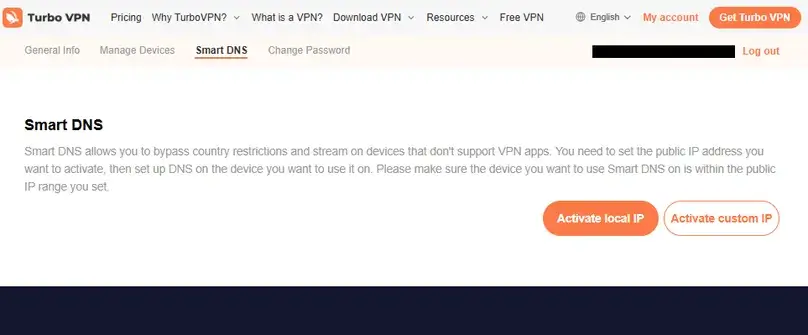
Smart DNS was included in the paid account and did not count toward the device limit, according to support. It required registering a public IP and configuring DNS on a compatible device. We successfully completed the workflow. Smart DNS can help with geo-restricted media on devices without VPN apps, but it does not provide VPN encryption.
Locations
Server Network and Specialized Locations
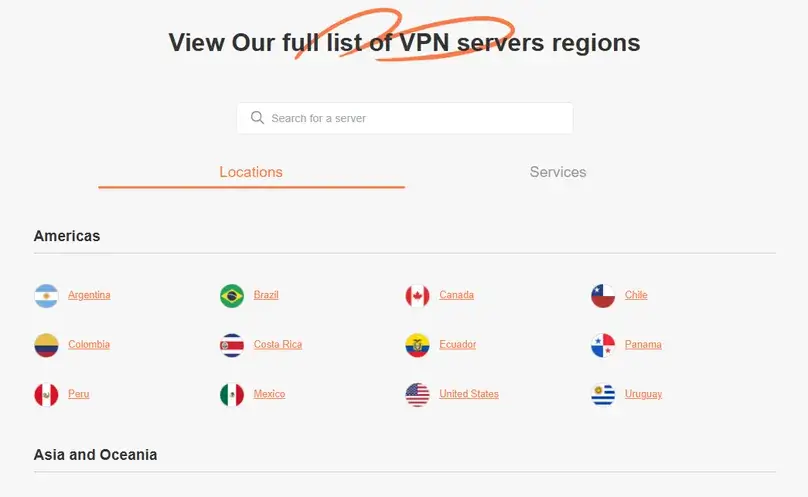
Turbo VPN advertised 21,000+ servers in 111 locations. We cannot independently verify the physical server count, but we counted 94 entries under Global and 19 under Special in the Windows app—113 visible location/server entries in total at the time of testing.
The app included São Paulo, many US cities, London, Frankfurt, Amsterdam, Marseille, Osaka, Tokyo, Hong Kong, Singapore, Sydney, and several African countries. The Special tab included labels such as USA “All Videos,” UK “All Videos,” Brazil “All Videos,” France Netflix, Australia DAZN, and India Hotstar. We did not find servers explicitly labeled for gaming, despite gaming claims on the website.
The app’s “Optimal Location” selected Toronto from our Latin America-based environment. That was not the nearest choice and produced worse latency and download speed than manually selecting São Paulo. “Optimal” was doing a little more traveling than we expected.
Entertainment and file sharing
Streaming, Live Video, and Legal P2P Results
Streaming checks
On the USA “All Videos” server with Automatic protocol, Prime Video, Apple TV, and Netflix loaded and played successfully on the first attempt. A live video stream also loaded quickly without buffering during the check.
Disney+/Hulu did not work in the same setup: the website returned an error before login/catalog access. These are point-in-time results, not guarantees. Streaming platforms frequently change VPN detection and licensing behavior.
Legal P2P check
We downloaded an Ubuntu Linux image using the Los Angeles server and Automatic protocol. The legal download started immediately, and outbound seeding traffic was observed, although the connection did not feel particularly strong. Turbo VPN did not show P2P labels, and support did not give a direct answer identifying allowed P2P servers. Port forwarding was not available.
To find VPN providers that support port forwarding, feature-level test methods, and the differences across providers, check out our VPN port forwarding guide.
The paid Windows kill switch can reduce exposure if the VPN disconnects during P2P use, but it does not replace lawful-use checks or port-forwarding support.
Customer service
Support Was Fast, but Some Technical Answers Were Vague
Turbo VPN offered live chat, email, in-app feedback, and a help center. Pre-purchase live chat moved from a bot to a human agent immediately. The agent confirmed that canceled subscriptions remain active until expiration, crypto purchases can fall under the direct refund policy, Smart DNS does not count as a device, there was no native Linux app, and special servers were included across paid tiers.
However, several answers were incomplete. The agent did not directly address port forwarding, gave no useful detail on obfuscation or blocking tools, did not identify P2P locations, and responded to our audit question by inviting us to conduct an audit ourselves. A Google Play independent security review badge is not the same as a published independent no-logs audit.
The refund interaction was more useful: support asked for a reason and proof of purchase, processed the request, and sent approval approximately one day later. Overall, support was fast and courteous, but technical precision was inconsistent.
Trust and privacy
Privacy Policy, Ownership, and Reputation Signals
Turbo VPN is operated by Innovative Connecting Pte. Limited in Singapore. The privacy policy reviewed was effective April 25, 2025. Turbo VPN says it does not log browsing activity or DNS queries in a way tied to the VPN account, while also describing anonymized diagnostics and analytics such as connection success, selected VPN location, country, ISP, device and OS information, failures, transferred data, speed-test data, and crash reports.
The policy says analytics, diagnostics, and advertising data are logically segregated from VPN account information, subscription status, user activity logs, and traffic content. That is more nuanced than simply saying “no logs,” and readers should evaluate the full policy rather than relying on a slogan.
We found a Google Play independent security review reference, but no public transparency report and no independent no-logs audit report. Store ratings recorded during research were strong, while Reddit and billing discussions included mixed complaints. User reviews can be useful for spotting patterns, but they are not substitutes for hands-on testing or independent technical audits.
Comparisons
Turbo VPN Alternatives
Surfshark
Better if you want unlimited devices, stronger paid speed results in our testing, and a broader set of privacy tools.
Proton VPN
Better if privacy documentation, a respected free tier, and a wider privacy ecosystem matter more than specialized streaming labels.
Private Internet Access
Better for technical configuration, open-source app positioning, and advanced network controls.
CyberGhost VPN
Worth comparing for specialized streaming servers and a longer 45-day guarantee on longer plans.
NordVPN
Better if you want a mature premium product, stronger audit visibility, and more advanced security features.
PrivateVPN
Better for users who specifically want port forwarding and a smaller, more technical provider—though our PrivateVPN app tests also found important limitations.
Turbo VPN fits convenience-first buyers
Its paid app is approachable and feature-complete for everyday use, but confirm that its speed and missing advanced features fit your needs.
Final verdict
Should You Choose Turbo VPN?
Turbo VPN is more capable than its “simple mobile VPN” reputation suggests. The paid Windows app includes a working kill switch, useful split tunneling, Wi-Fi Protection, special streaming servers, detailed server statistics, Smart DNS, and support for up to 20 devices on Platinum. The free Windows tier was also unusually easy to try: no account, no ad observed, and no visible data or time limit during our test.
But the performance gap was too large to ignore. The local server retained about 20.6% of baseline download speed, Miami about 11.2%, London about 5.5%, and several distant or specialized cases were highly inconsistent. V2Ray failed, LinkSentinel was extremely slow, and Lepus traded better throughput for measurable packet loss. The TAP adapter conflict also turned installation into a multi-hour troubleshooting session on a Windows system with previous VPN drivers.
Our conclusion: Turbo VPN can make sense for casual users who prioritize easy apps, many devices, streaming categories, and responsive live chat. It is harder to recommend for users who prioritize speed, Linux, port forwarding, Dedicated IP, transparent protocol documentation, or strong independent privacy assurance.
Evidence summary
What We Checked in This Review
Common questions
Turbo VPN FAQ
Is Turbo VPN free?
Yes. We tested the free Windows tier without creating an account. It offered seven server countries and showed no visible data or time limit during our session, but it did not include protocol selection, kill switch, split tunneling, special streaming servers, or Smart DNS.
How much does Turbo VPN cost?
In July 2026, Gold was listed at $11.99 monthly and Platinum at $13.99 monthly. Annual and long-term plans lowered the equivalent monthly cost. We purchased the Platinum one-month plan.
What is the difference between Turbo VPN Gold and Platinum?
The offers we reviewed showed the same VPN network and special-server access. The practical difference was devices: Gold supported 10 and Platinum supported 20.
Does Turbo VPN offer a 30-day refund?
Eligible first purchases made directly from Turbo VPN were covered by the 30-day policy we reviewed. Renewals and app-store purchases followed different rules. Our direct PIX refund was approved approximately one day after the request, and the full payment returned seven calendar days after the request.
Was Turbo VPN fast in your tests?
No. The seven-run baseline averaged about 930.8 Mbps download. São Paulo averaged 191.3 Mbps, Miami 104.1 Mbps, and London 51.2 Mbps. Results are specific to our setup and can differ elsewhere.
Does Turbo VPN have a kill switch?
Yes, on the paid Windows plan we tested. It blocked internet access during manual disconnect and app-process checks, did not expose the real public IP in our test, and restored connectivity normally.
Does Turbo VPN support split tunneling?
Yes. The Windows app supported bypass rules for applications and websites. We tested both. We did not find a reverse “only selected items use the VPN” mode or a dedicated IP-rule interface.
Does Turbo VPN support WireGuard?
WireGuard did not appear in the Windows 3.5.2.0 app we tested. The available Windows choices were Automatic, OpenVPN, V2Ray, Lepus, and LinkSentinel.
Does Turbo VPN support Linux or port forwarding?
We did not find a working native Linux app or manual configuration workflow, and port forwarding was not available. Buyers needing either feature should compare another VPN.
Did Turbo VPN work with streaming services?
Prime Video, Apple TV, Netflix, and a live video stream worked on the USA “All Videos” server in our checks. Disney+/Hulu returned an error. These results can change and do not guarantee future access.
Sources reviewed
User experiences
Share Your Turbo VPN Experience
Have you used Turbo VPN on Windows, Android, iOS, Chrome, Smart DNS, or a streaming device? Tell us what happened with speed, server reliability, support, billing, and refunds. Comments are moderated before publication.